

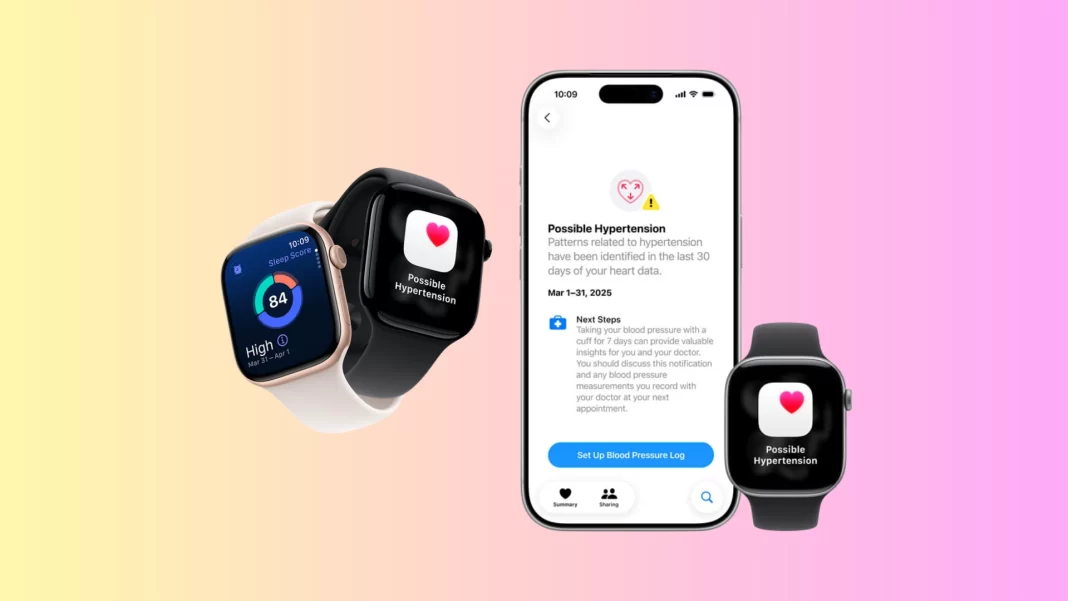
Apple Watch Series 11 is now on sale, and Apple’s new AI-powered blood pressure alerts are rolling out with it. The feature is FDA-cleared and aims to flag patterns consistent with chronic high blood pressure so people can confirm with a cuff and talk to a clinician.
Supported models and regions: Hypertension notifications are available on Apple Watch Series 9 and later, plus Apple Watch Ultra 2 and later, with watchOS 26. Apple says availability spans 150+ countries and regions.
Release timing: Series 11 availability begins Friday, September 19, 2025.
Table of Contents
How the AI blood pressure alerts work
Apple does not take a cuff-based reading. Instead, the watch analyzes optical heart sensor signals over about 30 days to look for patterns associated with sustained hypertension, then sends a notification if the pattern meets the threshold.
Apple trained the model using data from its Heart and Movement Study (launched in 2019) with over 100,000 participants, then validated it in a separate clinical study of more than 2,000 people, according to Apple’s VP of Health Sumbul Ahmad Desai.
Accuracy claims and what they mean
In testing, Apple’s machine-learning model achieved specificity above 92% and performed especially well at identifying Stage 2 hypertension, the more severe category. High specificity means fewer false positives, but it does not tell you sensitivity in daily life. Users should still confirm with a cuff.

What to do if you get an alert
A notification is a prompt, not a diagnosis. Apple advises you to log blood pressure with a clinically validated cuff twice daily for seven days and share the results with your clinician. The Health app guides that process and can export a PDF.
Short Answer: If your watch flags “Possible Hypertension,” set up the 7-day Blood Pressure Log in the Health app, take morning and evening cuff readings, and share the report with your doctor. The watch feature is not a medical diagnosis.
Who should not use it
Apple’s support notes the feature is not intended for users under 22, during pregnancy, or for people already diagnosed with hypertension.
Limits and expert caution
Cardiology leaders welcome earlier detection but stress that wearables should not replace professional evaluation. The American College of Cardiology’s innovation lead, Ami Bhatt, says Apple appears careful about false positives, yet people without alerts could still have hypertension. That is the “false reassurance” risk.
Apple itself underscores the limitation: the watch does not measure blood pressure and cannot identify every case. A cuff remains the standard for diagnosis and management.
Why this matters
Hypertension affects an estimated 1.28 billion adults worldwide, with about 46% unaware they have it. It is a leading risk factor for heart attack and stroke. Making checks part of daily life could help people get care earlier.
Yale cardiologist Harlan Krumholz put it plainly in Apple’s announcement: making accurate detection easy and part of daily life can prevent avoidable harm.
Setup guide: turn it on in 60 seconds
- On iPhone, open Health → tap your profile → Health Checklist → Hypertension Notifications → follow prompts.
- Ensure Apple Watch is Series 9 or later, or Ultra 2 or later, on watchOS 26.
- If you receive a notification, start the Blood Pressure Log to capture 7 days of cuff readings.
Apple Watch vs a real cuff: what each is good for
| Task | Apple Watch Hypertension Notifications | Cuff Blood Pressure Monitor |
|---|---|---|
| What it does | Flags patterns suggesting possible chronic high BP over ~30 days | Provides actual systolic/diastolic readings |
| Accuracy focus | High specificity to reduce false positives | Clinical standard for diagnosis |
| When to use | Passive daily screening between clinic visits | Confirm alerts, diagnose, and manage treatment |
| Output | Notification and guidance to log for 7 days | Numeric readings, trend over time |
Models, pricing, availability snapshot
- Series 11 availability: Sept 19, 2025.
- Feature availability: 150+ countries and regions with watchOS 26 on supported models.
The Bottom Line and Checklist
Apple Watch Series 11 can now flag possible chronic high blood pressure using AI and optical sensor data. It does not measure BP. If alerted, log with a cuff for seven days and speak with your doctor.
Checklist:
- Update to watchOS 26 and iOS 26
- Turn on Hypertension Notifications in Health Checklist
- If alerted, start 7-day cuff log
- Export PDF and share with your clinician
Does Apple Watch measure blood pressure?
No. It analyzes optical heart sensor data over about 30 days to flag patterns consistent with hypertension, then asks you to confirm with a cuff. It is screening, not diagnosis.
Which Apple Watch models support the alerts?
Series 9, Series 10, Series 11, Ultra 2, and Ultra 3 on watchOS 26. Availability spans 150+ countries and regions.
What should I do if I get an alert?
Log cuff readings twice daily for seven days in the Health app, then share the report with your clinician.
Is this FDA-cleared?
Yes. The FDA cleared Apple’s hypertension notification feature ahead of launch.
How accurate is it?
Apple cites specificity above 92% and stronger performance for Stage 2 hypertension in validation studies, but you still need cuff confirmation.
Source: Apple Newsroom | Apple Support | Reuters

