

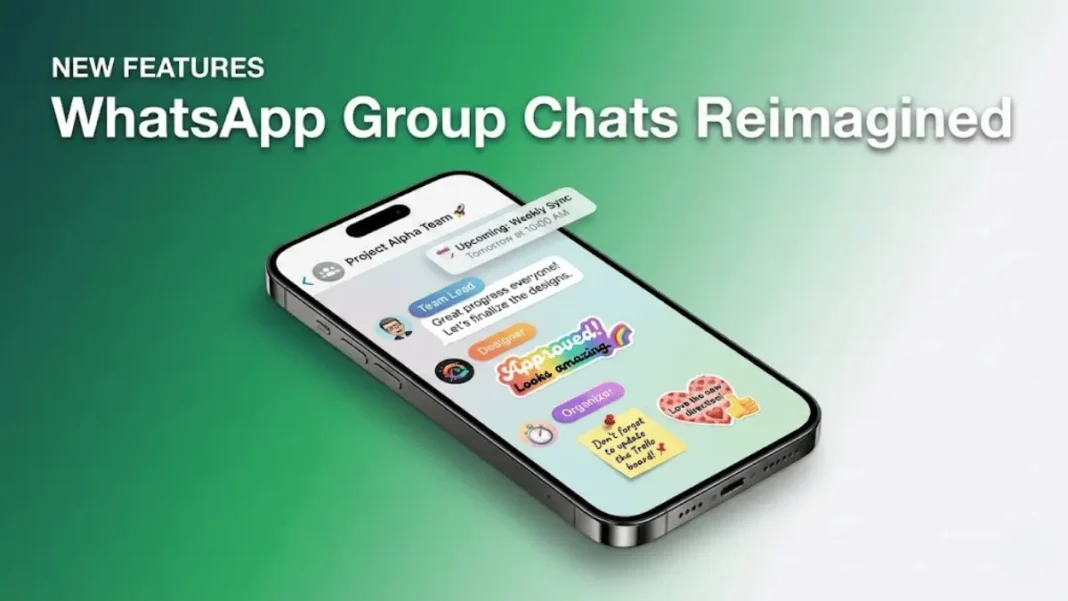
WhatsApp announced three new group chat features on January 6, 2026, designed to reduce confusion and improve coordination in busy conversations. The updates member tags, text stickers, and custom event reminders are rolling out gradually to Android and iOS users worldwide. These tools address common issues in multi-person chats, such as unclear roles, lack of visual emphasis, and missed events.
What’s New in WhatsApp Group Chats
Member Tags allow users to assign themselves custom labels that appear alongside their name in specific group chats. A person can be “Anna’s Dad” in a school group, “Treasurer” in a building committee, or “Goalkeeper” in a sports team chat. Tags are self-assigned, group-specific, and visible to all members in both message bubbles and the participants list. The feature rolls out gradually, with no admin approval required for changes.
Text Stickers let users convert any typed word or phrase into a sticker by entering it into Sticker Search. Users can choose from five design styles rainbow, Post-it note, caution, heart, or blue bubble and save stickers directly to their personal packs without sending them first. The feature is available immediately through the emoji icon under the Stickers menu.
Event Reminders now include custom early notifications when users create and share events in group chats. Organizers can set reminders for 1 day, 1 hour, 30 minutes, or 15 minutes before an event starts. All event details remain end-to-end encrypted and visible only to group participants.
Why It Matters
Group chats are used by billions of people for family coordination, work projects, and community management, yet confusion around roles and missed plans remain persistent pain points. Member tags solve the identity problem in large or multi-purpose groups where the same person plays different roles. Text stickers add visual emphasis to short messages, reducing the need for external image tools. Custom event reminders help groups coordinate without switching to third-party calendar apps.
WhatsApp’s focus on practical usability over flashy features signals a shift toward solving real user problems. These updates build on recent additions like 2GB file sharing, HD media, screen sharing, and voice chats.

How to Use the New Features
Setting Up Member Tags:
- Open a group chat and tap the group name
- Scroll to the Members section with “You” at the top
- Tap “Add member tag” and enter your title
- Your tag becomes visible to all members immediately
Creating Text Stickers:
- Tap the emoji icon in a chat
- Navigate to Stickers and tap the search icon
- Type your desired text in the search box
- Select from five design options at the top
- Save to your sticker pack or send directly
Setting Event Reminders:
- Create an event within a group chat
- Choose a custom reminder time: 1 day, 1 hour, 30 min, or 15 min before
- All invitees receive notifications at the selected time
What’s Next
The features are rolling out gradually to users on the latest versions of WhatsApp for Android and iOS. Availability varies by device and region, with no official completion timeline announced. Users who don’t see the updates immediately should check for app updates through their device’s app store.
WhatsApp has not indicated whether member tags will eventually support admin assignment or group-wide role management. The current self-assignment model prioritizes flexibility over structure.

Featured Snippet Boxes
Can I use different member tags in different group chats?
Yes, member tags are group-specific. You can assign yourself “Project Manager” in one group and “Dad” in another without affecting other chats. Tags appear only in the group where you set them and are visible to all members.
Do I need to send text stickers before saving them?
No, text stickers can now be saved directly to your sticker pack without sending them first. Type your text in Sticker Search, select a design, and add it to your collection for later use across any chat.
Are event reminders visible outside the group?
No, all event details and reminders remain end-to-end encrypted and visible only to group participants. Events are shared within the group chat, so no external calendar app receives the information unless you manually export it.
When will these features be available on my device?
WhatsApp is rolling out member tags, text stickers, and event reminders gradually to Android and iOS users. Check for the latest app update through your device’s app store if you don’t see the features yet. Availability varies by region and device.

