

Quick Brief
- The Launch: GitHub released 20+ slash commands for Copilot CLI, enabling terminal-native AI interactions for 20 million developers
- The Impact: Developers complete coding tasks 55% faster, with Copilot generating 46% of code written by active users
- The Numbers: 1.3 million paid subscribers across Free ($0), Pro ($10/month), Business ($19/user/month), and Enterprise ($39/user/month) tiers
- The Context: 90% of Fortune 100 companies deployed Copilot as GitHub revenue surged 40% year-over-year
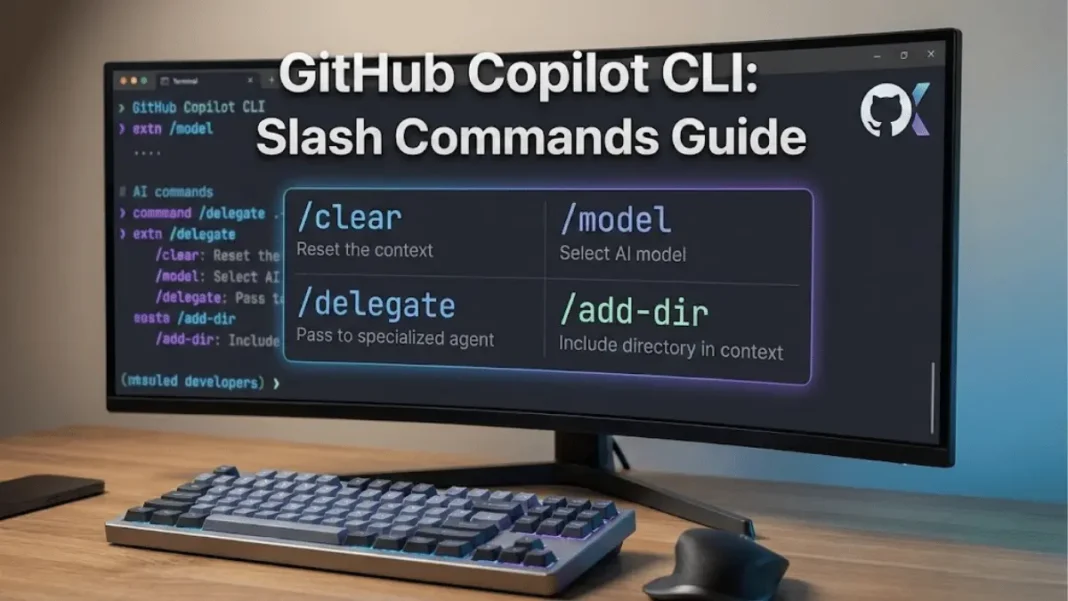
GitHub published an official cheat sheet documenting slash commands in Copilot CLI, providing developers with explicit, repeatable shortcuts for terminal-based AI workflows. The commands address context management (/clear), directory scoping (/add-dir), model selection (/model), and automated pull request generation (/delegate). With 81.4% of developers installing Copilot extensions the same day they gain access, slash commands represent GitHub’s response to demand for faster, keyboard-driven AI interactions.
Terminal Command Architecture for Enterprise Workflows
Slash commands enable developers to execute predefined Copilot actions without crafting natural language prompts. The /clear command wipes conversation history when context accumulation degrades suggestion quality during multitasking. The /add-dir command restricts file access to specific directories, creating audit trails essential for compliance-focused teams. Session management commands /session and /usage display metrics including request counts, API duration, and code change statistics.
Model selection through /model presents an interactive menu featuring Claude Sonnet 4.5, Claude Opus 4.5, GPT-5.1, and Gemini 3 Pro. The /delegate command automates pull request creation directly from terminal prompts, eliminating context switching for remote repository workflows. Directory navigation via /cwd maintains focus on active codebase segments.
Market Impact and Enterprise Adoption Metrics
GitHub Copilot reached 1.3 million paid subscribers by July 2025, growing 30% quarter-over-quarter. The platform commands 42% market share among paid AI coding tools, with GitHub’s overall revenue increasing 40% year-over-year. Over 50,000 organizations deployed Copilot, including 90% of Fortune 100 companies.
Copilot now generates 46% of all code written by active users, rising from 27% in 2022. Java developers see 61% Copilot-generated code, while Python projects average 40%. Code retention stands at 88%, indicating developers trust and preserve AI suggestions. Organizations report measurable ROI within 3-6 months of deployment, with productivity gains consistently documented across enterprise implementations.
Controlled experiments demonstrate developers with Copilot complete tasks in 1 hour 11 minutes versus 2 hours 41 minutes without AI assistance a 55% speed improvement. Pull requests increased 8.69% while PR merge rates rose 15%. Pull request cycle time decreased 75%, from 9.6 days to 2.4 days. Among survey respondents, 88% reported feeling more productive with Copilot.
Critical Slash Commands for Production Environments
| Command | Function | Primary Use Case |
|---|---|---|
/clear | Deletes session history | Reset context between projects |
/add-dir <path> | Grants directory access | Security scoping and audit compliance |
/model [name] | Switches AI model | Optimize reasoning depth vs. speed |
/delegate <prompt> | Creates automated PR | Multi-repo workflow automation |
/share [file|gist] | Exports session | Documentation and async handoff |
/cwd [directory] | Changes working directory | Limit Copilot context scope |
/mcp [action] | Manages MCP servers | Enterprise proxy configurations |
/user [action] | Switches GitHub accounts | Multi-tenant development workflows |
Pricing Structure and Enterprise Calculations
GitHub offers five Copilot tiers as of January 2026. The Free tier provides 2,000 completions and 50 premium requests monthly. Pro costs $10/month ($100/year) while Pro+ reaches $39/month ($390/year) with 5x premium request capacity and access to o3 models.
Business tier pricing sits at $19/user/month, adding IP indemnity, centralized management, and audit logs. Enterprise costs $39/user/month, including 1,000 premium requests per user, GitHub.com Chat integration, and custom models trained on organizational codebases. Enterprise requires GitHub Enterprise Cloud subscription.
A 50-developer team pays $950/month for Business ($11,400 annually) or $1,950/month for Enterprise ($23,400 annually). When combined with GitHub Team hosting ($4/user/month), total cost reaches $23/user/month for Business stack. Full Enterprise stack totals $60/user/month ($3,000 monthly for 50 developers).
Security and Compliance Architecture
The /add-dir command creates explicit directory allowlists, preventing unintended file exposure in sensitive environments. The /list-dirs command provides transparency for team compliance audits. The /reset-allowed-tools command removes obsolete or risky tool permissions.
MCP (Model Context Protocol) server management through /mcp enables enterprise proxy configurations and CI/CD integration. The /terminal-setup command enables multiline inputs for complex instructions. Session export via /share generates markdown files for documentation and knowledge transfer.
Developer Adoption Patterns and Retention
Nearly 80% of developers used Copilot within their first week after the free tier launched in late 2024. Among users, 96% accept suggestions on installation day, demonstrating minimal onboarding friction. Long-term retention exceeds 50%, with 67% of users engaging at least five days weekly.
Average suggestion acceptance rates reach 30%, though less experienced developers show 31.9% acceptance versus 26.2% for senior developers. License utilization rates hit 80% across organizations. About 70% of users rely on Copilot for tasks in familiar programming languages.

Frequently Asked Questions (FAQs)
What are slash commands in GitHub Copilot CLI?
Slash commands are prefixed shortcuts like /clear or /model that trigger specific Copilot actions without natural language prompts, executed directly in the terminal.
How much does GitHub Copilot cost for enterprises?
Business tier costs $19/user/month with IP indemnity and audit logs. Enterprise costs $39/user/month with 1,000 premium requests and custom models.
Which slash commands provide immediate productivity gains?
Start with /clear for context reset, /cwd for directory scoping, and /model for AI optimization. These control context, scope, and output quality.
What ROI do organizations achieve with GitHub Copilot?
Companies report measurable returns within 3-6 months. Developers complete tasks 55% faster, and PR cycle time drops 75% from 9.6 to 2.4 days.

