

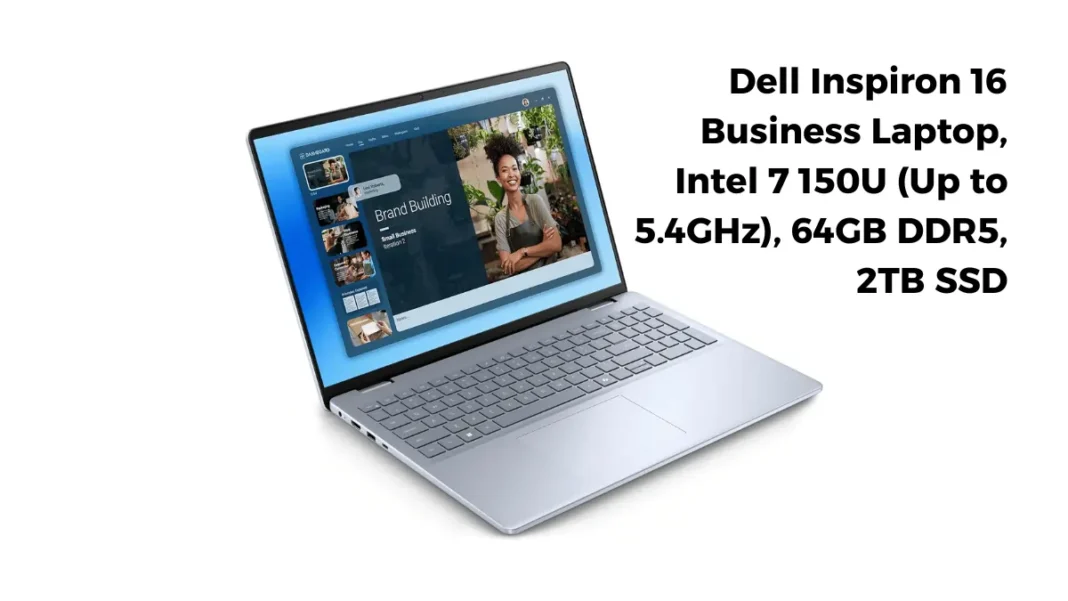
Short Answer: Deals like this look unreal: a Dell Inspiron 16 with Intel Core 7, 64GB DDR5 RAM, and a 2TB SSD around $1,195 on Amazon. Some listings even claim a “$4,599 list price.” Tempting, but you should verify what you’re getting and who’s selling it before clicking Buy. We’ll break down the hardware, the pricing math, the warranty questions, and exactly how to sanity-check the listing so you don’t get burne.
Is the $1,195 Dell Inspiron 16 worth it?
It can be a great value if the unit is new, the upgrades are genuine, and warranty remains intact. Core 7 150U handles everyday work, heavy multitasking, and light creative tasks well. Watch for third-party “list price” tricks, dubious “Office Lifetime” bundles, and reseller-performed upgrades that might affect warranty.
Good buy if you want lots of RAM/storage for multitasking, VMs, or large datasets, and you can confirm it’s truly new with Dell warranty.
Think twice if you need color-accurate creative work (FHD+ 300-nit touch is only okay), or if you’re allergic to marketplace caveats.
Not ideal for serious gaming or heavy GPU work; this build typically relies on integrated graphics.
What exactly is this configuration?
CPU: Intel Core 7 150U
Intel’s Core 7 150U is a modern 10-core/12-thread chip that can boost up to 5.4 GHz. It’s built for efficiency and strong single-thread bursts. Expect smooth office work, many browser tabs, coding, light photo/video edits, and light data tasks. If your workflow leans on multi-core rendering or heavy GPU, consider an H-series CPU or a discrete GPU.
Memory & storage
64GB DDR5 plus a 2TB NVMe SSD is overkill for casual users but lovely for power users who keep dozens of apps/tabs or run VMs and local dev databases. Many Inspirons ship with lower stock specs; resellers often upgrade RAM/SSD before sale. That’s fine if it’s done cleanly and the warranty stands verify both.
Display
Most listings cite a 16″ FHD+ (1920×1200) 16:10 touch panel around 300 nits. It’s sharp enough for office, coding, and browsing, with extra vertical room compared to 16:9. Drawbacks: outdoors it’s only passable; creators may prefer 2.5K/3K and higher brightness or wider gamut. Dell’s official pages do show FHD+ 300-nit touch and higher-res panels across Inspiron 16 variants.
Ports, wireless, OS
Typical I/O: USB-C, USB-A, HDMI, audio jack, and often an SD slot. Wireless is usually Wi-Fi 6E, which can lower latency on the 6 GHz band if your router and device both support it. These builds often ship with Windows 11 Pro, which adds BitLocker, domain/Entra join, and Remote Desktop hosting useful for IT and power users.
Charging note
Listings frequently mention ExpressCharge “80% in ~60 minutes.” ExpressCharge is a Dell feature on various models, but check the exact power adapter and battery spec in the listing or manual; marketplace pages can over-generalize.
The pricing claim: “$3,400 off” real or marketing?
You’ll see “$1,195” and a supposed “$4,599 list price.” On Amazon marketplace, list price is often set by the seller, not Dell. It may not reflect a real Dell MSRP for a comparable factory configuration. Don’t anchor on that number. Cross-check Dell’s current Inspiron 16 pricing to understand genuine savings.
How to check a fair baseline
Find the closest Inspiron 16 on Dell.com with Core 7-class CPU and similar display. Note the official price range and ongoing promos.
Add the cost of reputable RAM/SSD upgrades (if you’d do them yourself).
Compare total vs the marketplace listing and factor risk (warranty, return policy).
Risk check: third-party bundles & warranty
“MS Office Lifetime”
Multiple pages bundle “Microsoft Office Lifetime.” That’s not a standard retail license from Microsoft. Treat it as a red flag and assume it’s not transferable. If the bundle price hinges on this, ignore it when comparing value.
Who upgraded to 64GB/2TB?
If the seller did, it can still be fine but:
Confirm brand/speed of DDR5 and SSD.
Ask whether the warranty is unchanged and whether Dell’s Service Tag shows the machine as new with coverage start date near your purchase
Verify return policy (30-day minimum is ideal).
Service Tag & warranty
After delivery, check Dell’s Support site with the Service Tag to confirm model, ship date, and warranty status. If anything smells off (used/open-box, mismatched parts), return it.
Performance expectations
Everyday work & multitasking
Core 7 150U + 64GB DDR5 + 2TB SSD will feel snappy with 100+ Chrome/Edge tabs, Slack/Teams, VS Code, and light photo edits. The generous RAM prevents swap thrash; the 2TB SSD keeps large projects on internal storage.
Coding & light dev
Great for Docker, local DBs, and multiple IDEs. For GPU-accelerated AI, look to RTX-equipped creator laptops; integrated graphics will limit you.
Media & light creative
1080p editing is fine; 4K with heavy effects will bottleneck. For color-critical work, consider a higher-res, higher-gamut panel.
Gaming
Integrated graphics can handle indie/older titles at 1080p low/medium. For modern AAA 60-fps gaming, pick a discrete-GPU laptop.
Alternatives around $1-1.3K
New Inspiron 16 (official configs) with 16–32GB RAM and 1TB SSD direct from Dell during promos lower risk, lower RAM; upgrade later yourself.
Lenovo IdeaPad Pro / Slim series: often strong 2.5K displays and good port selection during sales.
Asus Zenbook 14/16: lighter builds, OLED options; may cost more for 32GB RAM.
Refurb business-class (Latitude/ThinkPad/T480-T16 etc.) with extended warranties less glam, more durability.
Comparison Table
| Item | CPU | RAM/SSD | Display | OS | Typical Price Window* |
|---|---|---|---|---|---|
| Amazon Dell Inspiron 16 (marketplace) | Core 7 150U | 64GB / 2TB | 16″ FHD+ 300-nit touch | Win 11 Pro | ~$1,150–$1,350 (varies) |
| Dell.com Inspiron 16 (official) | Core 7-class options | 16–32GB / 512GB–1TB | FHD+ or 2.5K | Win 11 Home/Pro | Changes with promos |
How to verify before you buy (checklist)
- Seller: 4.5★+ rating, 12+ months on platform, clear 30-day returns.
- “New” vs “Renewed/Open-box”: ensure “New.”
- Panel: confirm FHD+ 1920×1200, 300-nit touch (or your preferred panel).
- RAM/SSD: ask for brand, speed (e.g., DDR5-5600), NVMe model.
- Warranty: get confirmation in writing that Dell warranty is intact; check Service Tag after delivery.
- Charger: verify wattage matches Dell spec; look for genuine Dell adapter.
- “Office Lifetime”: ignore it for value calculations.

Featured Snippet Boxes
Is the $1,195 Dell Inspiron 16 a good deal?
Yes if it’s new, the seller is reputable, and warranty is intact. Core 7 150U with 64GB/2TB is fast for multitasking and light creative work. Verify panel, charger, and upgrades, and ignore inflated marketplace “list price” claims.
What are the key specs to check?
Core 7 150U, 64GB DDR5-5600, 2TB NVMe SSD, 16″ FHD+ 1920×1200 300-nit touch, Wi-Fi 6E, Windows 11 Pro. Confirm brand/speed of RAM/SSD, panel brightness, and Dell warranty via Service Tag.
Why is the discount so big?
Many Amazon listings set their own “list price,” which may not match Dell’s official MSRP. Consider the real-world Dell price for similar configs and the cost of parts if you upgraded yourself.
*Marketplace prices fluctuate and may hide until cart; official pricing varies by promo.
Frequently Asked Questions (FAQs)
Does the Core 7 150U have enough power for VMs and light editing?
Yes 10 cores/12 threads with up to 5.4 GHz turbo make it capable for multitasking, VMs, and light creative work. Heavy 4K editing or 3D rendering will prefer H-series chips or discrete GPUs.
Is Wi-Fi 6E worth it?
If you have a 6E router and compatible clients, you’ll see lower latency and more consistent throughput on the 6 GHz band. Otherwise, it behaves like standard Wi-Fi 6.
Is Windows 11 Pro necessary?
Only if you need BitLocker, Remote Desktop (host), Hyper-V/Sandbox, or domain/Entra join. Home is fine for most.
Can these Amazon units be upgraded later?
Physically, yes on many Inspiron 16 models but opening the chassis yourself could affect the seller’s return policy. If warranty is critical, consider buying lower-RAM direct from Dell and upgrading later.
Is the “$3,400 off” claim real?
Treat it as marketing. Marketplace “list prices” can be inflated. Compare to Dell’s official pricing and realistic DIY upgrade costs.

