

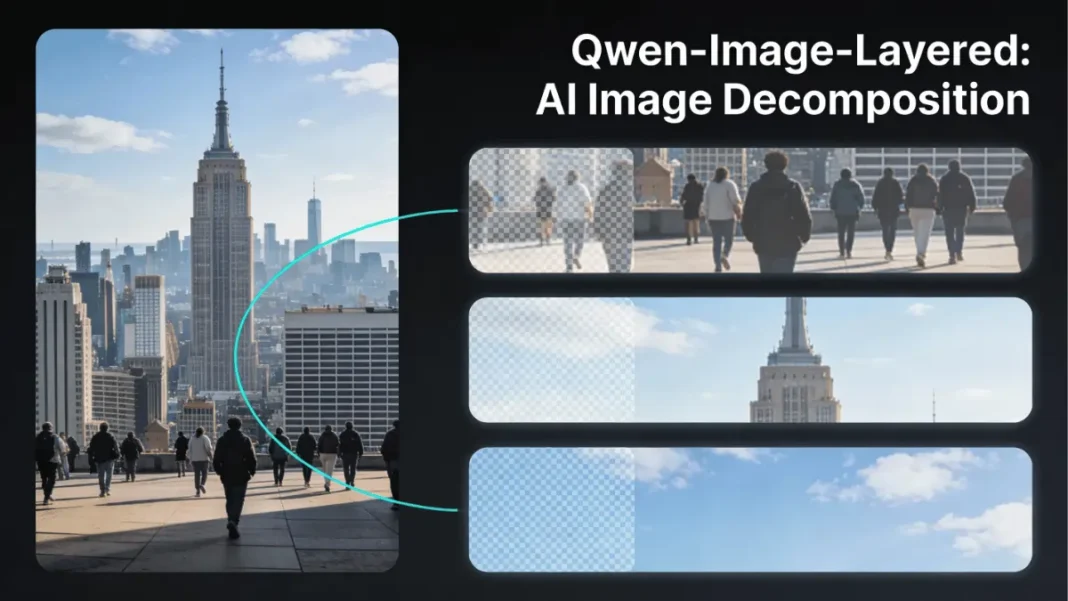
Summary: Alibaba’s Qwen AI team has released Qwen-Image-Layered, an open-source diffusion model that automatically decomposes flat images into 3 to 8 editable RGBA layers with transparent backgrounds. Unlike mask-based editing tools, it semantically separates subjects, backgrounds, text, and objects into distinct layers that can be resized, repositioned, or replaced without affecting other elements. The model uses a custom RGBA-VAE architecture and VLD-MMDiT backbone to enable “near-zero drift” editing, positioning it as a bridge between standard images and Photoshop-style PSD files. Available on GitHub, Hugging Face, and ModelScope with Apache-style licensing, it supports ComfyUI integration and API access through platforms like Pixazo and fal.
Alibaba’s Qwen AI team has just open-sourced a breakthrough image model that decomposes any flat photo into separate, editable layers eliminating hours of manual masking work in Photoshop. Released on December 19-20, 2024, Qwen-Image-Layered transforms standard RGB images into structured RGBA layer stacks, each with its own transparency channel, letting designers edit individual elements without disturbing the rest of the composition.
What You Need to Know
Qwen-Image-Layered is a free, open-source AI model from Alibaba that automatically splits images into 3-8 editable layers with transparent backgrounds. It uses semantic understanding to separate subjects, props, and backgrounds, enabling precise edits like background swaps, object repositioning, and text modifications without repainting the entire image. Available on Hugging Face, GitHub, and ModelScope under Apache 2.0 license.
- Fully open source with Apache 2.0 license no vendor lock-in
- Semantic layer separation preserves relationships between visual elements
- Near-zero drift editing maintains quality across iterations
- Recursive decomposition enables granular control
- Fast inference (under 5 seconds for most images)
- Works with any RGB image photos, AI art, screenshots
- Production-ready APIs available from multiple providers
- Active community support (ComfyUI workflows, tutorials)
- Requires GPU for local use (8GB VRAM minimum)
- No user control over layer assignment in initial release
- Struggles with transparent/reflective objects (glass, water)
- Limited documentation for advanced customization (early release)
- Occlusion completion quality varies with background complexity
- Large model size (~20B parameters) impacts deployment
What Is Qwen-Image-Layered?
Qwen-Image-Layered is an end-to-end diffusion model that decomposes a single RGB image into multiple semantically disentangled RGBA layers, essentially converting flat photos into Photoshop-style layer stacks automatically. Think of it as reverse engineering an image: instead of combining layers to create a final picture, the AI “peels back” visual elements like an onion, isolating foreground subjects, mid-ground objects, backgrounds, and even text overlays into independent editable files.
Breaking Down the Technology
Unlike traditional background removal tools (like Remove.bg) that simply mask unwanted areas, Qwen-Image-Layered performs semantic decomposition; it understands what each visual element represents and physically separates them into distinct RGBA files. Each layer includes a full alpha channel, preserving soft edges, shadows, and transparency information that would be lost in binary mask-based workflows.
The technical paper, “Qwen-Image-Layered: Towards Inherent Editability via Layer Decomposition,” describes this approach as creating “a bridge between standard images and structured, editable representations” akin to the PSD files designers use daily.
How It Differs From Traditional Image Editing
Traditional AI image editors rely on one of two approaches: mask-based editing (where you paint over areas to modify) or global regeneration (where the entire image is repainted). Both methods suffer from consistency drift: small edits to one area can unexpectedly alter unrelated parts of the image.
Qwen-Image-Layered sidesteps this by giving each visual element its own isolated layer. Resize a person? The background remains pixel-perfect. Swap the sky? The foreground stays untouched. This “inherent editability” eliminates the error propagation that plagues multi-step editing pipelines.
How Qwen-Image-Layered Works Under the Hood
RGBA-VAE: The Secret to Transparent Layers
At its core, the model uses a custom RGBA-VAE (Variational Autoencoder) that unifies RGB and RGBA image formats in a shared latent space. Standard image generators work only with opaque RGB pixels; Qwen’s VAE adds native support for the alpha (transparency) channel, allowing it to encode and decode transparent layers without losing edge fidelity.
This architectural choice is critical: it means the model can “hallucinate” hidden details behind foreground objects for instance, inferring what the background looks like behind a person, even though those pixels are occluded in the original photo.
VLD-MMDiT Architecture Explained
The Variable-Layer Decomposition Multi-Modal Diffusion Transformer (VLD-MMDiT) is the engine that handles the actual layer separation. Unlike fixed-output models, VLD-MMDiT can generate a flexible number of layers 3 for simple scenes, 8 for complex compositions depending on the image’s semantic complexity.
This architecture mirrors how professional compositors think: a portrait might need just three layers (subject, background, lighting overlay), while a busy product shot could require eight (main product, multiple props, shadow layers, text elements).
Multi-Stage Training Strategy
The Qwen team trained the model in stages, starting with a standard image generator and progressively adapting it into a multilayer decomposer. This approach leverages pre-trained knowledge from billions of images while teaching the model the specific task of semantic layer separation, a training strategy that balances quality with computational efficiency.
Key Features and Capabilities
3-Layer vs 8-Layer Decomposition
Users can specify whether they want a 3-layer or 8-layer output when processing an image:
- 3-layer mode: Ideal for simple edits typically separates into foreground subject, midground elements, and background
- 8-layer mode: For complex scenes with multiple overlapping objects, text, shadows, and detailed backgrounds
Both configurations maintain full RGBA transparency and can be exported directly to Photoshop, Figma, After Effects, or any design tool that supports layered files.
Recursive Layer Splitting
One standout feature: any generated layer can be recursively decomposed into additional sub-layers. For example, if the “foreground subject” layer contains both a person and a hat, you can run that layer through the model again to separate them further. This recursive capability enables increasingly granular control without manual masking.
Near-Zero Drift Editing
The Qwen team claims “near-zero drift” when editing individual layers. In testing scenarios, modifying one layer such as changing a background color or moving an object left adjacent layers completely unchanged, with pixel-perfect preservation of details like hair strands, fabric texture, and shadow edges.
This consistency is a game-changer for professional workflows where maintaining visual fidelity across dozens of iterations is critical.
Real-World Use Cases and Applications
For Graphic Designers and Creatives
Designers spend hours manually creating layer masks in Photoshop. Qwen-Image-Layered automates 80-90% of that work, delivering clean layer stacks in seconds. Use cases include:
- Background replacement: Swap studio backdrops without re-shooting
- Composition mockups: Move subjects between scenes while preserving lighting
- Text overlay editing: Isolate embedded text for font changes or translation
For E-Commerce and Product Photography
Product photographers can instantly separate items from backgrounds, props, and shadows critical for creating white-background listings, seasonal campaigns, and A/B testing variants. The model’s occlusion completion feature even “guesses” what’s behind foreground objects, enabling background edits without re-shoots.
For AI Researchers and Developers
The open-source release (Apache 2.0 license) makes Qwen-Image-Layered a powerful building block for custom AI editing pipelines. Developers can:
- Integrate layer decomposition into automated content workflows
- Build specialized APIs for vertical industries (real estate, fashion, automotive)
- Combine with other models like Stable Diffusion or ControlNet for advanced editing
Platforms like Pixazo have already launched commercial APIs exposing Qwen-Image-Layered endpoints, returning RGBA layers, masks, and metadata via REST calls.
Technical Specifications
Model Architecture Details
| Specification | Details |
|---|---|
| Model Type | End-to-end diffusion model (layer decomposer) |
| Base Architecture | VLD-MMDiT with RGBA-VAE backbone |
| Input Format | Single RGB image (JPG, PNG, WEBP) |
| Output Format | 3-8 RGBA layers with alpha channels |
| License | Apache 2.0 (fully open source) |
| Model Size | ~20B parameters (estimated based on Qwen-Image family) |
| Inference Time | <5 seconds for standard images |
| Max Resolution | Supports up to 4K images |
Supported Formats and Requirements
The model accepts standard image formats and runs on consumer GPUs:
- Input: RGB images (JPEG, PNG, WEBP) up to 10MB
- Hardware: NVIDIA GPUs with 8GB+ VRAM recommended
- Platforms: Hugging Face Diffusers, ModelScope, ComfyUI
- Dependencies: Python 3.8+, PyTorch 2.0+, Transformers library
Qwen-Image-Layered vs Traditional Editing Tools
| Feature | Qwen-Image-Layered | Photoshop Manual Masking | Remove.bg / AI Background Removers |
|---|---|---|---|
| Layer Separation | Automatic semantic decomposition | Manual selection + masking | Binary mask only (no layers) |
| Transparency Quality | Full RGBA with soft edges | Depends on skill level | Often pixelated edges |
| Occlusion Handling | AI inpaints hidden areas | Requires separate inpainting | Not supported |
| Edit Flexibility | Per-layer independent edits | Full control but labor-intensive | Limited to foreground/background |
| Speed | <5 seconds | 10-30 minutes per image | 5-10 seconds (background only) |
| Cost | Free (open source) | Photoshop subscription ($10-55/mo) | Freemium ($0-$30/mo) |
| Recursive Splitting | Yes | Manual only | No |
| API Access | Available via Pixazo, fal | Not applicable | API available (limited) |
Getting Started: Access and Implementation
Open Source Availability
Qwen-Image-Layered is fully open-sourced with code, model weights, and documentation available on:
- GitHub: Full source code and training scripts
- Hugging Face: Pre-trained checkpoints and inference demos
- ModelScope: Alibaba’s model hub with optimized deployments
All releases use Apache 2.0 licensing, allowing commercial use without restrictions.
Integration Options
For Developers:
- Clone the GitHub repo and run locally with PyTorch
- Use Hugging Face Diffusers for one-line API calls
- Deploy via ModelScope for production inference
For Designers:
- Access web demos on Hugging Face Spaces and ModelScope
- Use ComfyUI workflows (community-created nodes available)
- Call commercial APIs from Pixazo or fal for Photoshop-direct exports
ComfyUI Workflow Setup
YouTuber SudoInstallAI published a ready-to-use ComfyUI workflow within 24 hours of release:
- Download model weights from Hugging Face
- Install Qwen-Image-Layered ComfyUI nodes
- Load source image
- Set layer count (3 or 8)
- Generate RGBA layer stack
- Export as PSD or individual PNG files
The workflow supports batch processing for e-commerce catalogs.
Limitations and Considerations
When Layer Decomposition Struggles
Despite impressive capabilities, Qwen-Image-Layered has boundaries:
- Complex occlusions: Heavily overlapping objects (e.g., tangled chains) may fuse into single layers
- Transparent objects: Glass, water, and reflective surfaces confuse the alpha channel
- Abstract art: The model expects recognizable subjects; non-representational images produce unpredictable splits
- Low contrast: Subjects that blend into backgrounds (same color/texture) may not separate cleanly
Performance and Hardware Requirements
Running locally requires:
- Minimum: 8GB VRAM (NVIDIA RTX 3060 or equivalent)
- Recommended: 12GB+ VRAM (RTX 4070 Ti or higher) for 4K images
- Inference time: 3-15 seconds depending on resolution and layer count
For users without GPUs, cloud APIs (Pixazo, fal) offer pay-per-use access starting around $0.02-0.05 per decomposition.
Expert Analysis: What This Means for AI Image Editing
Industry Impact
Qwen-Image-Layered represents a fundamental shift from destructive to inherently editable AI generation. Previous models output final, flattened images; this approach mirrors how professionals actually work in layers.
By open-sourcing the technology, Alibaba is challenging proprietary tools from Adobe (Firefly) and Stability AI (Stable Diffusion inpainting), potentially accelerating adoption in cost-sensitive markets like freelance design and small agencies.
Future Development Directions
The technical paper hints at upcoming features:
- Video layer decomposition: Extending to multi-frame sequences for motion graphics
- 3D layer stacking: Depth-aware separation for AR/VR applications
- Text-to-layer generation: Creating layered compositions from prompts (combining with Qwen-Image generation model)
Third-party integrations are already emerging: Pixazo’s API dashboard shows layer metadata, position coordinates, and suggested edit operations, pointing toward fully automated design pipelines.
Try It Yourself:
Access demos on Hugging Face or explore the GitHub repository to run locally. For production workflows, check out Pixazo’s API playground or fal inference platform.
Frequently Asked Questions (FAQs)
Is Qwen-Image-Layered free to use commercially?
Yes. The Apache 2.0 license permits commercial use, modification, and redistribution without royalties. Alibaba does not restrict commercial applications.
Can it work with AI-generated images from Midjourney or DALL-E?
Absolutely. The model accepts any RGB image regardless of origin photos, AI art, scans, or screenshots. It’s particularly useful for making AI-generated images editable post-creation.
How does it compare to Photoshop’s AI masking tools?
Photoshop 2024’s Select Subject and Remove Background use similar AI segmentation, but produce binary masks (on/off transparency) rather than true RGBA layers with semantic separation. Qwen goes further by inferring occluded content and maintaining layer independence.
What’s the difference between 3-layer and 8-layer modes?
3-layer mode splits images into broad categories (typically foreground-midground-background). 8-layer mode creates finer distinctions, isolating individual objects, shadows, text, and background elements. Use 3 for speed, 8 for precision.
Can I edit the layers in Photoshop after exporting?
Yes. The RGBA layers export as standard PNG files with alpha channels or combined PSD files. They’re fully compatible with Photoshop, GIMP, Affinity Photo, Figma, and any editor supporting transparency.
Does it require internet access or send images to Alibaba servers?
No. When running locally via GitHub or ComfyUI, all processing happens on your machine. Only cloud demos (Hugging Face Spaces, ModelScope web UI) and commercial APIs (Pixazo, fal) require internet.
How accurate is the “occlusion completion” feature?
The model infers hidden background areas using context clues (similar to Photoshop’s Generative Fill). Accuracy depends on scene complexity; simple backgrounds (solid colors, gradients) work perfectly, while intricate patterns may show visible seams.
Can I control which objects go on which layers?
Not directly in the current release. The model uses automatic semantic understanding. However, you can use recursive decomposition: generate 3 layers, then split specific layers further if needed. Future versions may add bounding-box guidance similar to ControlNet.

Featured Snippet Boxes
What is Qwen-Image-Layered?
Qwen-Image-Layered is an open-source AI model from Alibaba that automatically decomposes flat images into 3-8 editable RGBA layers with transparent backgrounds. It semantically separates subjects, backgrounds, and objects into independent layers, enabling Photoshop-style editing without manual masking. Released December 2024 under Apache 2.0 license.
How does layer decomposition differ from background removal?
Background removers create binary masks (on/off transparency), while layer decomposition separates images into multiple semantic layers with full alpha channels. Each layer represents distinct visual elements (foreground, midground, background, text), enabling independent editing, resizing, and repositioning without affecting other components.
What makes Qwen-Image-Layered’s editing “near-zero drift”?
Near-zero drift means editing one layer leaves others pixel-perfect unchanged. Traditional AI editors repaint entire images when modified, causing unintended changes elsewhere. Qwen’s layer-based approach isolates edits to specific elements, maintaining visual consistency across hundreds of iterations without quality degradation or compositional drift.
Can Qwen-Image-Layered work with AI-generated images?
Yes. The model accepts any RGB image regardless of source photos, Midjourney, DALL-E, Stable Diffusion outputs, screenshots, or scans. It’s particularly valuable for making AI-generated art editable post-creation, converting flat outputs into structured layer files compatible with Photoshop and Figma.
What is recursive layer splitting?
Recursive splitting lets you decompose any generated layer into additional sub-layers. For example, a “foreground subject” layer containing a person and hat can be processed again to separate them further. This enables increasingly granular control without manual masking, adapting to varying complexity needs.
How do I use Qwen-Image-Layered?
Access via: (1) Web demos on Hugging Face and ModelScope, (2) Local installation using GitHub code with 8GB+ VRAM GPU, (3) ComfyUI workflows for batch processing, or (4) Commercial APIs from Pixazo and fal. All options output RGBA layers compatible with Photoshop, GIMP, and Figma.

