

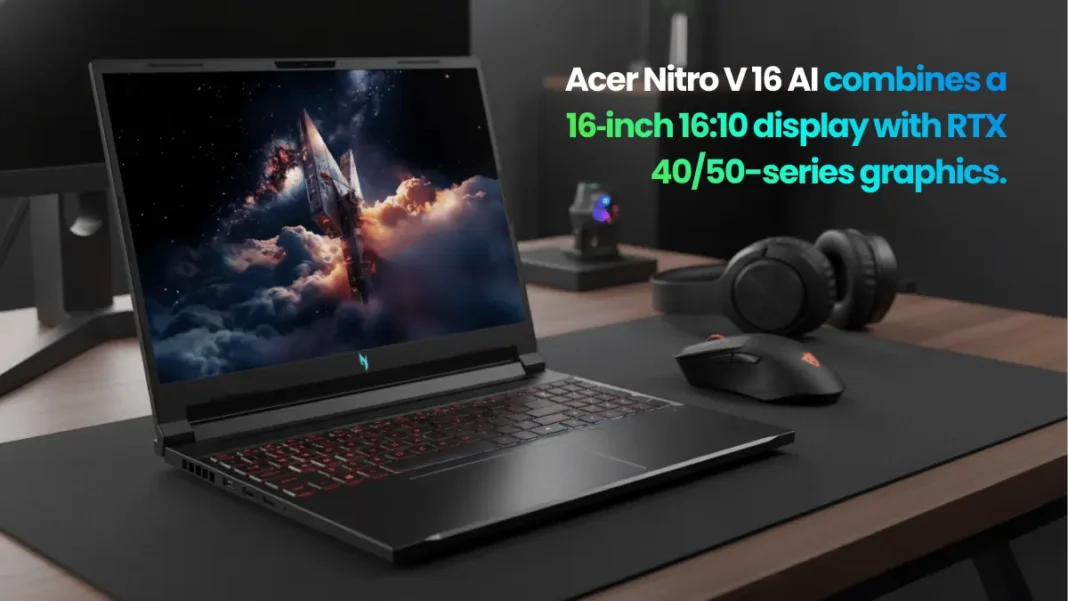
Summary: The Acer Nitro V 16 AI is a value-focused 16-inch gaming laptop that pairs AMD Ryzen AI processors with RTX 40/50-series GPUs and a fast 165–180 Hz display. It delivers smooth 1080p–1200p gaming, surprisingly strong battery life for this class, and good port selection, but CPU performance and speakers trail some rivals. For students, casual gamers, and creators who want a single all-rounder instead of a premium flagship, it hits a practical sweet spot in 2025.
Who Should Buy the Acer Nitro V 16 AI?
If you want a 16‑inch gaming laptop that can handle modern titles at 1080p–1200p, last through a workday, and not destroy your budget, the Acer Nitro V 16 AI is a strong contender. It is not the fastest CPU or GPU in the segment, but the balance of performance, battery life, and price is what makes it interesting in 2025.
The Acer Nitro V 16 AI is a budget-to-midrange 16‑inch gaming laptop built around AMD Ryzen AI processors and RTX 40/50-series GPUs, offering smooth 1080p–1200p gaming, strong battery life, and a fast 165–180 Hz screen. It suits students, casual gamers, and creators more than competitive esports pros.
This machine fits best if you:
- Play esports and popular AAA games at high or medium settings instead of chasing maxed-out 4K.
- Need one laptop for studies, remote work, and weekend gaming plus some creator workloads.
- Care about battery longevity and port selection as much as raw FPS.
You should probably skip it if you want:
- Top-tier CPU performance, where Intel HX or higher-tier Ryzen chips lead.
- The best speakers, colour-accurate display, or premium metal chassis.
- Wi‑Fi 7 or bleeding-edge connectivity; this line typically tops out at Wi‑Fi 6/6E.
- Strong 1080p–1200p gaming performance with RTX 40/50-series GPUs and DLSS
- 16‑inch 16:10 high-refresh display that feels spacious and smooth
- Better battery life than many gaming competitors
- Good port selection plus upgradable RAM and storage
- AI-ready platform with Ryzen AI CPU, NPU TOPS, and Copilot+ features
- CPU performance is merely “okay” versus some similarly priced rivals
- Speakers and overall audio quality are below average
- All-plastic build and gamer aesthetic may not appeal to everyone
- Wi‑Fi 6/6E instead of Wi‑Fi 7
Key Specs and Configuration (ANV16-61-R9MV)
The specific model Acer highlights, the Nitro V 16 AI ANV16‑61‑R9MV, is positioned as a Copilot+ PC with a clear focus on AI and gaming. Core hardware includes:
- CPU: AMD Ryzen AI 7 350 with up to 66 TOPS overall and up to 50 TOPS on the NPU, designed for local AI workloads.
- GPU: NVIDIA GeForce RTX 5060 Laptop GPU in this configuration, part of the newer RTX 50-series with 572 AI TOPS.
- Memory: 16 GB DDR5‑5600, typically in dual-channel, with slots for later upgrades.
- Storage: 1 TB PCIe Gen 4 NVMe SSD, with room for an additional M.2 SSD on many ANV16‑61 boards.
- Display: 16‑inch WUXGA (1920×1200) IPS panel with 180 Hz refresh and 16:10 aspect ratio in this SKU; some Nitro V 16 variants ship with WQXGA or 165 Hz panels.
- Battery: Large-capacity unit (around 76 Wh class depending on region) that reviewers praise for above-average life in a gaming chassis.
Connectivity covers:
- USB‑C (often USB 4 on newer Nitro V 16 AI), two USB‑A 3.x ports, HDMI 2.1, microSD, and RJ‑45 Ethernet.
- Wi‑Fi 6 or 6E and Bluetooth, which is fine for most home networks but not “next‑gen” like Wi‑Fi 7.
One thing to keep in mind: “Nitro V 16 AI” is a family. There are ANV16‑61, ANV16‑41, and other sub-models with Ryzen 8040, Hawk Point, or different RTX 40/50 GPUs. Always double-check the exact CPU and GPU before buying, because performance can jump significantly between RTX 3050, 4050, 4060, 5050, and 5060 options.
Design, Build, and Portability
The Nitro V 16 AI sticks to Acer’s familiar gamer aesthetic: angular lines, plenty of vents, and a mostly plastic build that trades premium feel for lower weight and cost. Reviewers note that the chassis is reasonably rigid and resists fingerprints better than earlier Nitro machines, though it still does not feel as solid as metal-bodied rivals.
At around 2.4-2.7 kg depending on configuration, plus a sizeable power brick, it is portable enough for a backpack commute or college use but not “ultrabook light.” The full-size keyboard with number pad and orange backlight is comfortable for long typing sessions, while the larger-than-average touchpad stands out versus many budget gaming laptops.
In everyday use, fan noise stays tolerable on balanced profiles, with aggressive ramps only under sustained gaming or heavy rendering. For a student or remote worker, that means you can get through classes and meetings without sounding like a jet engine, especially if you keep it on a table and not a soft surface.
Display Quality and Refresh Rate
One of the main selling points is the 16‑inch 16:10 panel with refresh up to 165–180 Hz, depending on the exact SKU. Compared with typical 15.6‑inch 1080p 144 Hz panels in this price band, the extra vertical space and faster refresh make both gaming and web work feel more spacious and fluid.
Independent tests show good response times and blur handling for the gaming-focused configurations, along with PWM‑free backlighting on some ANV16‑61 models, which helps reduce eye strain. Brightness and colour accuracy sit in the “good enough” zone for content consumption and casual creation, but serious colour-sensitive work still belongs on an external calibrated monitor.
For 1080p–1200p gaming, this panel is a great match to mid-range RTX GPUs: you can actually push close to the refresh rate in esports titles, while AAA games benefit from the smoothness even in the 70–100 fps range.
CPU, GPU, and AI Performance
On the CPU side, there are two main storylines in the Nitro V 16 family: the older Ryzen 7000/8040‑based models and the newer Ryzen AI 300‑series chips like the Ryzen AI 7 350. AMD’s AI‑focused parts shift some silicon budget to the NPU, so raw CPU performance can trail high-wattage Intel HX or non-AI Ryzen parts, but they are more efficient and better tuned for Copilot+ and local AI tasks.
GPU options are equally important. Review units with RTX 4050 or 4060 already showed excellent 1080p performance with DLSS and no significant thermal throttling. Moving to RTX 5050/5060 in ANV16‑61 AI variants brings newer architecture and higher AI TOPS, though some configurations are limited to around 95 W GPU power, which keeps thermals in check but caps absolute performance against fatter machines.
For AI, the combination of a dedicated NPU (up to 50 TOPS), GPU tensor cores, and modern Windows Copilot+ support makes this machine future-proof for on-device assistants, AI-enhanced content tools, and background tasks like live captions or noise reduction. If you use tools like AI-powered upscaling in video editors or AI filters in creative apps, this balance of CPU, NPU, and GPU is more meaningful than pure single-core benchmarks.
Gaming Benchmarks and Real-World FPS
Tested RTX 4050/4060 Nitro V 16 units already hit high frame rates in modern games at 1080p and 1200p, often delivering smooth gameplay with medium to high settings. Esports titles like Valorant and similar shooters can easily exploit the 165–180 Hz panel, while heavier AAA titles sit in a comfortable 60–100 fps band when DLSS is enabled.
Notebook-focused outlets highlight that even under extended gaming sessions, the Nitro V 16 AI maintains stable performance with restrained throttling, thanks to mature cooling and sensible power limits. Combined with a fast NVMe SSD, level loading times feel snappy, and frame pacing stays consistent enough that casual players will not notice small dips unless they stare at graphs.
For buyers in 2025, that translates into a laptop that plays current AAA games very well at native resolution and should keep up with most upcoming titles at tuned settings for the next three to four years.
Thermals, Noise, and Power
The Nitro V 16 AI uses a dual-fan cooler with multiple heatpipes and a dedicated NitroSense key that lets you switch profiles quickly. Under load, reviewers consistently mention that CPU and GPU temperatures remain within safe limits, with the system preferring slightly lower clocks over aggressive throttling spikes.
Fans can get loud in performance mode, which is expected for this class, but the tone is less shrill than some thin-and-light gaming competitors. For day-to-day use, balanced or silent profiles cut noise significantly while still keeping the chassis comfortable to touch, provided you have decent airflow around the vents.
Battery Life and Charging
Battery life is where this Nitro stands out from the typical “one-hour-on-battery” stereotype of gaming laptops. Expert reviews report that productivity and video playback can stretch into a full work or school day under lighter loads, which is rare in this category.
Gaming on battery drains it fast, often under an hour, but that is standard for mid-range dGPUs; you will want to stay plugged in for serious sessions. The power adapter is chunky but supports relatively quick charging, making it realistic to top up between classes or meetings.
Upgradability and Future-Proofing
The Nitro V 16 AI keeps the upgradability story alive, which matters if you plan to keep it for several years. You typically get:
- Two SODIMM slots supporting user-replaceable DDR5 memory.
- Two M.2 SSD slots, so you can add a second drive instead of replacing the stock one.
Combined with an RTX 40/50-series GPU and AI-ready CPU, this means you can start with 16 GB RAM and 1 TB storage and scale up later when games and tools demand more. Ports, Wi‑Fi 6E, and HDMI 2.1 cover multi-monitor setups and higher-refresh external displays, which is important if you want a colour-accurate monitor for creation and a gaming panel for play.
Acer Nitro V 16 AI vs Competing Laptops
Compared with Acer’s own Swift 14 AI, the Nitro V 16 AI trades thin-and-light portability and battery-first design for a much stronger GPU and higher-refresh display. If your priority is gaming or GPU-heavy work, Nitro wins; if you mostly code, browse, and video call on the move, a Swift 14 AI might be better.
Versus the earlier Nitro V 16 models with Ryzen 8040 and RTX 4060, the AI-branded variants bring Copilot+ readiness and more ambitious NPU performance, though raw FPS gains are modest at equivalent GPU power levels. Against competing midrange gaming laptops with RTX 4060 and stronger CPUs, the Nitro V 16 AI often undercuts on price, offers better battery life, but may lag slightly in CPU-heavy benchmarks and overall polish.
Technical Specs Section (Key Config: ANV16-61-R9MV)
| Spec | Detail |
|---|---|
| CPU | AMD Ryzen AI 7 350, up to 66 TOPS overall, up to 50 NPU TOPS |
| GPU | NVIDIA GeForce RTX 5060 Laptop GPU (572 AI TOPS, ~95 W MGP) |
| Display | 16‑inch WUXGA (1920×1200), 16:10, IPS, up to 180 Hz |
| RAM | 16 GB DDR5‑5600, dual-channel, user-upgradable |
| Storage | 1 TB PCIe Gen 4 NVMe SSD, second M.2 slot on many variants |
| Battery | ~76 Wh class, above-average life for gaming laptop |
| Wireless | Wi‑Fi 6/6E, Bluetooth |
| Ports | USB‑C, 2× USB‑A, HDMI 2.1, RJ‑45, microSD (varies by region) |
| Weight | ≈2.4–2.7 kg depending on config |
| OS | Windows 11 with Copilot+ features |
Nitro V 16 AI vs Nitro V 16 (older 8040-series)
| Feature | Nitro V 16 AI (ANV16‑61) | Nitro V 16 (8040-series) |
|---|---|---|
| CPU | Ryzen AI 7 350, NPU up to 50 TOPS | Ryzen 7 8845HS, no dedicated AI 300 NPU |
| GPU options | Up to RTX 5060/5070 | RTX 3050, 4050, 4060 |
| Display | 16:10, up to 180 Hz | 16:10, up to 165 Hz |
| AI features | Copilot+ PC focus | Standard Windows 11 with Ryzen AI 8040 |
| Battery focus | Strong battery reputation | Average to decent battery |
Nitro V 16 AI vs Acer Swift 14 AI
| Feature | Nitro V 16 AI | Swift 14 AI |
|---|---|---|
| Form factor | 16‑inch gaming laptop | 14‑inch thin-and-light AI laptop |
| GPU | Dedicated RTX 40/50-series | Integrated or low-power GPU |
| Target user | Gamers and creators | Productivity and AI-first users |
| Battery life | Good for gaming laptop | Typically better due to lower power |
Frequently Asked Questions (FAQs)
Is the Acer Nitro V 16 AI good for AAA gaming?
Yes, configured with an RTX 4050, 4060, 5050, or 5060, the Nitro V 16 AI delivers smooth 1080p–1200p performance in modern AAA games with DLSS enabled and sensible settings.
Does the Nitro V 16 AI overheat?
Tests show that the Nitro V 16 AI maintains stable CPU and GPU temperatures with its dual-fan cooler, prioritising consistent performance over aggressive boosts, so thermal throttling is limited.
How long does the battery last on the Acer Nitro V 16 AI?
Under light office work and video playback, reviewers report several hours of use, significantly better than many gaming laptops, though gaming on battery still drains it in under an hour.
Can you upgrade RAM and storage on the Nitro V 16 AI?
Yes, the Nitro V 16 AI typically offers two SODIMM slots for DDR5 RAM and two M.2 slots for NVMe SSDs, making memory and storage upgrades straightforward.
Is the Acer Nitro V 16 AI good for content creation?
For photo editing, light-to-moderate video work, and streaming, the Ryzen AI CPU and RTX GPU handle popular creator tools well, though colour-critical workflows benefit from an external calibrated monitor.
What’s the difference between Nitro V 16 and Nitro V 16 AI?
The Nitro V 16 AI models focus on AMD Ryzen AI processors and Copilot+ readiness, whereas earlier Nitro V 16 variants use Ryzen 7000/8040 CPUs without the same NPU emphasis but similar midrange GPUs.
Does the Acer Nitro V 16 AI support Wi‑Fi 7?
No, current Nitro V 16 AI configurations top out at Wi‑Fi 6 or 6E, which is fast enough for most users but not the latest Wi‑Fi 7 standard.
Is the Nitro V 16 AI loud while gaming?
In performance mode, fans become audible under load, but noise levels are typical for a midrange gaming laptop and remain reasonable compared with thinner, hotter competitors.

Featured Snippet Boxes
What is the Acer Nitro V 16 AI?
The Acer Nitro V 16 AI is a 16‑inch budget-to-midrange gaming laptop that pairs AMD Ryzen AI processors with NVIDIA RTX 40/50-series GPUs, a 165–180 Hz 16:10 display, and Copilot+ features for AI-enhanced gaming and productivity.
Is the Acer Nitro V 16 AI worth it in 2025?
For under flagship prices, the Acer Nitro V 16 AI offers smooth 1080p–1200p gaming, strong battery life, upgradable RAM and storage, and AI-ready hardware, making it a smart buy for students, casual gamers, and creators in 2025.
Does the Nitro V 16 AI run hot?
The Nitro V 16 AI uses dual fans and multiple heatpipes to keep CPU and GPU temperatures under control, and reviews show stable performance with limited thermal throttling during long gaming sessions.
Can you upgrade the Acer Nitro V 16 AI?
Yes, the Nitro V 16 AI typically includes two SODIMM slots and two M.2 SSD slots, so you can expand memory and storage over time instead of replacing the entire laptop.
How good is the Nitro V 16 AI display?
The Nitro V 16 AI’s 16‑inch 16:10 panel offers 1920×1200 or higher resolution with refresh rates up to 165–180 Hz, delivering smooth gameplay and extra vertical space compared with standard 1080p 144 Hz screens.

