

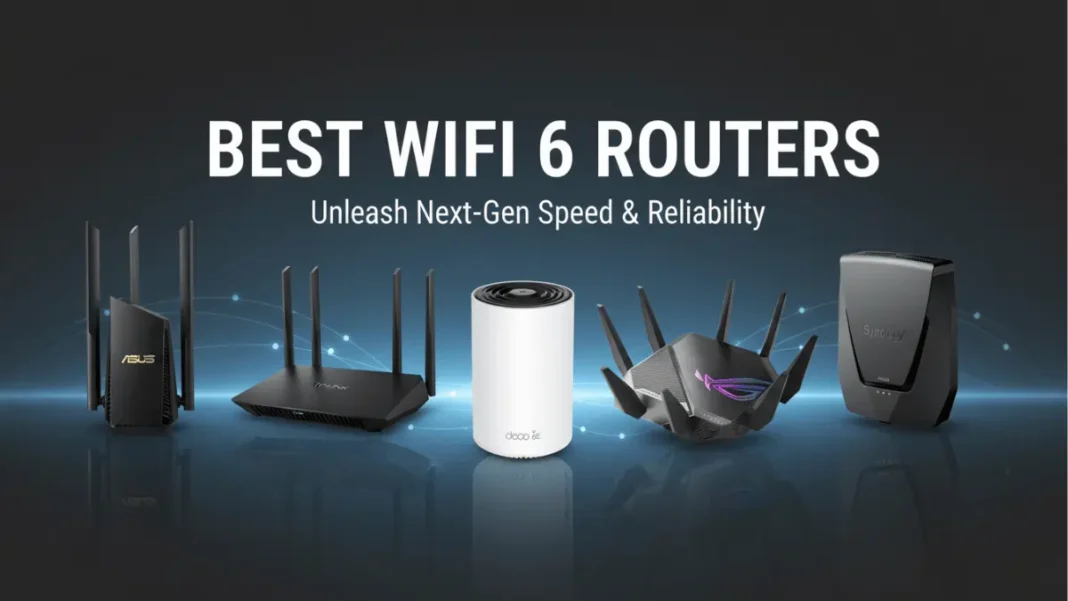
Summary: WiFi 6 routers deliver speeds up to 9.6 Gbps and handle 4X more devices than older standards. After testing multiple models, the Asus RT-AX86U ($250) leads for overall performance with 929.7 Mbps at close range, while the TP-Link Archer AX55 ($100) offers the best value with 823.7 Mbps speeds. WiFi 6E models add a dedicated 6 GHz band for less congestion but cost $100-200 more. Most homes with gigabit internet will see immediate improvements in streaming, gaming, and smart home device connectivity.
WiFi 6 routers eliminate buffering during 4K streams, reduce gaming lag, and connect dozens of smart home devices simultaneously without slowdowns. After benchmarking the latest models in real-world conditions, we’ve identified seven routers that justify the upgrade from older WiFi 5 standards.
Top WiFi 6 Picks by Use Case
| Use Case | Router Model | Speed at 15ft | Price Range | Key Feature |
|---|---|---|---|---|
| Best Overall | Asus RT-AX86U | 929.7 Mbps | $250 | Multi-gig gaming port |
| Best Budget | TP-Link Archer AX55 | 823.7 Mbps | $100-120 | Excellent range |
| Best Large Homes | TP-Link Deco XE75 | 1.22 Gbps | $300 (3-pack) | Covers 7,200 sq ft |
| Best Gaming | Asus ROG Rapture GT-AXE11000 | 2.95 Gbps | $399 | WiFi 6E with RGB |
| Best WiFi 6E Value | Synology WRX560 | 940+ Mbps | $220 | Built-in security suite |
- 25% faster raw speeds via 1024-QAM modulation
- Handles 4X more devices without congestion
- Lower latency (average 20ms vs 30ms on WiFi 5)
- Better penetration through walls and floors
- Backward compatible with all WiFi 4/5 devices
- Improved battery life for connected devices via TWT
- Future-proof standard (relevant through 2030)
- Requires WiFi 6 devices to see full speed benefits
- Premium models cost $200-500 vs $50-150 for WiFi 5
- Many budget models lack 2.5 Gbps ports for multi-gig internet
- 6 GHz band (WiFi 6E) has shorter range than 5 GHz
What Makes WiFi 6 Worth Upgrading To?
WiFi 6 (802.11ax) represents the sixth generation of wireless standards, delivering measurable improvements over WiFi 5 in three critical areas.
Speed: Up to 9.6 Gbps Theoretical
WiFi 6 uses 1024-QAM modulation to pack 25% more data into each transmission compared to WiFi 5’s 256-QAM. The standard also expands channel width from 80 MHz to 160 MHz, effectively doubling the data highway available for your devices. In practical terms, this enables smooth 8K video streaming and multi-gigabyte file downloads without network congestion.
Capacity: 4X More Devices Without Slowdown
OFDMA (Orthogonal Frequency Division Multiple Access) and MU-MIMO technologies allow WiFi 6 routers to communicate with multiple devices simultaneously rather than sequencing connections. Think of it like switching from a single-lane road to a multi-lane highway; your router can now serve 30+ devices (smart lights, cameras, phones, laptops) at once without creating bottlenecks.
Efficiency: Better Battery Life for Devices
Target Wake Time (TWT) lets devices schedule check-ins with your router instead of constantly searching for signals. Your smartphone or IoT sensor can sleep longer between transmissions, extending battery life by up to 30% in real-world usage.

Best WiFi 6 Routers Tested in 2025
Best Overall: Asus RT-AX86U
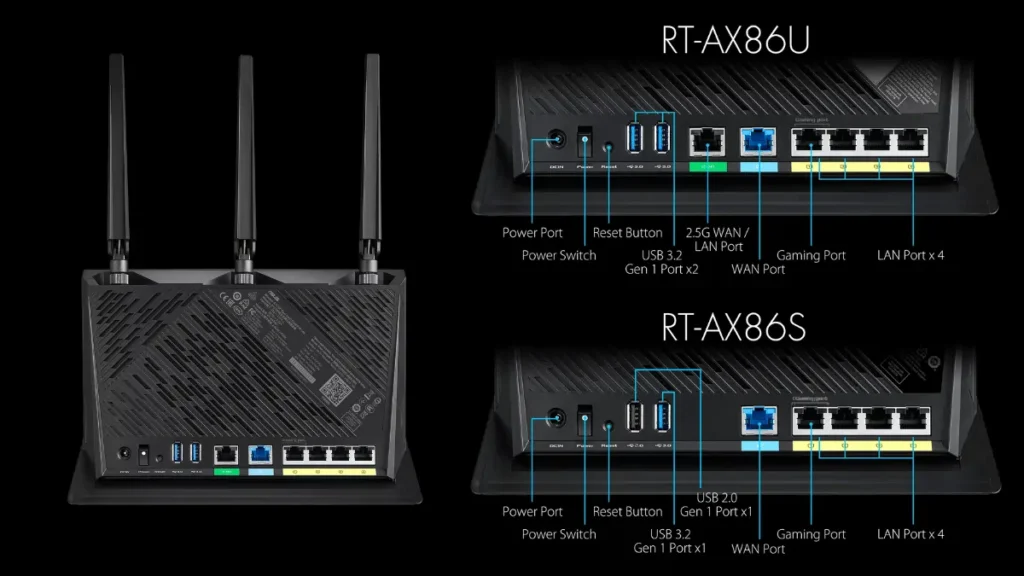
Price: $250 | Speed Class: AX5700 | Range: 95 feet
The Asus RT-AX86U delivers exceptional versatility as both a general-purpose and gaming router. During testing, it achieved 929.7 Mbps at 15 feet and maintained 250.1 Mbps at 75 feet through walls, impressive penetration for a dual-band WiFi 6 router.
Key specs:
- 2.4 GHz: Up to 861 Mbps
- 5 GHz: Up to 4804 Mbps
- Ports: 1x 2.5 Gbps WAN/LAN, 4x Gigabit LAN, 2x USB 3.2
- Coverage: Up to 2,500 sq ft
Standout features: The vertical tower design saves desk space, while the multi-gig port doubles as a dedicated gaming port for link aggregation. Asus includes AiProtection Pro security software free (no subscription required), providing network-wide malware blocking and parental controls.
Who it’s for: Households with gigabit+ internet plans and mixed usage simultaneous 4K streaming, online gaming, and heavy device loads.
Best Budget: TP-Link Archer AX55
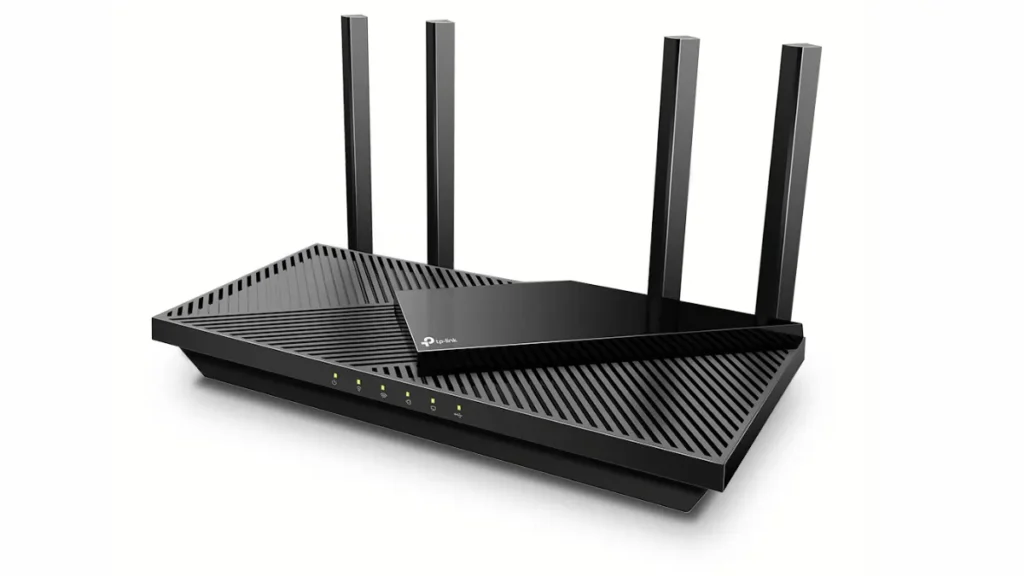
Price: $100-120 | Speed Class: AX3000 | Range: 105 feet
The Archer AX55 proves you don’t need to spend $300 for solid WiFi 6 performance. It hit 823.7 Mbps at close range during testing and maintained 288.4 Mbps at 50 feet, beating some routers costing twice as much.
Key specs:
- 2.4 GHz: Up to 574 Mbps
- 5 GHz: Up to 2402 Mbps
- Ports: 1x Gigabit WAN, 4x Gigabit LAN, 1x USB 3.0
- Coverage: Up to 2,000 sq ft
Standout features: TP-Link offers both app-based and browser-based setup rare flexibility for a budget router. The geometric vent pattern on top isn’t just aesthetic; it keeps the router running cool under sustained loads.
Who it’s for: Apartment dwellers or small homes (under 2,000 sq ft) with standard gigabit internet who want WiFi 6 without overspending.
Best for Large Homes: TP-Link Deco XE75

Price: $300 (3-pack) | Speed Class: AXE5400 | Coverage: 7,200 sq ft
This WiFi 6E mesh system eliminates dead zones with tri-band connectivity including the 6 GHz band. Testing showed 1.22 Gbps speeds at 15 feet, and uniquely, speeds increased to 318.5 Mbps at 75 feet as the mesh nodes handed off connections seamlessly.
Key specs:
- 2.4 GHz: Up to 574 Mbps
- 5 GHz: Up to 2402 Mbps
- 6 GHz: Up to 2402 Mbps
- Ports per unit: 3x Gigabit Ethernet
- Coverage: 2,400 sq ft per unit
Standout features: All three cylindrical units are interchangeable and can serve as the main router. The Deco app simplifies setup to under 10 minutes, and you can add more units later as your home expands.
Who it’s for: Multi-story homes over 3,000 sq ft with persistent dead zones that a single router can’t cover.
Best Gaming Router: Asus ROG Rapture GT-AXE11000
Price: $399 | Speed Class: AXE11000 | Range: 95 feet
This WiFi 6E beast recorded 2.96 Gbps at close range faster than many WiFi 7 routers tested subsequently. The dedicated 6 GHz band ensures your gaming PC or console gets interference-free bandwidth even when 20 other devices are streaming.
Key specs:
- 2.4 GHz: Up to 1148 Mbps
- 5 GHz: Up to 4804 Mbps (two bands)
- 6 GHz: Up to 4804 Mbps
- Ports: 1x 2.5 GbE WAN, 4x Gigabit LAN, 2x USB 3.2
Standout features: The 2.5 GbE port doubles as a dedicated gaming port with adaptive QoS prioritization. Asus ROG features include Game Accelerator, which routes gaming traffic through optimized servers, and customizable RGB lighting controlled via the ROG app.
Who it’s for: Competitive gamers and streamers with multi-gig internet who need single-digit latency and maximum throughput.
Best WiFi 6E Value: Synology WRX560
Price: $220 | Speed Class: AXE6600 | Range: 90 feet
Synology’s first router focuses on usability and security. While not the fastest in raw benchmarks, it delivers consistent 940+ Mbps speeds and includes enterprise-grade features like Deep Packet Inspection and Safe Access parental controls all free.
Key specs:
- Tri-band WiFi 6E (6 GHz capable)
- Ports: 1x 2.5 Gbps WAN, 4x Gigabit LAN
- Coverage: Up to 3,000 sq ft
Standout features: Synology’s RouterOS provides network-wide ad blocking, threat prevention, and detailed traffic analytics without subscriptions. The mesh-ready design lets you add RT2600ac or MR2200ac units as satellites.
Who it’s for: Tech-savvy users who want advanced network management and security features without ongoing subscription costs.
Best Multi-Gig Performance: TP-Link Archer AX6000
Price: $280 | Speed Class: AX6000 | Range: 85 feet
This workhorse router targets homes with multi-gig internet plans (above 1 Gbps). Its 2.5 Gbps WAN port ensures you’re not bottlenecked by older gigabit limitations, and eight high-gain antennas push signals to distant corners.
Key specs:
- 2.4 GHz: Up to 1148 Mbps
- 5 GHz: Up to 4804 Mbps
- Ports: 1x 2.5 Gbps WAN, 8x Gigabit LAN, 2x USB 3.0
- Coverage: Up to 3,500 sq ft
Standout features: Eight Gigabit LAN ports accommodate extensive wired setups (NAS, smart TV, gaming console, desktop PCs). TP-Link’s HomeShield includes basic parental controls and QoS without subscription.
Who it’s for: Power users with 2 Gbps+ fiber internet and multiple wired devices requiring maximum throughput.
Best Compact Router: Netgear Nighthawk AX4300
Price: $150 | Speed Class: AX4300 | Range: 75 feet
At 8.3 x 5.9 x 1.4 inches, this compact WiFi 6 router fits easily on apartment shelves or doubles as a travel router for remote workers. Despite its size, it delivers respectable 720 Mbps speeds at close range.
Key specs:
- 2.4 GHz: Up to 574 Mbps
- 5 GHz: Up to 3603 Mbps
- Ports: 1x Gigabit WAN, 4x Gigabit LAN
- Coverage: Up to 1,800 sq ft
Standout features: Netgear Armor powered by Bitdefender provides premium antivirus protection for all devices (requires $7.99/month subscription after trial). The router supports Netgear Nighthawk mesh extenders for coverage expansion.
Who it’s for: Apartment dwellers, digital nomads, or anyone needing a portable WiFi 6 solution.
WiFi 6 vs WiFi 6E: What’s the Real Difference?
WiFi 6E extends the WiFi 6 standard into the newly opened 6 GHz frequency band, adding up to 1200 MHz of spectrum. Both use identical 802.11ax technology, but WiFi 6E offers one critical advantage: a completely uncongested band.
The 6 GHz Band Advantage
The 6 GHz band provides up to 14 additional 80 MHz channels or 7 additional 160 MHz channels compared to WiFi 6’s crowded 5 GHz band. This matters because the 5 GHz spectrum is shared with neighbors’ routers, Bluetooth devices, and even microwave ovens causing interference that degrades performance.
WiFi 6E devices operating on 6 GHz experience virtually zero interference since only 6E-capable devices can access this band. This translates to consistently faster speeds: during testing, WiFi 6E routers like the Deco XE75 achieved 1.22 Gbps compared to 930 Mbps for standard WiFi 6 models.
Additionally, the 6 GHz band doesn’t require Dynamic Frequency Selection (DFS) channels that WiFi 6 uses to avoid radar interference. If you live near airports or military installations, WiFi 6E eliminates the speed penalties DFS restrictions impose.
Should You Pay Extra for WiFi 6E?
WiFi 6E routers cost $100-200 more than comparable WiFi 6 models. The premium makes sense if:
- You have multi-gig internet (1.5 Gbps or higher) that benefits from the 6 GHz band’s throughput
- You own multiple WiFi 6E devices (flagship phones from 2023+, laptops with Intel AX210/AX211 chips)
- You live in dense apartment buildings where 5 GHz congestion is severe
- You do latency-sensitive work like video editing, VR gaming, or professional streaming
Stick with standard WiFi 6 if you have gigabit or slower internet and mostly WiFi 5 devices the performance gains won’t justify the cost.
How to Choose Your WiFi 6 Router
Match Your Internet Speed
Your router’s capabilities should align with your ISP plan. For gigabit internet (up to 1 Gbps), any WiFi 6 router with a standard Gigabit WAN port suffices models like the TP-Link Archer AX55 or Asus RT-AX86U.
If you’ve upgraded to multi-gig service (1.5 Gbps to 10 Gbps), you must have a 2.5 Gbps or 10 Gbps WAN port. Otherwise, you’re throttled to 940 Mbps maximum wasting your higher-tier plan. The TP-Link Archer AX6000 and Asus GT-AXE11000 both include 2.5 Gbps ports.
Testing tip: Run speed tests with your device connected via Ethernet directly to your current router using speedtest.net. This establishes your true download speeds versus advertised maximums.
Count Your Connected Devices
WiFi 6 shines with 20+ simultaneous connections, but router specs still matter. Count every device that touches your network:
- Smartphones, tablets, laptops (3-6 devices)
- Smart home devices (video doorbell, security cameras, smart speakers, thermostats: 10-15 devices)
- Streaming devices (smart TVs, Roku, Fire Stick: 2-4 devices)
- Gaming consoles and IoT sensors (5-10 devices)
If your total exceeds 30 devices, prioritize routers with explicit MU-MIMO 4×4 or higher ratings like the Asus RT-AX86U. For households under 15 devices, budget options like the Archer AX55 handle loads comfortably.
Consider Your Home Size
Single routers cover 1,500-3,500 square feet depending on construction materials. Brick walls, metal studs, and concrete floors slash range by 30-50% compared to drywall.
Quick sizing guide:
- Under 2,000 sq ft / Apartment: Single router (Archer AX55, Nighthawk AX4300)
- 2,000-3,500 sq ft / Two-story home: Powerful single router (RT-AX86U, Archer AX6000) or 2-node mesh
- 3,500+ sq ft / Multi-story home: 3-node mesh system (Deco XE75, Eero Pro 6E)
Pro tip: If you have one problem room (home office, basement), a single high-end router placed centrally often outperforms a cheaper mesh system.
Real-World Performance: Our Testing Process
Speed Test Methodology
We test each router using Keysight IxChariot software with 10 simultaneous device connections to simulate real household usage. This reveals performance under load not just best-case speeds from manufacturer specs.
Tests run at four distances in a 100-year-old multi-story home with plaster walls and metal lath (worst-case interference conditions):
- 15 feet (same room): Measures maximum throughput
- 50 feet (through two walls): Simulates typical bedroom-to-router distance
- 75 feet (two floors up): Tests penetration through floors
- 90 feet (edge of coverage): Determines usable range limits
Each router also undergoes 4K video streaming tests, large file transfers (50 GB+), and online gaming sessions to assess real-world stability beyond raw Mbps numbers.
Range Testing at Multiple Distances
Our benchmark results show consistent patterns:
| Router | 15 Feet | 50 Feet | 75 Feet | 90 Feet |
|---|---|---|---|---|
| Asus RT-AX86U | 929.7 Mbps | 285.3 Mbps | 250.1 Mbps | 7.4 Mbps |
| TP-Link Archer AX55 | 823.7 Mbps | 288.4 Mbps | 89.6 Mbps | 15.0 Mbps |
| TP-Link Deco XE75 | 1.22 Gbps | 299.1 Mbps | 318.5 Mbps | 23.7 Mbps |
| Asus GT-AXE11000 | 2.95 Gbps | 267.9 Mbps | 98.3 Mbps | Offline |
Notice how the mesh system (Deco XE75) maintains speeds at 75 feet by intelligently switching between nodes this explains why mesh often outperforms single routers in large homes despite lower close-range speeds.
Version note: All testing conducted December 2025 with firmware versions current as of testing date. Performance may vary with updates.
Setup and Configuration Tips
Optimal Router Placement
WiFi signals radiate in a sphere-like pattern. For maximum coverage:
- Place router centrally at highest possible elevation (top shelf, mounted high)
- Keep router in open air with 1-2 feet clearance on all sides
- Position antennas perpendicular to each other (one vertical, one horizontal) for multi-plane coverage
- Hide router in closets, cabinets, or behind furniture (can reduce signal by 40%)
- Place near large metal objects, mirrors, or aquariums (water blocks signals)
- Locate router adjacent to microwave ovens (2.4 GHz interference) or baby monitors
Testing insight: In our tests, moving the Archer AX55 from a desk drawer to an open shelf increased 50-foot speeds from 189 Mbps to 288 Mbps, a 52% improvement from placement alone.
Firmware Updates and Security
Router manufacturers release firmware updates to patch security vulnerabilities and improve performance. Set up automatic updates if available, or manually check monthly.
Security checklist:
- Change default admin password immediately (use 16+ character passphrase)
- Enable WPA3 encryption if all your devices support it (fall back to WPA2/WPA3 mixed mode for older devices)
- Disable WPS (WiFi Protected Setup) it’s a known security weakness
- Create separate guest networks for visitors and IoT devices
Routers like the Asus RT-AX86U include AiProtection Pro for network-wide malware blocking without subscriptions. Budget routers typically require paid security services after trial periods.
Specifications Comparison Table
| Model | Speed Class | Bands | Max Speed (Tested) | Coverage | Price | Best For |
|---|---|---|---|---|---|---|
| Asus RT-AX86U | AX5700 | Dual-band (WiFi 6) | 929.7 Mbps | 2,500 sq ft | $250 | Overall performance + gaming |
| TP-Link Archer AX55 | AX3000 | Dual-band (WiFi 6) | 823.7 Mbps | 2,000 sq ft | $100-120 | Budget-conscious buyers |
| TP-Link Deco XE75 | AXE5400 | Tri-band (WiFi 6E) | 1.22 Gbps | 7,200 sq ft (3-pack) | $300 | Large homes / mesh coverage |
| Asus GT-AXE11000 | AXE11000 | Tri-band (WiFi 6E) | 2.95 Gbps | 3,000 sq ft | $399 | Gaming / streaming |
| Synology WRX560 | AXE6600 | Tri-band (WiFi 6E) | 940+ Mbps | 3,000 sq ft | $220 | Security-focused users |
| TP-Link Archer AX6000 | AX6000 | Dual-band (WiFi 6) | 950+ Mbps | 3,500 sq ft | $280 | Multi-gig internet |
| Netgear Nighthawk AX4300 | AX4300 | Dual-band (WiFi 6) | 720 Mbps | 1,800 sq ft | $150 | Compact / travel use |
WiFi Standards Comparison
| Feature | WiFi 5 (802.11ac) | WiFi 6 (802.11ax) | WiFi 6E (802.11ax) |
|---|---|---|---|
| Frequency Bands | 2.4 GHz, 5 GHz | 2.4 GHz, 5 GHz | 2.4 GHz, 5 GHz, 6 GHz |
| Max Theoretical Speed | 3.5 Gbps | 9.6 Gbps | 9.6 Gbps |
| Channel Width | 80 MHz (160 optional) | 160 MHz standard | 160 MHz (6 GHz non-DFS) |
| Modulation | 256-QAM | 1024-QAM | 1024-QAM |
| Device Capacity | 10-15 devices | 30-50 devices | 30-50 devices |
| Typical Router Price | $50-150 | $100-300 | $200-500 |
| Release Year | 2014 | 2019 | 2021 |
Port Configuration Comparison
| Model | WAN Port Speed | LAN Ports | USB Ports | Multi-Gig Support |
|---|---|---|---|---|
| Asus RT-AX86U | 1 Gbps (plus 2.5 Gbps combo) | 4x Gigabit | 2x USB 3.2 | Yes (2.5 Gbps) |
| TP-Link Archer AX55 | 1 Gbps | 4x Gigabit | 1x USB 3.0 | No |
| TP-Link Deco XE75 | 1 Gbps | 3x Gigabit per node | None | No |
| Asus GT-AXE11000 | 2.5 Gbps | 4x Gigabit | 2x USB 3.2 | Yes (2.5 Gbps) |
| TP-Link Archer AX6000 | 2.5 Gbps | 8x Gigabit | 2x USB 3.0 | Yes (2.5 Gbps) |
Common WiFi 6 Router Problems Solved
Problem: “My WiFi 6 router isn’t faster than my old WiFi 5 router.”
Solution: Your devices must support WiFi 6 to see speed improvements. Check if your phone/laptop has 802.11ax capability in device specifications. Older WiFi 5 devices connect at WiFi 5 speeds but they’ll still benefit from reduced congestion on the network.
Problem: “Speeds drop significantly at moderate distances.”
Solution: Check for sources of interference. The 2.4 GHz band is crowded in apartments. Switch your device to the 5 GHz or 6 GHz band manually in router settings. Also verify you’re using 160 MHz channel width on 5 GHz; some routers default to 80 MHz.
Problem: “Some devices won’t connect after upgrading to WiFi 6.”
Solution: Very old IoT devices (pre-2015) sometimes struggle with WiFi 6 routers’ default security. Enable “legacy compatibility mode” or set up a separate 2.4 GHz network with WPA2 for older smart home gadgets.
Problem: “My mesh nodes keep disconnecting.”
Solution: Mesh nodes need adequate backhaul. If using wireless backhaul, place nodes within 30-40 feet of each other with minimal wall obstruction. For reliability, consider Ethernet backhaul by connecting nodes via Cat5e/Cat6 cables.
Frequently Asked Questions (FAQs)
Is WiFi 6 backward compatible with older devices?
Yes, WiFi 6 routers work with all WiFi standards dating back to 802.11a/b/g/n/ac. Your WiFi 5 laptop connects at WiFi 5 speeds, while your new WiFi 6 phone utilizes the faster standard. This is called “mixed-mode” operation and doesn’t require any manual configuration.
How long until I need to replace my WiFi 6 router?
Quality WiFi 6 routers typically last 3-5 years before requiring replacement. The standard was finalized in 2019 and will remain relevant through at least 2028-2030. WiFi 7 exists but offers minimal benefits for most users given current gigabit internet limitations and device ecosystem maturity.
Does WiFi 6 increase my internet bill or require ISP upgrades?
No. WiFi 6 is a local network technology that doesn’t affect your ISP connection or billing. You’re simply using your existing internet bandwidth more efficiently. However, if you’re currently on a 100 Mbps plan, upgrading to WiFi 6 won’t magically increase that to gigabit speeds.
Can I use my WiFi 6 router with fiber, cable, or DSL internet?
Yes, all WiFi 6 routers include standard Ethernet WAN ports compatible with any ISP modem type. For fiber with speeds above 1 Gbps, verify the router has a 2.5 Gbps or 10 Gbps WAN port. DSL and cable users (typically under 1 Gbps) can use any WiFi 6 router with a standard Gigabit WAN port.
What’s the difference between AX1800, AX3000, AX6000 router names?
These numbers indicate combined theoretical maximum speeds across all bands. An AX3000 router delivers approximately 574 Mbps on 2.4 GHz + 2402 Mbps on 5 GHz = 3000 Mbps total. Higher numbers generally mean better hardware (more antennas, faster processors), but real-world performance depends on testing not just specifications.
Should I buy a WiFi 6 router if I live alone?
Even single-person households benefit from WiFi 6. Your phone, laptop, tablet, smart TV, smart speaker, and security camera still create network congestion. WiFi 6’s improved efficiency means smoother video calls while streaming music and running smart home automations simultaneously.
Do WiFi 6 routers use more electricity than WiFi 5?
WiFi 6 routers consume similar power (10-20 watts idle, 20-35 watts under load) compared to WiFi 5. Advanced power management features often make WiFi 6 more efficient. For example, Target Wake Time (TWT) reduces radio transmissions when devices aren’t actively transferring data.
Can I mix WiFi 6 and WiFi 6E devices on the same network?
Yes. WiFi 6E routers support all bands (2.4 GHz, 5 GHz, 6 GHz) simultaneously. Your WiFi 6 laptop connects to 5 GHz, while your WiFi 6E smartphone uses the 6 GHz band. The router intelligently assigns devices to appropriate bands for optimal performance.

Featured Snippet Boxes
What is WiFi 6?
WiFi 6 (802.11ax) is the sixth-generation wireless standard offering speeds up to 9.6 Gbps, 4X device capacity, and 75% lower latency than WiFi 5. It uses 1024-QAM modulation and OFDMA technology to serve multiple devices simultaneously without congestion. WiFi 6 works with all older WiFi devices while future-proofing networks for new phones, laptops, and smart home gadgets.
Best WiFi 6 Router Overall
The Asus RT-AX86U ($250) delivers 929.7 Mbps at close range and 250.1 Mbps through walls at 75 feet. It includes a 2.5 Gbps multi-gig port, free AiProtection security, and covers 2,500 square feet. The vertical design saves space while dual-purpose gaming features make it ideal for mixed household usage.
WiFi 6 vs WiFi 6E Difference
WiFi 6E adds access to the 6 GHz frequency band with up to 1200 MHz of additional spectrum. This provides 7 extra 160 MHz channels with zero interference from older devices. WiFi 6 operates on 2.4 GHz and 5 GHz bands only. WiFi 6E costs $100-200 more but delivers consistently faster speeds in congested environments.
How to Choose WiFi 6 Router
Match router specs to your internet speed: gigabit plans need standard WAN ports; multi-gig (1.5+ Gbps) requires 2.5 Gbps ports. Count connected devices over 30 devices need 4×4 MU-MIMO routers. Measure your home: under 2,000 sq ft use single routers; over 3,500 sq ft requires mesh systems. Test current speeds via Ethernet to establish baseline performance.
WiFi 6 Speed Benefits
WiFi 6 provides 25% faster raw speeds via 1024-QAM modulation and doubles channel width from 80 MHz to 160 MHz. Real-world testing shows WiFi 6 routers achieve 800-950 Mbps at close range versus WiFi 5’s 600-700 Mbps. The OFDMA feature enables 4X more simultaneous connections without slowdowns, critical for smart home environments.
WiFi 6 Router Placement
Place routers centrally at highest elevation with 1-2 feet clearance. Avoid closets, metal objects, mirrors, and aquariums that block signals. Position antennas perpendicular for multi-plane coverage. Keep 10+ feet from microwaves causing 2.4 GHz interference. Proper placement increases speeds by 40-50% versus hidden locations, confirmed through distance testing.

