

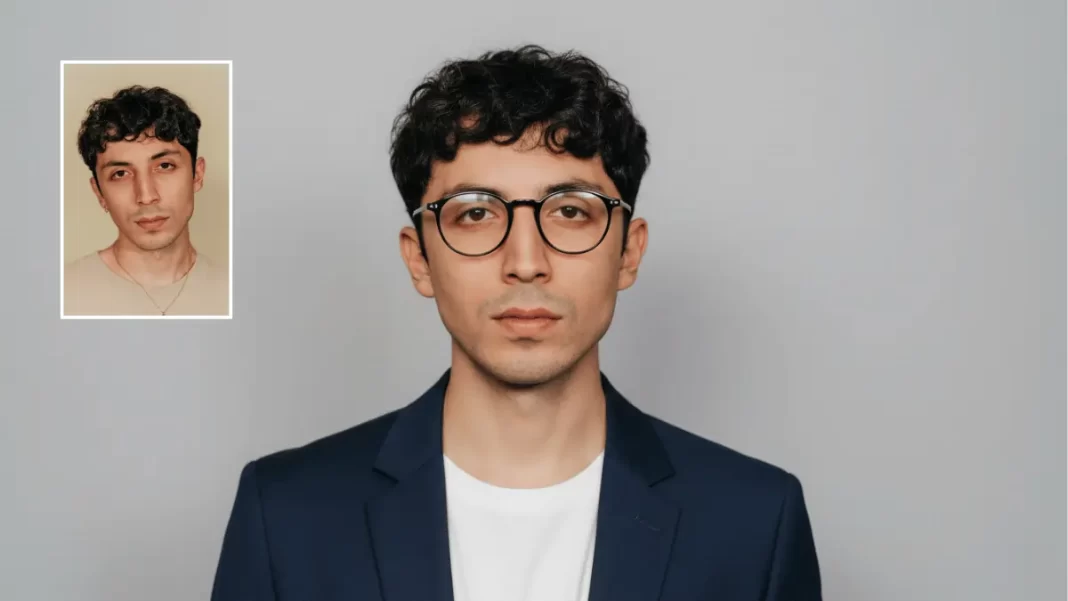
Nano Banana has gone from meme to must-try almost overnight. It can keep faces consistent, swap tiny details without breaking the scene, and even blend multiple photos into one. This guide shows you what actually works, why it works, and how to avoid the usual gotchas.
What Nano Banana actually is
Nano Banana is the latest image generation and editing model inside the Gemini app. It understands text and images together, so you can upload a photo, tell it what to change, and keep editing in a conversation. It also supports consistent characters, targeted local edits, and multi-image blends. You’ll see a visible watermark on outputs, and Google also applies an invisible SynthID marker.
Short Answer: Nano Banana is Gemini’s native image model for editing and generation that keeps subjects consistent, edits tiny details precisely, and blends multiple images. All outputs carry watermarks.
Table of Contents

Where you can use it
- Gemini app on the web and mobile for conversational editing.
- Canvas in the Gemini app and AI Studio for building simple image tools and templates.
- Slides and Vids in Google Workspace for prompt-driven edits inside presentations and videos as availability rolls out by edition.
Fast start: three 5-minute wins
- Keep the same face
Upload a selfie. Ask: “Make a figurine version of me in the same outfit. Keep my face the same.” If it drifts, add specifics like hair length, glasses, and lighting. - Pixel-perfect tweak
Upload a living-room shot. Ask: “Change the sofa to forest green. Do not alter the wall or floor.” If colors spill, add “keep wall, floor, and rug untouched.” - Blend two photos
Upload you + your pet. Ask: “Place us on a basketball court at sunset. Keep our original clothing and fur pattern. Natural shadows.”
Master the big four skills
1) Character consistency
Why images drift: the model fills gaps. Fix it with hard anchors.
- Provide a base photo.
- Lock identity traits: “same face shape, same beard length, round glasses, shoulder-length hair.”
- Control angle: “camera at eye level, 35 mm look.”
- Keep the chain: “Use the same person as in the previous image.”
Prompt template
“Use the previous photo. Create a studio portrait with softbox lighting at 45 degrees. Keep the same face, glasses, and hairstyle. Outfit: navy blazer, white crew neck. Background: light gray. Camera at eye level.”
2) Pixel-perfect local edits
Think of it like a surgical brush you control by language.
- Name the object.
- State the exact change.
- Freeze the rest of the scene.
- If text is involved, quote it.
Prompt template
“Edit only the sign in the back to read ‘OPEN 9–6’. Do not change any other area. Keep the same font style and color. Maintain original lighting.”
3) Multi-image fusion
Blend up to three inputs to create a new scene.
Prompt template
“Blend Image A (portrait of me) with Image B (my dog) in Scene C (empty basketball court). Evening golden hour. Keep our original clothing and fur. Natural shadows. No distortions.”
4) Conversational editing loops
Treat big jobs as steps.
- Step 1: rough scene.
- Step 2: fix details you spot.
- Step 3: color and contrast.
- Step 4: add text or overlays.
Mini case study
A small coffee brand mocked up seasonal posters in one evening. They reused the same cup photo, swapped backgrounds per season, and kept the logo consistent. The result looked like a unified campaign without a studio shoot.
Prompt patterns that work
- Identity lock: “same face as previous image” + 3–5 physical traits.
- Freeze-list: “do not change wall, floor, or table.”
- Lighting guardrail: “soft diffused light, no hard shadows.”
- Style carryover: “apply the floral pattern from Image B to the dress in Image A.”
- Resolution nudge: “export at default size; prioritize sharp edges, no watercolor artifacts.”
Troubleshooting and pitfalls
- Hands look odd → ask for “hands behind the mug” or “hands cropped at mid-palm.”
- Face isn’t identical → add a tighter identity description, reuse the last successful output as the new input, and keep camera angle constant.
- Color bleeds → use a freeze-list and specify “local edit only.”
- Stretched logos → request “true-to-source proportions” and “no warp.”
- Over-edited look → ask for “natural contrast and grain,” or “keep skin texture.”
Pro workflows you can copy
- Social profiles: batch “pro headshots” in different outfits while keeping the same face and pose.
- Product mockups: place a product in multiple real-world scenes to test thumbnails and ads.
- Teaching aids: turn a rough sketch into a clean diagram, then color-code labels.
- Slides/Vids: tweak an image in-app with a short prompt so design teams can iterate faster.
Safety, watermarks, and scams
Outputs include a visible watermark and an invisible SynthID marker. That is helpful for disclosure and provenance. Only use official Gemini surfaces. If a site asks you to upload photos and looks ad-heavy or sketchy, back out and find the official app.
Short answer (snippet-ready): Nano Banana images are watermarked. Use official Gemini products and avoid third-party “Nano Banana” sites that request uploads.
API or app? Cost and control
- Gemini app: fastest for everyday edits and social content.
- API via Google AI Studio: better for batch jobs, custom tools, and developer control. Pricing at the time of writing is $0.039 per image for the Gemini 2.5 Flash Image model in preview; check the model page for changes.
Comparison and Quick Picks
Where to use Nano Banana
| Surface | Best for | Standout benefit | Notes |
|---|---|---|---|
| Gemini app | Everyday edits, social | Conversational multi-turn edits | Watermarks added |
| Canvas / AI Studio | Reusable tools, batch tasks | Templates and simple app building | API pricing applies |
| Slides / Vids | Team content | Prompt edits inside decks and videos | Rollout by edition |
The Bottom Line and Checklist
- Upload a solid base photo.
- Lock identity traits and angle.
- Use a freeze-list for local edits.
- Blend up to three images for new scenes.
- Iterate in small steps.
- Share with watermark intact and avoid unofficial sites.
Frequently Asked Questions (FAQs)
Is Nano Banana free?
Using it in the Gemini app is included with your plan’s features. Developer API use is billed per tokens and images.
Can I edit an existing photo?
Yes. Upload the photo and describe the exact change. Add a freeze-list to protect the rest.
Can I keep the same person across multiple scenes?
Yes. Provide a reference image and lock key traits and angle.
Does it add a watermark?
Yes. There is a visible mark and an invisible SynthID marker.
Can I use it in Slides and Vids?
Yes, it is rolling out to supported editions. Check availability by Workspace plan.
What are good prompts for beginners?
Start with “Change only ___ to ___; keep everything else the same.” Add 1–2 traits at a time.

Featured Snippet Boxes
What is Nano Banana in Gemini?
It is Gemini’s native image model for editing and generation. It keeps subjects consistent, supports pixel-level local edits, and blends multiple images. Outputs include visible and invisible watermarks.
How do I use Nano Banana to edit a photo?
Upload a photo in the Gemini app and describe a single change. Name the object, state the exact edit, and list what must not change.
Can Nano Banana keep the same face across images?
Yes. Provide a reference photo and lock traits like hairstyle, glasses, and camera angle. Reuse the last successful output if drift appears.
Does Nano Banana work in Google Slides or Vids?
Yes. Prompt-driven image edits are rolling out to Slides and Vids for supported Workspace editions.
How does pricing work for developers?
Through the API, the Gemini 2.5 Flash Image model is priced per image. At publish time it’s $0.039 per image in preview.

