

Essential Points
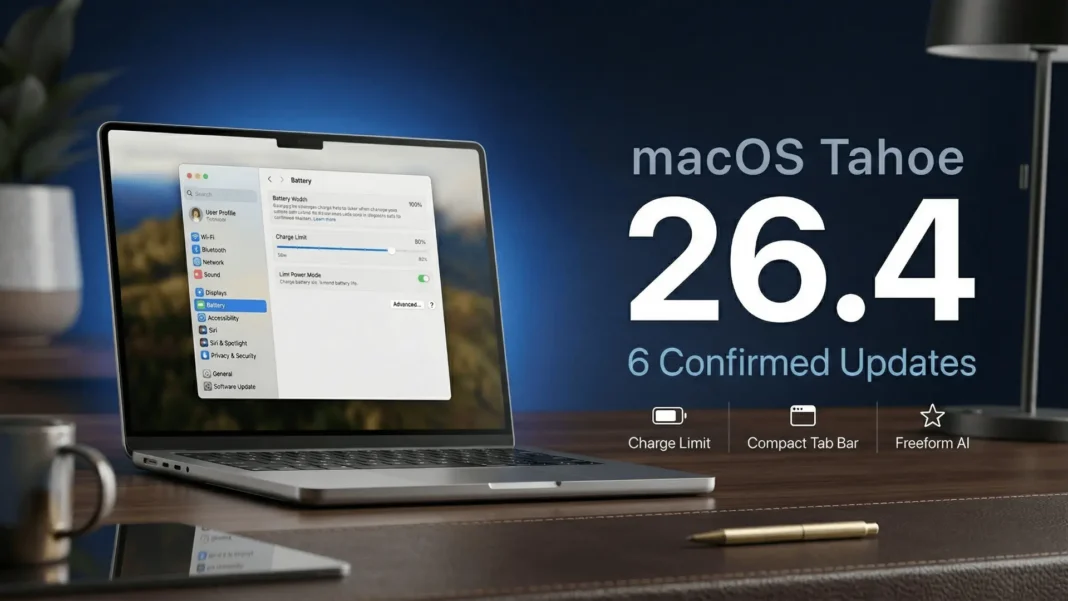
- macOS 26.4 (build 25E246) ships a long-requested Charge Limit setting that lets MacBook users cap battery charge between 80% and 100%
- Safari’s Compact Tab Bar returns, merging the address bar and tab row for more browsing space and direct search from the active tab
- Freeform gains advanced image creation and editing tools plus a premium content library via Apple Creator Studio
- Reminders adds urgent flagging via keyboard shortcut with Smart List filtering; Family Sharing gains per-member payment control
Apple released macOS Tahoe 26.4 publicly on March 24, 2026, carrying build number 25E246 and six user-facing changes confirmed directly in Apple’s own release notes. The update delivers on features Mac users have requested for years, including native battery charge limiting for MacBooks and the return of Safari’s compact tab layout that Tahoe 26.0 removed. Two of those six changes affect daily hardware and browsing habits for every MacBook owner.
The MacBook Battery Feature Mac Users Have Wanted for Years
macOS Tahoe 26.4 adds a Charge Limit control inside System Settings that lets MacBook users manually cap battery charge anywhere between 80% and 100%. Apple designed this specifically for MacBooks that stay connected to a monitor or dock for extended periods, where the battery would otherwise sit at 100% for hours continuously.
The 80% limit is the most protective setting for long-term battery capacity. Lithium-ion cells degrade faster when held at peak charge under constant power, and capping charge reduces that stress. Setting the limit requires no additional configuration after the initial adjustment and persists across reboots.
This feature mirrors the battery charge limits Apple has offered on iPhone since iOS 13. Mac users who work primarily at a desk with their MacBook connected to external power will see the most direct benefit.
Safari Gets Its Compact Tab Bar Back
The Compact Tab Bar option returns to Safari in macOS 26.4, giving users more browsing space and allowing them to search directly from the active tab. macOS Tahoe 26.0 had separated the address bar and tab strip into two distinct rows, a change that divided user preference from launch day. The compact layout reunifies both rows into a single line.
This setting is opt-in. Users who have adapted to the split layout on Tahoe 26.0 through 26.3 keep that view by default and must manually switch. On smaller MacBook Air displays, the compact layout reclaims meaningful vertical screen space that the two-row design consumed.
Freeform Joins Apple Creator Studio
Freeform receives its most substantial update in this release. The app gains advanced image creation and editing tools alongside a premium content library, now part of Apple Creator Studio. This positions Freeform as a more capable design and collaboration canvas for teams using it for content planning, product sketching, or creative brainstorming.
The premium content library gives Freeform users access to high-quality assets directly inside the app, reducing the need to import files from external sources. For Indian and US-based teams already using Freeform in collaborative workflows, the addition of AI image creation tools removes a step that previously required switching to a separate app.
Reminders and Family Sharing Both Get Practical Upgrades
Reminders in macOS 26.4 lets users mark any item as urgent using a keyboard shortcut and then filter specifically for urgent items within Smart Lists. The keyboard-first approach means flagging a critical task takes no mouse interaction, which reduces friction in fast-moving work sessions.
Family Sharing gains a meaningful change to how purchases work: adult members in a Family Sharing group can now use their own payment method when making purchases instead of routing every transaction through the family organizer. This addresses a long-standing friction point for families where adults wanted purchase independence without leaving the shared family group.
Subtitles and Captions Are Now Easier to Reach
Subtitle and caption settings are now accessible directly from the captions icon while watching media, with a real-time preview showing how the chosen style looks before you confirm the change. Previously, adjusting caption appearance required navigating through System Settings, which interrupted playback. The new in-player access removes that friction entirely.
The real-time preview is a practical addition for users who rely on captions for accessibility. Seeing the style change live against the actual content makes it easier to select a readable format without returning to settings multiple times.
Eight New Emoji
macOS 26.4 adds eight new emoji to the keyboard, including an orca, trombone, landslide, ballet dancer, and distorted face. These additions sync with the emoji updates in iOS 26.4 and iPadOS 26.4, keeping messaging consistent across Apple devices.
What Is Not in This Update
The broader artificial intelligence enhancements Apple signaled for spring 2026 are absent from this release. Apple reportedly delayed major Siri upgrades to a later update after encountering internal performance issues during the testing phase. Users who expected deeper Apple Intelligence expansion in this cycle will need to wait for a future macOS Tahoe point release.
How to Install macOS Tahoe 26.4
Open System Settings, select General, then Software Update. The update appears as macOS Tahoe 26.4 (build 25E246). For manual installation, direct installer and restore image files are available through Apple’s developer portal for IT administrators managing device fleets.
Frequently Asked Questions (FAQs)
What is new in macOS Tahoe 26.4?
macOS Tahoe 26.4 delivers six confirmed changes: a MacBook battery Charge Limit in System Settings (80-100%), Safari’s restored Compact Tab Bar, Freeform advanced image creation and editing tools via Apple Creator Studio, urgent Reminders with keyboard shortcuts, Family Sharing per-member payment control, and eight new emoji. Build number is 25E246, released March 23, 2026.
What is the macOS 26.4 build number?
The public release build number for macOS Tahoe 26.4 is 25E246. The Release Candidate seeded to developers and public beta testers the prior week carried a slightly earlier build that advanced to 25E246 for the final public distribution.
How does the macOS 26.4 Charge Limit feature work?
The Charge Limit feature in macOS 26.4 sits inside System Settings and lets you manually cap your MacBook’s maximum battery charge between 80% and 100%. Once set, charging stops at your chosen ceiling. Apple designed it for MacBooks that stay connected to a monitor or dock for extended periods, where sitting at 100% accelerates battery wear.
How do I enable the Safari Compact Tab Bar in macOS 26.4?
After updating to macOS Tahoe 26.4, open Safari and go to Settings, then select the Tabs section. The Compact Tab Bar option reappears there. Enabling it merges the address bar and tab strip into a single row, giving you more vertical browsing space and letting you search directly from the active tab.
What did Freeform gain in macOS 26.4?
Freeform in macOS 26.4 gains advanced image creation and editing tools, plus a premium content library as part of Apple Creator Studio. These additions expand Freeform’s usefulness as a creative collaboration canvas without needing to switch to external design apps.
What changed for Family Sharing in macOS 26.4?
Purchase Sharing in macOS 26.4 allows adult members of a Family Sharing group to use their own payment method when making purchases, rather than all transactions flowing through the family organizer. This gives adults in a shared family plan independent payment control.
Are major Siri or Apple Intelligence features included in macOS 26.4?
No. The broader Apple Intelligence and Siri enhancements anticipated for spring 2026 are not part of this release. Apple encountered internal performance issues during testing and pushed those upgrades to a later update. macOS 26.4 remains focused on the six user-facing changes confirmed in Apple’s official release notes.
What are the new emoji added in macOS 26.4?
macOS 26.4 adds eight new emoji, including an orca, trombone, landslide, ballet dancer, and distorted face. These match the new emoji in iOS 26.4 and iPadOS 26.4, keeping the character set consistent across all Apple devices for messaging compatibility.

