

Essential Points
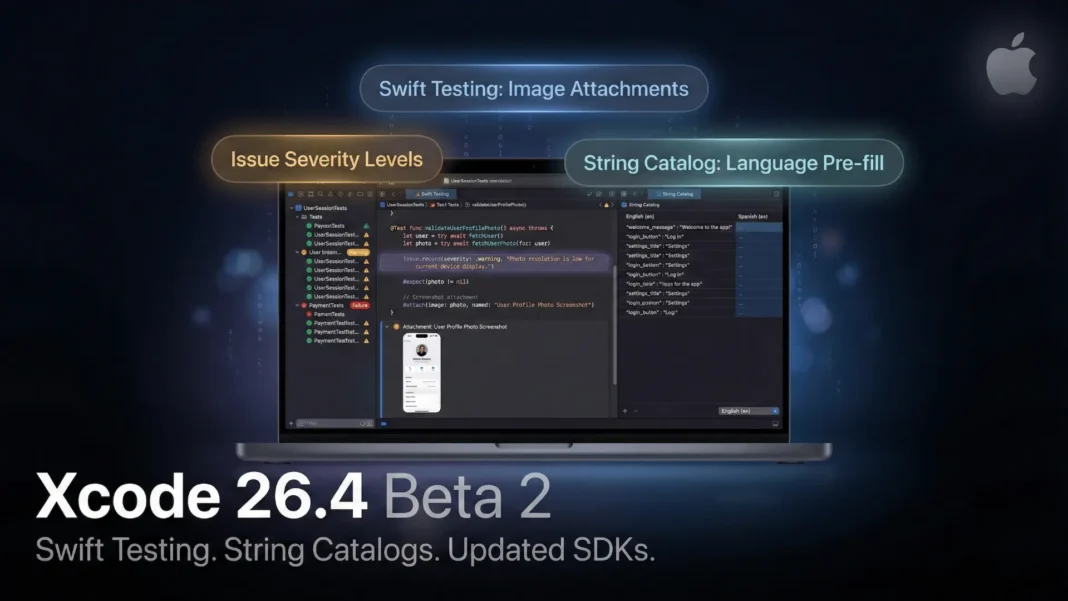
- Swift Testing now attaches CGImage, UIImage, NSImage, and CIImage directly to test results for visual failure diagnosis
- Test issue severity levels let teams separate warnings from hard failures, reducing unnecessary CI breaks
- String Catalog editor gains language removal, translation pre-fill, and full cut, copy, paste, and duplicate support
- Xcode 26.4 ships updated SDKs for all Apple platforms ahead of the April 2026 App Store Xcode 26 requirement
Apple pushed Xcode 26.4 Beta 2 on February 23, 2026, and the build number 17E5170d signals a deliberate refinement cycle, not a headline feature drop. Where Xcode 26.3 introduced agentic coding with Claude Agent and OpenAI Codex, 26.4 focuses on removing friction from two workflows developers use every single day: testing and localization. If your team ships UI-heavy apps or manages multilingual String Catalogs, this beta warrants immediate evaluation.
Swift Testing Gets the Practical Overhaul Developers Requested
The most impactful addition in Xcode 26.4 is direct image attachment in Swift tests. You can now attach a CGImage, NSImage, UIImage, or CIImage directly to a test result. This replaces text-only failure logs with visible evidence of what broke, which is particularly useful in snapshot testing, UI verification, and Vision pipeline validation.
Severity levels are the second major shift. Previously, every recorded issue in Swift Testing carried equal weight and could break a CI pipeline. Now you can assign warning, non-critical, or actual failure severity to each Issue, making large test suites far easier to triage without masking genuine problems.
Attachment Failure Reporting Closes a Silent Gap
Before this release, if Xcode failed to save a test attachment, nothing surfaced to the developer. Xcode 26.4 Beta 2 converts that silent failure into a visible runtime issue. The fix sounds minor, but anyone who has spent hours hunting a missing CI artifact understands the real cost of that silence.
UI Testing Crash Handling Is Faster and More Transparent
When an app crashes during a UI test launched via XCUIApplication(bundleIdentifier:) or XCUIApplication(url:), Xcode 26.4 now reports the crash as a warning and automatically attaches the crash log to the test result. Previously, developers had to locate those logs manually inside DerivedData. That manual step is gone with this beta.
Mixed XCTest and Swift Testing Projects Are Safer
Many teams run XCTest and Swift Testing side by side during migration. If code calls an assertion from the wrong framework, Xcode 26.4 now issues a runtime warning rather than failing silently. This is a direct quality-of-life improvement for any project mid-migration, which describes a substantial share of active iOS codebases in 2026.
String Catalog Localization Gets Three Long-Overdue Fixes
Xcode 26.4 addresses concrete pain points that developers have faced since String Catalogs became the standard localization format. First, you can now remove a language directly from the String Catalog editor with a single action, choosing whether to remove it from one catalog or from the entire project. Previously, this required manual cleanup across multiple files.
Second, when adding a new supported language in Project Settings, Xcode can now pre-fill translations using an existing language. This gives translators and developers a usable baseline immediately, instead of starting from empty strings. Third, String Catalog editing now supports full cut, copy, paste, and duplicate operations for strings, both within a single catalog and between catalogs. When pasting, you can choose to add the string as a new key with its translations or apply the translations to an existing key.
Updated SDKs Across All Apple Platforms
Xcode 26.4 Beta 2 ships refreshed SDKs for iOS, iPadOS, macOS, watchOS, tvOS, and visionOS. This matters because Apple will stop accepting App Store submissions built with Xcode 16 or earlier starting April 2026. Each 26.x beta is a lower-friction on-ramp than waiting for the final release. Testing your app against current SDK builds now reduces the risk of last-minute compatibility failures at that deadline.
How Xcode 26.4 Fits the Broader Xcode 26 Arc
Xcode 26.0, released September 16, 2025, introduced the coding assistant that lets developers connect a Claude or ChatGPT account to power coding intelligence features in Swift. Connecting a Claude account gives access to a coding assistant powered by Claude Sonnet 4, which handles natural language code interaction, documentation generation, inline edits, and SwiftUI preview creation. Xcode 26.3 then introduced agentic coding, a step further, where agents including Anthropic’s Claude Agent and OpenAI’s Codex work autonomously inside Xcode, searching documentation, exploring file structures, updating project settings, and iterating through builds. Xcode 26.4 does not change either of those systems. Its scope is strictly testing reliability and localization workflow.
Considerations
Xcode 26.4 remains a beta release. Running it as the primary build environment for active client projects carries risk. Keep a stable Xcode 26.3 installation alongside any 26.4 beta testing and do not submit App Store builds from a beta Xcode unless you are explicitly validating SDK-specific behavior.
Frequently Asked Questions (FAQs)
What is new in Xcode 26.4 Beta 2?
Xcode 26.4 Beta 2 adds image attachment support in Swift Testing, introduces severity levels for test issues, improves crash log reporting during UI tests, and delivers updated SDKs for all Apple platforms. Localization gains language removal, translation pre-fill, and copy-paste support in String Catalogs.
What image types can you attach to Swift Testing in Xcode 26.4?
Xcode 26.4 supports attaching CGImage, NSImage, UIImage, and CIImage directly to test results. This is most useful for snapshot testing, UI verification flows, and image-processing pipeline validation, where text-only failure logs previously made debugging time-consuming.
Does Xcode 26.4 affect the April 2026 App Store deadline?
Yes, indirectly. Apple will require all App Store submissions to use Xcode 26 or later starting April 2026. Testing your app against Xcode 26.4 beta SDKs now helps catch compatibility issues before that deadline arrives.
Can teams still use XCTest alongside Swift Testing in Xcode 26.4?
Yes. Xcode 26.4 specifically improves mixed-framework safety. If code calls an assertion from the wrong testing framework, Xcode now surfaces a runtime warning instead of failing silently. This makes projects that are mid-migration from XCTest to Swift Testing significantly easier to maintain.
What localization changes does Xcode 26.4 introduce?
Three concrete improvements: you can remove a language from one catalog or an entire project in a single step, pre-fill translations from an existing language when adding a new one, and use cut, copy, paste, and duplicate actions for strings within and between String Catalogs.
What is the difference between the Xcode 26.3 coding agent and the Xcode 26.0 coding assistant?
Xcode 26.0 introduced a coding assistant where developers connect a Claude or ChatGPT account to get natural language code help, inline edits, and documentation generation. Xcode 26.3 added agentic coding, where Claude Agent and OpenAI Codex work autonomously inside Xcode to break down tasks, explore file structures, update settings, and iterate through builds without step-by-step user input.
Is Xcode 26.4 Beta 2 safe for production workflows?
No. Beta builds carry known issues and should not be used for live App Store submissions. Maintain a stable Xcode 26.3 installation as your primary build environment until the final Xcode 26.4 release is available.
Where can I download Xcode 26.4 Beta 2?
Xcode 26.4 Beta 2, build 17E5170d, is available through the Apple Developer portal at developer.apple.com/news/releases. An active Apple Developer Program membership is required to access beta builds.

