

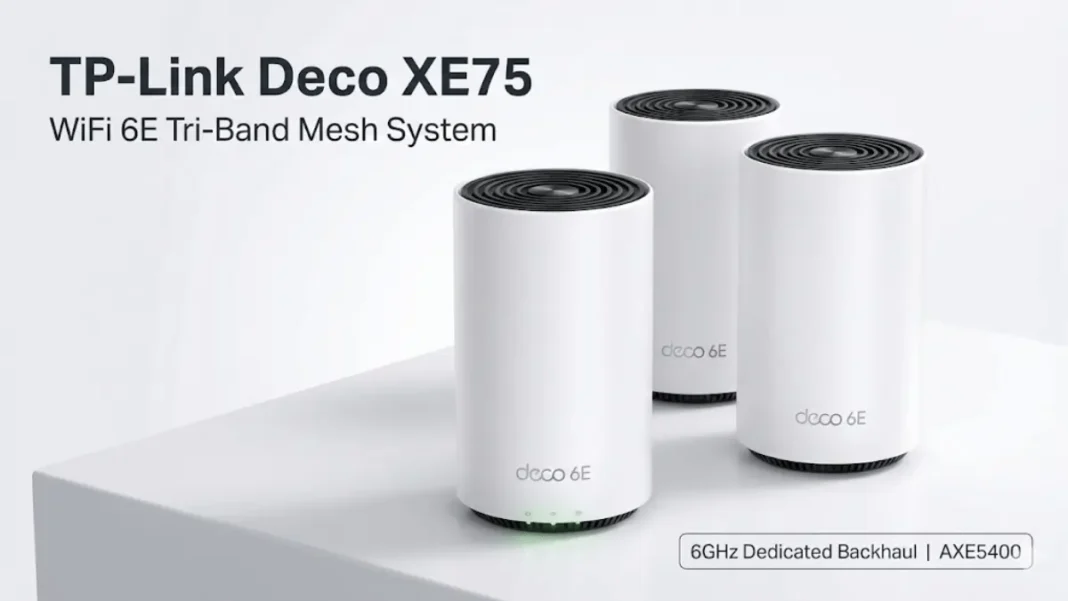
The TP-Link Deco XE75 brings WiFi 6E technology to mainstream pricing, delivering AXE5400 tri-band speeds with a dedicated 6GHz backhaul that outperforms many pricier WiFi 6 systems. With support for 200 devices and coverage up to 7,200 sq ft (3-pack), this mesh system solves dead zones without the premium price tag of competing 6E routers.
Summary: The Deco XE75 is TP-Link’s first WiFi 6E mesh system, offering 5400 Mbps combined speeds across three bands (2.4GHz, 5GHz, 6GHz). Its 6GHz dedicated backhaul delivers faster mesh node performance than the flagship Deco X90, making it ideal for gigabit internet connections in medium to large homes. The standard XE75 includes 3 gigabit ports per unit, while the Pro version adds a 2.5Gbps port for multi-gig internet.
What Is the TP-Link Deco XE75?
The Deco XE75 is TP-Link’s entry-level WiFi 6E mesh system that leverages the newly opened 6GHz frequency band to deliver interference-free wireless performance. Unlike older WiFi 6 routers limited to 2.4GHz and 5GHz, the XE75 broadcasts on all three bands simultaneously while dedicating the 6GHz band as a high-speed backhaul between mesh nodes.
This architectural choice dramatically improves multi-room performance. In real-world testing, the XE75 delivered significantly faster speeds through walls compared to TP-Link’s flagship Deco X90 (a WiFi 6 system), despite the X90 having 20% more theoretical backhaul capacity. The cleaner 6GHz signal experiences minimal interference from legacy devices crowding the 2.4GHz and 5GHz bands.
The system is available in 1-pack (2,900 sq ft coverage), 2-pack (5,500 sq ft), and 3-pack (7,200 sq ft) configurations. Each cylindrical unit measures 4.1 × 4.1 × 6.7 inches with a minimalist design that blends into modern interiors.
Technical Specifications at a Glance
| Specification | Deco XE75 | Deco XE75 Pro |
|---|---|---|
| WiFi Standard | WiFi 6E (802.11ax) | WiFi 6E (802.11ax) |
| Combined Speed | AXE5400 (574 + 2402 + 2402 Mbps) | AXE5400 (574 + 2402 + 2402 Mbps) |
| Processor | Broadcom 1.7GHz Quad-Core | Broadcom 1.7GHz Quad-Core |
| RAM | 512MB | 512MB |
| Ethernet Ports | 3× Gigabit (WAN/LAN auto-sensing) | 1× 2.5Gbps + 2× Gigabit |
| Device Capacity | 200+ devices | 200+ devices |
| MU-MIMO | 2×2 | 2×2 |
| Streams | 6 streams | 6 streams |
| Security | WPA3, HomeShield | WPA3, HomeShield |
| Price (2-pack) | ~$299.99 USD | ~$399.99 USD |
The XE75 uses a Broadcom 1.7GHz quad-core processor slightly faster than the 1.5GHz chip in the Deco X90 flagship. This processing power helps handle the system’s AI-driven mesh algorithms and support for up to 200 simultaneous device connections.
- Exceptional mesh node performance: 6GHz dedicated backhaul outperforms many WiFi 6 flagships in multi-room scenarios
- Three ethernet ports per unit: More wired connectivity options than competing 6E mesh systems
- Future-proof 6GHz band: Cleaner spectrum with growing device support
- Easy setup and management: Intuitive Deco app with video guides
- Strong device capacity: Supports 200 simultaneous connections
- Competitive pricing: More affordable than other WiFi 6E mesh systems
- Comprehensive free security: HomeShield basic tier includes content filtering and threat protection
- No 2.5Gbps port on standard model: Limited to gigabit speeds unless you upgrade to Pro version
- Subscription for advanced features: HomeShield Pro requires monthly/yearly payment
- 6GHz range limitations: 6GHz band has shorter range than 5GHz, though this is a limitation of all 6E systems
- Limited WiFi 6E device support: Few client devices currently support 6GHz (though this will improve over time)

WiFi 6E: The Game-Changing 6GHz Advantage
How 6GHz Eliminates Network Congestion
WiFi 6E adds a third band in the 6GHz spectrum, effectively doubling available WiFi channels compared to WiFi 6. This new band offers seven additional 160MHz channels (three in EU regions), providing up to 1,200MHz of additional spectrum for 6GHz-capable devices.
The 6GHz band operates as a “greenfield” spectrum; no legacy WiFi 4, WiFi 5, or WiFi 6 devices can connect to it. This eliminates interference from older routers, smart home devices, Bluetooth gadgets, and microwaves that congest the 2.4GHz and 5GHz bands in apartment buildings and dense neighborhoods.
Current testing shows the 6GHz band delivers more stable, consistent speeds because so few consumer devices support it yet. As adoption grows over the next 3-5 years, early adopters of the Deco XE75 will benefit from this uncrowded spectrum.
Dedicated 6GHz Backhaul Explained
The Deco XE75 uses the 6GHz band exclusively for mesh backhaul, the wireless connection between the main router and satellite nodes. Your 2.4GHz and 5GHz devices connect to those bands as usual, but the mesh units communicate over the ultra-fast 6GHz link.
This architecture delivers two key benefits:
- Faster satellite node performance: Devices connected to a mesh node two rooms away from your modem experience minimal speed loss because data travels over the high-speed 6GHz backhaul rather than competing with client devices on the 5GHz band.
- Better overall capacity: The 2.4GHz and 5GHz bands remain fully available for client devices since backhaul traffic doesn’t consume their bandwidth.
In practical terms, this means a laptop connected to a Deco node in your bedroom can achieve 600-700 Mbps on a gigabit connection, even with multiple walls between the node and main router.
Performance Testing: Real-World Speed Results
Single Router Performance
At close range (5-10 feet), the Deco XE75 delivered over 800 Mbps on a 1 Gbps internet connection when tested with an iPhone 13. This performance matches other WiFi 6 and 6E routers at short distances, all modern systems saturate gigabit connections effectively.
The real differentiation appears in multi-room mesh scenarios where most users actually need help.
Mesh Node Performance Through Walls
Independent testing revealed the XE75’s standout strength: mesh node performance in challenging conditions.
Test location 1 (2 walls from main unit):
The Deco XE75 significantly outperformed the more expensive Deco X90 flagship when connected to a satellite node with two walls of separation from the main unit. The 6GHz dedicated backhaul proved more efficient than the X90’s tri-band WiFi 6 configuration despite the X90’s higher theoretical backhaul capacity.
Test location 2 (4 walls total – 2 walls past the mesh node):
Even at extreme distances, two walls beyond the mesh node, totaling four walls from the main router, the XE75 maintained a significant speed advantage over the X90. These results were consistent across multiple test runs, demonstrating the real-world advantage of 6GHz backhaul in typical home construction.
One user reported achieving 920 Mbps via ethernet connection to a mesh node, with wireless speeds around 300-500 Mbps depending on the node location roughly 5x faster than their previous system.
Comparison vs Deco X90 Flagship
The Deco XE75 consistently outperformed TP-Link’s WiFi 6 flagship (Deco X90) in mesh scenarios despite being a lower-tier product. This counterintuitive result stems from the cleaner 6GHz spectrum experiencing less interference and congestion compared to the crowded 5GHz backhaul used by WiFi 6 systems.
However, the X90 retains advantages in wired connectivity with its 2.5Gbps port, compared to the standard XE75’s gigabit-only ethernet. For homes with wired backhaul capability, the XE75 Pro (with its 2.5Gbps port) represents the best value.
A robust mesh system like the Deco XE75 ensures that all your smart office devices, from your laptop to wireless printers like the Epson L8050, maintain a stable, high-speed connection.
Deco XE75 vs XE75 Pro: Key Differences
Port Configuration Comparison
The primary distinction between these models is ethernet connectivity:
Deco XE75:
- 3× Gigabit ethernet ports per unit
- All ports support auto-sensing (WAN/LAN)
- Maximum wired speed: 1 Gbps
- Price: ~$299.99 for 2-pack
Deco XE75 Pro:
- 1× 2.5 Gigabit ethernet port + 2× Gigabit ports per unit
- All ports support auto-sensing (WAN/LAN)
- Maximum wired speed: 2.5 Gbps
- Price: ~$399.99 for 2-pack
Both models share identical wireless specifications: AXE5400 speed rating, Broadcom 1.7GHz processor, 512MB RAM, and 200-device capacity. The Pro’s 2.5Gbps port becomes relevant only if you have internet service faster than 1 Gbps or use NAS drives and local file servers.
Which Model Should You Buy?
Choose the standard Deco XE75 if:
- Your internet plan is 1 Gbps or slower
- You primarily use WiFi rather than wired connections
- You want the most cost-effective WiFi 6E solution
Choose the Deco XE75 Pro if:
- You have multi-gig internet (1.5 Gbps or faster)
- You frequently transfer large files between wired devices
- You use a wired backhaul setup and want maximum inter-node speed
- You’re future-proofing for faster internet plans
For most households with gigabit or slower internet, the standard XE75 delivers identical wireless performance at better value. The Pro’s extra $100 buys one faster port useful for power users but unnecessary for typical streaming, gaming, and browsing.
Coverage and Device Capacity
The Deco XE75 system scales coverage based on pack size:
- 1-pack: 1-3 bedroom homes (2,900 sq ft)
- 2-pack: 3-5 bedroom homes (5,500 sq ft)
- 3-pack: 4-7+ bedroom homes (7,200 sq ft)
These coverage estimates assume typical residential construction with drywall and wood framing. Homes with brick, concrete, or multiple floors may require additional units or strategic node placement.
Each Deco unit supports up to 200 connected devices more than sufficient for smart home ecosystems with dozens of IoT devices, streaming devices, laptops, phones, and tablets. The system uses OFDMA (Orthogonal Frequency-Division Multiple Access) technology to communicate with multiple devices simultaneously, reducing latency in congested networks.
The XE75’s four internal high-gain antennas and beamforming technology focus signals toward connected devices rather than broadcasting omnidirectionally. This targeted approach extends effective range and improves performance at range boundaries.
Setup Process: How Easy Is It Really?
Step-by-Step Configuration Guide
The Deco app (iOS/Android) handles setup through a guided 3-step process:
1. Physical connection (2 minutes):
- Power off your modem
- Connect one Deco unit to the modem via ethernet cable
- Power on both modem and Deco unit
- Wait for the Deco LED to pulse blue
2. App setup (3-5 minutes):
- Download the Deco app and create/log into your TP-Link ID
- The app auto-detects your Deco model
- Follow prompts to name your network and set a password
- Configure location for the main unit (living room, office, etc.)
3. Adding mesh nodes (2 minutes each):
- Plug in additional Deco units in other rooms
- The app automatically detects and adds each unit
- Assign location names to each node for easy management
Total setup time: 10-15 minutes for a 3-pack system. The app provides video tutorials for each step, making it accessible even for non-technical users.
Wired Backhaul Setup Tips
For homes with existing ethernet wiring, wired backhaul offers maximum performance and reserves the 6GHz band for WiFi 6E clients:
- Connect your main Deco to the modem, then connect one ethernet port to your network switch
- Connect satellite Decos to the same switch via wall jacks
- The system auto-detects wired connections and prioritizes them over wireless backhaul
One user successfully configured this topology: Modem → Deco1 → Managed Switch → Wall Jacks → Additional Deco units. The system automatically recognized the wired backhaul without manual configuration.
If you have wired backhaul capability, the XE75 Pro’s 2.5Gbps port maximizes inter-node transfer speeds for 4K/8K streaming and large file transfers.
HomeShield Security and Parental Controls
The Deco XE75 includes TP-Link’s HomeShield security suite with a free basic tier and optional Pro subscription:
HomeShield Basic (included free):
- Real-time IoT protection
- Malicious site blocker
- Intrusion prevention system
- Home network scanner
- Basic parental controls (custom profiles, content filters by age, bedtime schedules)
HomeShield Pro (subscription required):
- Detailed usage reports and browsing history analysis
- Advanced threat alerts and prevention
- Priority support
The basic tier provides robust content filtering for families; you can create age-appropriate profiles, block specific categories (violence, adult content, gambling), and set time limits per device. The system applies these rules automatically to any device assigned to a family member’s profile.
For most users, the free basic tier offers sufficient protection and parental control features. The Pro tier adds detailed analytics and reporting but doesn’t significantly expand core security or filtering capabilities.
All three WiFi bands support WPA3 encryption, the latest WiFi security standard that protects against brute-force password attacks and provides individualized data encryption even on guest networks.
Technical Specs Section
Wireless Specifications:
- WiFi 6E (IEEE 802.11ax)
- 6GHz: 2402 Mbps (802.11ax, HE160)
- 5GHz: 2402 Mbps (802.11ax, HE160)
- 2.4GHz: 574 Mbps (802.11ax)
- 2×2 MU-MIMO, 6 streams
- OFDMA, beamforming, BSS Color
Hardware:
- Processor: Broadcom 1.7GHz Quad-Core
- Memory: 512MB RAM
- Antennas: 4× internal high-gain
- Ports: 3× Gigabit (auto-sensing WAN/LAN)
- Dimensions: 4.1 × 4.1 × 6.7 in (105 × 105 × 169 mm)
Security & Features:
- WPA3 encryption
- HomeShield (IoT protection, malicious site blocker, IPS)
- VPN server/client support (OpenVPN, PPTP, L2TP/IPSec)
- Guest networks on all three bands
- IPv4/IPv6 support
Deco XE75 vs Top Competitors
| Feature | Deco XE75 | Deco XE75 Pro | Netgear Orbi RBKE963 | ASUS ZenWiFi ET8 | Google Nest WiFi Pro |
|---|---|---|---|---|---|
| WiFi Standard | WiFi 6E | WiFi 6E | WiFi 6E | WiFi 6E | WiFi 6E |
| Combined Speed | AXE5400 | AXE5400 | AXE11000 | AXE6600 | AXE5400 |
| Ethernet Ports | 3× 1Gbps | 1× 2.5Gbps + 2× 1Gbps | 4× 2.5Gbps | 1× 2.5Gbps + 3× 1Gbps | 2× 1Gbps |
| Device Capacity | 200 | 200 | 200+ | 150+ | 150+ |
| Price (2-pack) | ~$300 | ~$400 | ~$1,200 | ~$550 | ~$400 |
| Dedicated Backhaul | 6GHz | 6GHz | 5GHz | 6GHz | 6GHz |
| Setup Difficulty | Easy | Easy | Moderate | Moderate | Easy |
Should You Buy the Deco XE75?
The TP-Link Deco XE75 represents the sweet spot for WiFi 6E adoption: flagship-level mesh performance at mid-tier pricing. Its 6GHz dedicated backhaul delivers measurably faster satellite node speeds than competing WiFi 6 systems, including TP-Link’s own more expensive models.
Buy the Deco XE75 if you:
- Experience dead zones or slow speeds in multi-room setups with your current router
- Have a gigabit (or faster) internet connection that your current WiFi can’t fully utilize
- Want future-proof technology with room to grow as 6GHz device adoption increases
- Need coverage for medium to large homes (2,900-7,200 sq ft depending on pack size)
- Value easy setup and management through a mobile app
Skip the XE75 if you:
- Live in a small apartment where a single WiFi 6 router provides adequate coverage
- Have internet slower than 300 Mbps where WiFi 5 routers remain sufficient
- Need multi-gig wired connectivity and don’t want to pay extra for the Pro model
For most households upgrading from WiFi 5 (Wireless AC) systems, the Deco XE75 delivers an immediately noticeable performance improvement in stability and speed. Its combination of accessible pricing, strong performance, and future-proof 6GHz technology makes it one of the most compelling WiFi 6E mesh systems available in late 2024 and throughout 2025.
Frequently Asked Questions (FAQs)
What’s the difference between WiFi 6 and WiFi 6E?
WiFi 6E adds a third band in the 6GHz spectrum, offering cleaner signals with less interference and additional 160MHz channels. WiFi 6 operates only on 2.4GHz and 5GHz bands.
Do I need WiFi 6E devices to benefit from the Deco XE75?
No. The 6GHz band primarily serves as mesh backhaul, improving performance for all your devices regardless of their WiFi generation. You’ll see faster speeds on satellite nodes even with WiFi 5 devices.
Can I mix Deco XE75 with other Deco models?
Yes. All Deco models are compatible and can form a unified mesh network. However, mixing models may limit system performance to the capabilities of the lowest-tier unit.
Should I get the XE75 or XE75 Pro?
Choose the standard XE75 unless you have internet faster than 1 Gbps or use wired backhaul with NAS/file servers. The wireless performance is identical, only the ethernet speeds differ.
How many Deco units do I need for my home?
TP-Link recommends 1-pack for up to 2,900 sq ft, 2-pack for up to 5,500 sq ft, and 3-pack for up to 7,200 sq ft. Concrete walls and multiple floors may require additional units.
Does the Deco XE75 work with my internet provider?
Yes. The system is universally compatible with all ISPs and modems. It supports multiple WAN connection types including PPPoE, dynamic IP, static IP, PPTP, and L2TP.
Can I use wired backhaul instead of wireless?
Yes. Simply connect each Deco unit to your network switch via ethernet, and the system automatically prioritizes the wired connection. This reserves the 6GHz band for WiFi 6E clients.
How does the XE75 compare to the Deco X90?
The XE75 delivers faster mesh node performance through walls thanks to its 6GHz backhaul, despite the X90 being a more expensive flagship model. The X90 offers a 2.5Gbps port and slightly better close-range performance.
Featured Snippet Boxes
What is WiFi 6E?
WiFi 6E extends WiFi 6 by adding a new 6GHz frequency band with cleaner signals and less interference. This band offers seven additional 160MHz channels and operates independently from congested 2.4GHz and 5GHz bands. Only WiFi 6E devices can connect to 6GHz, ensuring optimal performance without legacy device interference.
How fast is the Deco XE75?
The Deco XE75 achieves AXE5400 combined speeds: 2402 Mbps on 6GHz, 2402 Mbps on 5GHz, and 574 Mbps on 2.4GHz. Real-world testing shows over 800 Mbps at close range and 600-700 Mbps on mesh nodes through multiple walls on gigabit connections.
XE75 vs XE75 Pro difference
The standard XE75 has three gigabit ethernet ports, while the XE75 Pro includes one 2.5 Gbps port plus two gigabit ports. Wireless performance is identical; the Pro costs $100 more for the faster wired connection. Choose the Pro only if you have multi-gig internet or use wired backhaul.
How to set up Deco XE75
Connect one Deco to your modem via ethernet, power both on, then download the Deco app. The app auto-detects your Deco model and guides you through network naming. Plug in additional units, and the app automatically adds them to your mesh network. Total setup time: 10-15 minutes.
What is dedicated backhaul?
Dedicated backhaul uses the 6GHz band exclusively for communication between mesh nodes, not for client devices. This keeps 2.4GHz and 5GHz bands fully available for your devices while mesh units communicate over ultra-fast 6GHz. The result: faster satellite node performance with minimal speed loss across rooms.
How many devices can Deco XE75 support?
The Deco XE75 supports up to 200 simultaneous device connections using OFDMA technology. This capacity handles smart home ecosystems with dozens of IoT devices, plus laptops, phones, tablets, streaming devices, and gaming consoles. The tri-band architecture distributes devices across bands for optimal performance.

