

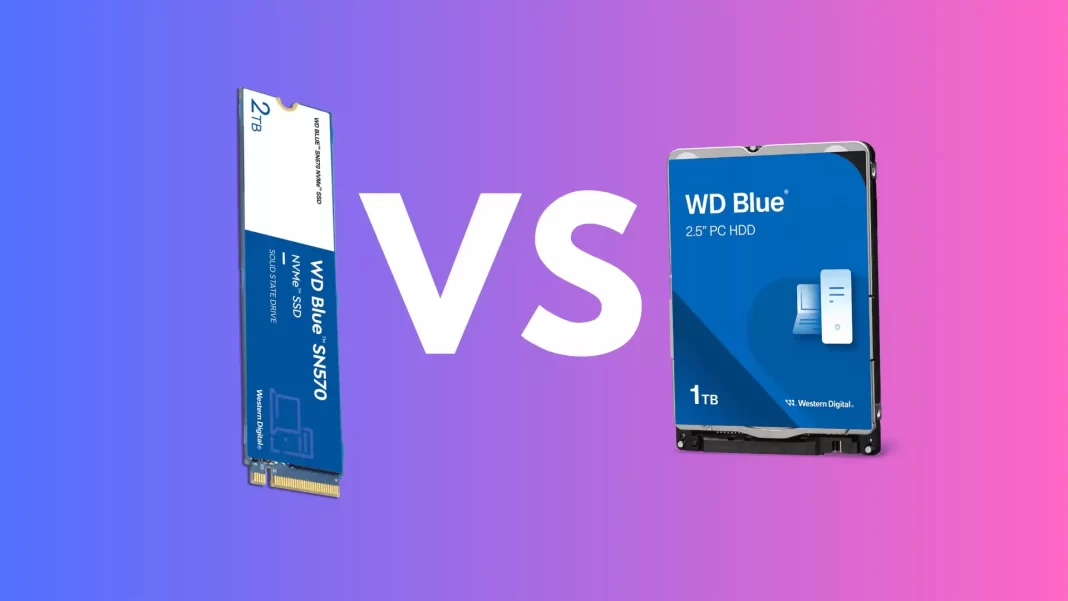
f your PC still feels slow, storage is usually the fix. The quick answer in 2025: buy an SSD for anything you touch often, and keep HDDs for cheap, bulk storage. Below is the simple why, plus clear picks for different needs.
Short Answer
- Get an SSD for Windows, apps, games, photo/video projects, and laptops. NVMe PCIe 4.0 is the sweet spot.
- Use an HDD only for big, rarely-touched files like backups or archives, or when you need 10 to 30TB on the cheap.
Modern NVMe SSDs hit multi-GB/s speeds while 3.5-inch HDDs top out around ~200 to 275 MB/s. That’s the core reason SSDs make everything feel instant, from boot to app launches to level loads.
Performance: the big, obvious win
- SATA SSDs are capped by the interface at ~600 MB/s theoretical, ~550 MB/s in practice.
- NVMe SSDs use PCIe lanes and go way faster. Flagship PCIe 5.0 drives like Crucial’s T700 advertise up to 12,400 MB/s sequential reads and around 1.5M IOPS for random access. That’s orders of magnitude more than a hard drive’s ~150 IOPS.
- HDDs are limited by spinning platters. A modern 7,200-rpm desktop drive sustains about 220 MB/s in sequential transfers.
What it feels like: Windows and apps start in seconds on an SSD. Game levels load much faster, and open-world streaming stutter drops when games can pull assets quickly.
Gaming reality check
Swapping HDD → any SSD is a massive quality of life upgrade. Among SSDs, Gen 3 vs Gen 4 vs Gen 5 rarely changes load times much in today’s games. TechSpot measured hard drives up to 3.8× slower than SSDs, while differences between SSD generations were often negligible in load screens.
Also, the industry is built around SSDs now. PS5 and Xbox Series X ship with NVMe SSD storage, and Microsoft’s DirectStorage APIs on Windows let games stream assets efficiently from NVMe, cutting CPU overhead and reducing load times in supported titles.
Price: close enough for your main drive
- Consumer NVMe deals in 2025 regularly put 1TB to 4TB drives around $0.05–$0.07 per GB (for example, 4TB drives near $200). Price swings happen, but that’s the ballpark.
- High capacity HDDs are still the bargain for bulk: brand-new 30TB models have landed around $600 (about $0.02/GB), and Seagate is sampling 36TB enterprise drives.
Takeaway: for your primary 1 to 2TB drive, the SSD premium is small and worth it. For 20 to 60TB of media or backups, HDDs still win on cost per GB.
Power, heat, and noise
- SSDs sip power and have near-zero idle draw on laptops. A Samsung 990 Pro 1TB lists ~5.4W average active, ≤50 mW idle. No moving parts, no noise.
- HDDs use more. A common 3.5 inch WD Blue lists ~8.8W during read/write and ~6.1W idle. They also vibrate and add case heat.
That extra efficiency can nudge laptop battery life up and keep desktops cooler and quieter.
Reliability and lifespan
Large fleet data is useful here:
- Backblaze’s 2024 HDD report shows an overall annualized failure rate around 1.57% across hundreds of thousands of spinning drives.
- Backblaze’s SSD boot-drive data (2018–2023) shows lifetime AFR around ~0.9% for their installed SSDs. Caveat: usage patterns differ from your PC, but directionally it’s encouraging.
On endurance, consumer SSDs publish TBW (Total Bytes Written). Example: 990 Pro 1TB = 600 TBW, 2TB = 1,200 TBW. If you write 50 GB/day, that 1TB model would take many years to hit its rating.
Interface choices, made simple
- SATA SSD: still fine for old systems, but capped at ~550 MB/s. Pick only if your PC lacks NVMe slots.
- NVMe PCIe 3.0/4.0: best price-to-performance for most people.
- NVMe PCIe 5.0: insanely fast on paper. Outside of certain pro workloads, the real-world bump over PCIe 4.0 is small.
Capacity in 2025
- Consumer NVMe SSDs commonly top out at 8TB in M.2 form factor. WD’s SN850X goes up to 8TB.
- HDDs push sheer size: 30TB drives are now widely available, with 36TB entering the market on Seagate’s Mozaic 3+ HAMR platform.
What to buy by use case
Gaming and everyday use
- Pick: 1TB to 2TB NVMe PCIe 4.0 SSD.
- Why: Huge jump in responsiveness vs HDD. No meaningful game-load advantage for PCIe 5.0 today.
Content creation (photo/video/audio, dev work)
- Pick: PCIe 4.0 or 5.0 NVMe with strong sustained writes and good thermals.
- Why: Importing footage, preview rendering, and timeline scrubbing all benefit from NVMe bandwidth and random I/O.
Business and servers
- Pick: Hybrid. Use SSDs for databases, VMs, hot data. Use HDDs for backups and cold storage where capacity matters.
Budget upgrades
- Pick: SATA SSD if your machine lacks NVMe. It still feels night-and-day vs HDD and costs little.
Quick recommendations (safe bets)
- Samsung 990 Pro (PCIe 4.0): fast, widely supported, clear TBW and power data. Good all-rounder.
- WD Black SN850X (PCIe 4.0): gaming-focused, up to 8TB capacity options.
- Crucial P3 Plus (PCIe 4.0, value): solid everyday speeds at budget pricing.
- Crucial T700 (PCIe 5.0): a Gen 5 showcase if you truly need peak sequential speeds.
Pro tips
- Check your slot: Many laptops and motherboards have multiple M.2 slots, but not all are PCIe 4.0/5.0.
- Add a heatsink for NVMe: Keeps performance steady during long copies or exports.
- Keep 10–20% free space: SSDs need headroom to stay snappy.
- Back up regardless: SSDs fail differently than HDDs. A 3 – 2 – 1 backup plan beats any single reliable drive.
FAQs
Do SSDs boost FPS in games?
Not directly. They slash load times and reduce stutter from texture streaming. Your GPU/CPU drive frame rates.
Is PCIe 5.0 worth it over PCIe 4.0?
Only if your workflow is bandwidth-bound and sustained. Most people won’t feel a difference day to day or in game loads.
How long do SSDs last?
Years for typical use. Check TBW. For example, Samsung’s 990 Pro 1TB is rated 600 TBW under a 5-year warranty.
Are HDDs dead?
No. They’re still the cheapest way to store huge libraries and backups, and capacities now reach 30 to 36TB.
Conclsion
For 2025, the smart setup is simple: NVMe SSD for everything you use and HDDs for bulk. If you want one line to shop by, grab a 1TB or 2TB PCIe 4.0 NVMe SSD today. Add a big HDD later for backups or a media hoard.
Source: Seagate.com | Samsung Semiconductor Global | Western Digital | Microsoft Learn | Crucial

