

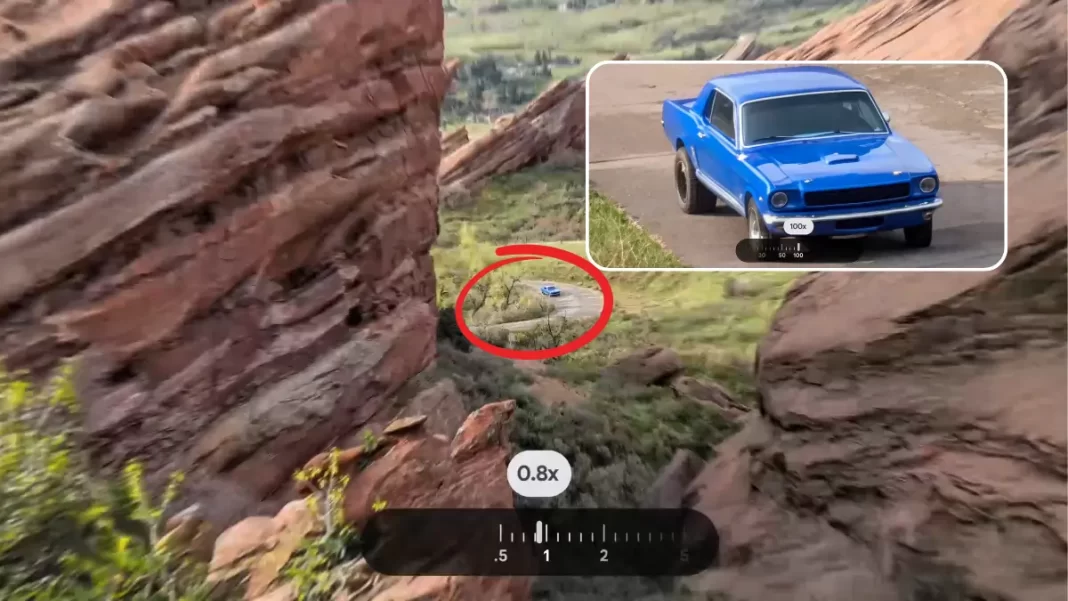
What is Pro Res Zoom?
Pro Res Zoom is Google’s new long-range zoom for the Pixel 10 Pro and Pixel 10 Pro XL. It reaches 100x by running a diffusion model on the phone to add plausible detail that the sensor didn’t capture. Think of it as “AI reconstruction” rather than a simple crop.
How it differs from Super Res Zoom
Super Res Zoom (older Pixels, including Pixel 9 Pro) leans on multi-frame tricks to sharpen what’s already there. Pro Res Zoom goes further. It studies shapes, colors, and context, then creates new pixels that fit the scene. It is still a photo, but with AI-assisted detail.
How Pro Res Zoom Works in Practice
On Pixel 10 Pro, the Tensor G5 chip runs a single-step diffusion model on the device. You shoot the scene, tap into higher magnification, and the phone processes a refined image in a few seconds. Because it’s on-device, you don’t need cloud processing, and privacy stays intact.
When is it strongest? Good light and stable subjects. Landscapes, buildings, the moon, and wildlife that isn’t moving much tend to look best. If you push to 100x in poor light or with fast motion, you may see artifacts or “painted” textures.

What You Can Expect at 30x…100x
At 30x to 60x, the results are often the most pleasing. Feathers on a distant bird, bricks on a tower, ridges on the moon, all can look surprisingly clean. At 100x, the phone is doing the most guesswork. Expect impressive scenes, but don’t expect small printed text to be perfectly legible every time. If the source pixels are extremely noisy, the model may invent patterns that look right but aren’t exact.
What about people? Google tunes Pro Res Zoom to avoid changing faces. You still get an enhanced image, but the system is conservative around facial features to reduce misrepresentation.
Pros and Cons
Pros
- Reaches scenes phones couldn’t cleanly capture before
- Fast, on-device processing
- Best results at 30x–60x on static subjects
- Privacy-friendly and labeled for transparency
Cons
- At 100x, fine text or complex textures may look stylized
- Works best in good lighting and with stable framing
- Not meant for fast-moving subjects at extreme zoom
Quick Start: Using Pro Res Zoom on Pixel 10 Pro
- Open Camera, compose at 1x or 5x.
- Pinch to zoom. At higher ranges, Pro Res Zoom kicks in.
- Brace the phone or use a support. Tap to focus, then shoot.
- Review both the original and the AI-enhanced version in Photos. Keep the one that tells your story best.
Pro Res Zoom vs Super Res Zoom
| Feature | Pro Res Zoom (Pixel 10 Pro/XL) | Super Res Zoom (earlier Pixels) |
|---|---|---|
| Max range | Up to 100x | Typically up to 30x |
| Core method | On-device diffusion model adds plausible detail | Multi-frame upscaling sharpens captured detail |
| Best use cases | Landmarks, landscapes, lunar shots, distant wildlife | General telephoto beyond optical range |
| Speed | A few seconds post-capture | Near-instant multi-frame process |
| People handling | Cautious around faces | Standard processing |
Featured Snippet Boxes
What is Pro Res Zoom on Pixel 10 Pro?
An AI zoom mode that reaches 100x by running a diffusion model on the Tensor G5 chip. It reconstructs plausible detail on-device, so long shots look clearer than simple crops.
Is Pro Res Zoom “real” or AI-generated?
It is a photo with AI-added detail. The model fills gaps based on context, which can look very natural, but it is not the same as pure optical detail.
When does Pro Res Zoom work best?
Static subjects in good light. Buildings, landscapes, and distant wildlife at 30x–60x usually look better than extreme 100x shots.
Does it edit people’s faces?
Google tunes the system to avoid altering people. It aims to reduce misrepresentation, especially of facial features.
How fast is Pro Res Zoom?
Processing typically takes a few seconds after capture on Pixel 10 Pro, since it runs fully on the device.

