

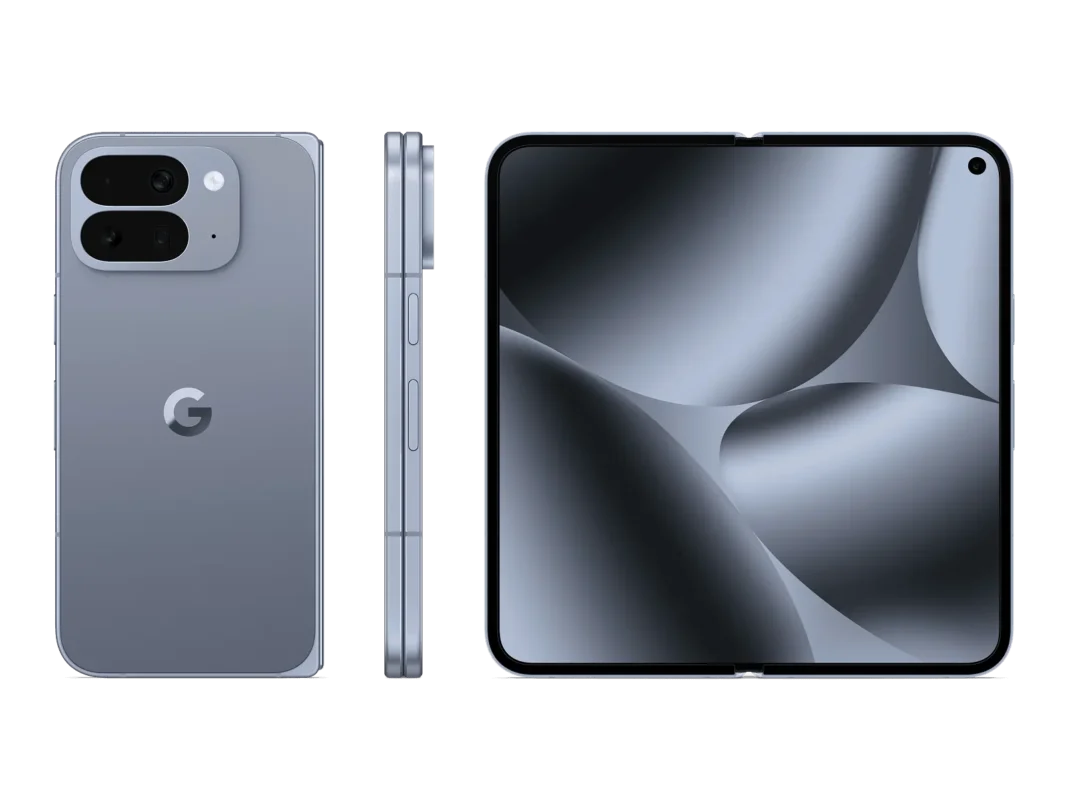
Google’s Pixel 10 Pro Fold and Pixel Buds 2a are now available. If you’ve been eyeing a foldable or just want solid earbuds for calls and workouts, this guide helps you decide fast—who each product suits, the smartest configs, and when to wait or buy now. No lab tests, just practical buying advice.
Buy the Pixel 10 Pro Fold if you’ll actually use split-screen apps, a tablet-sized canvas, and Qi2 magnetic charging every day. If you mainly shoot photos or want the best low-light camera, a non-foldable Pixel 10/10 Pro may be better. Buds 2a are the value pick for calls and workouts; upgrade to Buds Pro 2 for stronger ANC and features.
At-a-Glance Specs & Terms
Chip: Tensor G5 powers AI features (voice, photos, live assistance).
Screens (Fold): A phone-like outer display for quick use; an 8-inch-class inner screen for reading, video, docs.
Durability: IP68 on the phone helps with dust/rain; still treat it like a foldable (avoid sand, close it in pockets).
Charging: Qi2 means magnetic wireless charging—snaps to a compatible pad/stand.
Buds 2a: Active Noise Cancelation (basic), IP54 sweat resistance on buds (case IPX4), comfortable smaller shells.
Price Brackets & What You Get
Pixel 10 Pro Fold: Expect premium pricing similar to other big foldables. In the US, carrier deals and trade-ins often cut the out-of-pocket cost. In India, watch for bank offers and limited-time combos (e.g., cashback when pairing with Buds 2a). Storage bumps are pricey; most buyers are fine at 256 GB unless you store a lot of offline video.
Pixel Buds 2a: Priced as an affordable step below Buds Pro 2. You get ANC, a lighter fit, and colors that match Pixel phones. IP54 is sweat/rain friendly; not for swimming.
Best Configurations by Use Case
Everyday + travel (Fold): Choose 256 GB and add cloud backup. The outer display handles quick replies/maps; open to the big screen for flights, reading, or two apps side-by-side. Add a slim case with a ring/stand and a Qi2 stand for desk charging.
Camera-first buyers: If you shoot lots of night photos or want the most consistent imaging in a slim body, consider Pixel 10/10 Pro/10 Pro XL instead of the Fold. Foldables are about canvas and multitasking; slab Pixels still tend to be lighter with camera-first tuning. (Cross-shop before paying foldable premiums.)
Work + multitaskers: If you live in Docs/Sheets, split-screen on the inner display is the point. Pair with a USB-C hub, compact keyboard, and Qi2 stand to turn it into a mini-desk.
Audio on a budget (Buds 2a): Great for calls, podcasts, and runs. Start with medium tips; test the twist-to-fit stabilizer for a secure seal.
No-compromise audio (Buds Pro 2): Step up if you want stronger ANC, more features, and seamless Pixel perks.
Alternatives & Trade-offs
- Galaxy Z Fold 7: Slimmer feel and a deep accessory ecosystem; typically pricier.
- OnePlus Open 2: Wide outer screen and fast charging; regional availability varies.
- Stay slab: Pixel 10 Pro/XL if weight, camera consistency, and price matter more than a folding screen.
- Earbud step-up: Pixel Buds Pro 2 for stronger ANC and long-haul flights; Buds 2a if you want value, comfort, and Pixel colors.
Display Choices (Fold)
The outer display is your “regular phone” window—maps, messages, camera. The inner display is tablet-like for reading, video, or two apps. Brightness is strong for daylight, though any OLED can dim in prolonged sun to manage heat. Use a screen protector designed for foldables; avoid sand and sharp debris.
Battery & Charging Expectations
Plan on a full day for mixed use, more if you stay on the outer screen. Heavy inner-screen time drains faster. The box typically includes a USB-C cable and SIM tool—not a wall charger—so budget for a 45 W USB-C PD charger if you don’t have one. Qi2 magnets make desk and nightstand charging easier; a ring stand or Pixelsnap stand is handy for video calls.
Ports, Connectivity & Accessories
You get USB-C for data/charging, 5G support (varies by carrier banding), Wi-Fi/Bluetooth standards expected of a flagship, and eSIM. Practical add-ons: Qi2 stand charger, slim case with ring/stand, and a tempered camera-ring protector.
Warranty, Updates & After-Sales
Pixel phones get long software support; specifics vary by model/year. Water/dust resistance helps, but it’s not a warranty against liquid damage. Earbuds are IP54 (buds) and IPX4 (case)—fine for sweat and light rain; dry them after workouts. Keep purchase receipts for bank-offer claims or trade-in credits.
Where to Buy & Timing
US: Compare Google Store trade-ins vs carrier bill credits. Look for bundle freebies, storage upgrades, and accessory discounts.
India: Watch the Google Store and large retailers for bank cashbacks and short-window combo offers (e.g., Fold + Buds 2a). If you don’t need a foldable immediately, note that prices often soften a few weeks after launch.
Comparison Table / Decision Matrix
| Buyer type | Recommended pick | Why | Storage | Must-buy add-ons |
|---|---|---|---|---|
| Multitasker, reading, flights | Pixel 10 Pro Fold | Big inner screen; split-screen | 256 GB (512 if heavy video) | 45 W USB-C charger; Qi2 stand; slim case |
| Camera-first, pocketable | Pixel 10/10 Pro/10 Pro XL | Lighter; consistent camera tuning | 256 GB | Fast charger (if needed); case |
| Budget earbuds | Pixel Buds 2a | Light fit; ANC; IP54 | n/a | Extra tips; case lanyard |
| Frequent flyers | Pixel Buds Pro 2 | Stronger ANC; features | n/a | Spare tips; USB-C cable |
Frequently Asked Questions (FAQs)
Does the Pixel 10 Pro Fold support Qi2 magnetic wireless charging?
Yes, it’s the first foldable Pixel with Qi2, which makes alignment easy on compatible chargers.
What’s the water/dust rating?
The phone is rated IP68; it helps with rain and dust but isn’t a license to swim with it.
Are Buds 2a waterproof?
No. Buds are IP54 (sweat/rain); the case is IPX4. Wipe them dry after exposure.
Which is better for photos: Fold or Pixel 10 Pro?
If camera quality is your top priority, many shoppers prefer the lighter non-foldable Pixel models; the Fold is about screen real estate and multitasking. (Compare in store if possible.)
What do I need in the box to get started?
You’ll get a USB-C to USB-C cable and SIM tool. Bring your own charger.
When do deals get better?
Often a few weeks after launch or during seasonal promos. In India, bank-card offers and bundles are common; in the US, carrier trade-ins drive the best effective prices.
Featured Snippet Boxes
Who should buy the Pixel 10 Pro Fold?
Buy it if you’ll use the big inner screen for reading, video, and split-screen work. If you mostly text, browse, and shoot photos, a cheaper non-foldable Pixel 10/10 Pro is the safer pick.
Are Pixel Buds 2a good for workouts?
Yes. The buds are IP54 sweat-resistant and light, with a twist-to-fit stabilizer. Dry them after workouts; the case is IPX4 splash-resistant, not waterproof.
Do I need to buy a charger for the Pixel 10 Pro Fold?
Usually yes. The box includes a USB-C cable and SIM tool, but not a 45 W wall charger. Add a USB-C PD charger and consider a Qi2 stand for magnetic wireless charging.
Is 256 GB storage enough on a foldable?
For most people, yes especially if you stream media and use cloud backup. Go 512 GB if you record lots of 4K/slow-mo video for offline editing.

