

OpenAI launched ChatGPT Atlas, a web browser with ChatGPT built in. It runs on macOS today and brings agent mode, optional browser memories, and tight privacy controls. Windows, iOS, and Android versions are on the way. If you live in chat to get work done, Atlas tries to make that your default browser experience.
What is ChatGPT Atlas?
Atlas is a desktop browser where ChatGPT is always present. You can ask questions, summarize a page, or let the agent take actions for you without switching tabs. Your existing browsing habits still apply, but chat sits next to them and understands the page you are on.
ChatGPT Atlas is OpenAI’s AI browser for macOS. It embeds ChatGPT into the browser so you can ask, browse, and act in one place. Agent mode can open tabs and click through sites for tasks like research or shopping. Browser memories are optional and under your control.
Key features that matter right now
Agent mode in your browser
Agent mode can perform steps across websites while you watch, such as opening past docs, running new research, and compiling a brief. You can trigger it from a button, and Atlas will ask before it starts opening pages and clicking. Today it is a preview feature for Plus, Pro, and Business users.
What this looks like in practice: planning a dinner, a trip, or a project review. Provide the goal, give the source pages or let Atlas search, then approve actions. OpenAI notes the preview may make mistakes in complex workflows, with reliability and latency improving over time.
Browser memories
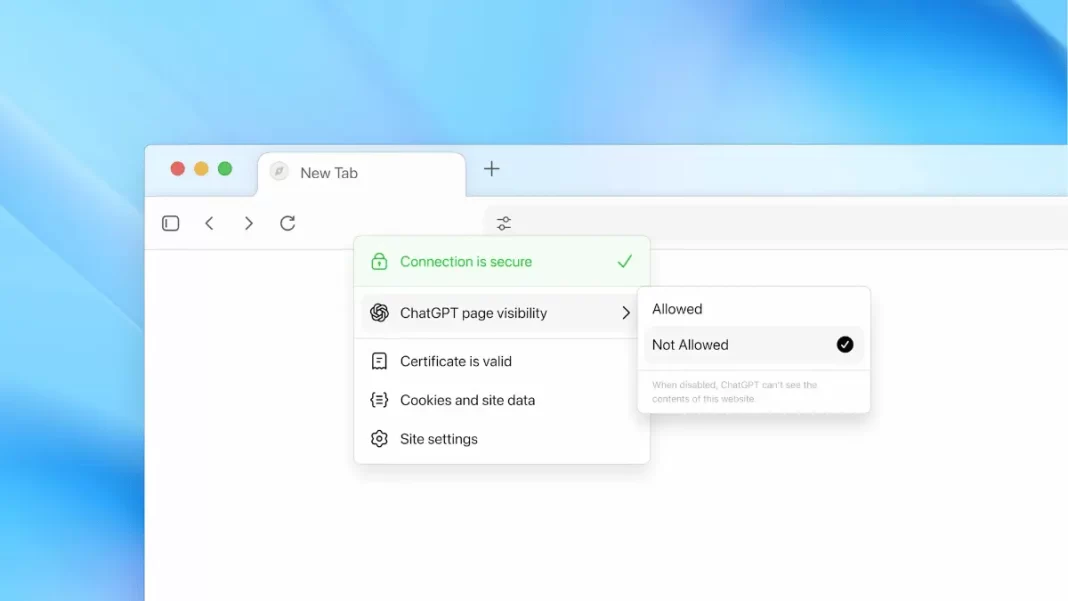
Memories let ChatGPT remember context from sites you visit. That could be job posts you viewed last week or the products you compared during a shopping session. You can view or archive memories in settings, and clearing history deletes linked memories. You decide which sites ChatGPT can see via a toggle in the address bar.
Work in your flow
During the livestream, media highlighted a split-screen style where chat sits next to the page. That keeps the conversation tied to what you are viewing, so you can ask questions and apply changes without juggling windows.
Parental controls
If you already set parental controls in ChatGPT, those settings carry over to Atlas. Parents can also turn off browser memories and agent mode.

Privacy and control
Incognito and fine-grained visibility
Atlas includes an incognito mode that signs ChatGPT out temporarily. Even when not in incognito, you can set ChatGPT page visibility to “Not Allowed” for a site, which prevents the model from seeing page content and stops memory creation.
Training opt-in
By default, OpenAI says browsing content is not used to train models. You can opt in by enabling “include web browsing” in data controls. If you previously turned on training for chats, Atlas will follow that setting, including content you attach in the Ask ChatGPT sidebar and any memories used in a chat.
Business, Enterprise, Education
Atlas is available in beta for Business, and can be enabled by admins for Enterprise and Edu plans. That matters if your organization needs policy control before rolling out agent features.
Availability and pricing
- Platforms: macOS worldwide today for Free, Plus, Pro, and Go users. Windows, iOS, and Android experiences are coming soon.
- Agent mode access: preview for Plus, Pro, Business at launch.
Atlas vs Chrome, Edge, and Comet
| Feature | ChatGPT Atlas | Google Chrome | Microsoft Edge | Perplexity Comet |
|---|---|---|---|---|
| Built-in AI chat | Native ChatGPT in sidebar and page context | Gemini features in Search and Chrome in development | Copilot built into sidebar | Native Perplexity |
| Agent-style actions | Preview agent mode can open tabs and click | Early task automation plans | “Agentic browser” direction | AI browsing with task flow |
| Memories | Optional browser memories | N/A in core Chrome | N/A in core Edge | Session memory in app |
| Privacy controls | Incognito, per-site visibility toggle, training opt-in | Incognito, site permissions | InPrivate, tracking controls | Standard site permissions |
| Availability | macOS today, others coming | All major platforms | All major platforms | Desktop and mobile apps |
Comparative claims here align with each product’s public positioning and today’s Atlas feature list. Atlas’ unique angle is agent mode with page actions plus browser memories you can manage.
Getting started on macOS
- Download and sign in: Grab Atlas from the official page, then sign in with your ChatGPT account.
- Import your stuff: First-run flow lets you import bookmarks, saved passwords, and history from your current browser.
- Set your privacy: Visit settings and review data controls. Decide whether to enable browser memories. Leave “include web browsing” off if you do not want browsing content used for training.
- Learn the visibility toggle: When a site is sensitive, set ChatGPT page visibility to “Not Allowed.”
- Try agent mode: If you are Plus, Pro, or Business, enable agent mode preview and start with small tasks like compiling a reading list or turning notes into a draft.
Real-world examples
- Research brief in 15 minutes: Ask Atlas to scan 6–8 official posts, pull dates and quotes, and draft a one-page brief with sources you can verify.
- Trip shopping: Provide dates and budget. Agent mode can open tabs, compare flights, and fill a cart for groceries or supplies, with a summary of choices.
- Student study flow: Keep slides open, ask targeted questions as you go, and have Atlas generate practice questions tied to the current topic.
Limitations, pitfalls, and what’s next
- Preview reliability: Agent mode can stumble on complex flows. Expect iterative improvements to success rate and latency.
- Admin readiness: Business has a beta, and Enterprise/Edu require admin enablement. Confirm policy and audit needs before broad rollout.
- Roadmap: Multi-profile support, better dev tools, better Apps SDK discoverability, and ARIA tags website owners can add to help agents work on their sites. Follow release notes for fast iteration.
Frequently Asked Questions (FAQs)
Is Atlas Chromium-based?
Some reports suggest a Chromium base, but OpenAI’s page does not specify. We will update when official docs confirm.
How do I turn off ChatGPT for a specific site?
Use the address-bar toggle to set page visibility to “Not Allowed,” which also prevents memory creation.
Does Atlas have incognito?
Yes. Incognito temporarily signs ChatGPT out and avoids linking chats to your account during that session.
Can parents control Atlas?
Parental controls from ChatGPT carry over. Parents can disable browser memories and agent mode.
Do I need Plus to use Atlas?
No. Atlas is available to Free users, but agent mode preview requires Plus, Pro, or Business.
Will Atlas replace Chrome or Edge?
It aims to offer an AI-first experience. Early coverage frames this as a new front in the browser market, not an instant replacement.
How do I import bookmarks and passwords?
Use the import prompt on first run to bring data from your current browser.

Featured Snippet Boxes
What is ChatGPT Atlas?
It is OpenAI’s AI browser for macOS that embeds ChatGPT beside any page. You can ask questions, summarize content, and use agent mode to take actions across sites. Browser memories are optional and can be turned off.
Is ChatGPT Atlas free?
Atlas is available to Free, Plus, Pro, and Go users on macOS today. Agent mode is a preview for Plus, Pro, and Business. Enterprise/Edu access depends on admin settings.
How do browser memories work?
Atlas can remember key details from pages you visit to improve responses. You control them in settings, can archive them, and clearing history removes linked memories. Per-site visibility can be disabled.
Is my browsing used to train the model?
By default, no. You can opt in via data controls. If training is enabled for chats, Atlas follows that setting for chats and attached content.
When are Windows, iOS, and Android coming?
OpenAI says these experiences are coming soon. macOS is first at launch.

