

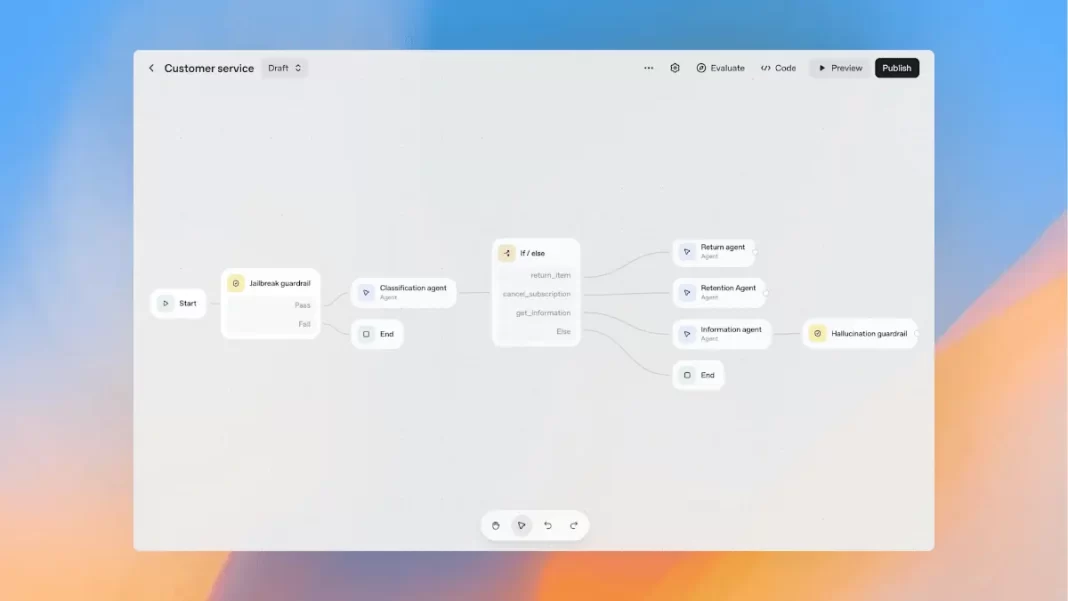
OpenAI’s AgentKit bundles the pieces you need to build, ship, and improve AI agents: a visual Agent Builder, an embeddable ChatKit UI, and expanded Evals. Builder is in beta. ChatKit and the new Evals features are GA. Pricing is included with standard API model pricing. If you want to go from workflow sketch to a live agent fast, start here.
What is OpenAI Agent Builder and AgentKit
AgentKit is OpenAI’s end-to-end platform for agent development. It tackles the usual mess of piecemeal orchestration, custom connectors, ad-hoc evals, and hand-rolled chat UIs. You design workflows visually, embed an agent chat in your app, and measure performance with built-in eval tools.
What’s inside
- Agent Builder: a drag-and-drop canvas with nodes for agents, tools, branching, and guardrails. It supports preview runs and versioning so engineering, product, and legal can stay aligned.
- ChatKit: a toolkit to embed a production-quality chat interface that handles streaming, threads, and in-chat experiences.
- Evals: datasets, trace grading, automated prompt optimization, and support for evaluating third-party models.
- Connector Registry: a central panel for managing data and tools across workspaces, including prebuilt connectors and MCP servers.
- Guardrails: an open-source safety layer for masking or flagging PII, jailbreak detection, and other safeguards in Python or JavaScript.
Status: ChatKit and the new Evals features are generally available. Agent Builder is beta. Connector Registry is rolling out in beta to orgs with the Global Admin Console. Tools are included with standard API model pricing.
How Agent Builder works
Think of the canvas as a storyboard for your agent. You add an Agent node, wire Tools for data and actions, set Guardrails, and connect If/Else branches. You can run a Preview, tweak prompts, attach evals, and version the flow when you’re happy. Templates help you move fast, but a blank canvas gives you fine control.
Prefer code? Build the same logic in the Agents SDK with Node, Python, or Go. Many teams prototype visually then codify the final flow for CI. The platform page confirms a code-first path powered by the Responses API.
What is Agent Builder?
It’s a visual canvas to design multi-agent workflows with tools, guardrails, branching, preview runs, evals, and versioning. It aims to cut orchestration time and frontend work.
ChatKit: embedding agent chat fast
Shipping a robust chat UI is more work than it looks. You need streaming, threads, approvals, and a clean way to expose “in-chat” actions. ChatKit handles the plumbing so you can style it, drop it into your app, and focus on the agent’s behavior. Teams commonly use it for internal knowledge assistants, onboarding guides, and customer support agents.
What to ship with
- Clear system prompt and scoped tools
- Human-in-the-loop controls for risky actions
- Short in-chat tutorials so users know what the agent can and cannot do
Evals and optimization
You will not trust an agent you cannot measure. The updated Evals feature set gives you:
- Datasets to build eval suites and grow them with human annotations
- Trace grading to assess full end-to-end runs and catch brittle steps
- Automated prompt optimization based on grader outputs
- Third-party model support for side-by-side tests
Teams report cuts in iteration time and measurable accuracy gains when they wire agents to evals from day one.
OpenAI also highlights Reinforcement Fine-Tuning (RFT) to teach models better tool calling and apply custom graders for your own success criteria. RFT is GA for o4-mini and in private beta for GPT-5. Consider RFT only after you’ve squeezed wins from prompts, tools, and evals.
How do I evaluate an agent?
Start with a small dataset, run trace grading on real workflows, and track pass rates on high-risk steps. Use the prompt optimizer to reduce errors. Add human spot checks on fails.
Step by step: Build your first Agent
This is a lightweight, repeatable path that works for support, sales ops, and research.
- Scope the job
Write one user story, one success metric, and one list of off-limits actions. Example: a support triage agent that classifies tickets, answers with links to docs, and escalates complex cases to a human. - Define tools and approvals
List read tools (file search, web search) and write tools (ticket update, refund). Anything that changes state should require approval. - Compose it in Builder
Create nodes for Classification, Retrieve, Answer, and Escalate. Add a Jailbreak guardrail near the start and a Hallucination guardrail before output. Save a first version and run a preview on a small test set. - Embed ChatKit
Drop ChatKit into a staging page, theme it, and add a short “What this agent can do” card. Wire up approvals to your team’s inbox or Slack. - Add Evals
Create a dataset of 50 real tickets with correct outcomes. Turn on trace grading. Fix the top two failure modes. Re-run until pass rate stabilizes. - Roll out gradually
Ship to 10 percent of users, monitor results and override rate, then scale. Keep one click to disable tool use if something goes wrong.
Do I need multiple agents?
Not at first. Max out a single agent with clean tools and instructions. Split into multiple agents when prompts get too conditional or tools overlap in messy ways.
AgentKit vs LangGraph, CrewAI, AutoGen, DSPy
AgentKit bundles visual design, UI, and evals. Open-source stacks trade convenience for flexibility and control. Pick based on your constraints and where you want to own the runtime.
Comparison table (high-level)
| Framework | Visual builder | Built-in chat UI | Built-in evals | Guardrails | Ecosystem fit | Best for |
|---|---|---|---|---|---|---|
| OpenAI AgentKit | Yes (Builder, beta) | Yes (ChatKit) | Yes (datasets, trace grading, prompt optimizer) | Yes | Tight with OpenAI API plus connectors and MCP | Fast path from idea to production in OpenAI stack |
| LangGraph | No native visual builder | No native chat UI | External | Community patterns | Python focus, strong orchestration | Custom orchestration, human-in-the-loop, durable state |
| CrewAI | No native visual builder | External | External | Community | Python, multi-agent crews | Multi-agent teamwork and roles |
| AutoGen / Microsoft Agent Framework | Studio for prototyping | External | External | Community | .NET/Python, Microsoft stack | Multi-agent research to production on MS tools |
| DSPy / Agenspy | No native visual builder | External | DSPy optimization focus | Community | Declarative optimization & program synthesis | Evaluation-driven improvement and structured programs |
AgentKit or LangGraph?
If you want a hosted path with visual building, built-in evals, and a drop-in chat UI, AgentKit is simpler. If you need deep control over state, recovery, and custom runtimes, LangGraph is strong.
Pricing, availability, and rollout planning
OpenAI says ChatKit and the new Evals features are GA. Agent Builder is beta. Connector Registry is in beta for orgs with the Global Admin Console. Tools are included with standard API model pricing. Plan access with your admin early if you need the Registry.
Real-world examples and mini case studies
Below are condensed “starter blueprints” you can adapt.
Internal knowledge assistant
- Goal: answer policy and process questions from handbooks and tickets.
- Tools: file search, web search for public policy pages.
- Guardrails: PII masking, jailbreak detection, “no legal advice” disclaimer.
- Evals: answer correctness, citation presence, tone.
Buyer ops agent
- Goal: classify requests, fetch vendor info, draft approvals, route for sign-off.
- Tools: CRM read, procurement API write with approval step.
- Evals: step pass rate per branch, tool call accuracy.
Sales research copilot
- Goal: compile account briefs with sources and contacts.
- Tools: web search, CRM read, spreadsheet write.
- Evals: factual accuracy, duplicate rate, average time to brief.
Pitfalls, safeguards, and checklists
- Scope creep: start with one outcome and expand.
- Tool sprawl: merge overlapping tools, name them clearly.
- Silent failures: enable trace grading and alerting on key nodes.
- Sensitive actions: require approvals for any state-changing tool.
- User trust: show what the agent did and why. Log everything.
What guardrails should I enable first?
Enable PII masking, jailbreak detection, approval gates for write tools, and a hallucination check before responses. Add audit logs and disable-switches.
Frequently Asked Questions (FAQs)
What’s the difference between Agent Builder and the Agents SDK?
Agent Builder is visual. The SDK is code-first in Node, Python, or Go. Both run on the Responses API.
Can I evaluate non-OpenAI models in Evals?
Yes, third-party model evaluation is supported.
What is the Connector Registry?
A central admin panel to manage data sources and MCP servers across ChatGPT and API workspaces. Beta with the Global Admin Console.
Is RFT required?
No. RFT is optional and useful after you’ve stabilized prompts and tools. It is GA for o4-mini and in private beta for GPT-5.
Can I embed ChatKit in my existing app?
Yes. It is designed to be embedded in apps and websites, with theming and branding options.
How do I keep agents safe?
Enable Guardrails, require approvals for write actions, and log tool calls with audit trails.
Does AgentKit replace LangGraph or CrewAI?
No. It’s an integrated option. If you need deep control over orchestration, open-source stacks remain strong choices.
Do I need the Global Admin Console?
Only if you want Connector Registry during its beta rollout.

Featured Snippet Boxes
What is OpenAI Agent Builder?
A visual tool for designing multi-agent workflows with tools, guardrails, branching, preview runs, and versioning. It aims to cut orchestration time and front-end work, and it is part of AgentKit.
What is AgentKit?
An end-to-end stack to build, deploy, and optimize agents. Includes Agent Builder, ChatKit, and Evals, plus connectors and guardrails.
Is Agent Builder free?
AgentKit features are included with standard API model pricing. Usage-based model costs still apply.
How do I evaluate agents?
Use datasets and trace grading, add a small gold-set, and enable prompt optimization. Track pass rates and fix top failures first.
AgentKit vs LangGraph?
AgentKit is simpler to ship with visual design, chat UI, and built-in evals. LangGraph offers granular orchestration and durability. Choose by control vs speed.

