

Quick Brief
- Notion 3.3 launched Custom Agents on February 24, 2026, with over 21,000 agents built during beta
- Agents run fully autonomous on schedules or triggers, no manual prompting needed after setup
- Remote’s IT Ops team saved 20 hours per week using Custom Agents with greater than 95% triage accuracy
- Custom Agents are free through May 3, 2026; Notion Credits apply from May 4 for Business and Enterprise plans
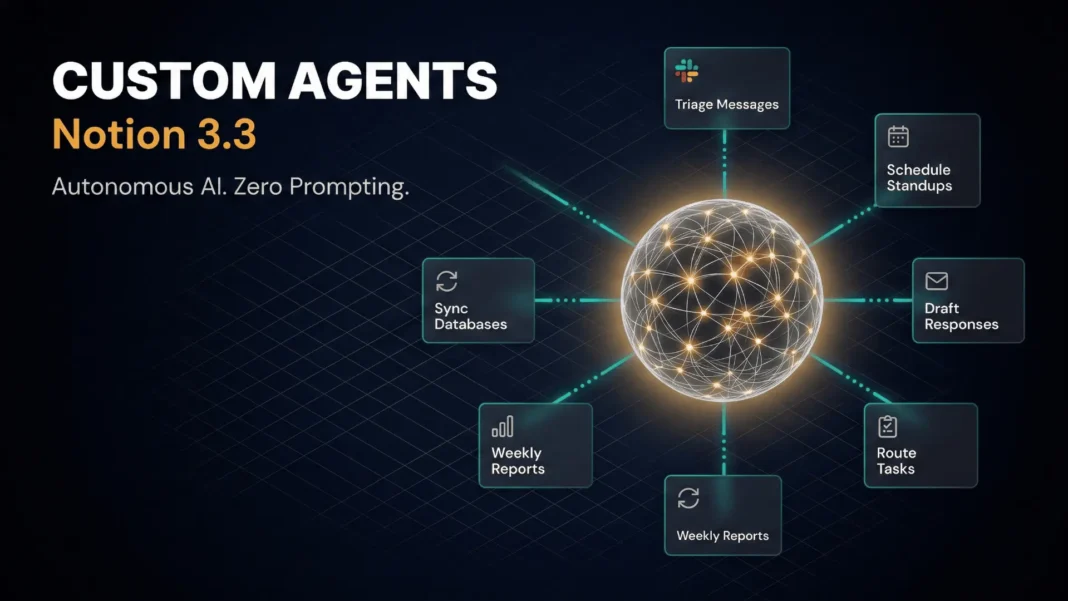
Notion just shipped the update teams have waited years for: AI that works without being asked. Notion 3.3 introduces Custom Agents, fully autonomous workflows that run 24/7, handle repetitive tasks, and integrate with the tools your team already depends on. This is not another AI writing assistant layered onto a notes app.
What Notion Custom Agents Actually Do
Custom Agents are autonomous AI workers you configure once and let run indefinitely. You define the job, set a trigger or schedule, and the agent executes whether you are online or not. Notion itself runs 2,800 Custom Agents internally, and now has more agents than employees.
Three core behaviors define what agents can do:
- Answer repeat questions by pulling from Notion, Slack, Mail, Calendar, and MCP integrations without human intervention
- Capture incoming requests, convert them to tasks, and route them to the correct team member automatically
- Write daily standups, weekly sprint recaps, and monthly OKR reports based on live context across connected tools
Ben Levick, who leads Ops and Internal AI at Ramp, reports that Ramp has built over 300 agents, many for Q&A. Their “Product Oracle” agent answers dozens of questions every day about the roadmap and how features work. Teams that previously monitored Slack channels now only audit agent responses and feed corrections back in.
How to Set Up a Custom Agent
Setup requires no coding. Describe the agent’s job in plain language and Notion AI builds its configuration for you, including writing its own instructions and wiring up all tools. You then adjust three elements:
- Triggers: Schedule-based or event-based, configured after initial setup
- Instructions: Define scope, tone, output format, and escalation rules in plain text
- Sources: Grant access to specific Notion pages, Slack channels, email threads, or external tools via MCP
Permission architecture mirrors Notion’s existing access controls. If an agent lacks access to a page, it will not read or summarize it. Every agent run is logged, and changes are reversible. Business and Enterprise admins control who can create agents.
Integrations: Where Agents Connect
Custom Agents work across the tools teams already use daily:
- Slack: Respond to channel mentions, triage messages, post scheduled summaries
- Notion Mail and Calendar: Draft email responses, find meeting times across multiple participants
- Linear, Figma, and HubSpot: Connected via Model Context Protocol (MCP) for cross-tool workflows
One standout example from Notion’s own team: an agent that connects FigJam and Notion to convert design boards into structured documents and docs into diagrams. Willie Yao, Head of Engineering at Clay, automated his information-gathering process entirely: “I spent quite a bit of time combing through Slack channels and reading through all materials to make sure I’m up to date on things. With Custom Agents, a summary automatically pushes to me.“
Real Outcomes From Early Users
The beta results are specific and verifiable. Remote’s IT Ops Manager James Lawley completely replaced his team’s IT help desk with Custom Agents that now resolve more than 25% of tickets autonomously while keeping Slack and Notion synchronized, saving 20 hours per week.
Morgane Palomares, VP of Marketing at Braintrust, uses two agents in parallel: one posts daily competitive updates, and a customer reference agent sends a weekly summary of top new logos to her and the CEO. Each update saves her 20 minutes per day.
Brandon Gell, COO at Every, reports his team is “starting to move 100% away from managing work themselves in a Notion database and moving to only chatting with Notion Agents“. Brian Emerick, Technical Program Manager at Vercel, describes the impact directly: “It’s a great way to spin up something quickly and elegantly without over-cooking a custom solution. Soon, there will probably be more agents running at Vercel than people.”
Enterprise-Grade Safety and Control
With agents running continuously, Notion built a structured control layer:
- AI usage dashboard shows exactly how Custom Agents consume credits and where they add value
- Proactive alerts and auto-pause notify admins when approaching credit limits, with agents stopping automatically at the limit
- Logged runs show what triggered each agent and every action it took
- Reversible changes allow undoing any action a Custom Agent performs
- Detailed permissions control what each agent can access and edit
Notion also disclosed an active security consideration: Custom Agents can encounter prompt injection attempts where someone manipulates an agent through hidden instructions in content it reads. Notion is implementing guardrails to detect this automatically, and advises admins to review unfamiliar content before granting agent access and to use detailed permissions to limit agent scope.
Pricing and Availability
Custom Agents are available now to all Business and Enterprise plan users. They are free through May 3, 2026. Starting May 4, 2026, they will consume Notion Credits based on how much work agents perform, available as an add-on for Business and Enterprise plans. Existing seat prices and plan pricing do not change. Other Notion AI features including Notion Agent, AI Meeting Notes, and Enterprise Search remain included in Business and Enterprise plans at no extra cost.
Admins can purchase as many or as few credits as their team needs. Notion has not published a per-credit rate at this stage, so teams should use the free period to benchmark their actual agent usage volume before committing to a credit budget.
Limitations to Consider
Custom Agents are currently available on Business and Enterprise plans only; Free and Plus plan users cannot access them at launch. Notion publicly acknowledges that prompt injection risk exists across connected tools, uploaded documents, and internal communications, and full mitigation is still in active development. Teams with highly sensitive data should review Notion’s permission controls and usage dashboard before deploying agents at scale.
Frequently Asked Questions (FAQs)
What is Notion 3.3 and when did it launch?
Notion 3.3 is a major product update released on February 24, 2026. Its headline feature is Custom Agents, autonomous AI workers that run on schedules or event triggers across Slack, Mail, Calendar, and third-party tools connected via MCP. The update was announced by Notion Co-founder Akshay Kothari.
Are Notion Custom Agents free to use?
Yes, Custom Agents are free for all Business and Enterprise users through May 3, 2026. Starting May 4, 2026, they will consume Notion Credits based on usage volume, available as an add-on. Your existing seat price and plan pricing remain unchanged.
What tools do Notion Custom Agents integrate with?
Custom Agents connect natively with Slack, Notion Mail, and Notion Calendar. They also integrate with Linear, Figma, and HubSpot through Model Context Protocol (MCP). Custom MCP servers allow teams to connect additional tools specific to their workflows.
How many Custom Agents can a team create?
Notion has not stated a cap on the number of agents a team can build. During beta, early testers created over 21,000 Custom Agents. Notion itself operates 2,800 agents internally and has more agents running than it has employees.
Do Notion Custom Agents require coding skills to set up?
No coding is required. You describe what you want in plain language, and Notion AI writes the agent’s instructions and wires up all its tools for you. Adjust triggers, sources, and instructions through a visual interface, or use one of Notion’s pre-built agent templates.
Can Custom Agents access all content in a Notion workspace?
No. Agents only access pages and data explicitly granted to them. Notion’s existing permission architecture applies fully to agent access. All agent runs are logged, all changes are visible, and everything an agent does can be reversed.
Are Custom Agents available on all Notion plans?
Custom Agents are currently available to Business and Enterprise plan users only. Free and Plus plan users do not have access at this stage. Notion has not announced a timeline for expanding access beyond Business and Enterprise tiers.
What security risks should teams know about with Custom Agents?
Notion discloses that Custom Agents can be targeted by prompt injection attempts through hidden instructions in content they read. Notion is actively building automatic detection guardrails. Teams should review content before granting agent access and use detailed permissions to limit each agent’s scope.

