

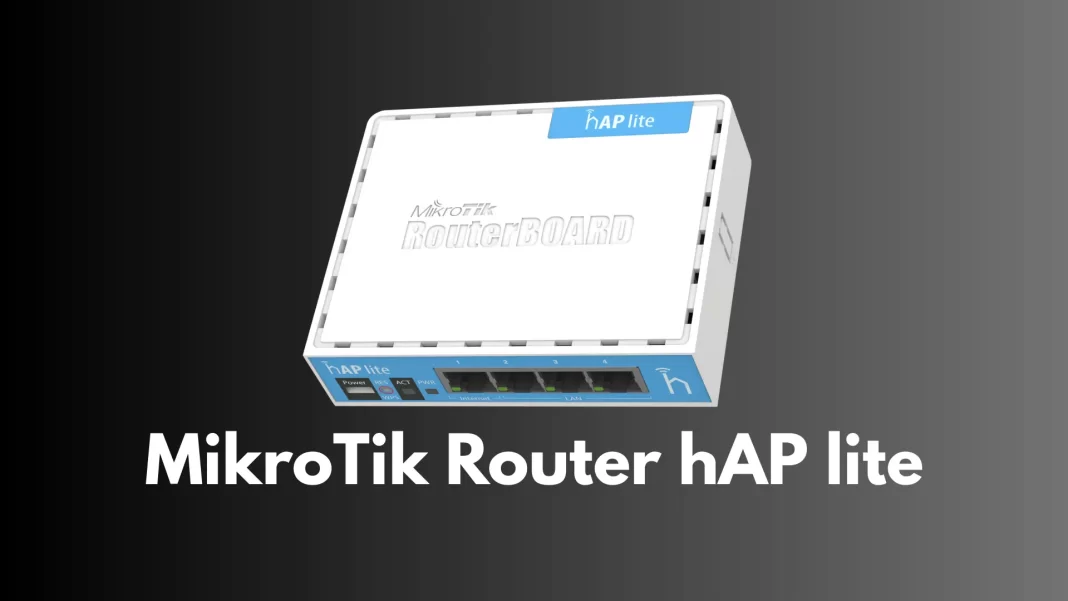
If you’re staring at budget routers and wondering what’s worth buying, you’re not alone. The MikroTik RB941 (better known as hAP lite) is a small, low-cost box that can get you online and teach you real networking along the way. The short version: it’s fine with modest internet plans and small homes, and it’s excellent if you want to learn RouterOS. It’s not built for gigabit speeds or 5 GHz Wi-Fi.
What is the RB941, in plain English?
The RB941 is a compact 2.4 GHz Wi-Fi 4 router with four 10/100 Ethernet ports, a 650 MHz QCA9533 CPU, 32 MB RAM, and RouterOS preinstalled with a Level 4 license. It powers over MicroUSB and ships with a 5 V adapter. Translation: simple hardware, serious software.
There are two looks: the flat RB941-2nD and the upright RB941-2nD-TC (“tower case”). Same internals, different shell.
Who should consider it?
- First time MikroTik users and students. It’s one of the cheapest ways to explore RouterOS features like firewall rules, queues, and CAPsMAN.
- Small apartments and dorms. 2.4 GHz Wi-Fi reaches far enough for one-room or small two-room spaces.
- Anyone on basic plans. Each LAN port tops out at 100 Mbps, so it won’t fully use a 300 to 1000 Mbps connection.
Skip it if you need dual band (5 GHz) or gigabit Ethernet. Look at a dual band MikroTik with gigabit ports instead.
Quick setup (about 10 minutes)
- Plug it in and connect. Internet cable into the Internet port, power via MicroUSB. Connect your phone or laptop to the default MikroTik Wi-Fi.
- Open the setup page. Go to 192.168.88.1 in a browser. Username admin; on many units there’s no default password (or check the sticker).
- Update first. Tap Check for updates and install the latest RouterOS. This keeps things stable and compliant.
- Secure it. In Quickset, pick your country, set a strong Wi-Fi password, then set a router admin password. You’re done.
What it’s good at
- Learning real networking. RouterOS gives you bandwidth shaping, firewalling, user access control, and rarer at this price.
- WPS and CAPsMAN. There’s a WPS button for easy joins, and you can flip it into cAP mode to be managed by a central controller later. Handy for labs.
- Always-on frugal box. It sips power (max around 3.5 W), so it’s fine to leave running.
Practical limits to know
- No gigabit ports. All four are 10/100, so wired speeds cap around 100 Mbps per device.
- 2.4 GHz only. You won’t get 5 GHz performance or relief from 2.4 GHz crowding in busy apartments. Max link rate is 300 Mbps (real-world will be much lower).
- MicroUSB power only. No PoE. Keep the included 5 V adapter nearby for stable power.
Everyday tips
- Place it high and central, away from microwaves and thick walls.
- Change the admin password right away; also disable services you don’t use (FTP, Telnet) in RouterOS.
- Name your Wi-Fi clearly (e.g., AdwaitX-Home) and keep your country set correctly for legal power/channels.
Should you buy it?
If you want an ultra-affordable starter router or a RouterOS sandbox, yes. The RB941 usually sells for around $25, which is tough to beat for a learning tool or a small space. For faster plans or bigger homes, step up to a dual band MikroTik with gigabit.
What to avoid
- Don’t expect 1 Gbps speeds or Wi-Fi 6-class performance.
- Don’t power it from a flaky USB port; use the included 5 V adapter.
FAQs
What’s the difference between RB941-2nD and RB941-2nD-TC?
Same hardware and specs; the TC version stands upright in a blue “tower” case. Pick the shape you like.
Can it handle a 300 to 1000 Mbps plan?
Not really. Ports are 10/100, so you’ll cap around 100 Mbps per wired device. For faster internet, get a gigabit model.
Does it support 5 GHz Wi-Fi?
No. It’s 2.4 GHz (802.11b/g/n) only with a max link rate of 300 Mbps.
Is RouterOS included, or do I need to buy a license?
It comes with RouterOS Level 4 out of the box. No extra purchase is needed.
How do I log in the first time?
Connect to its Wi-Fi, go to 192.168.88.1, user admin, and set new passwords for Wi-Fi and the router. Update RouterOS right after.
Can I use it as an access point only?
Yes. You can bridge ports and let another router handle DHCP or switch it to cAP mode for centralized management.
Takeaway: If you’re fine with 2.4 GHz Wi-Fi and 100 Mbps ports, the RB941 is a smart, low-risk buy especially if you want to learn RouterOS without spending much.
Source: Mikrotik | Mikrotik Help

