

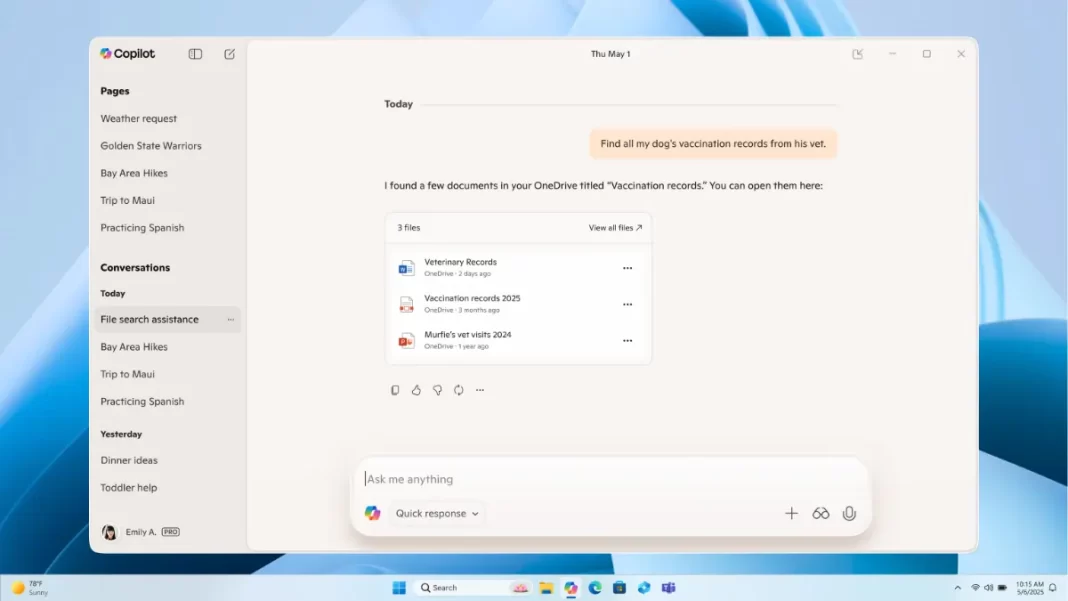
Microsoft just added Gmail integration to Copilot on Windows. It’s rolling out to Windows Insiders first and lets Copilot search across your Gmail, Google Drive, Google Calendar, and Google Contacts alongside Outlook and OneDrive so you can pull the right email or file without hopping apps. You can also export long answers straight to Word, Excel, PowerPoint, or PDF. Here’s what it does, who gets it today, how to turn it on, and what to know about privacy.
Table of Contents
What “Microsoft Copilot Gmail integration” means
Copilot’s Connectors let you link personal services to the Copilot Windows app. Once linked, you can ask natural questions like “Find all invoices from Acme in my inbox” or “What’s Sarah’s email address?” and Copilot will search across your connected accounts, including Gmail. This is optional and off by default.
What you can do today
- Search across Gmail, Outlook, Google Drive, OneDrive, and more with one prompt.
- Pull a contact detail from Gmail and keep moving.
- Export long Copilot responses to Word/Excel/PowerPoint/PDF with one click.
What you can’t do yet
At launch, Microsoft describes natural-language search and retrieval across connected services. It hasn’t announced features like sending emails from Gmail via Copilot. Expect this to evolve, but right now think “search and summarize,” not “act as your Gmail client.”
Who gets it first, version, and rollout timing
The update is live for Windows Insiders and will expand later to all Windows 11 users. Check the Copilot app version 1.25095.161.0 or higher via the Microsoft Store. Staged rollout means not everyone sees it immediately.
Short Answer: Copilot’s Gmail integration is available today to Windows Insiders in the Copilot app on Windows (version 1.25095.161.0+). It’s rolling out gradually; general availability comes later.
How to enable Microsoft Copilot Gmail integration
- Open the Copilot app on Windows.
- Click your profile → Settings → Connectors.
- Toggle Gmail (and Google Drive/Calendar/Contacts if you want).
- Sign in to your Google account and allow access.
- Ask: “Find receipts from last month in Gmail.”
Tip: You can disconnect any connector later in the same Settings page.
Privacy and data handling: what’s opt-in and what’s stored
This is opt-in. You must explicitly connect Gmail and other services. Microsoft’s Windows Insider post frames the feature as search across your connected accounts; permissions sit in the Copilot app’s Settings. For Microsoft’s broader Copilot privacy controls and policies, see its docs (note: enterprise docs cover Microsoft 365 Copilot; consumer Copilot follows Microsoft’s privacy statement).
Short Answer: You choose to connect Gmail. You can remove it anytime. Microsoft documents privacy controls for Copilot and publishes an overall privacy statement; read both before enabling.
Real-world examples
- Track payments: “Show emails from Gmail with ‘Invoice’ from July to September.”
- Find a contact fast: “What’s Priya’s email address?”
- Package a brief: Ask Copilot to summarize a thread, then export to Word to share with your team.
Copilot Gmail vs Google’s Gemini in Gmail: who should use what?
- Use Copilot + Gmail if your daily work spans Microsoft and Google files and you want one search box across both. The new export to Office is handy if your output ends up in Word/Excel/PowerPoint.
- Use Gemini in Gmail if you live in Google Workspace and rarely touch Office files. (Gemini is built into Google’s side panel for many Workspace tiers.)
- Hybrid? Try both and keep the one that reduces your app-switching the most.
Quick Comparison Table
| Task | Copilot + Gmail (Windows app) | Native Gmail search | Gemini in Gmail |
|---|---|---|---|
| Cross-account search (OneDrive/Drive/Outlook/Gmail) | Yes (connectors) | No | Limited to Google ecosystem |
| Export to Office formats | One-click to Word/Excel/PPT/PDF | No | Not native to Microsoft Office |
| Rollout today | Windows Insiders | GA | Workspace-dependent |
The Bottom Line
Microsoft’s Copilot Gmail integration is live for Windows Insiders in the Copilot Windows app (v1.25095.161.0+). It’s opt-in, lets Copilot search Gmail alongside Outlook/Drive, and can export longer answers to Word/Excel/PPT/PDF. Turn it on in Settings → Connectors; review privacy controls first.
Frequently Asked Questions (FAQs)
Is Copilot Gmail integration free?
Included in the Copilot app on Windows for Insiders; no separate fee is stated for the connector itself. (Copilot Pro/M365 tiers are unrelated here.)
Which services can I connect besides Gmail?
OneDrive, Outlook (mail/contacts/calendar), Google Drive, Google Calendar, Google Contacts.
What app version do I need?
1.25095.161.0 or higher. Check the Microsoft Store for updates.
Does it work on the web or just Windows?
This announcement is specific to the Copilot app on Windows.
Where are the settings?
Copilot app → profile → Settings → Connectors.
Can I revoke access later?
Yes. You can disconnect any connector in the same Settings panel.
Will it index my entire Gmail?
Microsoft describes natural-language search across connected accounts. Exact indexing behavior isn’t detailed beyond retrieval examples; review permissions during sign-in.
Does Copilot store my emails?
Microsoft’s consumer post doesn’t say that emails are stored; it emphasizes opt-in connections and search. See Microsoft’s privacy docs for how Copilot handles data and personalization.

Featured Snippet Boxes
What is Microsoft Copilot’s Gmail integration?
An opt-in connector in the Copilot Windows app that lets Copilot search your Gmail (and other Google/Microsoft services) with natural language, then export longer results to Word, Excel, PowerPoint, or PDF. It’s rolling out to Windows Insiders first.
Who can use it today?
Windows Insiders on the latest Copilot app (v1.25095.161.0+). General availability for Windows 11 users will follow after testing.
How do I connect Gmail to Copilot?
Open Copilot → Settings → Connectors → toggle Gmail → sign in and allow access. You can disconnect anytime in the same panel.
Can Copilot send Gmail messages?
Microsoft’s announcement focuses on search and retrieval across connected services. It doesn’t promise Gmail send actions at launch. Treat it as search-first for now.
Is my data safe?
The feature is opt-in with controls in Settings. Review Microsoft’s Copilot privacy controls and Privacy Statement before connecting third-party accounts.

