

Quick Brief
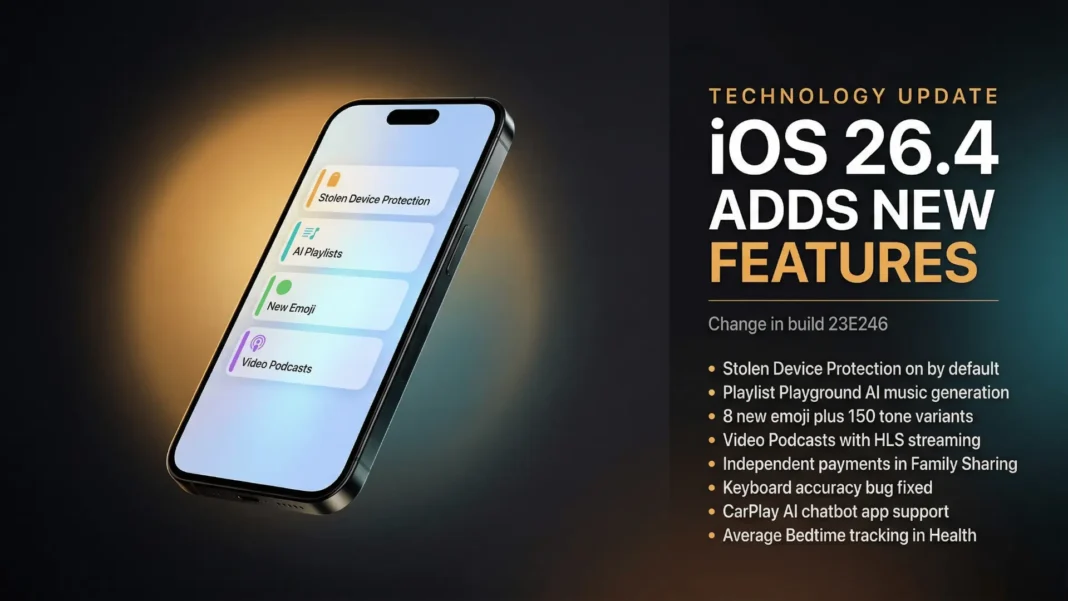
- iOS 26.4 (build 23E246) RC released to developers and public beta testers on March 17-18, 2026, with official OTA launch expected March 23 or 24
- Stolen Device Protection now activates by default for all iPhones that have Two-Factor Authentication enabled
- Apple Music gains Playlist Playground, an Apple Intelligence AI tool that generates playlists from plain-text prompts
- Eight new unique emoji added, including orca, ballet dancer, trombone, and treasure chest
Apple shipped one of iOS 26’s most security-significant updates in build 23E246, and most users will never notice the most important change. iOS 26.4 flips Stolen Device Protection to on by default for every eligible iPhone, a decision that directly addresses real-world theft patterns documented since iOS 17.3’s 2024 launch. Alongside that security shift, the update delivers AI playlist generation, video podcast support, CarPlay AI app compatibility, independent Family Sharing payments, and a long-overdue keyboard accuracy fix.
The Feature That Protects the Most Users: Stolen Device Protection
Stolen Device Protection is now enabled by default in iOS 26.4 for all iPhones with Two-Factor Authentication active. Apple originally made this feature opt-in when it launched with iOS 17.3 in January 2024, following documented cases where thieves observed victims entering passcodes before stealing their phones and accessing financial accounts.
With the default-on change, actions like accessing stored passwords, viewing saved credit cards, turning off Lost Mode, and disabling the feature itself all require biometric authentication through Face ID or Touch ID, with no passcode fallback. Sensitive actions such as changing your Apple Account password carry an additional one-hour security delay, even after biometric confirmation.
Users who find the added friction inconvenient can still turn off Stolen Device Protection manually in Settings. If Two-Factor Authentication is not enabled on your Apple Account, the feature will remain off after updating.
Apple Music Gets an AI Brain: Playlist Playground
Playlist Playground lets you type a mood, feeling, activity, or even something entirely abstract, and Apple Music generates a matching playlist. Apple has tagged the feature as beta, which signals it may not always produce expected results. It is currently limited to US English.
The update also brings a dedicated Ambient Music widget for quicker access to Apple’s curated Sleep, Chill, Productivity, and Wellbeing background sound playlists directly from the home screen. A new Concerts section helps discover nearby shows from artists already in your library and recommends new artists based on listening history. Full-screen album and playlist backgrounds now appear in Now Playing for a more immersive browsing experience.
Music Recognition in Control Center, Apple’s built-in Shazam integration, can now be used when offline. Apple describes the behavior precisely: it “identifies songs without an internet connection and delivers results automatically when you’re back online.”
Eight New Emoji Join the Keyboard
iOS 26.4 adds eight new unique emoji characters: trombone, treasure chest, distorted face, hairy creature, fight cloud, orca, landslide, and ballet dancer. The update also includes 150 additional emoji representing gender and skin tone combinations for the existing People With Bunny Ears and People Wrestling characters, bringing the total new characters to 158.
Cross-platform emoji rendering depends on recipient device updates, meaning Android users may see placeholder squares until their platform adds support for the same character set.
Video Podcasts and CarPlay AI Apps: Two Features with Long-Term Reach
The Podcasts app receives native video episode support in iOS 26.4 with HLS streaming, giving users the ability to toggle between audio and video modes and download video episodes for offline playback. This closes a long-standing gap between Apple Podcasts and video podcast consumption on other platforms.
CarPlay now supports third-party AI chatbot apps, with the technical framework included in iOS 26.4. Apple’s CarPlay Developer Guide explicitly lists this as an iOS 26.4 feature, though companies like OpenAI and Google must each release updated apps with CarPlay support before end users can interact with their respective assistants through a car display.
The Keyboard Fix Apple Should Have Shipped Months Ago
iOS 26.4’s official release notes confirm: “Improved keyboard accuracy when typing quickly.” Since iOS 26 launched, a keyboard bug caused incorrect characters to register at normal typing speed, generating consistent complaints across user forums. The fix is applied automatically after updating and requires no user action.
Independent Payment Methods for Family Sharing
Adults in a Family Sharing group no longer need to share a single payment method. Apple’s iOS 26.4 release notes state directly: “Purchase Sharing lets adult members in Family Sharing groups use their own payment method when making purchases, without relying on the family organizer.” Apple also updated its official Support Document to reflect this change.
Since Family Sharing launched, purchases billed to the family organizer’s card was the only option short of disabling purchase sharing entirely or using gift cards. This update removes that restriction for all adult members.
Accessibility and Interface Refinements
A new Reduce Bright Effects setting minimizes bright flashes that occur when tapping UI elements like buttons. Reduce Motion in iOS 26.4 more reliably suppresses Liquid Glass animations for users sensitive to on-screen movement, going further than it did in previous iOS 26.x releases.
Subtitle and caption settings are now accessible directly from the captions icon while viewing media, rather than requiring a trip through the Settings app. Freeform gains Apple Creator Studio support with advanced image creation and editing tools and a premium content library. Reminders adds the ability to mark items as urgent from the Quick Toolbar or by touching and holding, with a filter for urgent reminders in Smart Lists.
Average Bedtime Tracking in Health
The Sleep feature in the Health app now records your average bedtime over the past two weeks, giving a clearer picture of how bedtime consistency affects overall sleep quality. This is a data point the Health app did not surface previously and requires no setup beyond having Sleep tracking active.
What’s New for iPad: iPadOS 26.4 Additions
iPadOS 26.4 ships the same feature set as iOS 26.4 but adds two iPad-specific refinements. A compact tab bar option in Safari gives users more screen real estate while browsing and allows searching directly from the active tab. An open window indicator appears when switching to an app with hidden or minimized windows, reducing the multi-window confusion that arrived with iPadOS 26.
Supported Devices
iOS 26.4 supports all devices that ran iOS 26, which covers iPhones from iPhone SE 2nd generation and iPhone 11 through the iPhone 17 lineup. Apple Intelligence features within iOS 26.4 require iPhone 15 Pro or newer. iPhone XS, iPhone XS Max, and iPhone XR are not supported, as Apple dropped them from iOS 26 entirely.
| Device Range | iOS 26.4 Support | Apple Intelligence |
|---|---|---|
| iPhone 11 to iPhone 14 | Yes | No |
| iPhone SE 2nd and 3rd gen | Yes | No |
| iPhone 15 (base/Plus) | Yes | No |
| iPhone 15 Pro / Pro Max | Yes | Yes |
| iPhone 16 series | Yes | Yes |
| iPhone 17 / Air / 17e | Yes | Yes |
What Didn’t Make It: Siri and RCS Encryption
iOS 26.4 does not include the significantly upgraded, personalized Siri features Apple has been developing. The RCS end-to-end encryption feature that appeared in iOS 26.4 betas was confirmed by Apple as a developer test only. Apple’s official release notes state explicitly that RCS encryption “is not shipping in this release.”
Considerations
Reality Composer for iOS cannot export projects as .reality or USDZ files in this release, a known limitation noted in Apple’s developer documentation. Playlist Playground carries a beta tag and is currently limited to US English, meaning users outside the US may not have access at launch. The one-hour security delay for Apple Account changes in Stolen Device Protection applies when the device is away from familiar locations such as home or work.
How to Install iOS 26.4 (23E246)
- Open Settings on your iPhone or iPad
- Tap General, then Software Update
- Select iOS 26.4 and tap Download and Install
- Ensure your device has at least 50% battery or is plugged in
- Enter your passcode when prompted and wait for the restart
Frequently Asked Questions (FAQs)
What is iOS 26.4 build number?
iOS 26.4 carries build number 23E246. Apple released the RC to developers and public beta testers on March 17-18, 2026, with the official OTA update expected on March 23 or 24. The beta cycle for this release began in February 2026.
Is Stolen Device Protection on by default in iOS 26.4?
Yes, for iPhones with Two-Factor Authentication enabled. iOS 26.4 turns Stolen Device Protection on automatically for those users. It requires Face ID or Touch ID to access passwords, payment cards, and to disable Lost Mode, with no passcode fallback. Users can turn it off in Settings under Face ID and Passcode.
What is Playlist Playground in iOS 26.4?
Playlist Playground is an Apple Intelligence feature in Apple Music that generates playlists from text prompts. You describe a mood, activity, or feeling, and the AI builds a matching playlist. The feature is currently in beta and is limited to US English.
Does iOS 26.4 fix the keyboard typing bug?
Yes. iOS 26.4 includes an explicit fix confirmed in Apple’s official release notes: “Improved keyboard accuracy when typing quickly.” The improvement is applied automatically after updating and requires no user action.
Is RCS end-to-end encryption available for iPhone users in iOS 26.4?
No. Apple’s official iOS 26.4 release notes confirm that RCS end-to-end encryption “is not shipping in this release.” It was present in betas only as a developer test, and Apple has stated it will ship in a future iOS 26 update.
Which iPhones support iOS 26.4?
iOS 26.4 supports iPhone SE 2nd generation and later, iPhone 11 and later, and all iPhone 17 models including iPhone Air and iPhone 17e. iPhone XS, XS Max, and XR are not supported. Apple Intelligence features require iPhone 15 Pro or newer.
What new emoji are in iOS 26.4?
iOS 26.4 adds eight unique new emoji: trombone, treasure chest, distorted face, hairy creature, fight cloud, orca, landslide, and ballet dancer. The update also includes 150 gender and skin tone variants for existing emoji, totaling 158 new characters.
Does iPadOS 26.4 have any iPad-specific features?
Yes. iPadOS 26.4 adds a compact tab bar option in Safari with the ability to search from the active tab, and an open window indicator when switching between apps with hidden or minimized windows. Both additions are exclusive to iPadOS 26.4.

