

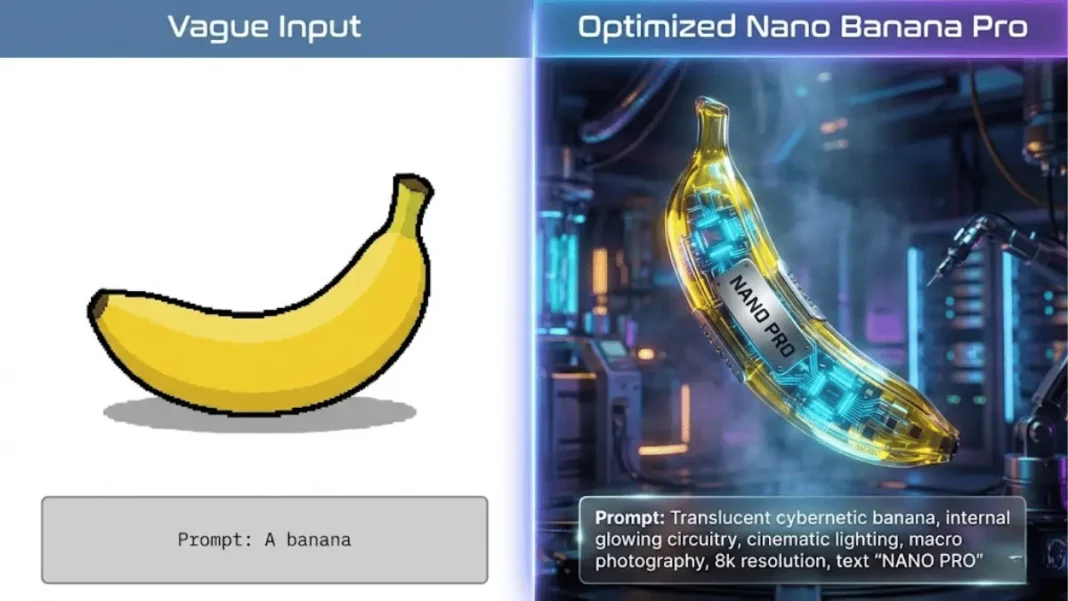
Summary: Nano Banana Pro requires natural, complete-sentence prompts with five essential elements: subject, composition, action, location, and visual style. Unlike keyword-based generators, it uses a “thinking process” to reason through prompts before generating, achieving 94% text accuracy and 4K resolution. The ICS framework (Image type, Content, Style) combined with specific camera, lighting, and material details produces professional results. For character consistency, use up to 14 reference images, and break complex edits into step-by-step instructions.
Nano Banana Pro transforms simple text instructions into professional 4K images in under 12 seconds, but only if you know how to prompt it correctly. Google’s latest AI image generator, powered by Gemini 3 Pro, achieves 94% text accuracy and generates images 10 times faster than Midjourney yet most users struggle with inconsistent results because they treat it like older keyword-based models.
This guide reveals the exact prompting strategies professional designers use to create product photography, infographics, and character-consistent illustrations that outperform DALL-E 3 and Midjourney in specific use cases.
Table of Contents
What Is Nano Banana Pro and Why Prompting Matters
Nano Banana Pro represents a fundamental shift from “fun” image generation to functional professional asset production. Released in November 2025, this Gemini 3 Pro-powered model excels in text rendering across multiple languages, character consistency for up to 5 people, visual synthesis with Google Search grounding, and native 4K output at 4096×4096 pixels.
Core Capabilities That Set It Apart
The model supports multiple aspect ratios from cinematic 21:9 to vertical 9:16, processes up to 14 reference images simultaneously for brand consistency, and delivers resolution options at 1K, 2K, and 4K. Unlike DALL-E 3’s 1792px maximum or Midjourney’s artistic interpretation approach, Nano Banana Pro prioritizes prompt accuracy and practical usability for commercial applications.
The Thinking Process Behind Generation
Nano Banana Pro employs a reasoning mechanism that analyzes prompts before generation, automatically fixing logic errors and spatial relationships. This “thinking process” explains why it handles complex instructions like “create an infographic showing how to make elaichi chai” with proper step sequencing and labeled diagrams.
Essential Elements of Effective Nano Banana Pro Prompts
The model performs optimally with natural, complete-sentence prompts rather than comma-separated keyword lists. Professional results require structured instructions that provide clear subject depiction, environmental context, and stylistic direction.
The ICS Framework: Image, Content, Style
Every high-performing prompt should specify three core elements:
- Image type: Blueprint, infographic, diagram, product photo, editorial illustration
- Content: Source data, information hierarchy, subjects, objects, and relationships
- Visual style: Survival guide aesthetic, McKinsey presentation format, comic book style, photorealistic render
Example: “Create a technical blueprint (Image) showing smartphone internal components with labeled parts (Content) in an engineering schematic style with blue linework on dark background (Style).”
Five Core Components Every Prompt Needs
Professional prompts integrate these elements:
- Subject: Specific details beyond generic descriptions. Replace “a woman” with “a sophisticated elderly woman wearing a vintage Chanel-style suit”
- Composition/Framing: Canvas definition like “9:16 vertical poster” or “cinematic 21:9 wide shot”
- Action: What’s happening in the scene, including gestures, movements, or interactions
- Location: Environmental context with architectural details, weather conditions, time of day
- Visual Style: Artistic direction, color palette, mood, and reference aesthetics
Advanced Prompting Strategies for Professional Results
Moving beyond basic descriptions requires cinematographer-level control over technical parameters.
Camera Controls and Composition Techniques
Nano Banana Pro understands photography terminology for precise framing control. Specify camera angles (“low-angle shot creating heroic perspective,” “bird’s-eye view directly overhead”), focal length (“85mm portrait lens,” “wide-angle 24mm architecture shot”), and depth of field (“shallow f/1.8 with bokeh background,” “deep f/16 for landscape detail”).
The model handles composition rules naturally: “Rule of thirds placement with subject on left vertical line,” “symmetrical centered composition,” or “dynamic diagonal leading lines.”
Lighting and Atmospheric Details
Lighting instructions dramatically impact mood and professionalism. Professional prompts specify light quality (“golden hour backlighting creating long shadows,” “soft diffused studio lighting with fill,” “harsh noon sunlight with deep contrast”), direction (“Rembrandt lighting from 45-degree angle,” “rim lighting separating subject from background”), and color temperature (“warm 3200K tungsten glow,” “cool 5600K daylight balance”).
Atmospheric elements add depth: “morning mist creating layers,” “rain-wet surfaces with reflections,” “dust particles visible in light shafts.”
Material and Texture Specifications
Describing materiality produces photorealistic results. Use terms like “matte finish,” “brushed steel,” “soft velvet,” “crumpled paper,” “glossy lacquer,” or “weathered concrete.” For product photography, specify “frosted glass with light diffusion,” “anodized aluminum with fingerprint resistance,” or “premium leather with visible grain texture.”
Text Rendering and Typography Prompts
Nano Banana Pro’s 94% text accuracy surpasses DALL-E 3 (78%) and Midjourney V7 (71%), making it ideal for graphics requiring legible typography.
Achieving 94% Text Accuracy
For perfect text rendering, provide exact content in quotes and specify typography details. Example: “Create a motivational poster with the text ‘Dream Bigger’ in bold sans-serif typography, centered, white text on gradient blue-to-purple background, modern minimalist design.”
The model handles complex scenarios: “Design a product label with ‘Organic Green Tea’ as the main heading in elegant serif font, ‘100g Premium Blend’ as subtext in smaller weight, ingredients list in 8pt readable font, arranged on a vertical rectangular label”.
Multi-Language Text Generation
Nano Banana Pro excels at non-English text rendering. Specify language explicitly: “Translate all English text on these three yellow and blue cans into Korean, while keeping everything else the same”. The model supports Hindi, Japanese, Korean, Arabic, and European languages with proper character formation.
Multi-Image Blending and Character Consistency
The model’s ability to process up to 14 reference images simultaneously enables brand consistency and character continuity.
Reference Image Integration (Up to 14 Images)
Upload reference images and instruct the model: “Blend these 6 product shots into a cohesive lifestyle scene showing all items on a modern desk, maintaining exact product appearance, colors, and branding”. The system preserves visual identity while creating new compositions.
For brand work, provide logo files, color swatches, and style guides: “Create a social media carousel using these 4 brand images, maintaining the exact color palette (#FF6B35, #004E89, #F7F7FF), typography style, and logo placement conventions.”
Maintaining Character Identity Across Scenes
Nano Banana Pro maintains consistency for up to 5 people across multiple generations. Provide clear reference images and descriptive anchors: “Using this reference photo, show the same woman in three different settings: office meeting, coffee shop, outdoor park. Maintain her appearance, clothing style, and facial features exactly”.
For comics and sequential art, describe characters with permanent identifiers: “Create a 4-panel comic featuring the blue-haired scientist character from the reference image. Panel 1: lab setting with beakers. Panel 2: examining microscope. Panel 3: excited discovery expression. Panel 4: showing results to colleague. Maintain character design consistency throughout”.
Common Prompting Mistakes and How to Avoid Them
Most inconsistent results stem from prompt structure issues rather than model limitations.
Vague vs. Specific Instructions
Ineffective: “Make it nicer” or “improve the image”
Effective: “Apply a dreamy soft-focus effect, increase warm color temperature by 15%, add subtle lens flare in top-right corner”
Ineffective: “A car”
Effective: “A matte black 2024 sports coupe with aggressive front grille, LED headlights, and 20-inch alloy wheels, photographed at 3/4 angle in studio lighting against seamless white background”
Overloading Single Prompts
Break complex requests into sequential steps. Instead of “Create a product mockup with logo, change background to gradient, add shadows, resize to Instagram format,” execute as:
- “Create clean product mockup with transparent background”
- “Add brand logo in top-right corner at 80% opacity”
- “Replace background with vertical blue-to-teal gradient”
- “Add realistic drop shadow beneath product, 45-degree angle, 20% opacity”
- “Resize final composition to 1080×1350 Instagram portrait format”
This step-by-step approach gives Nano Banana Pro’s reasoning process clear checkpoints.
Nano Banana Pro vs. Competitors: Prompting Differences
Understanding model-specific strengths optimizes your workflow across platforms.
How Nano Banana Pro Differs from DALL-E 3
DALL-E 3 uses conversational, natural language prompts with built-in safety interpretation. Nano Banana Pro requires more technical specificity for professional results but offers superior text rendering and resolution.
DALL-E 3 style: “Create a cozy coffee shop scene with a barista making latte art”
Nano Banana Pro style: “Interior photograph of modern coffee shop with exposed brick wall, industrial pendant lighting, barista in denim apron creating heart-pattern latte art in white ceramic cup, shot with 50mm lens at f/2.8, warm color grading with boosted amber tones, shallow depth of field, afternoon window light from left side”
Midjourney vs. Nano Banana Pro Prompt Styles
Midjourney V7 excels at artistic interpretation and fantastical scenes but requires different prompt syntax. Midjourney responds well to comma-separated aesthetic keywords and style references. Nano Banana Pro prefers grammatically complete instructions with technical parameters.
Midjourney approach: “cyberpunk street market, neon lights, rain-slicked pavement, Blade Runner aesthetic, cinematic, highly detailed –ar 16:9 –v 7”
Nano Banana Pro approach: “Create a cinematic 16:9 photograph of a futuristic street market at night with vibrant neon signs in pink and blue, wet pavement reflecting colorful lights, crowded vendor stalls with holographic displays, atmospheric fog, shot with cinematic color grading emphasizing teal shadows and orange highlights, inspired by Blade Runner visual style”
Troubleshooting Prompt Issues
When outputs don’t match expectations, systematic debugging identifies the problem.
Handling Misinterpretation
If Nano Banana Pro misinterprets instructions, simplify language and remove ambiguous terms. Test with progressively detailed prompts: start basic, generate, then add one specific element at a time to identify which instruction causes confusion.
Use an AI assistant to refine prompts: “Convert this vague idea into a structured Nano Banana Pro prompt: I want a tech startup office vibe with young team working”. Gemini 3 can optimize your natural language into model-effective instructions.
Resolution and Output Problems
For 4K generation, explicitly specify “Generate at 4K resolution (4096×4096)” and ensure your account tier supports high-resolution output. Free tier users receive 1MP (approximately 1024×1024) maximum.
If experiencing “Internet or Internal Errors,” check connection stability, clear browser cache, avoid peak usage hours (typically 9-11 AM and 6-8 PM IST), and verify Google AI service status. Restart your Gemini session if errors persist.
Review prompts against safety policies content filters may block generation without clear error messages. Rewrite using neutral terms while maintaining creative intent.
Nano Banana Pro vs. Competitors (2025)
| Feature | Nano Banana Pro | DALL-E 3 | Midjourney V7 |
|---|---|---|---|
| Text Accuracy | 94% | 78% | 71% |
| Max Resolution | 4K (4096×4096) | 1792px | Varies by plan |
| Generation Speed | 8-12 seconds | 15-25 seconds | 20-30 seconds |
| Reference Images | Up to 14 | Limited | Style references only |
| Character Consistency | 5 people | Session-bound | Requires manual prompting |
| Search Grounding | Yes (Google Search) | No | No |
| Free Tier | 3 images/day (1MP) | 40-50/3hrs via ChatGPT | Limited trial |
| Best For | Text-heavy graphics, brand consistency, infographics | Conversational editing, ease of use | Artistic creativity, fantasy scenes |
Prompt Element Comparison
| Model | Vague Approach | Nano Banana Pro Optimized |
|---|---|---|
| Subject | “A woman” | “Sophisticated elderly woman wearing vintage Chanel-style suit” |
| Material | “Metal finish” | “Brushed steel with matte coating, fingerprint-resistant surface” |
| Lighting | “Good lighting” | “Golden hour backlighting creating long shadows, warm 3200K color temp” |
| Composition | “Nice framing” | “9:16 vertical format, rule of thirds with subject on left line, 50mm lens equivalent” |
| Edit Request | “Make it nicer” | “Apply dreamy soft-focus, increase warm tones 15%, add lens flare top-right corner” |
Resolution & Access Tiers
| User Tier | Platform | Max Resolution | Daily Quota | Cost (Approx.) |
|---|---|---|---|---|
| Free | Gemini App | 1MP (~1024×1024) | 3 generations | Free |
| Pro Subscriber | Gemini App + AI Mode | Up to 4K (4096×4096) | Extended quota | Subscription fee |
| Ultra Subscriber | Gemini Ultra/Flow | Full 4K | High priority access | Premium subscription |
| Developer | AI Studio/Vertex AI | 4K | API billing | Pay-per-use |
Frequently Asked Questions (FAQs)
What is Nano Banana Pro and how does it work?
Nano Banana Pro is Google’s advanced AI image generator powered by Gemini 3 Pro, launched in November 2025. It uses a “thinking process” that reasons through prompts before generation, automatically fixing logic errors and spatial relationships. The model excels at text rendering with 94% accuracy, supports 4K resolution output, and can blend up to 14 reference images while maintaining character consistency for 5 people.
How do I access Nano Banana Pro for free?
Free access provides 3 daily image generations at 1MP resolution (approximately 1024×1024) through the Gemini App. Download the Gemini App for Android or iOS, sign in with your Google Account, select “Thinking Model,” and choose image generation. Free tier includes visible watermarks and limited resolution, suitable for testing but not professional commercial use.
What’s the best prompt structure for Nano Banana Pro?
Use natural complete sentences incorporating five essential elements: specific subject description, composition/framing, action, location, and visual style. Apply the ICS framework specify Image type (blueprint, infographic, photo), Content details (data, subjects, relationships), and Style preferences (aesthetic, mood, color palette). Add technical parameters like camera angle, lighting conditions, and material textures for professional results.
How is Nano Banana Pro different from DALL-E 3 and Midjourney?
Nano Banana Pro achieves 94% text accuracy versus DALL-E 3’s 78% and Midjourney V7’s 71%, making it superior for text-heavy graphics. It generates images in 8-12 seconds (10x faster than Midjourney’s 20-30 seconds) and supports native 4K output versus DALL-E 3’s 1792px maximum. However, Midjourney V7 excels at artistic interpretation and fantastical scenes, while DALL-E 3 offers more conversational, forgiving prompting.
Why are my Nano Banana Pro results inconsistent?
Inconsistent results typically stem from vague prompting rather than model limitations. Replace generic terms like “make it nicer” with specific instructions: “increase warm color temperature by 15%, add soft-focus effect, subtle lens flare in top-right corner”. Break complex requests into sequential steps instead of overloading single prompts. Use descriptive anchors: change “a woman” to “sophisticated elderly woman wearing vintage Chanel-style suit”.
Can Nano Banana Pro maintain character consistency across multiple images?
Yes, Nano Banana Pro maintains visual consistency for up to 5 people across different scenes. Provide clear reference images and descriptive anchors: “Using this reference photo, show the same woman in office meetings, coffee shop, and outdoor park settings. Maintain her appearance, clothing style, and facial features exactly”. The model can blend up to 14 reference images for brand consistency and character continuity.
How do I achieve perfect text rendering?
Provide exact text content in quotes with typography specifications. Example: “Create a motivational poster with the text ‘Dream Bigger’ in bold sans-serif typography, centered, white text on gradient blue-to-purple background, modern minimalist design.” Include font style, weight, size, positioning, and color details. For multi-language text, explicitly state the target language to leverage the 94% accuracy rate.
What subscription tier do I need for the 4K generation?
4K resolution (4096×4096) requires Gemini Pro or Ultra subscription. Free tier users receive maximum 1MP resolution (~1024×1024) with 3 daily generations. Pro subscribers access extended quotas with 4K support, while Ultra subscribers receive high-priority processing and full creative controls. Developers can access 4K through Google AI Studio or Vertex AI with API billing.

Featured Snippet Boxes
What is Nano Banana Pro?
Nano Banana Pro is Google’s advanced AI image generator powered by Gemini 3 Pro, launched in November 2025. It creates professional 4K images with 94% text accuracy in 8-12 seconds, supporting multi-language text rendering, character consistency for up to 5 people, and multi-image blending of up to 14 reference images.
How do I write effective Nano Banana Pro prompts?
Use natural complete sentences with five core elements: specific subject description, composition/framing, action, location, and visual style. Apply the ICS framework to specify Image type, Content details, and Style preferences. Include camera controls, lighting details, and material textures for professional results.
What makes Nano Banana Pro different from DALL-E 3?
Nano Banana Pro achieves 94% text accuracy versus DALL-E 3’s 78%, supports native 4K output (4096×4096) versus DALL-E’s 1792px maximum, and integrates Google Search for factual verification. It can blend up to 14 images and maintain consistency for 5 people across scenes.
How to access Nano Banana Pro?
Access Nano Banana Pro through the Gemini App (free tier: 3 images/day at 1MP; Pro/Ultra: extended quota with 4K support), Google App AI Mode in the US, Google AI Studio for developers, or Vertex AI for enterprise users. Download Gemini App, sign in, select “Thinking Model,” and choose image generation.
What are common Nano Banana Pro prompting mistakes?
Avoid vague instructions like “make it nicer” use specific details like “increase warm color temperature by 15%, add soft-focus effect”. Don’t overload single prompts; break complex requests into sequential steps. Replace generic terms with specific descriptions: change “a woman” to “sophisticated elderly woman wearing vintage Chanel-style suit”.
How to achieve perfect text rendering in Nano Banana Pro?
Provide exact text content in quotes and specify typography details: “Create a poster with ‘Dream Bigger’ in bold sans-serif, centered, white on gradient blue background”. Include font style, weight, size, positioning, and color specifications. For multi-language text, explicitly state the target language to leverage Nano Banana Pro’s 94% accuracy.

