

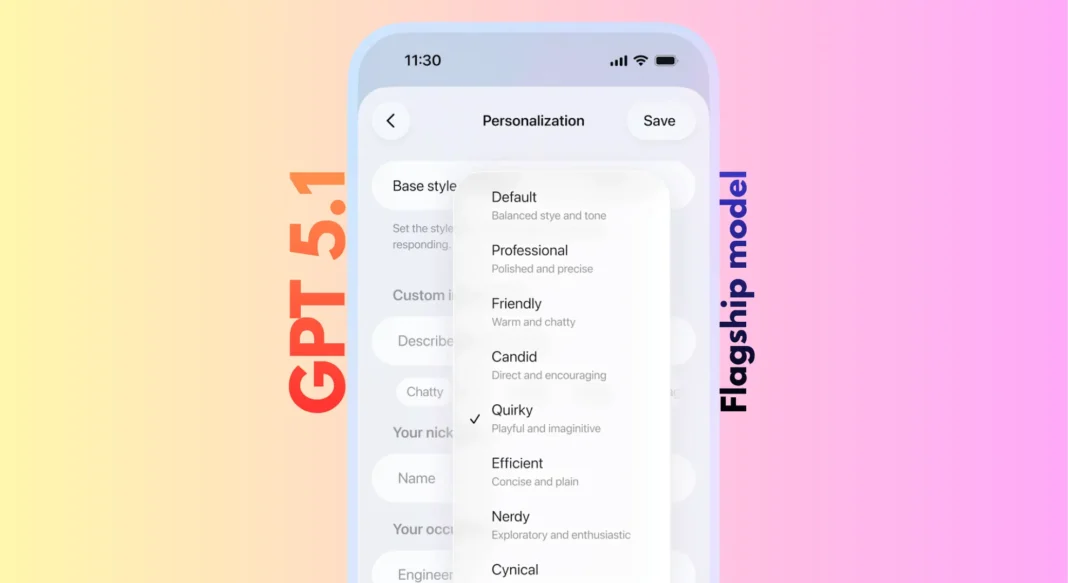
GPT-5.1 is OpenAI’s November 2025 upgrade to ChatGPT that makes conversations warmer and more natural. It introduces two models GPT-5.1 Instant (faster, friendlier) and GPT-5.1 Thinking (deeper reasoning) plus adaptive reasoning that lets AI “think before responding” on complex questions. You also get six new personality presets to customize ChatGPT’s tone. Rolling out now to paid users, with free access coming soon.
ChatGPT just got a major personality upgrade and you’ll notice the difference immediately. OpenAI’s GPT-5.1 release transforms how ChatGPT communicates, making it warmer, more conversational, and genuinely enjoyable to interact with rather than feeling like you’re talking to a helpful robot. After months of user feedback saying AI should be both intelligent and pleasant to use, OpenAI delivered two upgraded models alongside powerful new customization tools that let you shape ChatGPT’s personality to match your mood.
Whether you’re a developer looking for smarter coding assistance, a content creator seeking natural-sounding AI writing, or someone who just wants ChatGPT to feel less mechanical, GPT-5.1 represents a meaningful leap forward in conversational AI. Here’s everything you need to know about what changed, how to access it, and whether it lives up to the hype.
Table of Contents
What Is GPT-5.1?
GPT-5.1 is OpenAI’s latest AI model released in November 2025, upgrading ChatGPT with warmer conversational tone, improved instruction following, and adaptive reasoning. It includes two variants: GPT-5.1 Instant for everyday use and GPT-5.1 Thinking for complex problem-solving, both rolling out to paid users first.
Rather than a completely new model generation, GPT-5.1 represents a significant iterative upgrade to the GPT-5 series that launched in August 2025. OpenAI adopted the “.1” naming convention to signal meaningful improvements while staying within the same generation. Think of it like a major software update that fundamentally changes how the app feels, not just bug fixes.
The Two Models Explained
GPT-5.1 comes in two distinct variants optimized for different use cases:
GPT-5.1 Instant serves as the default model for most ChatGPT interactions. It’s designed for everyday queries, content creation, casual conversations, and general problem-solving. The “Instant” designation reflects its speed responses typically arrive within 1-3 seconds while maintaining the warmer, more natural tone. This model now includes adaptive reasoning, meaning it can automatically decide when to “think before responding” on more challenging questions without making you wait unnecessarily.
GPT-5.1 Thinking represents OpenAI’s advanced reasoning model, optimized for complex tasks requiring deeper analysis. It’s the successor to GPT-5 Thinking and excels at advanced mathematics, intricate coding challenges, multi-step problem-solving, and technical explanations. The November 2025 update made GPT-5.1 Thinking faster on simple tasks while more persistent on genuinely difficult problems. It also produces clearer responses with less jargon and fewer undefined technical terms, making OpenAI’s most capable model more accessible to non-experts.
GPT-5.1 Auto continues to route each query to whichever model best suits it, so you don’t need to manually choose. Most users will simply notice that answers across the board feel both smarter and more natural.
Release Timeline and Availability
OpenAI is rolling out GPT-5.1 gradually starting November 11, 2025:
Immediate access: ChatGPT Pro, Plus, Go, and Business subscribers. Seven-day early toggle: Enterprise and Edu plans (off by default, allowing organizations to test before full deployment). Coming soon: Free and logged-out users will receive access gradually over the following weeks. API release: Both GPT-5.1 Instant and Thinking arrive in the API later in November 2025.
If you check ChatGPT today and don’t see GPT-5.1 yet, that’s expected OpenAI is rolling it out gradually over several days to maintain performance stability. Legacy GPT-5 models remain available through a “legacy models dropdown” for three months, giving paid subscribers time to compare at their own pace.
Key Features and Improvements
Warmer, More Human Conversations
The most immediately noticeable change is how GPT-5.1 communicates. Previous versions of ChatGPT, while helpful, often felt robotic and overly structured. GPT-5.1 Instant surprised early testers with its playfulness while maintaining clarity and usefulness.
In OpenAI’s official comparison examples, a user asked for stress relief tips. GPT-5 responded with a comprehensive, well-organized guide complete with emoji headers, bullet points, and detailed techniques perfectly helpful but reading more like a wellness article than a conversation. GPT-5.1 Instant took a completely different approach, opening with “I’ve got you, Ron that’s totally normal” and offering personalized, conversational suggestions that felt like advice from a friend who happens to know a lot about stress management.
The warmth isn’t just surface-level personality; GPT-5.1 demonstrates genuine empathy in emotionally charged situations. When a user complained about spilling coffee before a meeting, GPT-5.1 Thinking responded: “Hey no, they didn’t. You’re rattled, so your brain is doing that thing where it catastrophizes a tiny mishap into a character flaw”. This level of emotional intelligence and conversational nuance represents a significant leap in making AI feel less mechanical.
Adaptive Reasoning (Think Before Responding)
For the first time, GPT-5.1 Instant can use adaptive reasoning to automatically decide when to spend extra time thinking through challenging questions. This means you get thorough, accurate answers on complex tasks while still receiving quick responses for simple queries.
The technology works by evaluating query complexity in real-time. For straightforward questions like “What’s the capital of France?” GPT-5.1 Instant responds immediately. For multi-step reasoning problems, mathematical proofs, or intricate coding challenges, it allocates additional processing time to work through the problem more carefully.
This adaptive approach delivers significant performance improvements on technical benchmarks. GPT-5.1 Instant shows meaningful gains on AIME 2025 (advanced mathematics) and Codeforces (competitive programming) evaluations compared to its predecessor. The model achieves this without forcing users to manually select a “thinking” mode for every difficult question the AI figures it out.
Better Instruction Following
GPT-5.1 more reliably does what you actually ask. OpenAI demonstrated this with a deceptively simple constraint: “Always respond with six words”.
When asked “where should i travel this summer?” GPT-5 responded: “How about exploring Japan this summer?” followed by a lengthy explanation that completely ignored the six-word constraint. GPT-5.1 Instant nailed it: “Consider Japan, Italy, Greece, Canada, Iceland”. On the follow-up “why there?” GPT-5 again broke the rule, while GPT-5.1 Instant delivered: “Scenery culture cuisine climate friendly locals”.
This improvement extends far beyond party tricks. Better instruction following means GPT-5.1 excels at complex multi-step tasks, maintains specific formatting requirements, adheres to custom instructions more precisely, and follows technical specifications in code generation. For developers and power users who craft detailed prompts, this reliability upgrade eliminates frustrating situations where the AI “understood” your request but didn’t quite execute it.
Clearer Technical Explanations
GPT-5.1 Thinking produces responses with significantly less jargon and fewer undefined terms. OpenAI illustrated this by asking both models to explain BABIP (Batting Average on Balls In Play) and wRC+ (Weighted Runs Created Plus) two advanced baseball statistics.
GPT-5 delivered a technically accurate but dense explanation filled with formulas and abbreviations like “wOBA,” “wRAA,” and “GPQA Diamond”. While comprehensive, it assumed significant statistical knowledge. GPT-5.1 Thinking started with “Nice, nerd stat time 🧢” and broke down each concept in genuinely plain English: “BABIP measures how often a ball put into the field of play falls in for a hit, excluding home runs and strikeouts”. It explained why it matters, how people actually use it, and provided context without drowning users in jargon.
This accessibility improvement makes OpenAI’s most capable model useful for a broader audience. You no longer need a technical background to benefit from GPT-5.1 Thinking’s advanced reasoning on complex subjects.

GPT-5.1 vs GPT-5: What Changed?
| Feature | GPT-5 | GPT-5.1 | Improvement |
|---|---|---|---|
| Conversational Tone | Formal, helpful | Warm, playful | More natural interactions |
| Adaptive Reasoning | No | Yes (Instant & Thinking) | Smarter on complex tasks |
| Instruction Following | Good | Excellent | Higher constraint accuracy |
| Jargon Level | Technical | Simplified | More accessible |
| Response Style | Structured lists | Conversational flow | Feels human |
| Thinking Model Speed | Fixed processing | Adaptive (faster on simple tasks) | Better efficiency |
| Empathy/Tone | Professional | Warm, empathetic | Emotionally intelligent |
| Rollout Status | Legacy (3-month sunset) | Current default | Active support |
Side-by-Side Response Examples
The differences become crystal clear when you see actual responses. In the stress relief example mentioned earlier, GPT-5 provided a comprehensive wellness guide organized into time-based categories with emoji headers and detailed bullet points. GPT-5.1 Instant opened with personalized acknowledgment (“I’ve got you, Ron that’s totally normal”), organized suggestions around feelings (“If your mind feels scattered”), and closed by offering to create a custom 5-minute routine.
Both responses contain helpful information. The distinction lies in how they communicate GPT-5 reads like a well-written article you found online, while GPT-5.1 feels like a conversation with someone who gets where you’re coming from.
The six-word constraint test reveals the instruction-following improvement starkly. GPT-5 understood the instruction (“Understood. All responses will be six”) but immediately broke it with multi-sentence answers. GPT-5.1 Instant maintained the constraint perfectly across multiple exchanges.
Performance Benchmarks
Beyond subjective tone improvements, GPT-5.1 delivers measurable performance gains:
AIME 2025 (American Invitational Mathematics Examination): GPT-5.1 Instant shows significant improvement on advanced math problems thanks to adaptive reasoning. The model can recognize when a problem requires deeper thought and allocate processing time accordingly.
Codeforces (competitive programming): GPT-5.1 demonstrates enhanced coding capabilities, particularly on complex algorithmic challenges. The combination of better instruction following and adaptive reasoning helps the model produce more accurate, efficient code.
MMMU (Massive Multi-discipline Multimodal Understanding): While specific numbers aren’t disclosed in the announcement, OpenAI references improved multimodal understanding across GPT-5.1 models.
How to Access GPT-5.1
For ChatGPT Plus and Pro Users
If you subscribe to ChatGPT Plus or Pro, accessing GPT-5.1 is straightforward:
- Open ChatGPT and log into your account at chat.openai.com
- Look for the model selector at the top of the chat interface
- Select your preferred model: Choose “GPT-5.1 Instant” for everyday use, “GPT-5.1 Thinking” for complex problems, or “GPT-5.1 Auto” to let ChatGPT decide
Important note: Due to gradual rollout, you might not see GPT-5.1 options immediately even with a paid subscription. OpenAI is rolling out access over several days to maintain performance stability. If GPT-5.1 isn’t available yet, check back tomorrow most paid users should have access within a week of the November 11 launch.
During the three-month transition period, you can still access legacy GPT-5 models through a “legacy models dropdown” if you want to compare responses or have specific compatibility needs.
For Free Users
Free ChatGPT users will receive GPT-5.1 access gradually over the weeks following the paid rollout. OpenAI hasn’t announced a specific timeline, but based on previous model launches, expect access within 2-4 weeks of the initial release.
To check availability, simply log into ChatGPT and look for GPT-5.1 options in the model selector. Once available, free users will likely see GPT-5.1 become the new default model, with potential usage limits during peak times.
For Developers (API Access)
Developers can access GPT-5.1 through OpenAI’s API starting later in November 2025:
GPT-5.1 Instant: Available as gpt-5.1-chat-latest GPT-5.1 Thinking: Released as GPT-5.1 in the API Both models include adaptive reasoning capabilities
Here’s a basic implementation example:
pythonfrom openai import OpenAI

client = OpenAI(api_key="your-api-key")

response = client.chat.completions.create(
    model="gpt-5.1-chat-latest",  # Use GPT-5.1 Instant
    messages=[
        {"role": "system", "content": "You are a helpful assistant."},
        {"role": "user", "content": "Explain quantum computing in simple terms"}
    ]
)

print(response.choices[0].message.content)
Migration from GPT-5: Existing API integrations using GPT-5 endpoints will continue working during the transition period. OpenAI recommends testing GPT-5.1 endpoints in development environments before switching production systems. API pricing details will be announced when GPT-5.1 becomes available to developers.
Customizing ChatGPT’s Personality
One of GPT-5.1’s most exciting features is dramatically improved personalization. OpenAI learned that people have strong, varied preferences in how ChatGPT should respond to preferences that change from person to person and even conversation to conversation.
The Six New Personality Presets
ChatGPT now offers six refined personality presets that align with how people naturally use the platform:
| Preset | Best For | Tone | Example Use Case |
|---|---|---|---|
| Default | General use | Balanced, helpful, conversational | Everyday queries, mixed topics |
| Friendly | Casual chat | Warm, empathetic, supportive | Personal advice, brainstorming, emotional support |
| Efficient | Quick answers | Concise, direct, no fluff | Work tasks, research, time-sensitive queries |
| Professional | Business | Formal, polished, precise | Emails, reports, client communications |
| Candid | Honest feedback | Straightforward, genuine, unfiltered | Critiques, honest opinions, direct advice |
| Quirky | Creative work | Playful, unexpected, fun | Creative writing, entertainment, experimentation |
The original Cynical and Nerdy options introduced earlier in 2025 remain available under the same dropdown for users who prefer those personalities.
How to Change ChatGPT’s Tone
Adjusting personality settings takes seconds:
- Open ChatGPT Settings by clicking your profile icon
- Navigate to Personalization in the settings menu
- Select your preferred preset from the personality dropdown
- Changes apply immediately across all conversations, including ongoing chats
Unlike previous implementations where settings only affected new conversations, GPT-5.1’s updates take effect instantly everywhere. If you switch from Default to Friendly mid-conversation, the very next response will reflect that warmer tone.
Advanced Customization
For users who want granular control, OpenAI is experimenting with the ability to tune specific characteristics directly:
Conciseness slider: Adjust response length from brief summaries to comprehensive explanations Warmth adjustment: Fine-tune how friendly vs. professional the tone feels Emoji frequency: Control how often ChatGPT uses emojis in responses Scannability options: Optimize for quick reading with more headers and bullet points
Even more impressively, ChatGPT can proactively offer to update these preferences during conversations when it notices you consistently asking for a certain style. If you frequently say “be more concise” or “explain this more simply,” ChatGPT might suggest updating your personalization settings to make that the default.
This advanced customization is rolling out gradually as an experiment starting with a limited number of users in late November 2025. Both the updated presets and granular controls will continue improving over time based on user feedback.
GPT-5.1 Instant vs Thinking: Which Should You Use?
GPT-5.1 Instant is optimized for speed and everyday queries with warmer tone, while GPT-5.1 Thinking uses extended reasoning for complex problems like coding, math, and multi-step analysis. Instant responds in seconds; Thinking may take longer but delivers more thorough, accurate answers for difficult tasks.
When to Use Each Model
Choose GPT-5.1 Instant for:
- Quick questions and casual conversations
- Content writing, social media posts, and emails
- General information lookup and research
- Brainstorming and creative ideation
- Everyday problem-solving that doesn’t require deep analysis
- Most coding tasks and debugging
Choose GPT-5.1 Thinking for:
- Complex mathematical proofs and advanced calculations
- Intricate coding challenges and algorithm design
- Multi-step reasoning requiring careful analysis
- Technical documentation that demands precision
- Research analysis with nuanced interpretation
- Strategic planning and decision-making frameworks
Performance Comparison
| Metric | GPT-5.1 Instant | GPT-5.1 Thinking |
|---|---|---|
| Response Speed | 1-3 seconds | 5-30+ seconds (adaptive) |
| Best Use | Everyday tasks | Complex problems |
| Reasoning Depth | Standard + adaptive | Extended reasoning |
| Jargon Level | Minimal | Technical but clearer |
| Tone | Warmer, conversational | Warm + empathetic |
| Adaptive Reasoning | Yes (auto-detects complexity) | Yes (more intensive) |
| API Cost | Standard pricing | Premium pricing (TBD) |
The good news: GPT-5.1 Auto intelligently routes queries to the appropriate model automatically. For most users, leaving it on Auto means you’ll get Instant’s speed when appropriate and Thinking’s depth when necessary without manually choosing.
GPT-5.1 vs Competing AI Models
GPT-5.1 vs Claude Opus 4.1
Claude Opus 4.1 from Anthropic excels at long-form content analysis with its 200K token context window compared to GPT-5.1’s 128K. Claude often receives praise for superior coding assistance, particularly for documentation and code explanation. However, GPT-5.1’s warmer conversational style and adaptive reasoning make everyday interactions feel more natural. For general use, GPT-5.1 Instant provides a more enjoyable experience, while Claude might edge ahead for technical writing and extensive document analysis.
GPT-5.1 vs Gemini 2.5 Pro
Google’s Gemini 2.5 Pro boasts an enormous 1 million token context window, making it exceptional for analyzing entire codebases or lengthy documents. Gemini’s multimodal capabilities integrate tightly with Google Workspace and Google Search. GPT-5.1 counters with superior conversational quality and more refined personality customization. The choice often comes down to the ecosystem: Gemini for Google-integrated workflows, GPT-5.1 for versatile conversational AI.
GPT-5.1 vs Grok-4
Grok-4 from xAI demonstrates exceptional mathematical reasoning and benefits from real-time access to X (Twitter) data. On pure reasoning benchmarks, Grok-4 often matches or exceeds GPT-5.1 Thinking. However, GPT-5.1’s adaptive reasoning, warmer tone, and broader availability through ChatGPT’s polished interface make it more practical for most users. Grok excels for users who need cutting-edge math capabilities and real-time social media context.
Leading AI Models Comparison
| Model | Conversational | Reasoning | Context | Speed | Best For |
|---|---|---|---|---|---|
| GPT-5.1 Instant | ★★★★★ | ★★★★☆ | 128K | Fast | Balanced everyday use |
| GPT-5.1 Thinking | ★★★★★ | ★★★★★ | 128K | Medium | Complex reasoning |
| Claude 4.1 Opus | ★★★★☆ | ★★★★★ | 200K | Fast | Coding, documentation |
| Gemini 2.5 Pro | ★★★★☆ | ★★★★☆ | 1M | Medium | Document analysis |
| Grok-4 | ★★★★☆ | ★★★★★ | 256K | Fast | Math, real-time data |
Getting the Most from GPT-5.1
Prompting Best Practices
GPT-5.1’s improvements open new possibilities for effective prompting:
Embrace conversational style: You no longer need to structure prompts like formal commands. Natural, conversational requests work exceptionally well. Be specific about constraints: GPT-5.1’s improved instruction following means it will actually respect formatting requirements, word counts, and specific guidelines. Leverage personality presets strategically: Switch to Professional for work tasks, Friendly for personal advice, Efficient when you’re in a hurry. Trust adaptive reasoning: You don’t need to manually request “think carefully” on complex problems GPT-5.1 Instant automatically allocates extra thinking time when needed.
Productivity Tips
Custom instructions optimization: With GPT-5.1’s better adherence to custom instructions, it’s worth refining your standing preferences to match your workflow. Be specific about formatting, citation style, and communication preferences.
Project-specific configurations: Use different personality presets for different projects. Keep Default or Friendly for creative brainstorming, Professional for client work, Efficient for research tasks.
Workflow integration: If you’re integrating GPT-5.1 through the API, experiment with adaptive reasoning for user-facing features where response quality matters more than speed.
Troubleshooting Common Issues
“Model not available yet” message: GPT-5.1 is rolling out gradually. Paid users should have access within a week of November 11; free users within 2-4 weeks. Check back daily.
Personality preset not working as expected: Ensure you’ve saved changes in personalization settings. Remember that settings now apply immediately to all chats, including ongoing ones.
Performance differences from expectations: During the transition period, compare responses between GPT-5 (in legacy models) and GPT-5.1 for your specific use cases. Some specialized workflows might benefit from continued GPT-5 use during the three-month sunset window.
Limitations and Considerations
Current Limitations
GPT-5.1 represents a significant upgrade, but it’s not perfect:
Gradual rollout delays: Not all users have immediate access, even with paid subscriptions. Patience is required during the multi-day rollout. API pricing not finalized: Developers planning production deployments don’t yet know GPT-5.1’s cost structure. OpenAI will announce pricing when API access launches. Enterprise features pending: Some enterprise-specific features and integrations are still rolling out during the seven-day early access period. Legacy model sunset: While GPT-5 remains available for three months, teams need to plan migration strategies.
When to Consider Alternatives
Despite GPT-5.1’s improvements, other models might better suit specific needs:
For massive context windows: Gemini 2.5 Pro’s 1M token context handles much larger documents. For advanced coding: Claude Opus 4.1 often receives praise for superior code generation and explanation. For mathematical proofs: Grok-4 demonstrates exceptional performance on pure math reasoning tasks. For budget-conscious API use: Until pricing is announced, GPT-5 or other models might offer better cost-efficiency.
Privacy and Safety
OpenAI released a system card addendum detailing GPT-5.1’s safety approach. The model underwent extensive safety testing and red-teaming before release. Data handling practices remain consistent with OpenAI’s existing policies: conversations may be reviewed for safety and quality purposes unless you opt out through data controls. For sensitive applications, review the complete system card and consider enterprise deployment options with enhanced privacy controls.

Frequently Asked Questions (FAQs)
Is GPT-5.1 available for free ChatGPT users?
GPT-5.1 is rolling out first to paid users (Plus, Pro, Go, Business) starting November 2025, with free and logged-out users receiving access gradually over the following weeks. OpenAI hasn’t announced an exact timeline for full free access.
How much does GPT-5.1 cost?
GPT-5.1 is included in existing ChatGPT Plus ($20/month) and Pro subscriptions at no additional cost. API pricing for developers will be announced when GPT-5.1 API access launches later in November 2025.
What’s the difference between GPT-5.1 Instant and Thinking?
GPT-5.1 Instant is optimized for speed and everyday conversations with a warmer tone, while GPT-5.1 Thinking uses extended reasoning for complex problems like advanced coding and math, taking longer but providing more thorough answers.
Can I still use GPT-5 after GPT-5.1 launches?
Yes, GPT-5 models remain available through a “legacy models dropdown” for paid subscribers for three months after GPT-5.1 launch, giving users time to compare and transition at their own pace.
What is adaptive reasoning in GPT-5.1?
Adaptive reasoning allows GPT-5.1 Instant to automatically decide when to “think before responding” on challenging questions, resulting in more accurate answers on complex tasks while maintaining fast responses for simple queries.
How do I change ChatGPT’s personality in GPT-5.1?
Go to Settings → Personalization and select from six presets (Default, Friendly, Efficient, Professional, Candid, Quirky), or customize specific characteristics like conciseness, warmth, and emoji frequency. Changes apply to all conversations immediately.
Is GPT-5.1 better at coding than GPT-5?
Yes, GPT-5.1 shows significant improvements on coding benchmarks like AIME 2025 and Codeforces due to adaptive reasoning, allowing it to think through complex logic problems more thoroughly while still responding quickly to simpler coding questions.
When will GPT-5.1 be available in the API?
OpenAI announced GPT-5.1 will arrive in the API later in November 2025 as gpt-5.1-chat-latest for GPT-5.1 Instant and as GPT-5.1 for GPT-5.1 Thinking, both with adaptive reasoning capabilities.
Source: OpenAI

