

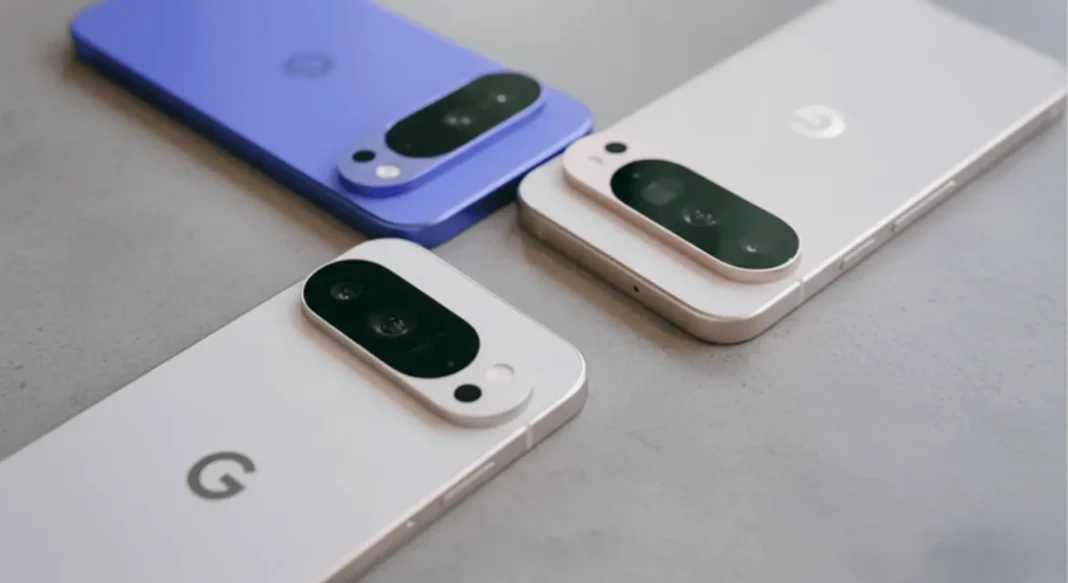
Google’s November 2025 Pixel Drop just started rolling out with seven practical features that genuinely change how you use your phone from AI-powered photo remixing in your group chats to scam detection that runs silently in the background. This quarterly update hits all eligible Pixel devices (Pixel 6 through Pixel 10 series) over the next few weeks, bringing a mix of creative tools, security upgrades, and battery-saving tricks that don’t require you to be a power user to appreciate.
The November Pixel Drop brings Remix photo editing powered by Gemini Nano Banana directly into Google Messages, Wicked movie-themed customization packs (available until January 31, 2026), AI notification summaries for Pixel 9+ devices, expanded scam detection in five countries, Google Maps power saving mode for Pixel 10 series, enhanced VIP contact prioritization, and Call Notes expansion to new regions.
What’s Actually New in the November Pixel Drop
Remix: AI Photo Editing Inside Your Messages
The standout feature this month is Remix in Google Messages, an on-device generative AI tool that lets you completely reimagine photos without leaving your conversation thread. Powered by Google’s Gemini Nano Banana model (the same tech behind Pixel Studio), Remix can turn your friend’s selfie into a 3D action figure, add outfits to photos, or redesign room layouts with simple text prompts.
Here’s what makes it practical: both you and your friends can remix the same image back and forth, creating a collaborative creative exchange that works even if they don’t have a Pixel phone; everyone sees the AI-generated results regardless of their device. To use it, long-press any photo in your Messages app and tap the “Remix” button, or select an image from your gallery before sending. The feature requires RCS chats to be enabled, works only with Google Messages, and you must be 18+ with your device language set to English.
Google emphasizes the “check responses” and “create responsibly” disclaimers here the AI can occasionally produce unexpected results, and there’s no built-in content filter for group chats beyond standard message moderation.
Wicked Theme Packs Transform Your Home Screen
If you’ve been wanting more customization options beyond Material You’s color extraction, the “Wicked: For Good” theme packs deliver exactly that. Available for Pixel 6 and newer devices until January 31, 2026, these themed bundles include wallpapers, custom icon packs, system sounds, and animated GIFs inspired by the upcoming Wicked film.
You can choose from three styles: “For Good” (combining both characters’ aesthetics), “Glinda” (soft pinks and sparkles), or “Elphaba” (dramatic greens and darker tones). The packs are available exclusively through the Pixel Themes app and apply across your entire system UI lock screen, home screen, quick settings, and even notification sounds.
This marks Google’s first branded theme collaboration since launching seasonal theme support in September 2025, suggesting more movie and entertainment partnerships could arrive in future Pixel Drops.
AI Notification Summaries Cut Through the Noise
Pixel 9 and newer devices (excluding the Pixel 9a) now get AI-powered notification summaries that condense lengthy group chats and email threads into scannable recaps right on your lock screen. Instead of seeing 47 individual message notifications from your chaotic family group chat, you’ll see a one-sentence AI-generated summary like “Discussion about weekend plans and dinner reservations”.
The feature works across multiple messaging apps and email clients, using on-device processing to maintain privacy. Google promises an additional update in December that will automatically organize and silence lower-priority notifications, reducing overall notification overload without manual intervention.
Early testing shows the summaries work best for text-heavy conversations and struggle with image-only message threads or rapid-fire emoji exchanges; the AI needs actual text content to generate meaningful summaries.
Security & Privacy Upgrades Worth Knowing
Scam Detection Expands to More Countries
Google’s real-time scam detection feature, which analyzes phone calls for common fraud patterns using on-device AI, now reaches Pixel 9 and newer users in the UK, Ireland, India, Australia, and Canada (previously US-only). The system listens for speech patterns and scammers typically use urgent payment demands, requests for personal information, impersonation tactics and displays a warning notification if suspicious behavior is detected.
Importantly, all processing happens on-device through Gemini Nano; no audio leaves your phone. Google explicitly notes “Scam Detection is not 100% accurate and scammers constantly change tactics,” recommending you still exercise caution with unknown callers.
The November update also adds a new “Likely a scam” badge for suspicious text messages across popular messaging apps, flagging potential phishing attempts in your notification shade.
Call Notes Land in Five New Regions
Call Notes the Pixel 9+ exclusive feature that records phone calls, generates transcripts, and creates actionable summaries using on-device Gemini Nano now works in Australia, Canada, the UK, Ireland, and Japan. Previously limited to the US market, this expansion brings automated call documentation to professional users who need searchable records of client conversations, interviews, or technical support calls.
The feature requires explicit consent from all call participants (you’ll hear an automated announcement when recording starts), stores transcripts locally on-device, and generates follow-up task lists based on conversation content. All processing uses on-device AI with no cloud uploads, addressing privacy concerns around call recording.
Private AI Compute Explained
Google quietly introduced Private AI Compute with this update, a new cloud-based AI processing platform that extends Pixel’s on-device privacy guarantees to more powerful cloud-based Gemini models. This enables features like Magic Cue (which now delivers more timely contextual suggestions) to leverage advanced AI capabilities without compromising user data security.
The technical implementation creates an isolated processing environment where your data is analyzed but never logged, stored, or accessible even to Google engineers. Think of it as a temporary secure workspace that’s destroyed immediately after processing your request.

Battery & Performance Improvements
Google Maps Power Saving Mode (Pixel 10 Only)
Pixel 10, 10 Pro, 10 Pro XL, and 10 Pro Fold owners get an exclusive Maps feature designed for long road trips: Power Saving mode. Press your device’s power button while navigating in Maps, and the app switches to a simplified dark layout showing only critical information: your current route, next turn distance, and estimated arrival time.
Google claims this stripped-down interface can extend battery life by up to four hours during navigation, though actual savings depend on display brightness, traffic conditions, and background app activity. The feature automatically reactivates the full Maps interface when you tap the screen or exit navigation.
This makes practical sense for users who rely on navigation during camping trips, long highway drives, or situations where charging isn’t immediately available. The Pixel 10-exclusive limitation stems from hardware optimization; older Pixels lack the specific display and processor efficiency required for the feature.
VIP Contacts Get Smarter Prioritization
Building on the Pixel VIPs feature introduced in June, the November update adds two key improvements. First, message notifications from your designated VIP contacts (up to eight people) now get automatically prioritized above all other notifications, ensuring you never miss critical messages from family members or close friends.
Second, VIP contacts now display a “crisis badge” in your Contacts widget if they trigger an emergency alert or are located in an area experiencing a natural disaster, public safety incident, or other crisis situation. This leverages Google’s emergency location services to proactively inform you when someone important might need help.
Which Pixel Phones Get These Features
Device Compatibility Breakdown
Not all features arrive on all Pixel devices here’s the complete compatibility breakdown:
| Feature | Compatible Devices | Regional Limitations |
|---|---|---|
| Remix in Google Messages | Pixel 6 and newer | English language only; RCS required |
| Wicked Theme Packs | Pixel 6 and newer | Available until January 31, 2026 |
| AI Notification Summaries | Pixel 9, 9 Pro, 9 Pro XL, 9 Pro Fold (excludes 9a) | English language only |
| Scam Detection | Pixel 9 and newer (excludes A-series) | US, UK, IE, CA, AU, IN only |
| Call Notes | Pixel 9, 9 Pro, 9 Pro XL, 9 Pro Fold (excludes 9a) | AU, CA, UK, IE, JP only |
| Google Maps Power Saving | Pixel 10, 10 Pro, 10 Pro XL, 10 Pro Fold only | Global availability |
| VIP Contact Enhancements | Pixel 6 and newer | Global availability |
| Private AI Compute | Pixel 9 and newer | Global availability |
The Pixel 9a conspicuously misses several flagship features despite sharing the same Tensor G4 processor as other Pixel 9 models, likely a deliberate product segmentation decision rather than a hardware limitation.
Regional Availability Details
Updates roll out gradually over “the next several weeks” according to Google, with phased deployment starting November 11, 2025. Users in the US, Canada, UK, Australia, and India typically receive updates first, followed by European and Asian markets.
To check if your device has received the update: Open Settings → System → Software Update and look for the November 2025 security patch or Pixel Drop notification. The update arrives as part of your standard system update, not as a separate app store download.
How to Use the Best New Features
Getting Started with Remix in Messages
Step 1: Ensure you’re running the latest Google Messages version (update via Play Store) and have RCS chats enabled in Messages Settings → RCS chats.
Step 2: Open any conversation and long-press a photo already in the chat thread, or tap the gallery icon and select a photo from your device.
Step 3: Tap the Remix button (it appears next to Share and Delete options).
Step 4: Enter a text prompt describing your desired edit examples: “Add a wizard hat,” “Make this photo look like a 3D figurine,” “Turn the background into a beach scene”.
Step 5: Wait 5-15 seconds for Nano Banana to generate the remixed image, then tap Send to share it in the conversation. Your friends can then tap Remix on your generated image to continue the creative chain.
Limitation: The feature currently doesn’t work with videos, GIFs, or images containing faces of people under 18 (age detection happens on-device).
Setting Up Notification Summaries
Notification summaries activate automatically on eligible Pixel 9+ devices after installing the November update no manual setup required. The AI analyzes notification content in real-time and replaces grouped notifications with concise summaries when three or more messages arrive within a short timeframe.
To disable summaries if you prefer seeing individual notifications: Settings → Notifications → Notification summaries → Toggle off. You can also disable summaries per-app rather than system-wide.
The December update will add manual controls for which app notifications get summarized and which remain fully visible.
Downloading Wicked Theme Packs
Step 1: Open the Pixel Themes app (pre-installed on Pixel 6 and newer devices).
Step 2: Navigate to Theme Packs → Wicked: For Good.
Step 3: Choose from three options: For Good (combined aesthetic), Glinda (light theme), or Elphaba (dark theme).
Step 4: Tap Apply to instantly customize your wallpaper, icons, system sounds, and always-on display. The theme applies across your entire system UI automatically.
Note: Theme packs are time-limited promotional content available only until January 31, 2026 after that date, you can keep the theme if already installed, but new downloads won’t be available.
Is This Update Worth Installing?
The November Pixel Drop delivers practical value rather than gimmicky features. Remix in Messages genuinely changes how you interact with photos in group chats (assuming you have creative friends who’ll actually use it), notification summaries address a real pain point for anyone drowning in group chat notifications, and the security features run silently without requiring user intervention.
The Wicked theme packs are admittedly niche if you’re not a fan of the film, you’ll likely skip them entirely but they represent Google’s first real attempt at offering substantive customization beyond Material You’s automatic color extraction. Power users have been requesting themed icon packs for years; this collaboration suggests more partnerships could be coming.
The biggest limitation remains device fragmentation: flagship features like notification summaries and Call Notes are arbitrarily restricted to Pixel 9 devices (excluding the 9a), while Pixel 6-8 owners get fewer meaningful upgrades despite running the same underlying Android 15 platform. If you’re on an older Pixel, this update feels more incremental than transformative.
For Pixel 9 and Pixel 10 users, this update is absolutely worth installing immediately you’re getting the full feature set Google designed. For Pixel 6-8 owners, it’s still worth updating for security patches and minor improvements, but don’t expect a dramatically different experience.
Comparison Table (Device Compatibility):
| Feature | Pixel 6/6 Pro/6a | Pixel 7/7 Pro/7a | Pixel 8/8 Pro/8a | Pixel 9/9 Pro/XL/Fold | Pixel 9a | Pixel 10 Series |
|---|---|---|---|---|---|---|
| Remix in Messages | ✅ | ✅ | ✅ | ✅ | ✅ | ✅ |
| Wicked Themes | ✅ | ✅ | ✅ | ✅ | ✅ | ✅ |
| Notification Summaries | ❌ | ❌ | ❌ | ✅ | ❌ | ✅ |
| Scam Detection | ❌ | ❌ | ❌ | ✅ | ❌ | ✅ |
| Call Notes | ❌ | ❌ | ❌ | ✅ | ❌ | ✅ |
| Maps Power Saving | ❌ | ❌ | ❌ | ❌ | ❌ | ✅ |
| VIP Enhancements | ✅ | ✅ | ✅ | ✅ | ✅ | ✅ |
| Private AI Compute | ❌ | ❌ | ❌ | ✅ | ✅ | ✅ |
Frequently Asked Questions (FAQs)
Does the November Pixel Drop cost anything?
No, the November 2025 Pixel Drop is a free software update for all eligible Pixel devices (Pixel 6 through Pixel 10 series). It arrives through your standard system update process alongside the November security patch.
Can I use Remix if my friends don’t have Pixel phones?
Yes. Everyone in your conversation can see remixed photos regardless of their phone brand or messaging app, as long as they can receive images through Google Messages or SMS/MMS. Only Pixel users can create remixed images, but anyone can view them.
How much battery does Google Maps power saving mode actually save?
Google claims up to four hours of extended battery life during navigation, but actual savings vary significantly based on display brightness, traffic conditions, cellular signal strength, and background app activity. The feature is exclusive to Pixel 10 series devices.
Is scam detection always listening to my calls?
Scam detection analyzes calls in real-time using on-device AI (Gemini Nano), but all processing happens locally on your Pixel; no audio is sent to Google servers or stored permanently. The feature can be disabled in Settings → Security & Privacy → Scam Detection.
Why doesn’t my Pixel 9a get notification summaries?
Google has artificially limited certain features (notification summaries, Call Notes) to Pixel 9, 9 Pro, 9 Pro XL, and 9 Pro Fold models, excluding the 9a despite it using the same Tensor G4 processor. This appears to be product segmentation rather than a technical limitation.
Can I keep the Wicked theme pack after January 31, 2026?
Yes, if you download and apply a Wicked theme pack before the January 31, 2026 expiration date, it remains on your device permanently. Only new downloads will be unavailable after that date.
Does Private AI Compute send my data to Google?
Private AI Compute processes requests in an isolated cloud environment where data is analyzed but never logged, stored, or accessible to Google engineers. The system deletes all data immediately after processing, extending Pixel’s on-device privacy guarantees to cloud-based AI.
How do I check if my Pixel received the November update?
Open Settings → System → Software Update. Look for the November 2025 security patch or a notification mentioning “Pixel Drop.” Updates roll out gradually over several weeks, so not all devices receive it simultaneously.
Featured Snippet Boxes
What is the Pixel Drop November 2025?
The November 2025 Pixel Drop is Google’s quarterly feature update bringing AI photo editing (Remix) in Messages, Wicked movie theme packs, notification summaries for Pixel 9+, expanded scam detection in five countries, and Google Maps power saving mode for Pixel 10 devices.
Which Pixel phones get the November 2025 update?
All Pixel devices from Pixel 6 through Pixel 10 series receive the November update, but feature availability varies. Notification summaries and Call Notes require Pixel 9+ (excluding 9a), Maps power saving needs Pixel 10 series, while Remix and themes work on Pixel 6 and newer.
How do I use Remix in Google Messages?
Long-press any photo in a Google Messages conversation and tap “Remix,” or select a photo from your gallery before sending. Enter a text prompt describing your desired edit, wait for the AI to generate the result, then send it. RCS chats must be enabled.
What is a Gemini Nano Banana?
Nano Banana is Google’s on-device Gemini image generation and editing model powering the Remix feature in Messages. It processes image edits entirely on your Pixel phone without sending data to the cloud, maintaining privacy while generating AI-edited photos from text prompts.
Do notification summaries work on Pixel 8?
No. AI notification summaries require Pixel 9, 9 Pro, 9 Pro XL, or 9 Pro Fold devices and don’t work on Pixel 8, 7, or 6 series. The feature also excludes the Pixel 9a despite sharing the same processor as other Pixel 9 models.

