

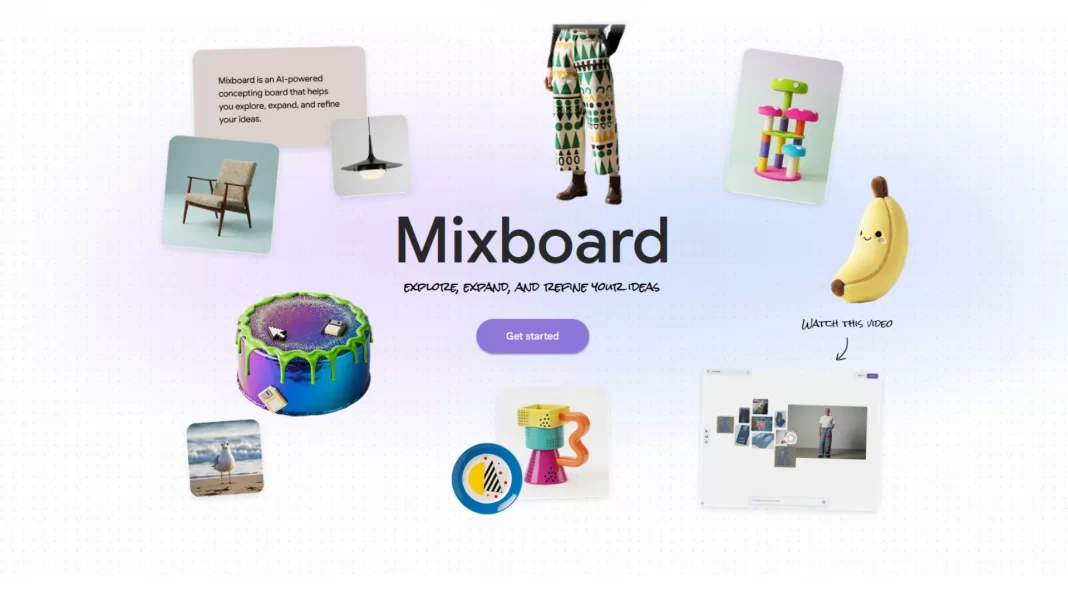
Google Mixboard is a new AI mood board tool inside Google Labs. It can generate visuals from text prompts, remix your images, and help you refine ideas with simple language edits. It runs on Gemini 2.5 Flash Image nicknamed “Nano Banana.” Public beta is US-only for now.
Table of Contents
What is Google Mixboard?
Mixboard is an AI-powered “concepting board.” Instead of only pinning existing pictures, you can create images from prompts like “boho living room with warm neutrals” and assemble a board in minutes. It’s an experiment under Google Labs and currently available as a public beta in the US. Try it at labs.google/mixboard and join Google’s Discord to share feedback.
The model behind it: “Nano Banana”
Mixboard uses Google’s latest image generation/editing model, officially Gemini 2.5 Flash Image, widely referred to as “Nano Banana.” It focuses on targeted edits, character consistency, and smart transformations via plain-English instructions. Google announced the model in late August, and it’s already turning into a consumer hit.
Recent coverage shows Gemini surged to the top of app charts in multiple markets, helped by the viral “Nano Banana” trend. Reported figures include 23 million new users between Aug 26 and Sept 9 and 500+ million image edits in that span; TechCrunch also reported 12.6 million September downloads mid-month. That momentum likely sets the stage for Mixboard adoption.

Why it matters: Mixboard vs Pinterest
Pinterest is built around curation: you search, click, and save images to themed boards. Mixboard flips that by prioritizing generation and editing. You can still upload your own photos, but the heavy lifting style exploration, color tests, layout ideas can start from a prompt. Think of it as a canvas for first drafts of visuals, not just a library of inspiration.
Competitively, Mixboard sits near Canva mood boards, Figma/FigJam, and Adobe’s Firefly Boards. The difference is how deeply AI is wired into the workflow and how conversational edits feel in practice. Early reports highlight natural language commands (“make it warmer,” “match this image’s palette”), one-click regeneration, and blending images into new compositions.
Pros and cons at a glance
| Area | Google Mixboard | Canva Mood Boards | FigJam / Figma | |
|---|---|---|---|---|
| Core idea | AI-generated + user images | Curate existing web images | Templates + light AI | Collaborative whiteboard |
| Speed from prompt | Very high (generates) | N/A (search/save) | Medium | Medium |
| Editing via chat | Yes, natural language | No | Limited | Limited |
| Best for | Fast ideation, style trials | Research, trend surfacing | Presentable collages | Team mapping, flows |
| Availability | US-only public beta (Labs) | Global | Global | Global |
| Limits today | Beta features, licensing clarity | Discovery reliance | Paid tiers for features | Not purpose-built for mood boards |
Features and how it works
Start with prompts or templates
Open Mixboard and choose a pre-made template or drop in a text prompt to kick things off. The system returns multiple visuals aligned to your theme (e.g., “Memphis style tableware,” “autumn gathering”).
Add your images and blend with AI
Upload your own photos—room shots, product images, logos—and blend them with generated elements. This helps you simulate real environments or brand-specific looks without scouting assets for hours.
Edit with natural language; regenerate and combine
Type instructions like “reduce clutter,” “make the lighting warmer,” or “combine image A and B.” One-click options let you regenerate or produce similar variants. It’s meant to feel like chatting with an art director who instantly shows you options.
Sharing, collaboration, and community
Google is capturing feedback through a Discord community while Mixboard evolves in Labs. Expect rapid changes; treat it as a moving target, not final software.
Quick start: make your first Mixboard (5 steps)
- Go to labs.google/mixboard and pick a template or click Get started.
- Enter a prompt like “cozy reading nook with earthy tones and natural textures.”
- Upload one photo of your space or product for context.
- Refine with short instructions: “swap to walnut wood,” “add warm lighting,” “make a matching rug.”
- Save, export, or share the board for feedback.
Pricing, availability, and limitations
- Availability: Public beta in the US via Google Labs. Expansion is likely but not announced.
- Pricing: Google has not detailed standalone pricing. Access today follows the general Labs experiment model.
- Model details: Runs on Gemini 2.5 Flash Image (“Nano Banana”). Google describes targeted edits, character consistency, and blending as core capabilities.
- Licensing & usage: As with any AI image tool, check usage rights for commercial projects and expect watermarking or provenance features to evolve.
- Road-testing: Multiple outlets show hands-on screenshots and step guidance; treat performance as subject to change during beta.
Use cases and mini-scenarios
- Home décor sprint: Generate a few styles for the same room, then keep the layout and swap materials.
- Event theme one-pager: Build a color story and table setup in under 15 minutes, then export options for a client review.
- Brand mood exploration: Upload a product photo, ask for “retro-modern palette,” and produce variants for social and packaging concepts.
Frequently Asked Question
Is Google Mixboard available worldwide?
Not yet. It’s a US-only public beta through Google Labs. Google hasn’t announced wider availability.
What model powers Mixboard?
Gemini 2.5 Flash Image, nicknamed “Nano Banana.” It enables targeted edits and natural-language transformations.
How is Mixboard different from Pinterest?
Pinterest helps you save and organize images from the web. Mixboard lets you generate images from prompts and blend them with your photos, then edit them conversationally.
Can I upload my own images?
Yes. You can upload photos and mix them with generated visuals for hybrid boards.
Why all the buzz around “Nano Banana”?
Gemini’s viral image editor helped push the Gemini app to the top of app charts this month, with reports of 23M new users and 500M+ image edits in two weeks.
What to watch next
- Broader rollout: Expect support beyond the US if feedback is strong.
- Deeper Google tie-ins: Look for integrations with Drive, Slides, Docs, and Photos, and tighter links to Gemini Live. Recent “Gemini Drop” updates hint at steady cross-app integration.

Featured Answer Boxes
What is Google Mixboard?
Google Mixboard is an AI mood board tool in Google Labs that generates visuals from text prompts, remixes your photos, and organizes ideas on a canvas. It runs on Gemini 2.5 Flash Image (“Nano Banana”) and is currently a US-only public beta.
How does Mixboard differ from Pinterest?
Pinterest curates existing images; Mixboard creates new ones. You start with a prompt, add your photos if needed, and edit results with natural-language commands. It’s built for fast concepting rather than long-term image libraries.
Is Mixboard free?
Mixboard is an experimental Google Labs product. Google hasn’t announced standalone pricing yet. Access can change as the beta evolves, so check the Labs page for the latest status.
What model powers Mixboard?
Mixboard uses Gemini 2.5 Flash Image nicknamed “Nano Banana” for generation and precise edits. It supports targeted transformations and character consistency via simple instructions.
Where can I get updates or give feedback?
Google is collecting feedback via a public Discord community for Labs experiments, including Mixboard. You’ll find the invite from Google’s Keyword post.
Source: Google Blog | Google Labs page

