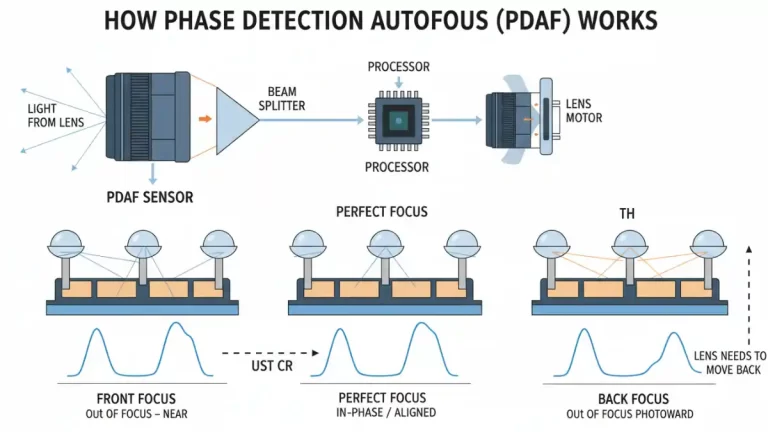
Definition: Autofocus that splits incoming light and compares phase differences to find focus quickly. It is faster than contrast AF and works well for tracking people or pets. Dual Pixel variants put detectors on most pixels for even quicker, smoother focus.
Phase Detection Autofocus (PDAF) is a sophisticated autofocus system commonly found in DSLR and mirrorless cameras. It works by analyzing the phase difference of light coming from different parts of the lens, allowing the camera to quickly and accurately determine the correct focus distance.
Here’s a breakdown of how it works:
Splitting Light: Inside the camera, a small portion of the light coming through the lens is diverted to a dedicated PDAF sensor. This light is split into two separate images.
Microlenses: The PDAF sensor has an array of microlenses, each paired with two photodiodes. Each microlens focuses light onto these two photodiodes.
Phase Difference: When the image is out of focus, the light reaching the two photodiodes through the microlens will be “out of phase,” meaning their intensity patterns won’t align perfectly.
Calculating Focus Adjustment: The camera’s processor analyzes this phase difference. Based on how much the patterns are shifted and in what direction, the camera can instantly calculate not just if the image is out of focus, but also by how much and in which direction the lens needs to move to achieve perfect focus.
Lens Movement: The camera then sends precise instructions to the lens motors to adjust the focus elements to the calculated position.
Confirmation: Because PDAF directly calculates the necessary lens movement, it’s very fast and efficient, often achieving focus in a single movement.
Example: Tapping a moving child in the viewfinder and the camera locks focus instantly.
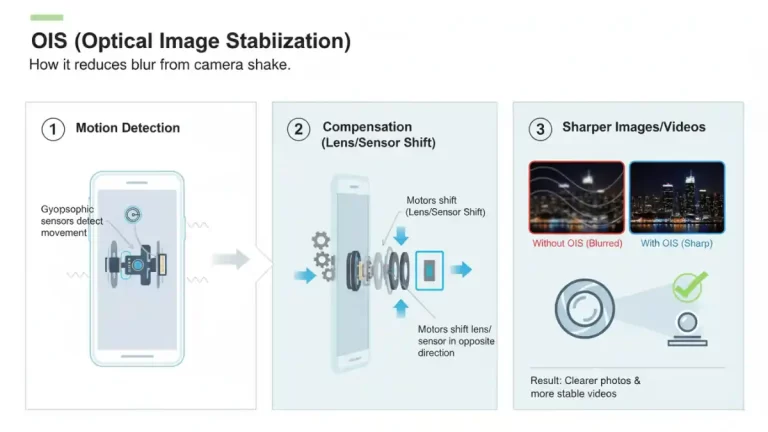
Definition: Hardware stabilization that moves the lens or sensor to counter small shakes. OIS helps reduce blur in low light photos and steadies video. It works alongside electronic stabilization, which crops and smooths motion in software.
Optical Image Stabilization (OIS) is a technology used in cameras and smartphones to reduce blur caused by camera shake. It works by physically adjusting the optical path to compensate for minor movements of the device.
Here’s a breakdown of how it works:
Motion Detection: Tiny gyroscopic sensors within the device detect the direction and magnitude of any unwanted camera movement.
Lens/Sensor Shift: This motion data is then sent to a miniature motor system.
Compensation: The motors precisely shift either the lens elements or the entire camera sensor in real-time, in the opposite direction of the detected shake. This effectively keeps the projected image steady on the sensor, even if your hand is moving slightly.
Sharper Images/Videos: The result is significantly clearer and sharper photos and more stable videos, especially in low-light conditions or when zooming in.
Example: Sharper night shots because the lens compensates for hand movement.
Also called: Optical image stabilization
Related: PDAF, 4K video recording, Optical zoom 3x
Definition: Low-power double data rate memory used in phones. LPDDR5 offers high bandwidth and lower power draw than older LPDDR generations, which helps with multitasking, gaming, and camera processing. Actual speed depends on the SoC memory controller and configuration.
What is LPDDR5?
LPDDR5 stands for Low Power Double Data Rate 5th generation. It’s a type of synchronous dynamic random-access memory (SDRAM) specifically designed for devices where power efficiency is crucial, such as smartphones, tablets, ultrabooks, and embedded systems.
Key Features and Improvements over LPDDR4X:
Higher Speed (Data Rate):
LPDDR4X typically offered speeds up to 4266 MT/s (mega transfers per second).
LPDDR5 significantly boosts this, with initial speeds of 5500 MT/s and reaching up to 6400 MT/s. This means data can be moved much faster between the RAM and the processor.
Increased Bandwidth:
With higher speeds comes greater bandwidth. LPDDR5 can achieve bandwidths exceeding 50 GB/s (gigabytes per second), compared to around 34 GB/s for LPDDR4X. This is crucial for handling demanding applications, high-resolution video, and complex AI tasks.
Improved Power Efficiency:
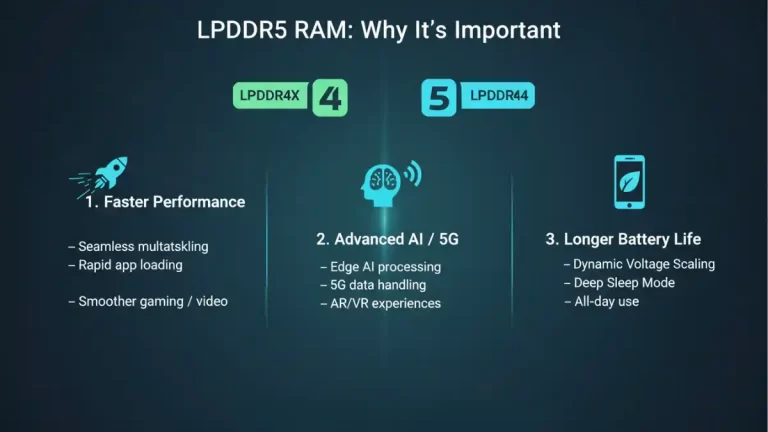
Despite the speed increase, LPDDR5 is even more power-efficient. It introduces features like Dynamic Voltage Scaling (DVS), allowing the memory to operate at lower voltages when less performance is needed, thereby reducing power consumption.
It also includes a new “Deep Sleep” mode for further power savings.
Enhanced Reliability and Stability:
LPDDR5 incorporates improved error correction features, leading to greater data integrity and system stability, which is vital for critical mobile applications.
Why is LPDDR5 Important?
Enabling Faster Mobile Performance: With more powerful mobile processors and increasingly complex apps, LPDDR5 provides the necessary memory bandwidth to prevent bottlenecks. This translates to:
Smoother multitasking
Faster app loading times
Improved gaming and video streaming experiences
Supporting Advanced AI and 5G:
Artificial Intelligence (AI): Many modern mobile devices perform AI computations directly on the device (“edge AI”). LPDDR5’s high bandwidth is essential for quickly processing the large datasets required for AI tasks like image recognition, natural language processing, and advanced camera features.
5G Connectivity: The super-fast data speeds of 5G require memory that can keep up. LPDDR5 ensures that data downloaded via 5G can be quickly accessed and processed by the device.
Extending Battery Life: For mobile devices, every milliwatt saved is critical. LPDDR5’s enhanced power efficiency helps devices run longer on a single charge, providing a better user experience.
Where is LPDDR5 Used?
You’ll primarily find LPDDR5 in high-end and flagship mobile devices:
Smartphones: The latest generation of premium smartphones heavily rely on LPDDR5 for their performance and power efficiency needs.
Tablets: High-performance tablets benefit from the increased speed for productivity and entertainment.
Ultrathin Laptops/2-in-1s: Some ultrabooks use LPDDR5 for a balance of performance and battery life in a compact form factor.
Automotive Systems: Increasingly, advanced in-car infotainment and autonomous driving systems are adopting LPDDR5 for its reliability and performance.
AIoT (AI + IoT) Edge Devices: Devices at the “edge” of networks that perform local AI processing often use LPDDR5.
In essence, LPDDR5 is a critical technology that underpins the performance, responsiveness, and battery life of modern portable electronics, enabling more powerful and intelligent mobile experiences.
Example: Switching between a game and camera without reloads thanks to ample LPDDR5.
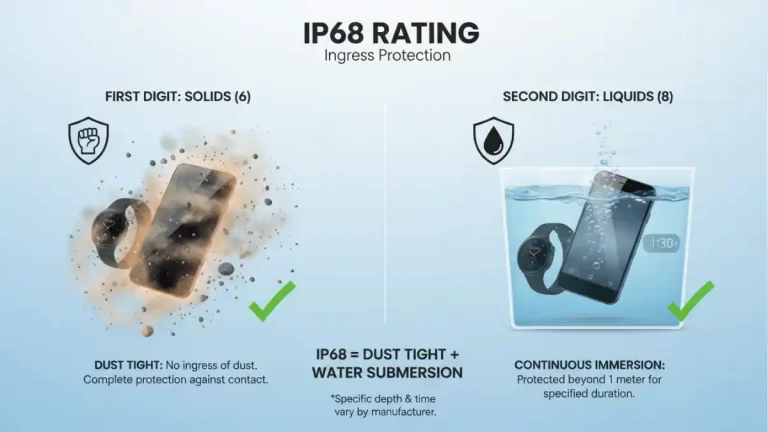
Definition: An ingress protection code showing resistance to dust and water. “6” means dust-tight, and “8” typically means tested for submersion beyond 1 meter for a set time under lab conditions. It does not cover salt water, high-pressure jets, or wear-and-tear. Water damage is usually excluded from warranties.
The IP68 rating is an international standard that classifies the degree of protection provided by electrical enclosures against the intrusion of solid objects and liquids. It’s commonly seen in specifications for smartphones, smartwatches, and other electronic devices.
Let’s break down what “IP68” means:
IP stands for Ingress Protection.
The first digit (6) refers to protection against solids (like dust, dirt, and sand).
The second digit (8) refers to protection against liquids (like water).
First Digit: Protection Against Solids (6)
A rating of 6 means the device is:
Dust tight: No ingress of dust. Complete protection against contact.
This is the highest possible rating for solid particle protection.
Second Digit: Protection Against Liquids (8)
A rating of 8 means the device is:
Protected against continuous immersion in water: The equipment is suitable for continuous immersion in water under conditions which shall be specified by the manufacturer. These conditions will normally be more severe than for a 7.
This typically means the device can be submerged in water up to a certain depth (often 1.5 to 2 meters) for a certain duration (usually up to 30 minutes), and still function correctly. The exact depth and time are usually specified by the manufacturer.
In Summary:
An IP68 rating means a device is:
Completely protected against dust.
Protected against continuous submersion in water beyond 1 meter. The specific depth and duration will vary by manufacturer but it generally means it can handle more than just a splash or quick dip.
Example: A quick rinse under a tap after a spill, then drying carefully.
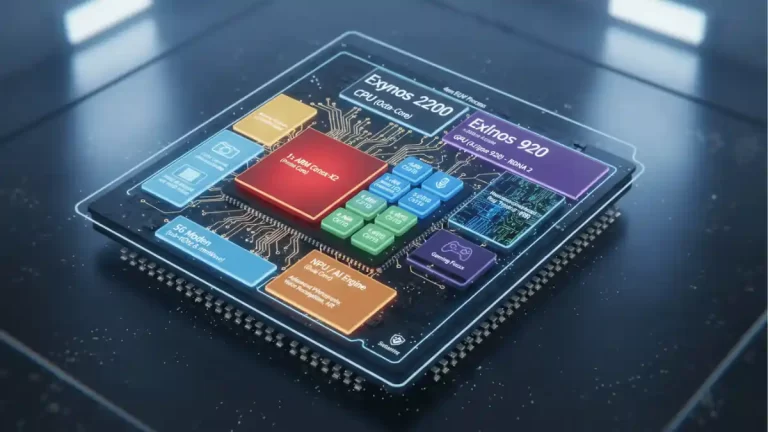
Definition: Samsung’s 4 nm system-on-chip with an ARM CPU cluster and an AMD-based Xclipse GPU. It supports 5G, hardware video encode/decode, and features like high-resolution cameras and 120 Hz displays. Real-world performance and heat depend on tuning, storage speed, and software.
The Samsung Exynos 2200 is a high-end system-on-a-chip (SoC) designed by Samsung Electronics, primarily for its flagship Galaxy smartphones. It was officially unveiled in January 2022.
Here’s a breakdown of its key design aspects and what makes it noteworthy:
1. CPU (Central Processing Unit) The Exynos 2200 features an octa-core CPU configuration using ARM’s v9 architecture in a tri-cluster setup:
1 x ARM Cortex-X2 (Prime Core): This is the most powerful core, clocked at a high frequency, designed for peak performance in demanding tasks like gaming or heavy application usage.
3 x ARM Cortex-A710 (Performance Cores): These cores balance performance and efficiency, handling most everyday tasks and sustained workloads.
4 x ARM Cortex-A510 (Efficiency Cores): These are the most power-efficient cores, used for background tasks, light browsing, and to conserve battery life.
This heterogeneous computing approach allows the chip to dynamically allocate tasks to the most appropriate cores, optimizing for both performance and power efficiency.
2. GPU (Graphics Processing Unit) – Xclipse 920 This is arguably the most significant design aspect of the Exynos 2200. Samsung collaborated with AMD to integrate an Xclipse graphics processing unit, which is based on AMD’s RDNA 2 architecture. This collaboration brought several firsts to mobile SoCs:
Hardware-accelerated Ray Tracing (RT): Ray tracing is an advanced rendering technique that simulates the physical behavior of light, resulting in much more realistic lighting, reflections, and shadows in games and graphics. The Exynos 2200 was one of the first mobile chips to support this at a hardware level.
Variable Rate Shading (VRS): VRS allows developers to selectively reduce the shading rate in parts of an image where detail is less critical (e.g., distant objects or areas blurred by motion), improving performance without a significant perceived loss in visual quality.
Gaming Focus: The RDNA 2 architecture is the same one used in current-generation gaming consoles (like PS5 and Xbox Series X) and PC graphics cards, suggesting a strong focus on enhancing mobile gaming experiences.
3. NPU (Neural Processing Unit) / AI Engine The Exynos 2200 includes a dual-core NPU designed for artificial intelligence and machine learning tasks. This unit accelerates on-device AI operations, such as:
Advanced photography features: Enhancing images, scene recognition, and computational photography.
Voice recognition and natural language processing.
Augmented reality (AR) applications.
Overall system optimization based on user patterns.
4. Modem It integrates a 5G modem that supports both sub-6GHz and mmWave frequencies, ensuring fast and reliable connectivity. It also supports older network standards.
5. ISP (Image Signal Processor) The ISP is crucial for camera performance. The Exynos 2200’s ISP is designed to handle high-resolution camera sensors, support multiple cameras simultaneously, and perform advanced image processing to deliver high-quality photos and videos. It can support resolutions up to 200 MP and 4K HDR video recording.
6. Manufacturing Process The Exynos 2200 is fabricated using Samsung Foundry’s 4-nanometer (4nm) EUV (Extreme Ultraviolet Lithography) process. A smaller process node generally means:
More transistors in a smaller area: Leading to increased performance.
Improved power efficiency: Less power consumption for the same amount of work.
Reduced heat generation.
7. Memory Support It supports LPDDR5 RAM, offering high bandwidth and low latency for fast data access, which is essential for demanding applications and multitasking.
8. Security Like other modern SoCs, it incorporates a secure element and various security features to protect user data and ensure the integrity of the device.
Overall Design Philosophy: The Exynos 2200 represents Samsung’s ambition to create a highly competitive flagship SoC, particularly by leveraging AMD’s GPU technology to push the boundaries of mobile graphics. It aims for a balance of raw CPU performance, cutting-edge graphics capabilities, advanced AI processing, and efficient power management, all manufactured on a leading-edge process node.
Example: Editing a short 4K clip uses the Exynos 2200’s media engines.
Definition: Samsung’s marketing name for an advanced OLED display with high contrast, deep blacks, and wide color. “2X” often signals up to 120 Hz refresh and improved brightness control. Pixels emit their own light, so dark themes can save power. PWM dimming and color tuning may vary by model.
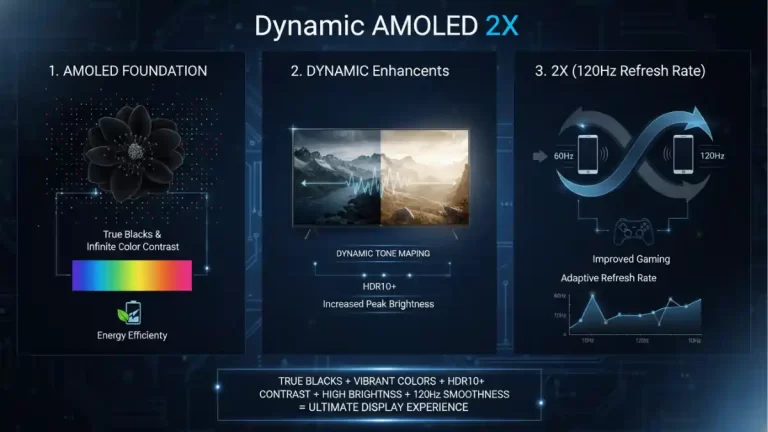
Dynamic AMOLED 2X is a display technology developed by Samsung, primarily found in their flagship smartphones and tablets. It’s an evolution of their Super AMOLED and Dynamic AMOLED screens, focusing on enhancing several key areas for a superior visual experience.
AMOLED Foundation:
Active Matrix Organic Light Emitting Diode: This is the core technology. Unlike LCDs that require a separate backlight, each pixel in an AMOLED display emits its own light.
True Blacks: When a pixel is off, it’s truly off, resulting in perfect blacks and infinite contrast ratios. This is a significant advantage over LCDs, which can have some light bleed even in dark areas.
Vibrant Colors: AMOLED displays are known for their rich, saturated colors and wide color gamuts.
Energy Efficiency: For darker content, AMOLED can be more power-efficient than LCDs because unlit pixels consume no power.
“Dynamic” Enhancements:
HDR10+ Support: This is where the “Dynamic” really comes into play. Dynamic AMOLED displays are capable of displaying High Dynamic Range content, specifically HDR10+. This means a much wider range of brightness levels, deeper shadows, and brighter highlights, leading to a more lifelike and immersive viewing experience.
Dynamic Tone Mapping: HDR10+ uses dynamic metadata, meaning the brightness and color information can be adjusted scene-by-scene or even frame-by-frame. This allows for optimal picture quality throughout an entire video, rather than a single static setting for the whole content.
Improved Brightness: Dynamic AMOLED screens generally offer higher peak brightness levels compared to older AMOLED panels, which is crucial for good HDR performance and outdoor visibility.
“2X” (120Hz Refresh Rate):
Double Refresh Rate: The “2X” in Dynamic AMOLED 2X specifically refers to the 120Hz refresh rate. This means the display updates 120 times per second, twice as fast as the traditional 60Hz displays.
Smoother Scrolling and Animations: The most noticeable benefit of a 120Hz refresh rate is incredibly fluid scrolling, silky-smooth animations, and a more responsive feel when interacting with the device.
Improved Gaming: For mobile gaming, a higher refresh rate can provide a significant advantage, reducing motion blur and making fast-paced action appear clearer and more immediate.
Adaptive Refresh Rate (Often Implemented): Many devices with Dynamic AMOLED 2X also incorporate an adaptive or variable refresh rate. This allows the display to automatically switch between different refresh rates (e.g., from 10Hz for static content to 120Hz for gaming) to conserve battery life while still providing a smooth experience when needed.
In summary, Dynamic AMOLED 2X combines the inherent advantages of AMOLED technology with:
HDR10+ for superior contrast and color (Dynamic)
Increased peak brightness (Dynamic)
A buttery-smooth 120Hz refresh rate (2X)
This combination results in a display that offers incredibly vibrant colors, true blacks, excellent contrast, and an exceptionally smooth and responsive user experience, making it ideal for multimedia consumption, gaming, and general daily use on high-end devices.
Example: Watching HDR clips looks punchy on a Dynamic AMOLED 2X panel.
Definition: A family of chemically strengthened glass used on phone screens and backs. It resists scratches and shattering better than regular glass by swapping ions during a salt bath process, which compresses the surface. Exact version and durability vary by model. Using a case and avoiding drops still helps most.
Corning Gorilla Glass is a brand of chemically strengthened glass developed and manufactured by Corning Inc. It’s designed to be thin, light, and durable, making it ideal for the screens of mobile devices like smartphones, tablets, and laptops, as well as wearables and other electronic displays.
Here’s a breakdown to help you understand it better:
What makes it special? The Ion-Exchange Process
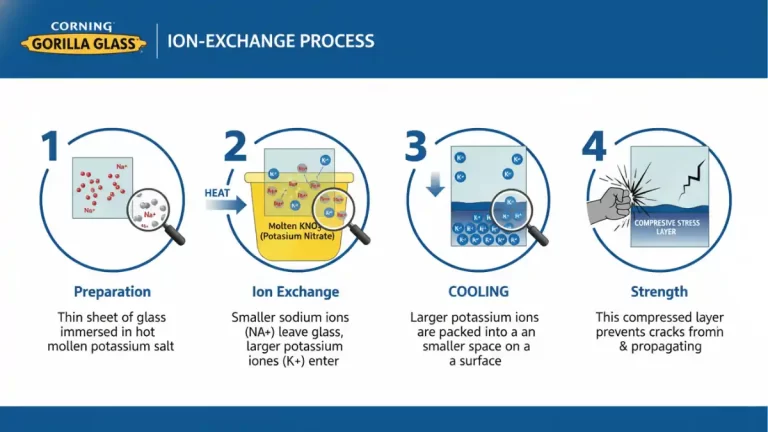
The key to Gorilla Glass’s strength lies in a process called ion-exchange. Here’s how it generally works:
Preparation: A thin sheet of glass is immersed in a hot bath of molten potassium salt.
Ion Exchange: At high temperatures, the smaller sodium ions in the glass migrate out of the material and are replaced by larger potassium ions from the salt bath.
Compression: When the glass cools, these larger potassium ions are “stuck” in a smaller space, creating a layer of compressive stress on the surface of the glass. Think of it like a tightly stretched spring.
Strength: This compressed layer makes the glass much more resistant to damage from impacts and scratches. It’s harder for cracks to initiate and propagate through this compressed surface.
Key Characteristics and Benefits:
Damage Resistance: Its primary benefit is its high resistance to scratches and impacts, which are common causes of screen damage in portable electronics.
Thinness and Lightness: It can be manufactured very thin without compromising significant strength, allowing for sleek device designs.
Touch Sensitivity: It doesn’t interfere with the touch sensitivity of screens.
Environmental Friendliness: Corning states that its manufacturing processes are environmentally conscious.
Evolution and Versions:
Corning has continuously improved Gorilla Glass over the years, releasing various generations, each offering enhanced durability, scratch resistance, or other features.
Gorilla Glass 1: Introduced in 2007, famously used in the original iPhone.
Gorilla Glass 2: Thinner and lighter than GG1 while maintaining similar strength.
Gorilla Glass 3: Introduced “Native Damage Resistance” (NDR) technology, making it more resistant to deeper scratches that often lead to glass breakage.
Gorilla Glass 4: Focused on improving drop performance, making it more likely to survive drops onto rough surfaces.
Gorilla Glass 5: Even better drop performance, designed to survive drops from up to 1.6 meters onto hard, rough surfaces.
Gorilla Glass 6: Further improved scratch resistance and drop performance, designed to survive multiple drops from 1 meter.
Gorilla Glass Victus / Victus 2: These versions represent a significant leap, combining excellent drop performance with significantly improved scratch resistance, aiming to be a “best of both worlds” solution.
Where you find it:
You’ll find Gorilla Glass on a vast majority of premium smartphones, tablets, smartwatches, and even some laptops and automotive displays. Many manufacturers highlight its inclusion as a key feature for device durability.
Example: A screen survives keys in a pocket thanks to Gorilla Glass.
Android 15 is Google’s 2024 Android release that focuses on privacy, safer app behavior, better media and camera controls, and smarter tools for big screens and foldables. It shipped first to Pixel phones, then to other brands through their own skins and schedules. It’s still current on many devices in 2025.
What is Android 15?
Android 15 is the fifteenth major version of Google’s mobile OS. It arrived on Pixels first, then reached other devices through manufacturer updates. It sits between Android 14 and Android 16, so if you’re on 14 it’s a meaningful step up, and if your phone hasn’t received 16 yet, 15 is likely the newest build available.
Release basics Google pushed Android 15 source code to AOSP before general availability, then rolled out the final build to supported Pixel phones. Other brands followed with their Android-15-based skins over the following months. If your phone is still on 14, check your OEM’s update page or your Settings app.
Codename Internally, Android 15 used the dessert codename “Vanilla Ice Cream.” Codenames are mostly for developers and internal references, but they help sort each generation.
Android 15 features at a glance
Privacy and security
Private Space. This creates a locked “second space” for sensitive apps. Apps in Private Space are hidden from the app launcher, Recents, notifications, and other apps when the space is locked. Think of it as a secure folder controlled by your device unlock or an extra PIN.
Screen recording detection. Apps can detect when they’re being recorded and respond, for example by dimming or hiding sensitive content.
Safer intents and tighter TLS. Android 15 tightens inter-app communication rules to reduce spoofing risks and disallows very old TLS versions for apps targeting 15.
Theft protection tools. Alongside Android 15 era updates, Google introduced Theft Detection Lock that can auto-lock a phone if it senses snatch-and-run motion, plus Remote Lock so you can lock a lost phone quickly from another device. These tools target a wide range of Android versions, not just 15, but most users met them around the 15 rollout.
Everyday usability
Partial screen sharing. Share or record a single app window instead of your whole screen. Great for classes, demos, and privacy during calls.
Richer widgets and predictive back. The system supports generated previews for widgets, and the back gesture shows smoother, clearer animations. Apps that opt in feel more consistent.
Edge-to-edge enforcement for new apps. Apps targeting 15 must handle insets properly and render edge-to-edge by default. That means cleaner full-screen layouts with better status and navigation bar behavior.
Media, camera, and audio
Low Light Boost and in-app camera controls. Developers get APIs that can brighten previews and influence camera behavior, so you see clearer framing in dim rooms and more consistent Night Mode output.
HDR headroom control. Apps can request how much highlight “headroom” to keep for HDR scenes, balancing bright highlights with SDR content.
Loudness control (CTA-2075). Android 15 adds a loudness control API so apps can keep volume consistent across content. Fewer jumps when switching from a quiet clip to a loud ad.
AV1 software decoding. Devices without AV1 hardware get the dav1d decoder for more efficient playback, which helps battery life in some streaming cases.
Connectivity and payments
Satellite support UI. The platform lays groundwork and UI elements for satellite connections as carriers and OEMs roll them out.
Smoother NFC for tap-to-pay. Under-the-hood improvements aim to make payments more reliable across terminals.
Wallet role. A new system role helps your chosen wallet integrate more tightly with the OS for passes and payments.
Auracast context. Android added Auracast support so phones can join public or private Bluetooth broadcasts. You’ll start seeing this in stadiums, gyms, airports, and museums as venues deploy transmitters and earbud makers update firmware.
Big screens, foldables, and cover displays
Android 15 improves multitasking on tablets and foldables. You get smoother split-screen, helpful taskbar behaviors, and better support for running apps on a small outer cover display on flip phones when the OEM enables it.
Performance and battery
Android 15 updates the Dynamic Performance Framework that games use to request short bursts of power without cooking the phone. It also gives developers better profiling tools, more efficient SQLite operations, and clearer app size breakdowns to hunt storage bloat.
Supported devices and how updates roll out
Pixels with official Android 15 builds Google provided Android 15 updates for Pixel 6 and newer, including the Pixel Tablet and Pixel Fold. If you own a supported Pixel, you could install Android 15 through Settings or sideload a factory image.
Non-Pixel brands Samsung, OnePlus, Xiaomi, Motorola, Nothing, and others shipped Android-15-based skins on their own schedules. Some features may look different because OEMs customize the interface, but core platform behaviors and APIs are the same. Many models moved on to Android 16 in late 2025, but plenty of phones still run 15.
How to check your version Open Settings, search “Android version,” and tap it. On most phones, you’ll see “Android version: 15” and a build number. To look for updates, open Settings → System → Software update.
Android 15 vs Android 14 vs Android 16
From 14 to 15, you gain:
Private Space for sensitive apps
App-level screen share
Better camera preview in low light, plus more control for camera apps
Loudness control API that reduces volume shocks
Stricter security defaults for apps targeting 15
Smoother large-screen multitasking
What 16 adds beyond 15 (at a high level) Android 16 continues the push on multitasking and UI polish and folds in more AI-assisted features on Pixels and partner devices. If your phone is eligible for 16, you should take it. If not, Android 15 still gets security patches and remains a safe daily driver.
Should you update now? If your device offers Android 15, yes. You’ll get meaningful privacy benefits and a few quality-of-life upgrades. Back up first, charge to 50 percent, and give it a day to settle.
How to use three headline features
Set up Private Space Open Settings → Security and privacy → Private Space. Choose your lock method, pick apps to move, and set notifications to hidden. When locked, those apps vanish from Recents and search.
Share a single app window During a Meet, Zoom, or Teams call, choose “Share” and select the target app instead of the full screen. You can demo a browser tab without exposing notifications or chats.
Tame audio jumps Apps that adopt loudness control can keep playback consistent. If your favorite app is too jumpy between tracks or ads, check its update notes and audio settings after you move to Android 15.
Mini case studies
Privacy in practice A student keeps banking and two-factor apps in Private Space. During travel, the apps stay hidden and require a second unlock. If someone borrows the phone for a call, sensitive apps remain invisible.
One-window sharing A teacher records just the Slides app for class videos. No accidental notifications appear, and editing tools remain off camera.
Hearing better in public At a museum with Auracast transmitters, visitors join the gallery audio broadcast in Bluetooth settings. People with hearing aids get a direct, low-latency feed without extra hardware.
Troubleshooting and caveats
Battery or app jank after updating Allow 24–48 hours for indexing. If problems persist, clear app cache for obvious offenders, check for app updates, or wipe cache partition if your OEM supports it.
Why a feature looks different OEM skins personalize quick settings, camera apps, and taskbars. The underlying APIs are there, but the look and toggles vary by brand.
Limits to expect Private Space hides apps system-wide when locked, but it does not hide data inside an app that you keep outside the space. Partial screen sharing relies on each meeting app’s latest version. Satellite support depends on your carrier and hardware.
Android 15 improves privacy, tightens app behavior, and adds smart quality-of-life tweaks like Private Space and single-app screen sharing. Camera and audio APIs help developers deliver clearer previews and steadier volume. If your device offers 15, it is a worthwhile update, even as Android 16 rolls out to newer phones.
Checklist: before and after you update
Back up photos and chats
Note important 2FA methods
Charge to at least 50 percent and connect to Wi-Fi
Update all apps after updating the OS
Set up Private Space for banking and health apps
Review notification permissions and location access
Test your most-used meeting app with partial screen share
Frequently Asked Questions (FAQs)
Is Android 15 stable now? Yes. It rolled out to Pixels first and then to other brands. Many devices have since moved to Android 16, but Android 15 remains current on a large number of phones.
What is the Android 15 codename? Vanilla Ice Cream. It is an internal dessert name mainly used by developers.
Does Android 15 improve battery life? It adds tools that help apps behave better and improves performance controls for games. Real-world battery life depends on your phone and apps.
Can I screen share a single app on Android 15? Yes. Partial screen sharing lets you share just one app window in supported meeting or recording apps.
Is Android 15 more secure than 14? Yes. It tightens inter-app communication, blocks very old TLS for apps targeting 15, and supports a Private Space for sensitive apps.
Which Pixels received Android 15? Pixel 6 and newer models, including Pixel Fold and Pixel Tablet, received official Android 15 builds.
Does Android 15 support satellite messages? Android 15 includes platform and UI support. Hardware, carrier, and country support decide whether it works on your phone.
What is loudness control? It is an API apps can use to keep audio volume consistent across tracks and ads, reducing sudden jumps.
Featured Snippet Boxes
What is Android 15?
Android 15 is Google’s 2024 Android release focused on privacy, safer app behavior, better media controls, and improved multitasking on big screens. It shipped to Pixels first and rolled out to other brands through their own updates.
What’s new in Android 15?
Highlights include Private Space for sensitive apps, partial screen sharing, Low Light Boost for camera previews, loudness control to reduce volume jumps, and tighter app security rules. Large screens and foldables also get smoother multitasking.
Which phones get Android 15?
Pixel 6 and newer officially received Android 15. Major brands like Samsung, OnePlus, Xiaomi, and Motorola shipped Android-15-based updates on their own timelines. Check Settings → System → Software update on your device.
Android 15 vs Android 14
Android 15 adds Private Space, single-app screen share, tighter security defaults, better low-light camera previews, and loudness control APIs. It is a solid upgrade if Android 16 is not yet available for your phone.
How do I use Private Space?
Go to Settings → Security and privacy → Private Space. Create a lock, choose apps to protect, and hide their notifications. When locked, those apps disappear from search, launcher, and Recents until you unlock the space.
Definition: A short-range wireless standard for audio and data. Version 5.3 improves reliability and power use compared to older versions and supports features like LE Audio on compatible devices. Actual range and stability depend on antennas, interference, and codecs used.
Bluetooth 5.3 is the latest version of the Bluetooth wireless communication standard, offering several enhancements over its predecessors. Here’s a breakdown to help you understand it better:
Core Concept: Bluetooth is a short-range wireless technology that allows devices to communicate with each other over a small distance without cables. Think of it as a way for your phone to talk to your headphones, smartwatch, or car’s infotainment system.
Key Features of Bluetooth 5.3:
Bluetooth 5.3 focuses on improving efficiency, security, and the overall user experience, particularly for low-power devices. Here are some of its most notable features:
Periodic Advertising Enhancements:
What it does: In Bluetooth Low Energy (LE), devices can periodically “advertise” their presence and data to other devices. Bluetooth 5.3 refines this process.
Benefit: It allows advertising devices to provide more information about the data they’re sending, enabling receiving devices to filter out unnecessary data more efficiently. This saves power for both the sender and receiver.
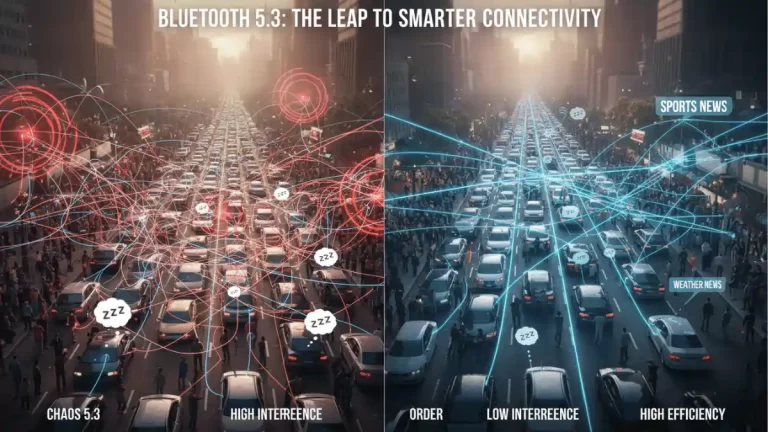
Analogy: Imagine someone shouting out “I have news!” repeatedly. With 5.3, they can shout “I have sports news!” or “I have weather news!” so you only listen if you care about that specific topic.
Encryption Key Size Control Enhancement:
What it does: This feature gives the host (e.g., your phone) more control over the encryption key size used for secure connections.
Benefit: It allows for more robust and secure connections, especially important in applications where data privacy is critical. It helps ensure that devices use the strongest possible encryption supported by both ends.
Connection Subrating:
What it does: This is a big one for power efficiency. It allows devices to quickly switch between low-duty cycle (sleep) and high-duty cycle (active) states during a connection.
Benefit: When your Bluetooth headphones are playing music, they need a high data rate. But when the music pauses, they can quickly drop into a very low-power state and only “wake up” briefly to check if anything’s happening. This significantly reduces power consumption, extending battery life for devices like wearables and earbuds.
Analogy: Instead of staying fully awake and alert all the time, your device can take frequent naps and only fully wake up when there’s important work to do.
Channel Classification Enhancement:
What it does: This improves the adaptive frequency hopping (AFH) mechanism in Bluetooth LE. AFH helps Bluetooth devices avoid interference by dynamically changing the channels they use.
Benefit: With 5.3, the host can provide more detailed information about bad channels to the controller, leading to more intelligent and effective channel selection. This results in more reliable connections and less interference, especially in busy radio environments.
How it impacts you (the user):
Future-Proofing: Devices with Bluetooth 5.3 are better equipped to handle upcoming advancements and applications that demand efficiency and reliability.
Longer Battery Life: Expect your Bluetooth earbuds, smartwatches, and other LE devices to last longer on a single charge due to Connection Subrating and improved advertising.
Improved Reliability: Fewer dropouts and more stable connections, even in crowded environments, thanks to better channel classification.
Enhanced Security: More robust encryption capabilities for sensitive data.
Example: Pairing earbuds that support Bluetooth 5.3 for fewer dropouts on a commute.
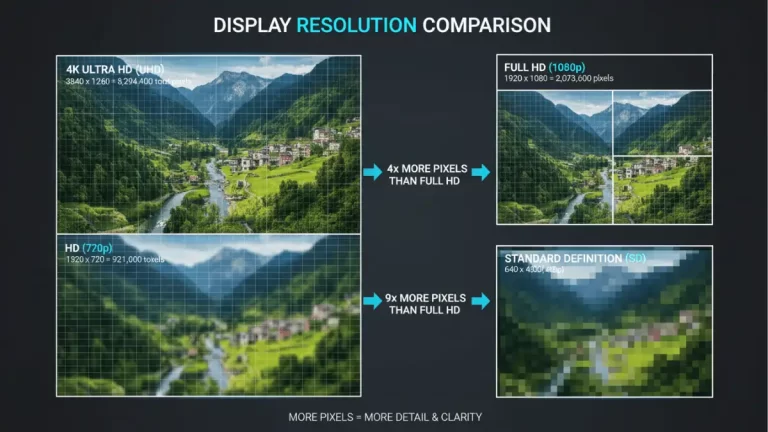
Definition: Video captured at roughly 3840×2160 pixels. 4K packs four times the pixels of 1080p, so footage looks sharper on large TVs and monitors. Bitrate, frame rate, stabilization, and codec (H.264 or HEVC) affect quality and file size. Many phones record 4K at 30 fps on the selfie camera and up to 60 fps on the rear camera, depending on the chip and heat limits.
Example: Recording a 4K/30 clip for YouTube product shots.