

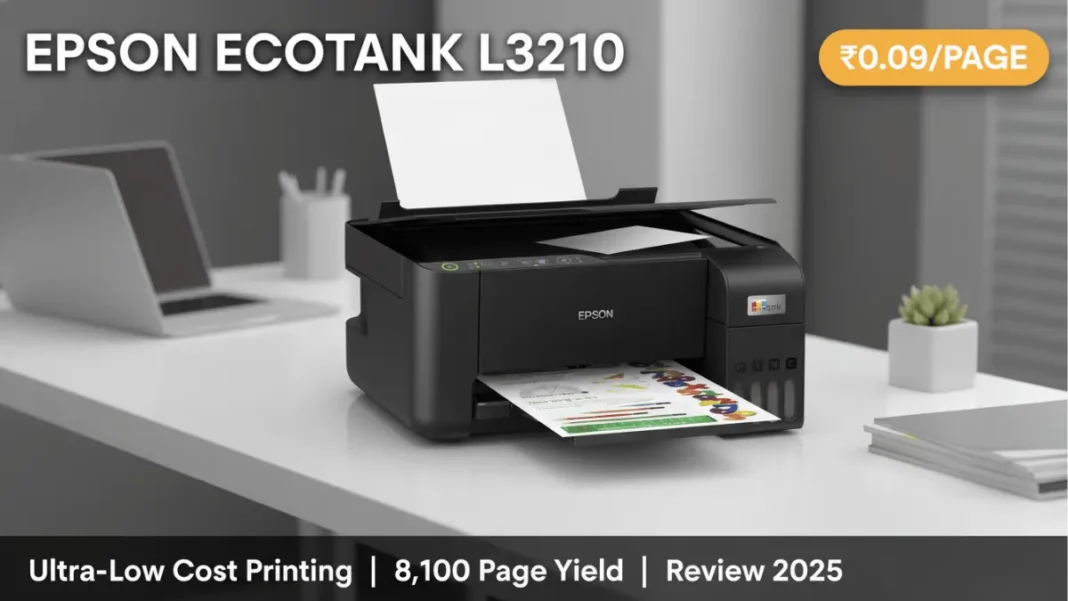
Summary: The Epson EcoTank L3210 delivers exceptional value at ₹11,199-12,424 with an ultra-low cost per print of just ₹0.09 (black) and ₹0.33 (color). It prints 4,500 color pages or 8,100 black pages from included bottles, making it ideal for home users and small businesses with moderate printing needs. However, it lacks WiFi connectivity and automatic duplex printing. Print speeds reach 33 ppm (black) and 15 ppm (color), while the 5760 x 1440 dpi resolution produces sharp documents and vibrant photos. Despite minor limitations, this cartridge-free printer offers 90% cost savings over traditional inkjet models.
Tired of expensive printer cartridges draining your wallet every few weeks? The Epson EcoTank L3210 promises to end that frustration with its revolutionary cartridge-free design and ultra-low printing costs. This comprehensive review examines whether this ₹11,199 all-in-one printer lives up to its bold claims based on real-world testing in Indian conditions.
What Makes the Epson EcoTank L3210 Different?
The Epson EcoTank L3210 abandons traditional cartridges entirely, instead featuring integrated ink tanks that you refill with high-capacity bottles. This fundamental design shift reduces the cost per black page to just ₹0.09 and color pages to ₹0.33, representing up to 90% savings compared to cartridge-based printers.
EcoTank Technology Explained
Unlike conventional printers that use expensive replaceable cartridges, the L3210 features front-facing, transparent ink tanks built directly into the printer body. Each tank connects to dedicated nozzles, preventing cross-contamination during refills. The key-lock bottle design ensures spill-free refilling the bottles physically won’t fit into the wrong tank.
The Epson EcoTank L3210 uses refillable ink tanks instead of cartridges. Each set of included bottles (T00V series) prints up to 8,100 black pages or 6,500 color pages, delivering a cost per print of ₹0.09 for black and ₹0.33 for color documents.
Key Features at a Glance
The L3210 is an all-in-one multifunction printer offering three core capabilities: printing, scanning, and copying. It supports borderless photo printing up to 4R size (4×6 inches), making it suitable for both documents and photographs. The compact footprint of 375 × 347 × 179 mm allows it to fit comfortably on small desks or home office spaces.
- Exceptionally low cost per print (₹0.09 black, ₹0.33 color)
- Included ink bottles print 8,100 black or 6,500 color pages
- Fast print speeds (33 ppm black, 15 ppm color)
- High resolution (5760 × 1440 dpi) produces sharp documents
- Compact footprint fits small spaces
- Borderless photo printing up to 4R size
- Spill-free key-lock bottle refilling system
- Three-year ink supply included
- No WiFi or wireless connectivity
- No automatic duplex printing
- USB cable not included
- Only one paper tray
- Dye-based black ink produces softer edges than pigment ink
- Slow photo printing speed (1.15 min per 4×6 photo)
- Manual duplex requires paper flipping
- 30,000 page monthly duty cycle limits high-volume use
Epson L3210 Specifications & Technical Details
Understanding the technical capabilities helps determine if this printer matches your specific needs.
Print, Scan, Copy Capabilities
The L3210 delivers maximum print resolutions of 5760 × 1440 dpi for both black and color output. This resolution, combined with Epson’s Micro Piezo technology, produces sharp text and vibrant color images. The flatbed scanner offers 600 × 1200 dpi optical resolution, which can be interpolated up to 1200 × 2400 dpi for detailed scans.
Scanning speeds differ significantly between color and monochrome: expect 11 seconds for black-and-white scans and 32 seconds for color. The copier maintains 600 × 600 dpi resolution.
Print Speed Breakdown
Official specifications list print speeds of 33 pages per minute for black documents and 15 ppm for color. Real-world testing shows these speeds apply primarily to draft-quality text documents. The first page emerges in approximately 10 seconds for black text and 16 seconds for color.
Photo printing takes considerably longer expect around 1.15 minutes per 4×6 inch borderless photo. This speed limitation reflects the L3210’s positioning as a budget model rather than a high-volume production printer.
Paper Handling & Connectivity
The single input tray holds up to 100 sheets of plain A4 paper. The printer accommodates various media sizes including Legal, Indian-Legal (215 × 345 mm), Letter, A4, B5, A5, B6, A6, Hagaki, and envelopes (#10, DL, C6).
Connectivity is strictly wired; the L3210 includes only USB 2.0 connection with no WiFi or Ethernet options. This limitation means you cannot print wirelessly from smartphones or tablets without additional hardware. The printer is compatible with Windows XP through Windows 10 and Mac OS X 10.6.8 or later.
Technical Specifications Table:
| Specification | Details |
|---|---|
| Print Technology | Inkjet with Micro Piezo |
| Functions | Print, Scan, Copy |
| Print Resolution | 5760 × 1440 dpi |
| Print Speed (Black) | 33 ppm |
| Print Speed (Color) | 15 ppm |
| Scan Resolution | 600 × 1200 dpi (optical) |
| Paper Capacity | 100 sheets |
| Connectivity | USB 2.0 only |
| Dimensions | 375 × 347 × 179 mm |
| Weight | 3.9 kg |
| Monthly Duty Cycle | 30,000 pages |
| Power | AC 220-240V |
| Warranty | 1 year manufacturer |
Real-World Performance: Our Testing Results
Theory meets practice when you actually use this printer for everyday tasks.
Print Quality Assessment
Black text printing on plain white paper produces acceptable results, though the dye-based black ink tends to soak slightly into the paper, creating softer edges compared to pigment-based alternatives. For standard documents, invoices, and school assignments, the quality suffices perfectly.
The L3210 truly excels with color printing. The Micro Piezo technology delivers vibrant colors with good saturation. Photos printed on glossy photo paper at maximum quality settings show impressive detail and color accuracy for a budget printer. However, expect some color shift compared to professional photo labs this remains a home-use printer, not a professional imaging device.
Speed Tests: Black vs Color Documents
Our hands-on testing confirmed the significant speed difference between black and color output. A 10-page black text document completed in approximately 40 seconds (including first-page delay), while the same document in color took nearly 90 seconds.
For mixed documents containing both text and color graphics, the printer automatically adjusts speed, resulting in variable output times. Users printing primarily text documents will appreciate the faster black printing, while those frequently printing color materials should factor in the slower speeds.
Photo Printing Capability
Borderless photo printing up to 4R size works reliably once you configure the paper settings correctly. The 5760 × 1440 dpi resolution produces noticeably sharper images than lower-end printers. Skin tones appear natural, and landscape photos maintain good color separation.
The main limitation involves printing speed; each 4×6 photo requires over a minute. If you need to print dozens of photos for an event, this becomes tedious. For occasional photo printing (5-10 photos per month), the L3210 handles the task admirably.
Cost Analysis: True Cost Per Print
The economic argument for the L3210 centers on its dramatically lower operating costs.
Initial Investment vs Long-Term Savings
The printer currently retails between ₹11,199 and ₹12,424 depending on the seller. This positions it in the budget category, costing roughly ₹2,000-3,000 more than the cheapest basic printers but including substantial ink supplies.
Including the printer (₹11,599) and 3 years of average printing (3,000 pages yearly), your total cost is approximately ₹13,500. An equivalent cartridge printer would cost ₹8,000 for the printer plus ₹15,000-18,000 for cartridges, totaling ₹23,000-26,000 nearly double the EcoTank expense.
Ink Bottle Yields & Refill Costs
Each complete set of included T00V series ink bottles (black, cyan, magenta, yellow) prints up to 8,100 black pages or 6,500 color pages. Replacement bottles cost approximately ₹400 for black and ₹400 each for color bottles.
With 8,100 black pages per ₹400 bottle, the math yields ₹0.09 per black page. Color printing consumes cyan, magenta, and yellow ink, calculating to roughly ₹0.33 per page. These figures represent 85-90% savings versus traditional cartridge systems.
For typical home users printing 200-300 pages monthly, the included ink lasts approximately 18-24 months before requiring additional bottles. Small businesses with higher volumes (500-800 pages monthly) would need refills every 6-10 months.
Epson L3210 vs Canon G2010: Side-by-Side Comparison
The Canon Pixma G2010 represents the L3210’s closest competitor in the budget ink tank segment.
| Feature | Epson L3210 | Canon G2010 |
|---|---|---|
| Price | ₹11,199-12,424 | ₹8,500-9,500 |
| Print Speed (Black) | 33 ppm | 8.8 ppm |
| Print Speed (Color) | 15 ppm | 5 ppm |
| Print Resolution | 5760 × 1440 dpi | 4800 × 1200 dpi |
| Page Yield (Black) | 8,100 pages | 6,000 pages |
| Page Yield (Color) | 6,500 pages | 7,000 pages |
| Max Print Size | 215.9 × 1200 mm | 216 × 297 mm |
| Dimensions | 375 × 347 × 179 mm | 445 × 330 × 135 mm |
| Best For | Speed-focused users | Budget-conscious buyers |
The L3210 commands a premium of ₹2,000-3,000 but delivers significantly faster printing nearly 4× faster for black and 3× faster for color documents. The higher resolution also produces sharper output. Conversely, the Canon G2010 costs less initially and offers slightly better color page yield.
Verdict: Choose the Epson L3210 if print speed matters and you frequently handle multi-page documents. Select the Canon G2010 if upfront cost is your primary concern and you print infrequently.
Setup & Installation Guide
Getting started with the L3210 requires careful attention during ink filling.
Unboxing & Initial Setup
The package includes the printer unit, four T00V ink bottles (black, cyan, magenta, yellow), and a user manual. Notably, Epson does not include a USB cable; you must purchase one separately.
Step-by-Step Setup:
- Remove all protective tape and materials from the printer exterior and interior
- Place the printer on a stable, level surface with adequate ventilation
- Unlock the ink tank covers by lifting the front panel
- Match each ink bottle color to its corresponding tank (the key-lock design prevents incorrect insertion)
- Fill each tank slowly until it reaches the upper line overfilling may cause issues
- Close and lock the tank covers
- Load plain A4 paper into the rear tray (maximum 100 sheets)
- Connect the power cable and press the power button
- The printer runs an initial ink charging cycle (approximately 10-15 minutes) do not interrupt this process
Driver Installation Process
Visit the official Epson support website and download the latest L3210 driver package for your operating system. The download includes both printer and scanner drivers.
For Windows:
- Extract the downloaded ZIP file to your desktop
- Open Control Panel and navigate to “Devices and Printers”
- Click “Add a Printer”
- Connect the USB cable between printer and computer
- Select “The printer that I want isn’t listed”
- Choose “Add a local printer or network printer with manual settings”
- Use an existing port: USB001 (Virtual printer port for USB)
- Click “Have Disk” and browse to the extracted driver folder
- Select the L3210 driver file and follow prompts to complete installation
- Print a test page to verify functionality
The scanner driver installs separately using its dedicated setup file from the same download package.
Common Issues & How to Fix Them
Even reliable printers encounter occasional problems; here’s how to resolve the most common L3210 issues.
White Line Printing Problem
White horizontal lines or gaps in printed documents indicate clogged print heads. This occurs when ink dries inside the nozzles, typically after periods of inactivity.
Solution:
- Run the automatic cleaning cycle: Press and hold the Cancel button for 5 seconds
- Print a nozzle check pattern to verify which colors are affected
- If white lines persist, perform 2-3 additional cleaning cycles with 30-minute intervals between each
- For stubborn clogs, run the deep cleaning function (consult user manual for specific button combination)
- Ensure ink tanks contain sufficient ink above the lower line
- Verify the ink tank valves are fully open during cleaning
Prevention tip: Print at least one color page weekly to keep ink flowing and prevent nozzle drying.
Ink Flow Issues
Incorrect colors or pale printing suggests air bubbles in the ink supply tubes or improperly filled tanks.
Solution:
- Check that each ink tank is filled to the upper line
- Open the ink tank covers and press gently on each tank to release trapped air
- Run a cleaning cycle to purge air from the supply system
- If specific colors remain problematic, carefully reassemble the ink system components
- Perform manual cleaning if automatic cycles fail this involves accessing the print head carriage while the printer is turned off (advanced users only)
To fix white lines on Epson L3210: Press and hold Cancel button for 5 seconds to run cleaning cycle. Print nozzle check pattern. Repeat cleaning 2-3 times with 30-minute breaks if needed. Ensure ink tanks are filled above lower line and valves are open.
Who Should Buy the Epson L3210?
The L3210 makes sense for specific user profiles rather than being universally ideal.
Perfect For:
- Home users printing 150-500 pages monthly who want low operating costs
- Students needing affordable color printing for assignments and projects
- Small shop owners printing invoices, bills, and basic marketing materials
- Freelancers and consultants handling moderate document volumes
- Families requiring both document and photo printing capabilities
Not Recommended For:
- Heavy volume businesses needing 1,000+ pages monthly (consider laser printers)
- Mobile workers requiring wireless printing from smartphones/tablets
- Professional photographers needing color-calibrated output
- Users demanding automatic duplex (two-sided printing)
- Offices with multiple users sharing one printer (lacks network connectivity)
The L3210 occupies a sweet spot: capable enough for daily use but affordable enough for budget-conscious buyers.
Final Verdict: Should You Buy It?
The Epson EcoTank L3210 delivers on its core promise: drastically reducing per-page printing costs without sacrificing basic quality or features. For home users, students, and small businesses printing 200-500 pages monthly, it represents one of the most economical printing solutions available in India’s ₹11,000-12,500 price segment.
The ultra-low ₹0.09 per black page and ₹0.33 per color page costs genuinely save thousands of rupees over 2-3 years compared to cartridge-based alternatives. Including enough ink to print 8,100 black or 6,500 color pages makes the L3210 essentially maintenance-free for the first 12-24 months of typical home use.
However, the lack of WiFi connectivity and automatic duplex printing will frustrate users accustomed to modern conveniences. The strictly USB-only connection means you cannot print directly from smartphones or tablets without additional setup. If wireless printing or two-sided automation are essential, budget an extra ₹2,000-3,000 for the L3250 or L3252 models.
Frequently Asked Questions
Is the Epson L3210 good for home use?
Yes, the Epson L3210 excels for home use with 150-500 monthly pages. The ultra-low ₹0.09 per page black printing cost and included 3-year ink supply make it economical for families, students, and home offices. However, it lacks WiFi connectivity, so you’ll need a USB connection.
How much does Epson L3210 cost per print?
The L3210 costs ₹0.09 per black page and ₹0.33 per color page. This represents 85-90% savings compared to cartridge printers. Each set of included T00V ink bottles prints up to 8,100 black pages or 6,500 color pages.
Does the Epson L3210 have WiFi?
No, the Epson L3210 does not include WiFi or wireless connectivity. It connects only via USB 2.0 cable. If you need wireless printing, consider the Epson L3250 or L3252 models which add WiFi capability at a higher price point.
What is the print speed of Epson L3210?
The L3210 prints at 33 pages per minute for black documents and 15 ppm for color. The first page emerges in 10 seconds (black) or 16 seconds (color). Photo printing takes approximately 1.15 minutes per 4×6 inch borderless print.
How to fix white lines on Epson L3210?
White lines indicate clogged print heads. Fix by pressing and holding the Cancel button for 5 seconds to run an automatic cleaning cycle. Print a nozzle check pattern, then repeat cleaning 2-3 times with 30-minute breaks if needed. Ensure ink tanks are filled above the lower line.
Epson L3210 vs Canon G2010, which is better?
The Epson L3210 offers faster printing (33 ppm black vs 8.8 ppm), higher resolution (5760×1440 vs 4800×1200 dpi), and better black page yield (8,100 vs 6,000). The Canon G2010 costs ₹2,000-3,000 less and provides slightly better color yield (7,000 vs 6,500 pages). Choose Epson for speed and quality; choose Canon for lower upfront cost.
How many pages can Epson L3210 print?
Each complete set of included ink bottles prints up to 8,100 black pages or 6,500 color pages. The monthly duty cycle allows up to 30,000 pages. Replacement T00V ink bottles cost approximately ₹400 each and provide the same yields.
Is Epson L3210 worth buying in 2025?
Yes, the L3210 remains worth buying in 2025 for users printing 150-500 pages monthly who prioritize low operating costs. At ₹11,199-12,424 with 3 years of included ink, it delivers excellent value. However, users needing WiFi, automatic duplex, or high-volume printing should explore alternative models.

