

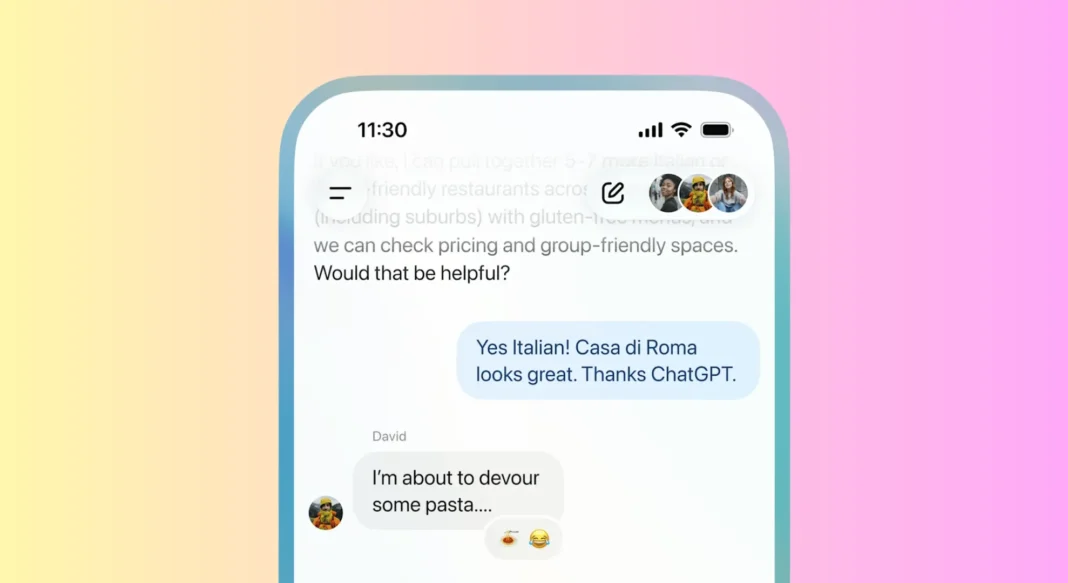
OpenAI quietly rolled out group chat functionality in ChatGPT on November 13, 2025, and it’s already changing how people collaborate with AI. Instead of juggling multiple individual conversations, up to 20 people can now brainstorm, plan, and solve problems together in a single ChatGPT thread with the AI acting as an intelligent facilitator rather than just another participant.
But here’s the catch: this feature isn’t available everywhere yet. Right now, it’s rolling out as a pilot in Japan, New Zealand, South Korea, and Taiwan, with global expansion expected in early 2026. Whether you’re coordinating a family vacation, running a remote team sprint, or planning a wedding with friends scattered across time zones, group chats promise to make AI-assisted collaboration feel less like passing notes and more like having a real-time creative session.
Table of Contents
What Is ChatGPT Group Chat?
ChatGPT Group Chat is a pilot feature that allows up to 20 users to collaborate in a single AI-powered conversation. Members can ask questions, share ideas, and make decisions together while ChatGPT provides suggestions, summaries, and facilitates the discussion in real time.
How It Works
Think of ChatGPT group chats as a hybrid between WhatsApp groups and Slack channels, but with an AI moderator built in. When you create a group chat, you become the admin with control over who joins, what gets shared, and how the conversation flows.
Each member can send messages, ask ChatGPT questions, and see everyone’s interactions in chronological order. The AI doesn’t respond to every single message it intelligently picks up on direct questions, group consensus moments, and when the conversation needs guidance. This prevents the “chatbot spam” problem where AI assistants interject unnecessarily.
Behind the scenes, ChatGPT uses the GPT-5.1 Auto model for group conversations, which dynamically adjusts response complexity based on the conversation context and number of active participants. During internal testing, groups of 5-10 people saw faster response times compared to maxed-out 20-person chats, though OpenAI hasn’t published official performance benchmarks yet.
Who Can Use It Right Now
As of November 2025, group chats are available to ChatGPT Plus, Pro, and Team subscribers in four pilot regions: Japan, New Zealand, South Korea, and Taiwan. Free-tier users in these countries can join existing group chats via invite but cannot create new ones.
OpenAI’s help documentation confirms the feature will expand to the US, Canada, UK, EU, and India by Q1 2026, pending localization and privacy compliance reviews. Enterprise customers will get priority access with additional admin controls like conversation export, audit logs, and SSO integration.
Important limitation: You can’t invite someone outside the pilot regions yet, even if both users have ChatGPT Plus subscriptions. This geographic restriction has frustrated early adopters trying to collaborate with international teams.
Getting Started
Creating Your First Group Chat
Here’s the step-by-step process based on the current pilot version:
On Desktop:
- Open ChatGPT and click the “+” icon next to “New chat” in the left sidebar
- Select “Start group chat” from the dropdown menu
- Give your group a descriptive name (e.g., “Tokyo Trip 2026” or “Product Launch Planning”)
- Set privacy preferences: Allow ChatGPT to remember conversations (recommended for continuity) or disable memory for sensitive discussions
- Click “Create” to generate a shareable invite link
On Mobile (iOS/Android):
- Tap the menu icon (three lines) → “New chat“
- Toggle “Group conversation” at the top
- Name your group and adjust memory settings
- Tap “Create & invite” to get your link
The group chat interface looks similar to individual ChatGPT conversations but adds member avatars at the top showing who’s currently viewing the thread. A subtle indicator shows when someone is typing, similar to iMessage or WhatsApp.
Inviting Members
Group admins get a unique invite link that works for 7 days by default. You can share it via:
- Direct message (WhatsApp, Telegram, Signal)
- Email with context about the group’s purpose
- Slack/Teams channel for work-related groups
- QR code generation (coming in December 2025 update)
Pro tip: Add a custom welcome message when creating the link explaining the group’s goal and any ground rules (e.g., “This is for budget-conscious travel ideas only no luxury suggestions!” or “Work hours responses only, please”).
Members can leave at any time without notifying others, but only admins can remove participants or delete the entire conversation. Unlike WhatsApp, there’s no “group info” panel showing join/leave timestamps OpenAI designed this intentionally to reduce social pressure around participation.
Setting Up Group Preferences
Before diving into collaboration, configure these three settings:
1. Memory Controls:
- On: ChatGPT remembers preferences, past decisions, and context across sessions (ideal for ongoing projects)
- Off: Treats each conversation as standalone (better for one-time planning or sensitive topics)
2. Notification Style:
- All messages: Get pinged for every chat activity (overwhelming for large groups)
- Mentions only: Only notify when someone @mentions you or asks ChatGPT a direct question
- Digest mode: Receive a summary every 4 hours of key decisions and action items
3. Response Mode:
- Proactive: ChatGPT offers suggestions and jumps into discussions when it detects questions
- On-demand: AI only responds when explicitly asked with “@ChatGPT” tag
- Facilitator: ChatGPT summarizes discussions and highlights consensus without giving opinions
Most power users report that “Mentions only” notifications + “On-demand” response mode creates the best balance between useful AI input and conversation flow.

Real-World Use Cases
Remote Team Collaboration
A distributed software team in Wellington, New Zealand tested group chats for sprint planning and reported 40% faster consensus on priorities compared to Slack threads. Instead of endless back-and-forth, they ask ChatGPT to:
- Summarize 50+ messages into action items
- Compare two competing approaches (microservices vs monolith)
- Draft project requirements based on the team’s discussion
- Calculate realistic timelines from everyone’s availability
Example workflow:
textTeam Lead: "We need to decide: ship the mobile app now with bugs, or delay 2 weeks?"

Developer A: "Delay—bugs will hurt reviews"
Developer B: "Ship now—competitors just launched"
Designer: "Can we do a soft launch to beta users?"

@ChatGPT: Based on this discussion, create a decision matrix

[ChatGPT generates a table weighing risks, user impact, and market timing, highlighting that a beta soft launch addresses both concerns]
The team voted to pursue the designer’s compromise a decision they estimate would’ve taken 3+ meetings otherwise.
Trip Planning With Friends
Group chats shine for complex coordination scenarios where everyone has opinions but no one wants to be the sole decision-maker. A group of six friends planning a two-week Japan itinerary used ChatGPT to:
- Aggregate everyone’s “must-see” destinations
- Calculate optimal routes based on JR Pass coverage
- Suggest accommodation near shared interests (food markets, temples, nightlife)
- Create a budget breakdown showing individual and shared expenses
What made it different from Google Docs?
Real-time adjustment. When two people realized they couldn’t take the first three days, ChatGPT instantly recalculated the itinerary without anyone manually editing spreadsheets.
Study Groups and Learning
University students in South Korea are using group chats as AI-powered study facilitators. Instead of one person monopolizing the conversation or everyone working in silos, ChatGPT:
- Poses Socratic questions to guide group problem-solving
- Identifies gaps when the group reaches a wrong conclusion
- Generates practice problems at increasing difficulty levels
- Creates study schedules based on everyone’s exam dates
One computer science study group reported that having ChatGPT in the conversation reduced “I’ll just Google it later” disengagement because the AI provided instant clarification without derailing the group’s flow.
ChatGPT vs Other Collaboration Tools
| Feature | ChatGPT Group Chat | Slack | Microsoft Teams | |
|---|---|---|---|---|
| AI Facilitation | Native (GPT-5.1 Auto) | Plugin-based | Copilot (separate license) | None |
| Max Participants | 20 | Unlimited | 250 (meetings: 300) | 1,024 |
| Cost (Small Teams) | $20/month (Plus) | Free (limited) or $8.75/user | $12.50/user | Free |
| Memory Across Sessions | Yes (optional) | Via search only | Yes (SharePoint) | No |
| File Sharing | Links only (no uploads yet) | Full support | Full support | Up to 2GB |
| Code Execution | Yes (Python, JS) | Via apps | Via Power Automate | No |
| Enterprise Security | SOC 2 (coming Q1 2026) | SOC 2, ISO 27001 | FedRAMP, ISO 27001 | E2E encryption only |
| Best For | Creative brainstorming, decision-making, learning | Asynchronous work communication | Enterprise document collaboration | Casual personal groups |
The verdict: ChatGPT group chats aren’t replacing Slack or Teams, they’re solving a different problem. Use them when you need AI-assisted decision-making and creative synthesis, not for file storage, video calls, or complex project management.
Privacy and Security
What Data Gets Stored
OpenAI’s updated privacy policy for group chats states:
- Message content: Stored for 30 days, then deleted (unless memory is enabled)
- Member metadata: Usernames and join timestamps kept for 90 days
- AI training: Group chat data is not used for model training without explicit opt-in
- Admin controls: Group creators can export full conversation logs anytime
Key concern: Unlike end-to-end encrypted messengers (Signal, WhatsApp), ChatGPT group chats are server-side encrypted, meaning OpenAI can technically access the content. Don’t share:
- Passwords, API keys, or credentials
- Confidential business data (until Enterprise tier launches)
- Personally identifiable information (PII) of third parties without consent
- Medical/legal advice requests (ChatGPT isn’t licensed for professional services)
Memory Controls
Each group chat has independent memory settings. When memory is enabled:
- ChatGPT recalls past preferences (“We agreed to keep the budget under $5,000”)
- It references earlier decisions to maintain consistency
- Personalization improves over time (learns group’s communication style)
When memory is disabled:
- Each session starts fresh (good for one-off planning)
- More privacy-conscious (no long-term data retention)
- Requires more context-setting at the start of conversations
Pro tip: Use memory-enabled chats for ongoing projects (product launches, recurring events) and memory-disabled for sensitive discussions (medical advice, financial planning).
Tips for Better Group Chats
When to Use Group vs Individual
Use group chat when:
- Decisions need consensus from 3+ people
- Everyone has equal input (no hierarchies)
- The topic benefits from diverse perspectives (design, travel, learning)
- You want AI to facilitate rather than dictate
Stick with individual ChatGPT when:
- You need deep technical assistance (coding, research)
- Privacy is critical (personal questions, sensitive data)
- Speed matters (group chats have slightly slower response times with 10+ members)
- You’re iterating rapidly on a solo project
Managing Notifications
To avoid notification fatigue in active groups:
- Set digest mode for non-urgent planning (trip itineraries, long-term projects)
- Use @mentions to direct questions to specific people or ChatGPT
- Create separate groups for different topics rather than one mega-thread (e.g., “Wedding Venue” vs “Wedding Menu” instead of “Wedding Planning 2026”)
- Establish response windows: “Check-in twice daily at 9 AM and 6 PM” works better than constant monitoring
One team reported cutting notification overload by 60% simply by switching from “All messages” to “Digest mode”.
Troubleshooting Common Issues
Problem: “Invite link says ‘This group is full'”
- Solution: Group capacity is 20 members. Admin needs to remove inactive users or create a new group
Problem: “ChatGPT isn’t responding to my questions”
- Solution: Check response mode settings. If set to “On-demand,” use @ChatGPT to trigger responses
Problem: “I can’t see other members’ typing indicators”
- Solution: This feature requires ChatGPT mobile app version 4.7.2 or later (released Nov 14, 2025)
Problem: “How do I transfer admin rights?”
- Solution: Currently not supported only the original creator can admin. OpenAI plans to add this in December 2025 update
Problem: “Can I use group chats with API access?”
- Solution: Not yet. API support for group conversations is planned for Q2 2026 with developer beta starting March 2026
What’s Coming Next
Based on OpenAI’s public roadmap and pilot feedback:
December 2025:
- QR code invites for easier mobile sharing
- Voice mode support in group chats (members can speak instead of typing)
- Enhanced admin controls (mute members, pin messages)
Q1 2026:
- Global rollout to US, UK, EU, Canada, India, Australia
- Enterprise tier with SSO, audit logs, and compliance certifications
- File upload support (PDFs, images, spreadsheets)
Q2 2026:
- API access for developers to build custom group chat experiences
- Integration with Slack/Teams (AI assistant in existing channels)
- Advanced memory: Per-member preferences vs group-wide memory
OpenAI’s CEO Sam Altman hinted in a November 14 interview that group chats are “foundational infrastructure” for their vision of AI agents collaborating with human teams, suggesting much deeper functionality is coming.
The Bottom Line
ChatGPT group chats represent OpenAI’s first serious attempt at collaborative AI, moving beyond solo productivity tools toward team-based intelligence. While still in early pilot stages with geographic limitations and missing features (file uploads, admin transfers, API access), the core concept is compelling: an AI that facilitates group decisions rather than just answering individual questions.
For remote teams tired of Slack’s message overload, friend groups struggling to plan trips via endless group texts, or study groups wanting more structure, this feature offers a fresh alternative. It won’t replace your project management tools or video conferencing software but for brainstorming, consensus-building, and creative problem-solving, it’s already proving useful in pilot regions.
If you’re in the pilot regions: Try creating a group chat for your next collaborative project and set response mode to “On-demand” to avoid AI overload. If you’re waiting for global launch: Start thinking about which team projects or personal planning scenarios could benefit from AI-assisted group conversations; the feature is expected worldwide by late Q1 2026.

Frequently Asked Questions (FAQs)
Can I use ChatGPT group chats on the free plan?
Free users in pilot regions can join existing group chats via invite but cannot create new groups. Creating groups requires ChatGPT Plus ($20/month), Pro ($200/month), or Team subscriptions.
How many people can join a ChatGPT group chat?
The current limit is 20 members per group. OpenAI is testing higher limits (up to 50) for Enterprise customers in early 2026.
Is ChatGPT group chat available in the US?
Not yet. As of November 2025, it’s only available in Japan, New Zealand, South Korea, and Taiwan. US rollout is expected in January-February 2026.
Can ChatGPT remember past group conversations?
Yes, if you enable “Memory” in group settings. ChatGPT will recall past decisions, preferences, and context across sessions. You can disable this for more privacy-conscious discussions.
What happens if I leave a group chat?
You immediately lose access to the conversation history. Other members aren’t notified of your departure. You’ll need a new invite link to rejoin.
Can I delete messages in a group chat?
Currently, no. Only group admins can delete the entire conversation. Message editing/deletion is planned for the December 2025 update.
How is this different from using ChatGPT individually?
Group chats let multiple people contribute to one conversation with shared context. ChatGPT sees everyone’s input and facilitates group decision-making rather than just answering one person’s questions.
Is my data safe in ChatGPT group chats?
OpenAI uses server-side encryption and doesn’t use group chat data for model training by default. However, it’s not end-to-end encrypted like Signal. Avoid sharing passwords, credentials, or highly sensitive personal information.
Source: OpenAI

