

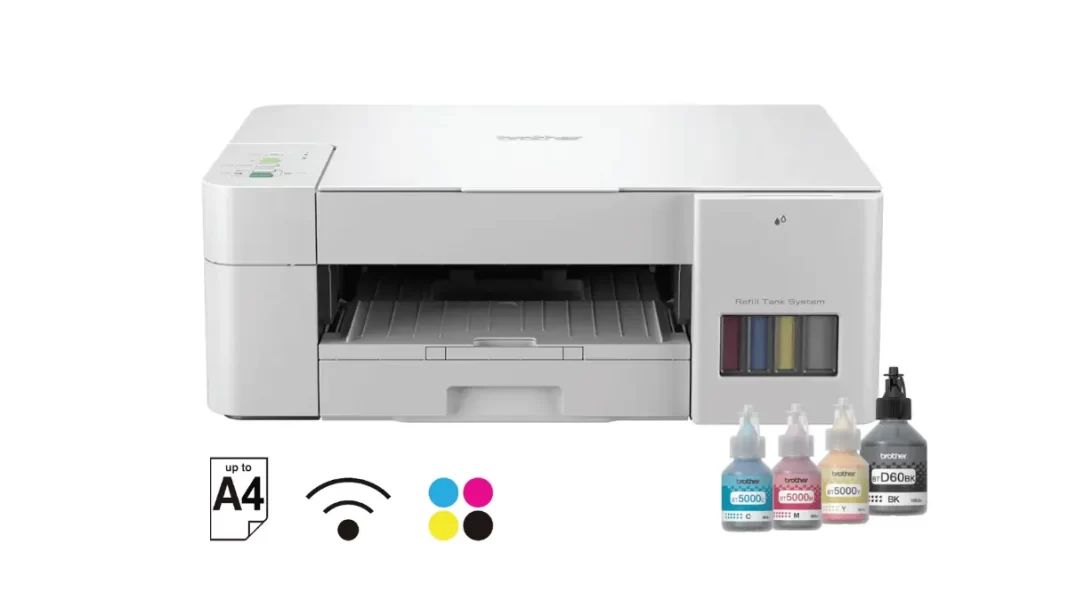
Brother DCP-T426W is a low-cost color ink tank A4 printer for homes and students. It prints up to 16/9 ipm (mono/colour), supports borderless, and includes Wi-Fi with Wireless Direct. There’s no ADF or auto-duplex, and it doesn’t support AirPrint on Apple devices.
Table of Contents
Key specs at a glance DCP-T426W
- Type: Color inkjet, refillable ink tank, A4, 3-in-1.
- Engine: Piezo printhead (210 black nozzles; 70×3 colour). Memory 64 MB. Noise ~53.5 dB(A).
- Speed: Up to 16 ipm mono / 9 ipm colour (ISO/IEC 24734); FPOT 6.5 s mono / 10.0 s colour.
- Paper: 150-sheet tray + single-sheet manual feed; borderless up to A4.
- Connectivity: USB 2.0, Wi-Fi, Wireless Direct; Mopria.
- Warranty (India): 1 year or 30,000 pages on-site. MRP ₹15,590.
What’s good in DCP-T426W
- Very low running cost with 7,500 black and 5,000 colour quoted yields.
- Borderless printing up to A4; compact footprint; 150-sheet tray.
- Wi-Fi Direct and Mopria support for quick Android printing.
What’s missing in DCP-T426W
- No automatic duplex; manual duplex only. No ADF for scanning stacks.
- No AirPrint; iPhone/iPad need Brother iPrint&Scan app.
Pros and cons
Pros
- Very low running costs
- Borderless up to A4; compact, easy refills
- Wi-Fi Direct and Mopria for quick Android prints
Cons
- No auto-duplex; no ADF for stacks
- No AirPrint; extra app needed on iOS/macOS users need drivers
Price in India and who should buy DCP-T426W
On Oct 11, 2025, we found street pricing around ₹10,799 on Flipkart against an MRP of ₹15,590. If you print a few dozen to a few hundred pages a month assignments, tickets, forms this is the sweet spot. If you need auto-duplex or an ADF for scanning stacks, step up a tier.
Mini case: A student printing ~100 pages a month will refill black roughly once every 6–7 months at OEM yields and see sub-₹0.10 mono pages (math below).
DCP-T426W: Print speed, quality, and paper handling
Brother quotes 16 ipm mono and 9 ipm colour, with first page out at 6.5 s (mono). That’s fine for home use. The tray holds 150 sheets, and the printer supports borderless printing for A4 and typical photo sizes handy for project charts or 6×4 photos. There’s no auto-duplex, so two-sided jobs take manual flips.
Connectivity and OS support
You get USB, Wi-Fi, and Wireless Direct. Android is easy via Mopria or Brother iPrint&Scan. On Apple devices, there’s no AirPrint on this model; use Brother’s app on iPhone/iPad or install Brother’s drivers on macOS. Supported OS spans Windows 7–11 and current macOS releases.
Does the DCP-T426W support AirPrint?
No. Brother’s support site states this model does not support AirPrint. Print from iPhone or iPad using the Brother iPrint&Scan app instead, or print from a Mac using Brother’s drivers. If you need native AirPrint, look at higher models like DCP-T525W.
DCP-T426W: Cost per page explained with ISO yields and MRPs
Brother quotes 7,500 pages black and 5,000 pages per colour (C/M/Y) using its methodology based on ISO/IEC 24712 test patterns (note: not ISO/IEC 24711). Official India MRPs we can cite today: BTD60BK often listed at ₹660, BT5000C/M/Y at ₹490 each.
Formula
Cost per page = Bottle price ÷ quoted yield.
Math (rounded):
- Black mono: ₹660 ÷ 7,500 ≈ ₹0.09/page.
- Colour composite: (₹490 ÷ 5,000) × 3 ≈ ₹0.29/page.
These are estimates. Real costs vary with coverage, paper, and maintenance cycles.
Cost-per-page table
| Type | Bottle | MRP (₹) | ISO pattern | Yield | Cost/page |
|---|---|---|---|---|---|
| Black | BTD60BK | 660 | 24712-based | 7,500 | ~₹0.09 |
| Colour (C/M/Y) | BT5000C/M/Y | 490 each | 24712-based | 5,000 each | ~₹0.29 (composite) |
Setup and maintenance tips
- Run a nozzle check after unboxing and whenever colours fade.
- Print at least one colour page weekly to keep tanks flowing.
- Keep the printer covered; avoid dusty, hot spots.
- Use OEM inks during warranty.
- If banding appears, do a gentle cleaning before a deep clean to save ink.
These align with Brother’s manuals and general inkjet best practice.
Common questions
Does it have auto-duplex?
Manual duplex only; no automatic two-sided.
Is there an ADF?
No, it’s a flatbed only.
Borderless A4?
Yes, plus common photo sizes.
Wi-Fi Direct?
Yes.
AirPrint?
Not supported; use Brother’s app on iOS.
Warranty in India?
1 year or 30,000 pages on-site.
Final Verdict
If you want a cheap-to-run home printer for assignments and everyday colour, the DCP-T426W delivers. Just accept the trade-offs: manual duplex, no ADF, and no AirPrint. If you need automatic duplex/ADF or native Apple printing, consider stepping up within Brother’s T-series.
Frequently Asked Questions (FAQs)
Does DCP-T426W have an ADF?
No; it’s a flatbed.
What’s the quoted yield?
7,500 black, 5,000 per colour (24712-based).
Which inks does it use in Brother DCP-T426W?
BTD60BK (black), BT5000C/M/Y (colour).
Can it print borderless photos in Brother DCP-T426W?
Yes, including A4 and common photo sizes.
Supported OS in Brother DCP-T426W?
Windows 7–11, macOS 10.13+ to 26.x, Linux.
What’s the tray capacity of Brother DCP-T426W?
150 sheets plus a single-sheet manual feed slot.
Brother DCP-T426W price in India?
Often ₹10.8k–₹13k; we saw ₹10,799 on Flipkart on Oct 11, 2025.
Featured Snippet Boxes
Is Brother DCP-T426W good for students?
Yes. It’s affordable to buy and run, prints borderless A4, and supports Wi-Fi Direct. The trade-offs: no auto-duplex and no ADF, so double-sided notes and bulk scans take longer. iPhone/iPad users must use Brother’s app.
What is the real cost per page?
Using current OEM MRPs, black works out around ₹0.09 and colour about ₹0.29 per page at quoted yields. Actual costs vary with coverage and cleaning cycles.
Does it support automatic two-sided printing?
No. The DCP-T426W supports manual duplex only. If auto-duplex matters, look at higher models with “DW” suffix.
Does it work with iPhone or Mac?
It doesn’t support AirPrint. Use Brother iPrint&Scan on iOS or install Brother drivers on macOS.

