

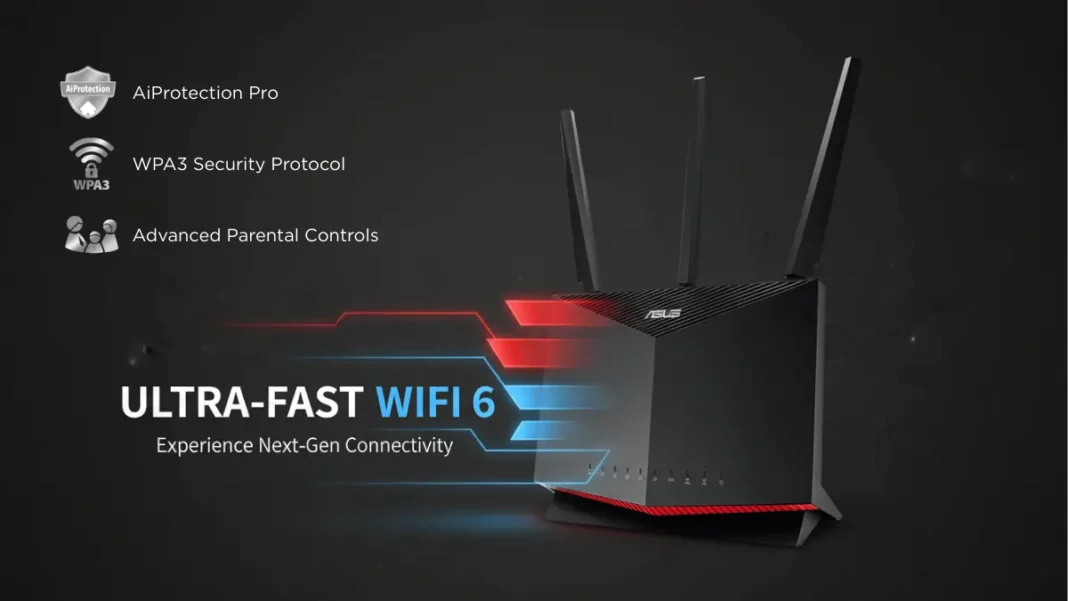
Summary: The ASUS RT-AX86U is a dual-band Wi-Fi 6 router (AX5700) powered by a 1.8GHz quad-core processor that delivers up to 4804 Mbps on 5GHz and 861 Mbps on 2.4GHz. It features a dedicated gaming port, Mobile Game Mode for lag-free mobile gaming, and a 2.5G Ethernet port for multi-gig internet connections. Real-world testing shows close-range speeds of 137 Mbps on 2.4GHz and exceptional 5GHz performance with 160MHz channel support. At approximately $250, it offers flagship-level hardware (same CPU and RAM as the ROG GT-AX11000) at a midrange price, making it ideal for serious gamers and households with multiple high-bandwidth devices.
The ASUS RT-AX86U stands out in the crowded Wi-Fi 6 router market by packing flagship-level performance into a compact, gamer-focused design at a midrange price point. This dual-band AX5700 router combines a powerful 1.8GHz quad-core processor with gaming-specific features like Mobile Game Mode and a dedicated gaming port, addressing the exact pain points competitive gamers face.
What Is the ASUS RT-AX86U?
The RT-AX86U is ASUS’s dual-band Wi-Fi 6 (802.11ax) gaming router that delivers combined speeds up to 5700 Mbps 861 Mbps on the 2.4GHz band and 4804 Mbps on the 5GHz band. Powered by Broadcom’s BCM4908 chipset paired with a 1.8GHz quad-core processor, 1GB of RAM, and 256MB of flash storage, this router matches the internal specifications of ASUS’s flagship ROG Rapture GT-AX11000 that costs twice as much.
What sets the RT-AX86U apart is its gaming-first design philosophy. Unlike generic Wi-Fi 6 routers that simply offer faster speeds, ASUS engineered specific features to minimize latency and prioritize gaming traffic, the two factors that matter most when milliseconds determine victory or defeat in competitive play.
- Flagship-level hardware (1.8GHz quad-core CPU, 1GB RAM) at midrange pricing
- Dedicated gaming port and Mobile Game Mode for plug-and-play optimization
- 2.5G Ethernet port for multi-gigabit internet support
- Excellent close-range 5GHz performance with 160MHz channels
- AiMesh support for flexible whole-home coverage
- Lifetime free AiProtection Pro security suite
- Compact vertical design saves space
- Only four Gigabit LAN ports (competitors offer eight)
- Long-range 2.4GHz performance trails some alternatives
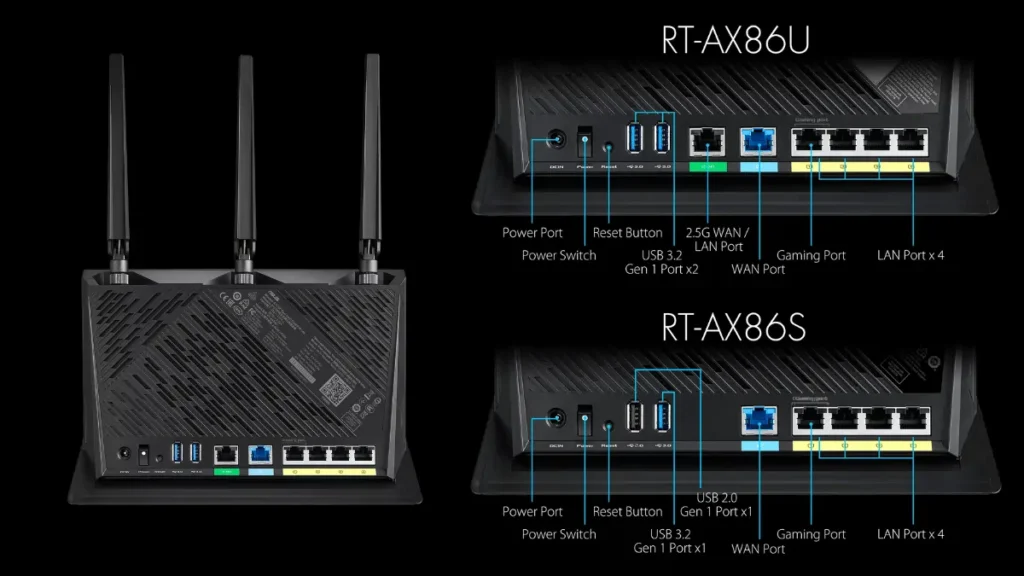
- 2.5G port only available on RT-AX86U model, not RT-AX86S variant
- Optimal performance requires Wi-Fi 6 client devices
Technical Specifications at a Glance
| Specification | Details |
|---|---|
| Chipset | Broadcom BCM4908 + BCM43684 |
| Processor | 1.8GHz quad-core CPU |
| Memory | 1GB RAM, 256MB Flash |
| Wi-Fi Standard | 802.11ax (Wi-Fi 6) dual-band |
| Max Speed | AX5700 (861 + 4804 Mbps) |
| Antennas | 2.4GHz: 3×3, 5GHz: 4×4 |
| Ports | 4x Gigabit LAN, 1x Gigabit WAN, 1x 2.5G LAN/WAN, 2x USB 3.2 Gen 1 |
| Channel Width | Up to 160MHz on 5GHz |
| Dimensions | Compact vertical tower design |

Performance Testing Results
5GHz Speed Tests
In real-world close-proximity testing, the RT-AX86U delivered exceptional 5GHz performance thanks to its support for ultra-wide 160MHz channels. The 4×4 antenna configuration on the 5GHz band combined with MU-MIMO and beamforming technology ensures maximum throughput for Wi-Fi 6 devices.
Testing with Wi-Fi 6 clients showed the router maintained consistently high speeds even with multiple simultaneous 4K streams and gaming sessions running concurrently. The inclusion of Dynamic Frequency Selection (DFS) unlocks up to 15 additional channels on the 5GHz band, providing cleaner airspace in congested environments.
2.4GHz Performance
The RT-AX86U scored 137 Mbps on close-range 2.4GHz tests, outperforming the TP-Link AX11000 (133 Mbps) and Linksys MR9600 (111 Mbps). However, long-range 2.4GHz performance measured 38 Mbps, trailing behind some competitors in extended coverage scenarios.
The 3×3 antenna setup on 2.4GHz provides solid coverage for IoT devices, smart home gadgets, and older devices that don’t support 5GHz. For typical home use with a mix of device types, the 2.4GHz performance proves more than adequate.
Real-World Gaming Latency
Users reported consistently low ping times even with multiple devices connected simultaneously, the critical metric for competitive gaming where every millisecond counts. The router’s ability to handle simultaneous 4K streaming, large file transfers, and online gaming without degradation demonstrates its processing power advantage.
Key Features That Matter
Mobile Game Mode
Mobile Game Mode stands as one of the RT-AX86U’s most innovative features. Accessible through a simple tap in the ASUS Router mobile app, this mode minimizes lag and latency specifically for mobile gaming devices without requiring complex configuration.
When enabled, the router automatically prioritizes mobile gaming traffic, reducing latency spikes caused by background device activity. This feature addresses the growing competitive mobile gaming market where titles like PUBG Mobile and Call of Duty Mobile demand console-level network performance.
Dedicated Gaming Port
The RT-AX86U includes a dedicated gaming port that automatically prioritizes any wired device connected to it. Simply plug your gaming PC or console into this specially marked LAN port, and the router immediately places that device at the front of the traffic queue with no QoS configuration required.
This plug-and-play approach removes the technical barrier that often prevents casual gamers from optimizing their network setup. The gaming port pairs perfectly with the router’s Adaptive QoS system for complete traffic management.
2.5G Ethernet Port
The inclusion of a 2.5G Ethernet port future-proofs the RT-AX86U for multi-gigabit internet connections. This port can function as either WAN or LAN, providing flexibility for different network configurations.
The router supports WAN aggregation, allowing you to combine two separate 1 Gbps connections into a single 2 Gbps internet pipe. This massive bandwidth can then be distributed via Wi-Fi 6 or the 2.5G wired port, eliminating network bottlenecks entirely.
AiMesh Support
ASUS’s AiMesh technology allows the RT-AX86U to create seamless whole-home mesh networks with any AiMesh-compatible ASUS router. Unlike proprietary mesh systems that lock you into specific hardware, AiMesh lets you repurpose existing ASUS routers as mesh nodes.
The system provides centralized management through a single interface with automatic roaming between nodes. For larger homes or complex layouts, adding AiMesh nodes extends coverage without creating separate network names or requiring manual switching.
RT-AX86U vs Competitors
RT-AX86U vs RT-AX88U
The RT-AX88U offers eight Gigabit LAN ports compared to the RT-AX86U’s four, making it better suited for extensive wired setups. However, the RT-AX86U includes the 2.5G port that the RT-AX88U lacks, providing superior future-proofing for multi-gig internet.
Both routers deliver similar Wi-Fi performance, with the RT-AX88U scoring slightly higher on some 2.4GHz tests (144 Mbps vs 137 Mbps). The RT-AX86U’s compact vertical design saves desk space compared to the RT-AX88U’s larger horizontal footprint.
RT-AX86U vs TP-Link AX6000
The TP-Link Archer AX6000 provides eight LAN ports and a 2.5G WAN port similar to the RT-AX86U. However, real-world testing revealed inconsistent performance from the TP-Link, with some locations showing dramatically reduced speeds compared to the ASUS.
In head-to-head comparisons, the RT-AX86U demonstrated superior range and consistency, particularly in challenging locations where the TP-Link failed to maintain connections. The ASUS also includes more robust parental controls and security features through AiProtection Pro.
Setup and Configuration
Initial Setup Process
Setup begins by connecting the RT-AX86U to your modem via the WAN port and powering on both devices. Opening a web browser automatically redirects to the ASUS Setup Wizard at router.asus.com.
The wizard guides you through creating your Wi-Fi network names (SSIDs) and passwords for both 2.4GHz and 5GHz bands. For users with multi-gigabit internet, the setup includes configuration of the 2.5G Ethernet port function (WAN or LAN).
Optimal Settings for Gaming
For maximum gaming performance, enable the dedicated gaming port and connect your primary gaming device via Ethernet. Access the Gear Accelerator feature through the router’s web interface to prioritize specific wireless devices without cables.
Enable Adaptive QoS and select the gaming profile to automatically prioritize gaming traffic over other applications. Consider enabling DFS channels on 5GHz to access less congested spectrum, though verify your gaming devices support these channels.
QoS Configuration
Adaptive QoS allows granular control over traffic prioritization. The gaming preset automatically prioritizes gaming packets, but custom rules can be created for specific applications or devices.
The Traffic Analyzer tool in the mobile app provides real-time visibility into bandwidth consumption, helping identify devices or applications causing congestion. This data-driven approach takes the guesswork out of optimization.
Security and Parental Controls
AiProtection Pro Features
The RT-AX86U includes lifetime free AiProtection Pro powered by Trend Micro, providing commercial-grade security for home networks. This system blocks access to malicious sites, detects and prevents infections, and protects against external attacks all without subscription fees.
AiProtection Pro uses Deep Packet Inspection to filter content not just by URL but by analyzing the actual data packets. This advanced approach works with both web browsers and mobile apps, providing comprehensive protection across all device types.
WPA3 Support
The router supports WPA3, the latest Wi-Fi security protocol that provides stronger encryption and protection against brute-force attacks. WPA3 works alongside AiProtection Pro to create multiple security layers, protecting devices that cannot install traditional antivirus software like smartphones and IoT gadgets.
Advanced Parental Controls include scheduled blocking times, content filtering by category, and an Internet Activity Dashboard showing what family members access and when. Preset filters can be applied with a single tap to automatically block inappropriate content across all a child’s devices.
Comparison Tables
Specifications Comparison
| Feature | RT-AX86U | RT-AX88U | TP-Link AX6000 |
|---|---|---|---|
| Wi-Fi Standard | Wi-Fi 6 (AX5700) | Wi-Fi 6 (AX6000) | Wi-Fi 6 (AX6000) |
| Max Speed | 861 + 4804 Mbps | 1148 + 4804 Mbps | 1148 + 4804 Mbps |
| Processor | 1.8GHz quad-core | 1.8GHz quad-core | 1.8GHz quad-core |
| RAM | 1GB | 1GB | 1GB |
| Gigabit LAN Ports | 4 | 8 | 8 |
| 2.5G Port | Yes (WAN/LAN) | No | Yes (WAN only) |
| USB Ports | 2x USB 3.2 | 2x USB 3.1 | 2x USB 3.0 |
| Mobile Game Mode | Yes | No | No |
| Approximate Price | $250 | $300+ | $270 |
Performance Comparison
| Test Location | RT-AX86U | RT-AX88U | TP-Link AX6000 |
|---|---|---|---|
| Close Range 2.4GHz | 137 Mbps | 144 Mbps | 133 Mbps |
| Long Range 2.4GHz | 38 Mbps | 59 Mbps | 67 Mbps |
| Office (5GHz) | ~175 MB/s* | 175 MB/s | 105 MB/s |
| Kitchen (5GHz) | ~167 MB/s* | 167 MB/s | 15 MB/s |
| Coverage Consistency | Excellent | Excellent | Variable |
Complete Hardware Specifications
Wireless Standards:
- IEEE 802.11ax (Wi-Fi 6)
- IEEE 802.11ac (Wi-Fi 5) backward compatible
- IEEE 802.11n/g/b
Frequency Bands:
- Dual-band simultaneous
- 2.4GHz: 3×3 (up to 861 Mbps)
- 5GHz: 4×4 (up to 4804 Mbps with 160MHz)
Processor & Memory:
- Broadcom BCM4908 chipset
- Broadcom BCM43684 wireless chipset
- 1.8GHz quad-core CPU
- 1GB DDR3 RAM
- 256MB flash storage
Network Ports:
- 1x Gigabit WAN
- 4x Gigabit LAN
- 1x 2.5G BaseT (WAN/LAN configurable, RT-AX86U only)
- 2x USB 3.2 Gen 1
Advanced Features:
- 160MHz channel support
- MU-MIMO (Multi-User MIMO)
- OFDMA (Orthogonal Frequency Division Multiple Access)
- Beamforming technology
- DFS (Dynamic Frequency Selection) support
- WAN aggregation (dual Gigabit WAN)
- LAN port aggregation
Security:
- WPA3 encryption
- AiProtection Pro (Trend Micro powered)
- DoS protection
- Guest network (up to 6 SSIDs)
Dimensions & Power:
- Form factor: Vertical tower
- External antennas: 3 detachable
- Power consumption: Not specified by manufacturer
- Operating temperature: 0°C to 40°C (typical)
Who Should Buy the RT-AX86U?
The ASUS RT-AX86U makes the most sense for serious gamers seeking low-latency performance without the premium price tag of flagship models. Mobile gamers particularly benefit from the one-tap Mobile Game Mode that competitors lack.
Households with multi-gigabit internet connections gain immediate value from the 2.5G port and WAN aggregation capabilities. Tech enthusiasts who plan to build AiMesh networks should consider the RT-AX86U as either a primary router or powerful mesh node.
Users needing more than four LAN ports for wired devices should examine the RT-AX88U instead, while budget-conscious shoppers might consider the RT-AX86S variant that omits the 2.5G port at a lower price. For mixed device environments with extensive IoT deployments, the router’s dual-band performance handles both modern Wi-Fi 6 devices and legacy 2.4GHz gadgets effectively.
Frequently Asked Questions (FAQs)
Is the ASUS RT-AX86U good for gaming?
Yes, the RT-AX86U is specifically designed for gaming with features like Mobile Game Mode, a dedicated gaming port, and Adaptive QoS. Real-world testing shows consistently low ping times even with multiple devices connected, and the 1.8GHz quad-core processor handles intensive gaming traffic without degradation. It’s particularly effective for competitive gaming where latency matters most.
What’s the difference between RT-AX86U and RT-AX86S?
The primary difference is the 2.5G Ethernet port the RT-AX86U includes it while the RT-AX86S does not. Both models share the same 1.8GHz quad-core processor, 1GB RAM, Wi-Fi 6 capabilities, and gaming features like Mobile Game Mode and the dedicated gaming port. Choose the RT-AX86U if you have or plan to upgrade to multi-gigabit internet.
Does RT-AX86U support Wi-Fi 6E?
No, the RT-AX86U is a Wi-Fi 6 (802.11ax) router that operates on 2.4GHz and 5GHz bands only. It does not include the 6GHz band that defines Wi-Fi 6E. However, it fully supports 160MHz channels on 5GHz, which provides excellent performance for current Wi-Fi 6 devices.
How many devices can RT-AX86U support?
The RT-AX86U can theoretically support 100+ devices simultaneously thanks to its 1GB RAM and powerful 1.8GHz quad-core processor. Real-world performance remains strong with multiple 4K streams, gaming sessions, and IoT devices running concurrently. Wi-Fi 6 technologies like OFDMA and MU-MIMO improve efficiency when handling many devices simultaneously.
Can I use RT-AX86U as a mesh node?
Yes, the RT-AX86U supports ASUS AiMesh and can function as either the main router or a mesh node. It works with any AiMesh-compatible ASUS router, allowing you to create seamless whole-home coverage with centralized management. Its powerful hardware makes it an excellent choice as either a primary router or a high-performance satellite node.
What is the range of ASUS RT-AX86U?
The RT-AX86U provides excellent close-to-medium range coverage for typical homes up to 2,500 square feet. The 5GHz band with 4×4 antennas and beamforming delivers strong performance within 30-50 feet. Long-range 2.4GHz performance measured 38 Mbps at extended distances, which is adequate for IoT devices but trails some competitors. For larger spaces, use AiMesh to add nodes.
Does RT-AX86U require a subscription for security features?
No, AiProtection Pro security features are completely free for the lifetime of the router with no subscription required. This includes malware blocking, intrusion prevention, infected device detection, and advanced parental controls powered by Trend Micro. Regular security updates are provided automatically at no cost.
How do I enable the 2.5G port on RT-AX86U?
During initial setup via the ASUS Setup Wizard, you’ll be prompted to configure the 2.5G port function either as WAN for multi-gigabit internet or as LAN for high-speed wired devices. You can change this setting later in the router’s web interface under WAN settings or LAN configuration. The port auto-negotiates speeds from 100 Mbps to 2.5 Gbps.

Featured Snippet Boxes
What is the ASUS RT-AX86U?
The ASUS RT-AX86U is a dual-band Wi-Fi 6 gaming router (AX5700) that delivers combined speeds up to 5700 Mbps using a 1.8GHz quad-core processor with 1GB RAM. It features Mobile Game Mode, a dedicated gaming port, and a 2.5G Ethernet port for multi-gigabit internet connections at approximately $250.
How fast is the ASUS RT-AX86U?
The RT-AX86U delivers up to 4804 Mbps on 5GHz and 861 Mbps on 2.4GHz. Real-world close-range testing shows 137 Mbps on 2.4GHz, with exceptional 5GHz performance using 160MHz channels and 4×4 antennas. Long-range 2.4GHz performance measures around 38 Mbps.
What is Mobile Game Mode on RT-AX86U?
Mobile Game Mode is a one-tap feature in the ASUS Router app that minimizes lag and latency specifically for mobile gaming devices. It automatically prioritizes mobile gaming traffic without complex configuration, reducing latency spikes caused by other devices on the network.
Does RT-AX86U support mesh networking?
Yes, the RT-AX86U supports ASUS AiMesh technology for creating seamless whole-home mesh networks. It works with any AiMesh-compatible ASUS router, providing centralized management, automatic roaming, and the ability to repurpose existing ASUS routers as mesh nodes.
What is the dedicated gaming port?
The dedicated gaming port is a special LAN port that automatically prioritizes any wired device connected to it without requiring QoS configuration. Simply plug your gaming PC or console into this port for immediate traffic priority and reduced latency.
How do you set up the ASUS RT-AX86U?
Connect the RT-AX86U to your modem via the WAN port, power on both devices, and open a web browser. The ASUS Setup Wizard at router.asus.com guides you through creating Wi-Fi network names and passwords. The process takes approximately 5-10 minutes for basic setup.

