

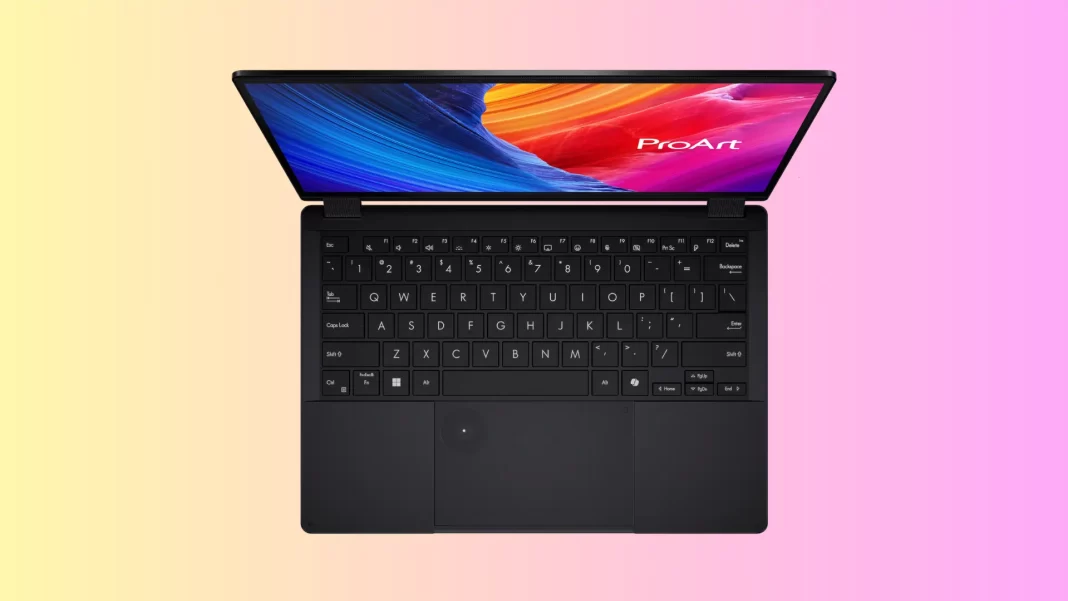
Short answer: The Asus ProArt PX13 is a tiny 13.3-inch 2-in-1 that hits creator-class speeds thanks to Ryzen AI and RTX 40 graphics. You get a gorgeous 3K OLED, strong CPU/GPU performance, Wi-Fi 7, and real ports. Trade-offs: a 60 Hz panel, fans that get loud under load, and zero RAM upgrades. US models pair Ryzen AI 9 HX 370 with 32GB RAM; India models commonly ship with Ryzen AI 9 365 and 24GB RAM. Battery life is good but not class-leading.
Table of Contents
Asus ProArt PX13: Key specs at a glance
- Display: 13.3-inch 3K (2880×1800) OLED, 16:10, touch, 60 Hz, HDR True Black 500, ~85% screen-to-body.
- CPU: US: Ryzen AI 9 HX 370 (12C/24T). India: often Ryzen AI 9 365 (10 cores).
- GPU: NVIDIA RTX 4050/4060 options (US); 4050 common in India SKUs.
- RAM: 24–32GB LPDDR5X soldered (no upgrade).
- Storage: 1× M.2 2230 PCIe Gen4 slot (upgradeable, but 2230 size only).
- Battery/Charger: 73 Wh; 200W barrel adapter; USB-C PD up to 100W.
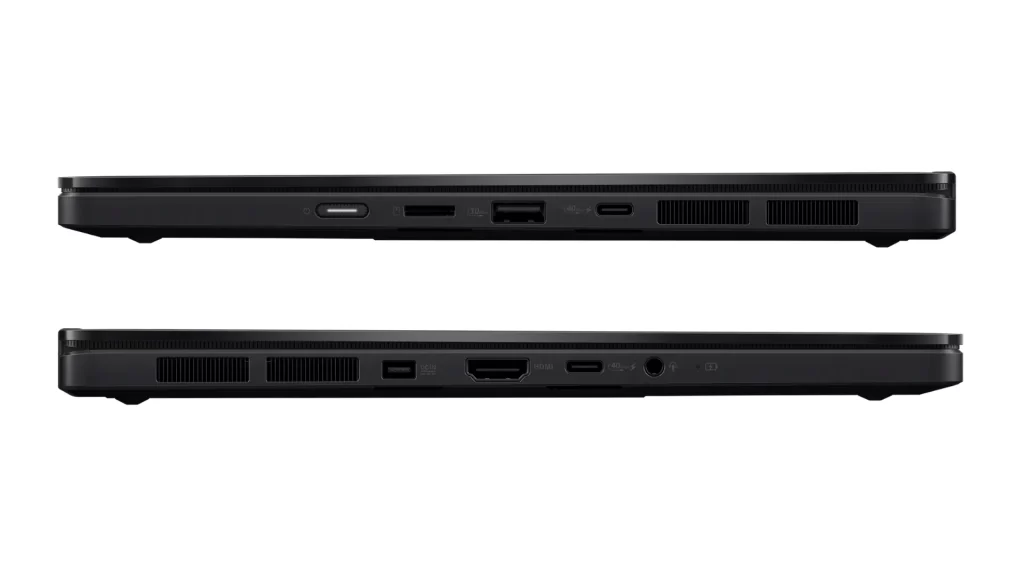
- Ports: 2× USB4 Type-C, 1× USB-A Gen2, HDMI 2.1 FRL, microSD, 3.5 mm.
- Wireless: Wi-Fi 7 (MediaTek MT7925), BT 5.4.
- Weight/Size: ~1.38 kg; 17.7 mm thick.

What’s new in Asus ProArt PX13 and who it’s for
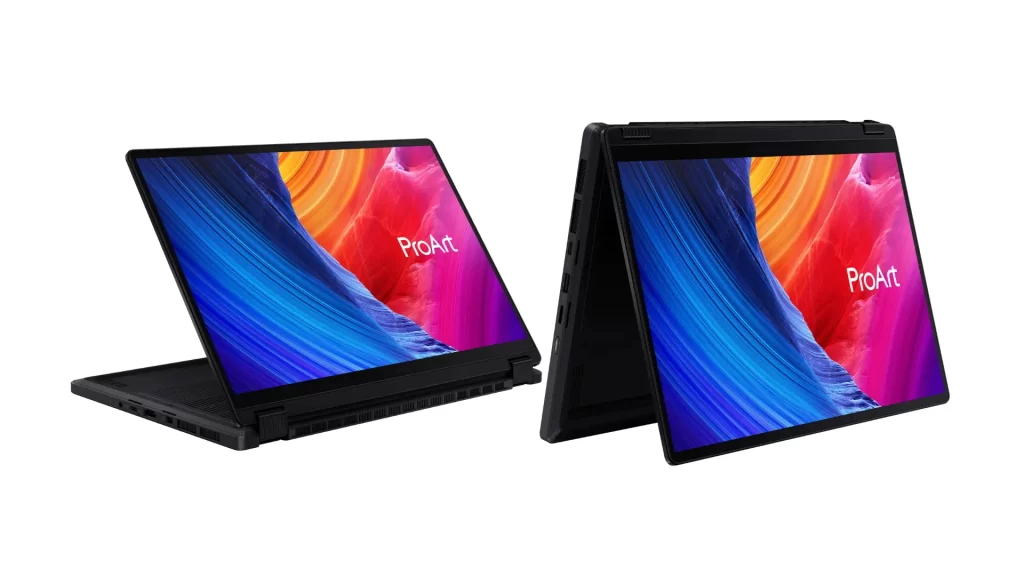
Asus took its compact creator formula and shrunk it into a 13-inch 2-in-1. You can flip the screen 360°, sketch with the included pen, and still chew through multi-threaded workloads.
Buy this if: you edit photos or short 4K videos, code in VS Code or Android Studio, present on the road, and want a small machine with a serious GPU.
Skip it if: you need a 120/144 Hz panel, whisper-quiet fans, or RAM upgrades.
The 3K OLED looks fantastic with deep blacks and wide color. Asus advertises 100% DCI-P3 and HDR True Black 500; reviewers report ~350+ nits sustained brightness on this touch OLED, which is fine indoors but can wash out in strong sun. The panel is 60 Hz only. Some units show PWM flicker at low brightness, common for OLED.
Is the ProArt PX13 good for color-critical work?
Yes. Out-of-the-box color is excellent on the 3K OLED with wide-gamut coverage, though you should still calibrate for print/video pipelines. Brightness is “good, not great” for bright outdoor use.
Asus ProArt PX13: Performance: CPU, GPU, NPU
On creator tasks, the HX 370/RTX 40 combo punches well above the PX13’s size. PCWorld measured a PCMark 10 score of 7,887, and the system excels in multi-threaded workloads. Real-world video exports in Premiere or DaVinci will lean on the RTX Studio stack, while the XDNA NPU supports Windows AI features and background acceleration.
Gaming is capable at 1080p medium/high on the RTX 4050/4060, but the 60 Hz panel caps visual smoothness. If you prioritize high-FPS gaming, consider a 120/144 Hz 14-inch alternative instead.
Thermals and noise
Notebookcheck’s testing shows the PX13 stays thermally controlled on the surface, but the fans can get loud at full tilt. Expect ~43 dB(A) under heavy mixed load and peaks above 50 dB(A) in stressful gaming. Surface hot spots on the underside can hit the high-40s °C; the keyboard deck remains cooler.
Ultrabookreview’s long-term testing aligns: Performance mode is audible, and the Manual/Custom profile can push into the 50-plus dB(A) range. Whisper/Standard modes are practical for cafes and meetings.
Asus ProArt PX13: Battery and charging
Lab results from Notebookcheck’s Wi-Fi test: ~8.5 hours at 150 nits, ~7 hours at max brightness, and ~10 hours 1080p video. That’s solid for a dGPU 13-inch convertible, though not “all-day” if you run heavy apps. A full charge takes ~100 minutes with the 200W brick; USB-C PD up to 100W works for travel but may cap peak performance.
How long does the battery last?
Plan on 7–9 hours of web/office work at sensible brightness, more on video playback, less on GPU-heavy projects. Bring the charger for serious edits.
Asus ProArt PX13: Keyboard, trackpad, ports, wireless
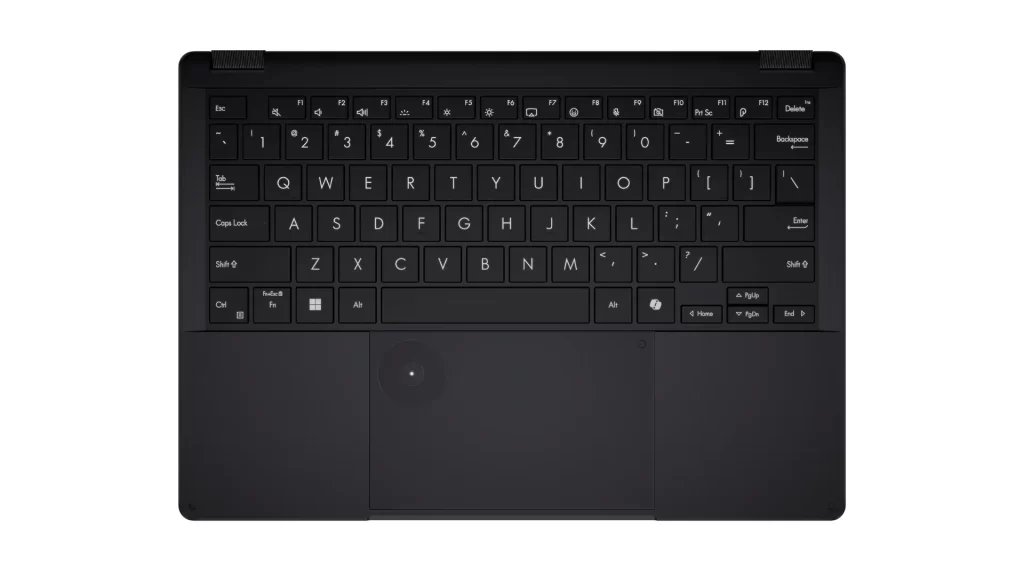
The keyboard is one of the best in class for this size; the glass touchpad hides Asus’s DialPad overlay for quick sliders in Adobe apps. Port selection is creator-friendly: 2× USB4, HDMI 2.1 FRL, USB-A, microSD, and an audio jack. Wi-Fi 7 is standard.
Asus ProArt PX13: Serviceability and upgrades
RAM is non-upgradeable LPDDR5X. Storage is a single M.2 2230 slot, so plan upgrades accordingly (2230 drives are readily available, but max capacities are lower than 2280). The Wi-Fi card is replaceable. Access requires removing Torx screws of varying sizes; keep track.
Can you upgrade RAM?
No. The PX13’s memory is soldered. You can upgrade the SSD, but only with M.2 2230 drives.
Software and warranty
You get Windows 11, ProArt Creator Hub for performance/fan modes, and Copilot+ features backed by the XDNA NPU. Warranty varies by region (typically 1 year). Stick to Asus-approved drivers if you want the smoothest experience.
Best configuration to buy (US and India)
United States (creators, mixed workloads)
- CPU/GPU: Ryzen AI 9 HX 370 + RTX 4060
- Memory/Storage: 32GB/1TB (since RAM can’t be upgraded)
- Street price: commonly $1,799-$1,999 depending on GPU and promos. Best Buy carries 4050/4060 variants.
India (travel creators, photo and light 4K video)
- CPU/GPU: Ryzen AI 9 365 + RTX 4050 (HN7306WU-LX001WS)
- Memory/Storage: 24GB/1TB
- Street price: promo pricing around ₹1,59,990 (MRP ₹2,15,990) at Flipkart/Croma.
Why: the 4060 offers a useful bump over the 4050 for Premiere, Resolve, and Blender, and 32GB is safer for heavy projects. In India, the common 24GB/4050 SKU is still a fine portable edit station for 1080p–light 4K.
Asus ProArt PX13: Full Specification
| Category | Details |
|---|---|
| Model / Series | ProArt PX13 (HN7306 series: HN7306WU, HN7306WV). |
| Chassis / Color | 13.3-inch 360° convertible (2-in-1), Nano Black finish; US MIL-STD 810H tested. |
| Operating System | Windows 11 Home or Windows 11 Pro (region/SKU dependent). |
| CPU (Ryzen AI 300) | Up to AMD Ryzen AI 9 HX 370 (12C/24T, up to 5.1 GHz, 36 MB cache, XDNA NPU up to 50 TOPS). India also lists Ryzen AI 9 365 (10C/20T, up to 5.0 GHz, 34 MB). |
| NPU | AMD XDNA NPU, up to 50 TOPS. |
| Discrete GPU Options | GeForce RTX 4050 Laptop GPU (6 GB GDDR6) or GeForce RTX 4060 Laptop GPU (8 GB GDDR6). |
| Integrated GPU | AMD Radeon 890M (HX 370 SKUs) / Radeon 880M (365 SKUs, per India page). |
| Memory (RAM) | LPDDR5X (soldered). US SKUs: 32 GB; India SKUs commonly: 24 GB. (No RAM slots / not upgradeable.) |
| Storage | 1 TB PCIe 4.0 NVMe SSD installed; 1× M.2 2230 PCIe 4.0 x4 slot (user-replaceable, 2230 size only). |
| Display | 13.3-inch 3K OLED (2880×1800), 16:10, 60 Hz, 0.2 ms; HDR peak 500 nits, 100% DCI-P3, Pantone Validated, 1,000,000:1 contrast; glossy, touch, stylus support, ~85% screen-to-body. VESA DisplayHDR True Black 500 noted on India specs. |
| Touch / Stylus | Multi-touch; box includes ASUS Pen (SA203H, MPP 2.0 support) in many regions (bundles vary). |
| Keyboard / Touchpad | Backlit chiclet keyboard, 1.7 mm travel; precision touchpad with ASUS DialPad overlay; Copilot key. |
| Webcam | FHD (1080p) camera with IR for Windows Hello. |
| Audio | harman/kardon (Premium) tuning, Smart Amp speakers, built-in array mics. |
| Wireless | Wi-Fi 7 (802.11be) 2×2 + Bluetooth 5.4 (BT version may vary with OS). |
| Ports / I/O | 2× USB4 (Gen3) Type-C (DP + PD, up to 40 Gbps), 1× USB-A 3.2 Gen 2 (10 Gbps), 1× HDMI 2.1 FRL, 1× 3.5 mm audio combo, 1× DC-in, microSD 4.0 card reader; XG Mobile (GC34) support listed. |
| Battery | 73 Wh, 4-cell (4S1P) Li-ion. |
| AC Adapter | 200 W rectangular-connector adapter (20 V⎓10 A); USB-C ports support Power Delivery for charging. |
| Dimensions (W×D×H) | 29.82 × 20.99 × 1.58–1.77 cm (11.74″ × 8.26″ × 0.62″–0.70″). |
| Weight | ≈1.38 kg (3.04 lb). |
| Security | Firmware TPM, Microsoft Pluton security processor, IR Windows Hello. |
| Pre-installed utilities | MyASUS, ProArt Creator Hub, ScreenXpert, GlideX, StoryCube, MuseTree, CapCut (bundle varies). |
| Included in Box (varies) | ASUS Pen (SA203H), USB-A→RJ45 Gigabit Ethernet adapter, Backpack (region-dependent). |
Notes: Specs vary by region/SKU and can change over time. Always confirm the exact model number with your retailer.
Core Differences Asus ProArt PX13: US vs India SKUs
| Region | CPU | dGPU | RAM | Storage | Wireless | Model examples / Notes |
|---|---|---|---|---|---|---|
| United States | Ryzen AI 9 HX 370 (12C/24T) | RTX 4050 or RTX 4060 | 32 GB LPDDR5X (soldered) | 1 TB PCIe 4.0 | Wi-Fi 7 + BT 5.4 | HN7306WU/WV on ASUS US; Best Buy lists HX 370 + 32 GB + RTX 4050. |
| India | Ryzen AI 9 365 (10C/20T) common; some listings also show HX 370 | RTX 4050 most common | 24 GB LPDDR5X (soldered) | 1 TB PCIe 4.0 | Wi-Fi 7 + BT 5.4 | ASUS India page + Flipkart SKU HN7306WU-LX001WS (365/24 GB/4050). |
Rivals: what to get instead
- Asus ROG Zephyrus G14 (2024/2025): faster gaming and higher-refresh displays, but clamshell only and larger.
- ROG Flow X13: similar size with dGPU, but not OLED everywhere and older gens are weaker.
- Surface Laptop Studio 2: great pen experience and studio hinge, heavier with lower GPU options at similar prices.
- MacBook Pro 14: best battery and screen consistency; no tablet mode or touch. Consider if you live in Final Cut/Logic.
Buyer Scenarios (Quick Picks)
- Premiere Pro 4K and motion graphics: US 4060/32GB model. Export times benefit from the stronger GPU.
- Lightroom + Photoshop travel kit: Either region model is fine. OLED helps for proofing; calibrate.
- Coding + Docker on the road: US 32GB RAM for headroom; fans audible under load.
- Casual gaming after work: It’ll run modern games at 1080p, but 60 Hz limits smoothness.
Asus ProArt PX13: Pros and Cons
Pros
- Creator-class speeds in a 13-inch 2-in-1
- Excellent 3K OLED color
- Real ports plus Wi-Fi 7
- Solid battery for a dGPU machine
Cons
- 60 Hz only
- Fans get loud under load
- RAM is soldered; SSD is 2230-only
Should you buy Asus ProArt PX13?
If you want a portable, pen-friendly creator laptop with real GPU muscle, the ProArt PX13 is one of the very few that nails it. If you’d rather have a high-refresh screen and quiet fans, the Zephyrus G14 or a bigger 14-inch creator laptop will suit you better.
Comparison Table
| Laptop | CPU/GPU (typical) | Panel | Weight | Why pick it |
|---|---|---|---|---|
| ProArt PX13 | HX 370 + RTX 4060 | 13.3″ 3K OLED 60 Hz | ~1.38 kg | 2-in-1 + pen, wide color, tiny footprint. |
| Zephyrus G14 | Ryzen 9 + RTX 4070 | 14″ 120–165 Hz | ~1.5 kg | Faster gaming, bigger battery feel. |
| ROG Flow X13 | Ryzen 9 + RTX 4060 | 13.4″ IPS/OLED | ~1.3 kg | Similar size, different hinge/IO trade-offs. |
| Surface Laptop Studio 2 | i7-13700H + RTX 4060 | 14.4″ 120 Hz IPS | ~2.0 kg | Studio hinge + pen, heavier, pricier. |
Frequently Asked Question
Is 16GB RAM enough?
For this class, no. Get 24–32GB; RAM is soldered.
Does the PX13 support a stylus?
Yes, pen is included on many SKUs and the touch layer supports it. Check box contents per retailer.
How bright is the OLED?
HDR peaks at ~500 nits, with ~350+ nits sustained SDR reported in long-term testing.
How loud are the fans?
Expect low-40s dB under heavy load; spikes to ~53 dB in demanding games on performance/custom modes.
Battery life in the real world?
Roughly 7–9 hours of web/office, ~10 hours local video at 150 nits.
Can I add a bigger SSD?
Yes, but only M.2 2230 drives fit.

Featured Answer Boxes
Is RAM upgradeable on the ProArt PX13?
No. Memory is soldered (LPDDR5X). Choose 24–32GB at purchase.
How long does the battery last?
About 8.5 hours web at 150 nits and ~10 hours video in lab tests; ~7 hours at max brightness.
How loud are the fans?
Around 43 dB(A) under heavy load, with peaks above 50 dB(A) in demanding games.
US vs India specs what changes?
US models often use Ryzen AI 9 HX 370 + 32GB; India SKUs commonly Ryzen AI 9 365 + 24GB and RTX 4050.
Source: Asus

