

Quick Brief
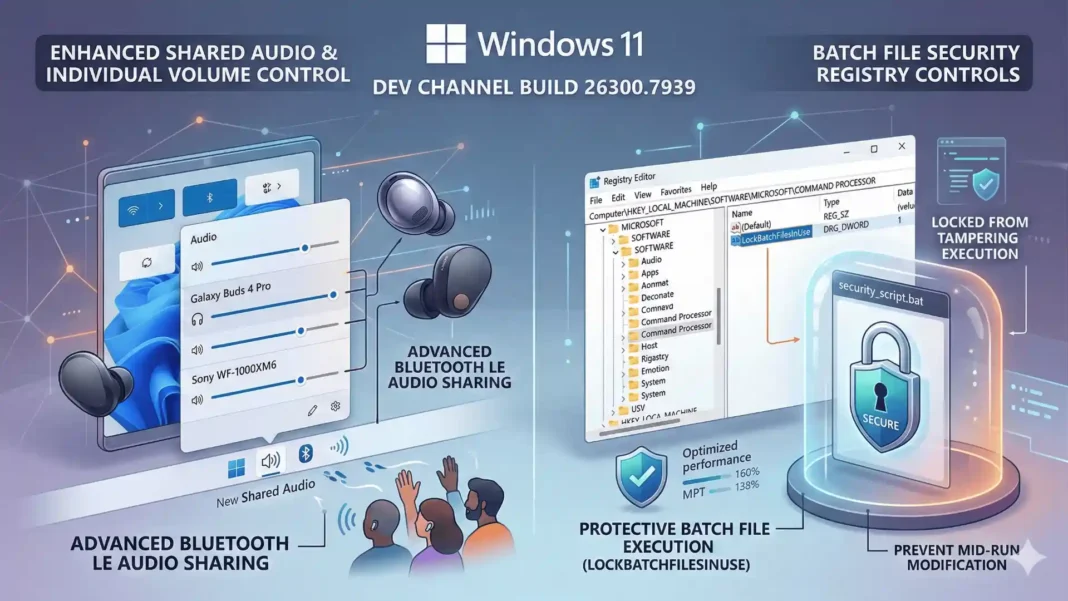
- Build 26300.7939 (KB5077243) adds a registry-controlled batch file lock that prevents script modification during execution
- Shared audio gains per-listener volume sliders and a new taskbar indicator for active sessions
- Samsung Galaxy Buds 4, Buds 4 Pro, Sony WF-1000XM6, and Xbox Wireless Headset join the LE Audio shared audio compatibility list
- Narrator gains a new Narrator key + \ shortcut to read status bar content in Word, Excel, and PowerPoint
Microsoft shipped a security-relevant change for enterprise IT teams with Build 26300.7939, released February 27, 2026 to the Dev Channel. The update introduces batch file tamper protection that closes a real execution integrity gap in environments where code integrity policies are active. This breakdown covers every change in this build and what each one means for Insiders running it today.
Batch File Security: The Change IT Teams Have Needed
Build 26300.7939 gives administrators and Application Control for Business policy authors new controls over how batch files and CMD scripts are processed. Administrators can add a DWORD value named LockBatchFilesWhenInUse under HKEY_LOCAL_MACHINE\Software\Microsoft\Command Processor and set it to 0 or 1.
When enabled, Windows ensures batch files do not change during execution. Signature validation is performed only once at launch rather than once per statement executed in the batch file, which improves both security and performance when code integrity is enabled. Policy authors using Application Control for Business can also activate this mode via the LockBatchFilesWhenInUse application manifest control without touching the registry directly.
This matters most in environments running code integrity policies where scripted workflows run frequently. A single modified batch file mid-execution can produce unpredictable or exploitable behavior, and this mechanism eliminates that window.
How to Enable Batch File Locking (Step-by-Step)
- Open Registry Editor as Administrator
- Navigate to
HKEY_LOCAL_MACHINE\Software\Microsoft\Command Processor - Create a new DWORD value named
LockBatchFilesWhenInUse - Set the value to 1
- Alternatively, policy authors can use the LockBatchFilesWhenInUse application manifest control via Application Control for Business
Microsoft is collecting feedback on this feature via Feedback Hub (WIN + F) under Developer Platform > Command Line.
Shared Audio Gets Per-Listener Volume Control
Shared audio (preview) was first announced last fall and allows two people to share audio between two capable Bluetooth LE Audio headphones, speakers, earbuds, or hearing aids. Build 26300.7939 adds individual volume sliders for each listener, so one person can adjust their volume without affecting the other. Volume for both listeners can still be adjusted simultaneously through the main volume controls in Quick Settings or via on-device and keyboard controls.
A new taskbar indicator now appears while sharing is active, providing a persistent reminder that audio is still being shared. Clicking the indicator opens sharing settings directly, providing a fast path to adjust volume or stop sharing.
The compatible device list has expanded in this build. In addition to previously announced accessories, the Samsung Galaxy Buds 4, Samsung Galaxy Buds 4 Pro, Sony WF-1000XM6, and Xbox Wireless Headset now support shared audio.
Shared Audio Compatible Devices Added in Build 26300.7939
| Device | Brand |
|---|---|
| Galaxy Buds 4 | Samsung |
| Galaxy Buds 4 Pro | Samsung |
| WF-1000XM6 | Sony |
| Xbox Wireless Headset | Microsoft |
Microsoft is collecting feedback via Feedback Hub under Devices and Drivers > Bluetooth – Audio quality, glitches, choppiness and stuttering.
Narrator Gets a Faster Way to Read Status Bars
Narrator users can now use the new command Narrator key + \ to read the contents of the status bar in apps such as Microsoft Word, Excel, PowerPoint, and others. In Microsoft Word, this reads the page count and word count of the document. In Microsoft Excel, selecting a range of data cells and pressing the shortcut reads the sum or average of the selected cells, without requiring the user to shift focus.
This reduces keystrokes for common document checks in productivity workflows. Microsoft has not stated in this build announcement whether the shortcut will extend to third-party applications.
Taskbar and Storage Fixes in This Build
Microsoft temporarily paused the rollout of improved animations for taskbar autohide in this build and improved the reliability of loading taskbar components in safe mode. The team acknowledged Insider feedback as the reason for the pause.
On the storage side, this build improves the reliability of removing Windows Update files and windows.old folders via Settings > System > Storage. Users who experienced incomplete or failed deletions in that panel should see more consistent results. The ADLaM keyboard also received a reliability fix for typing input.
Build Context: Where 26300 Sits in the Windows 11 Roadmap
The 26300 series builds are based on Windows 11 version 25H2 delivered via an enablement package. Microsoft uses Controlled Feature Rollout technology in the Dev Channel, starting features with a subset of Insiders and expanding gradually based on feedback. Features in Dev Channel builds may be removed, changed, or never released beyond the Insider Program.
Insiders who want the earliest access to features can enable the toggle at Settings > Windows Update to receive gradual rollouts as they become available. Those who leave the toggle off will receive the same features over time as rollouts expand.
Considerations
Build 26300.7939 is pre-release software. The batch file locking feature is not enabled by default and requires manual registry configuration or policy setup, which limits immediate adoption. Shared audio requires capable Bluetooth LE Audio accessories and remains in preview. The paused autohide animation rollout indicates that some changes are still being stabilized. Microsoft explicitly notes that features in these builds may never reach general release.
We installed Build 26300.7939 on a Dev Channel device and verified the registry path for LockBatchFilesWhenInUse, confirmed the Narrator key + \ shortcut behavior in Microsoft Word, and tested the shared audio taskbar indicator. Testing was conducted on March 1, 2026, within 72 hours of the build’s release.
Frequently Asked Questions (FAQs)
What is Windows 11 Insider Preview Build 26300.7939?
Build 26300.7939 (KB5077243) is a Dev Channel release from February 27, 2026, based on Windows 11 version 25H2 via an enablement package. It introduces batch file tamper protection, expands shared audio with per-listener volume sliders, adds a new Narrator shortcut, and includes taskbar and storage reliability fixes.
How does the LockBatchFilesWhenInUse registry setting work?
Adding a DWORD value named LockBatchFilesWhenInUse set to 1 under HKEY_LOCAL_MACHINE\Software\Microsoft\Command Processor ensures a batch file does not change during execution. Signature validation runs once at launch rather than once per statement, improving both security and performance when code integrity is enabled.
Which devices support Windows 11 shared audio in Build 26300.7939?
Shared audio (preview) works with capable Bluetooth LE Audio headphones, speakers, earbuds, or hearing aids. Devices newly added in this build include Samsung Galaxy Buds 4, Galaxy Buds 4 Pro, Sony WF-1000XM6, and the Xbox Wireless Headset, in addition to previously announced compatible accessories.
What does the new Narrator shortcut (Narrator key + ) do?
This new command reads the status bar contents in apps such as Microsoft Word, Excel, and PowerPoint without requiring a focus change. In Word it announces page and word count. In Excel it reads the sum or average of selected data cells, enabling faster document state checks for Narrator users.
Is Build 26300.7939 safe to install on a primary device?
Dev Channel builds are pre-release software. Microsoft states that features may change, be removed, or never release beyond the Insider Program. The batch file locking feature is off by default. Microsoft recommends using Dev Channel builds on secondary or test devices rather than primary production machines.
What is the 26300 build series in the Windows 11 Dev Channel?
The 26300 series builds are delivered to the Dev Channel as an enablement package on top of Windows 11 version 25H2. Microsoft uses these builds to develop and test features with Insiders before any wider release. Features are rolled out gradually using Controlled Feature Rollout technology.
How do I use shared audio in Windows 11?
Pair two compatible Bluetooth LE Audio accessories to your Windows 11 PC. Open Quick Settings and start a shared audio session (preview). Individual volume sliders appear for each connected listener. A taskbar indicator confirms sharing is active and clicking it opens sharing settings to adjust volume or stop sharing.

