

Quick Brief
- iOS 26.3 introduces native wireless Transfer to Android tool eliminating third-party migration dependencies
- Limit Precise Location feature available only on C1/C1X modem devices with extremely limited carrier support
- RCS encryption infrastructure deployed requiring carrier network activation throughout 2026
- Available for iPhone 12 and newer models with build number 23D127 released February 11, 2026
Apple rarely makes platform exit easier. iOS 26.3 does exactly that introducing tools that lower ecosystem walls while strengthening privacy controls. Released February 11, 2026, this update carries implications beyond its modest description. The Transfer to Android feature represents Apple’s first native migration utility designed specifically for users switching to Android devices.
What Makes iOS 26.3 Different From Typical Updates
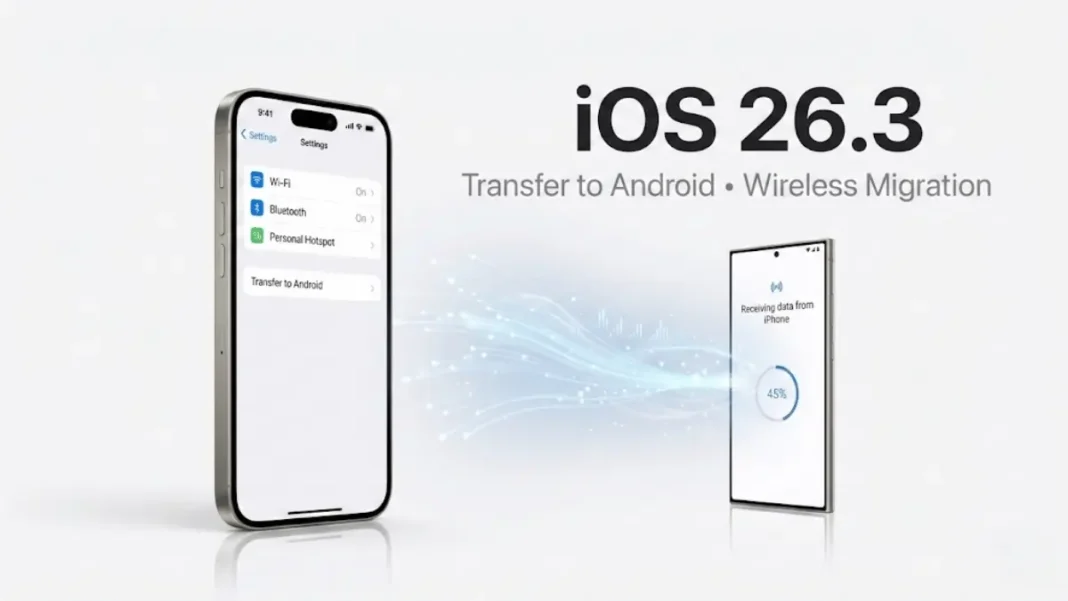
iOS 26.3 (build 23D127) marks Apple’s first native Android migration utility. The feature surfaces in Settings under a dedicated Transfer to Android menu, supporting wireless peer-to-peer connections. Photos, contacts, messages, notes, apps, passwords, and phone numbers move without cables or cloud intermediaries.
This shift responds directly to European Union Digital Markets Act requirements, though Apple implemented the feature globally rather than restricting it to EU countries. The wireless transfer protocol operates independently of iCloud, creating a pathway that bypasses Apple’s traditional data synchronization architecture.
Apple released iOS 26.3 Release Candidate (build 23D125) to developers on February 4, 2026, following three beta cycles that began December 15, 2025. The final build (23D127) became publicly available on February 11, 2026.
Five Features That Signal Apple’s Strategic Recalibration
1. Transfer to Android: First-Party Migration Tool
The wireless migration utility handles seven data categories without requiring Mac or PC intermediaries. Initiation occurs during Android device setup through a process that establishes a direct wireless connection between the iPhone and Android device.
The tool transfers photos, contacts, messages, notes, apps, passwords, and phone numbers. App names transfer for Play Store matching, but app-specific data and login credentials do not migrate. Notes transfer as plain text, potentially losing formatting and embedded content.
Apple positions this as Digital Markets Act compliance but implemented the feature globally. Users in the United States, Asia, and other regions outside the EU can access Transfer to Android immediately after installing iOS 26.3.
2. Limit Precise Location: Carrier Tracking Control (Limited Availability)
This privacy toggle reduces cellular network location accuracy from street address to neighborhood level. Critical limitation: The feature only works on devices with C1 or C1X cellular modems.
Carrier support remains extremely limited as of February 2026. In the United States, only Boost Mobile supports this feature. International carriers include EE and BT in the United Kingdom, Telekom in Germany, and AIS and True in Thailand. Emergency services maintain full precision regardless of setting status.
The control appears under Settings > Privacy & Security > Location Services > System Services > Networking & Wireless. Users on Verizon, T-Mobile, AT&T, and other major US carriers will not see this option even after installing iOS 26.3 on compatible iPhone models. Devices without C1 or C1X modems cannot access this feature regardless of carrier.
3. RCS Encryption Infrastructure Groundwork
iOS 26.3 deploys backend infrastructure for end-to-end encrypted RCS messaging between iPhone and Android devices. The implementation follows GSMA Universal Profile 3.0 standard specifications.
Activation requires carrier network updates expected throughout 2026 the feature remains dormant until wireless providers complete implementation. When carrier support activates, iPhone users will see encrypted indicators in Messages app threads with Android contacts using compatible devices. This represents Apple’s first acknowledgment of RCS encryption standards.
4. Weather Wallpaper Organization
The Settings app now includes a dedicated Weather Wallpaper section under Wallpaper settings. Three preset weather-responsive wallpapers appear in this menu, eliminating previous navigation through general wallpaper galleries.
5. Background Security Update Architecture
iOS 26.3 introduces more frequent security patches for Safari, WebKit, and system components between major iOS releases. This decouples critical vulnerability fixes from feature update cycles Apple can now deploy browser security improvements without waiting for iOS 26.4 or later versions.
The architecture allows Apple to address zero-day vulnerabilities faster than the traditional iOS update cadence permits.
Device Compatibility and Installation Requirements
iOS 26.3 supports iPhone 12 and newer models, plus iPhone SE (3rd generation and later). iPadOS 26.3 extends to iPad Pro (2021 and later), iPad Air (4th generation and later), iPad (10th generation), and iPad mini (6th generation).
Apple recommends backing up to iCloud or Mac before installing. The Transfer to Android tool modifies data structures that may complicate downgrades to iOS 26.2.1.
Third-Party Wearable Notifications: Beta Feature Status Uncertain
Beta versions of iOS 26.3 included the ability to forward iPhone notifications to non-Apple smartwatches in European Union countries. This feature allowed EU users to send notifications to non-Apple wearables, with activation automatically disabling Apple Watch notifications to prevent duplicate alerts.
The feature supported proximity pairing, allowing one-tap connection when bringing a compatible accessory near an iPhone or iPad. Third-party devices received richer notification formats including actionable buttons and inline reply fields.
Important caveat: MacRumors reports “While these features have been tested in iOS 26.3, they may have been removed for the release version of the software and could come in a future update”. Users should verify feature availability in Settings > Bluetooth on their specific devices after installation.
Privacy Implications: What Apple Isn’t Advertising
The Transfer to Android tool operates outside iCloud infrastructure, creating temporary local encryption during active migrations. These encryption elements delete automatically upon transfer completion or cancellation.
Limit Precise Location reduces carrier visibility without affecting Find My accuracy. Location data shared with emergency services, Apple Maps traffic analysis, and crowd-sourced Wi-Fi positioning remains unchanged. Third-party apps using Core Location APIs receive identical coordinates regardless of cellular precision settings the limitation only affects data shared with cellular carriers.
When Transfer to Android Makes Sense (And When It Doesn’t)
The migration tool suits users moving to Android after years in Apple’s ecosystem. Photos, contacts, messages, notes, apps, passwords, and phone numbers transfer wirelessly during Android device setup.
The tool has limitations with complex data. Shared albums don’t transfer recipients lose access unless manually re-shared through alternative platforms. Health app data, Home app configurations, and Apple Pay cards require manual setup on Android equivalents.
Security Updates Between Major Releases
The background security architecture in iOS 26.3 enables faster deployment of WebKit, Safari, and system component patches between major iOS releases. Apple can now address browser rendering vulnerabilities without requiring users to wait for iOS 26.4 or later versions.
This architectural change represents a fundamental shift in Apple’s security update cadence, decoupling critical fixes from feature updates.
Frequently Asked Questions (FAQs)
Does iOS 26.3’s Transfer to Android tool work with all Android phones?
The tool requires Android devices running Android 12 or newer with Google Mobile Services. Apple implemented the feature globally, so users in any country can initiate transfers during Android device setup. Custom Android builds without Play Store support may encounter compatibility issues.
Will enabling Limit Precise Location affect navigation app accuracy?
The feature only reduces location data shared with cellular carriers, not app-level GPS accuracy. Apps using GPS coordinates receive identical precision. However, the feature only works on devices with C1 or C1X modems and requires specific carrier support. Most iPhone users cannot access this feature due to carrier limitations.
Can I transfer data back from Android to iPhone after using the migration tool?
Yes, but not through iOS 26.3’s built-in tool. Moving from Android to iPhone requires the Move to iOS app available on Google Play Store. This app transfers contacts, photos, and calendar events, but not message history or app data.
Is third-party wearable notification forwarding available in iOS 26.3?
The feature appeared in beta versions but may have been removed from the public release. MacRumors states “these features have been tested in iOS 26.3, they may have been removed for the release version of the software and could come in a future update”. Users in the European Union should check Settings > Bluetooth to verify availability on their specific devices.
How does RCS encryption differ from iMessage encryption on iOS 26.3?
RCS encryption uses the MLS (Messaging Layer Security) protocol specified in GSMA Universal Profile 3.0, while iMessage employs Apple’s proprietary end-to-end encryption. Both prevent third-party interception. RCS encryption activation depends on carrier support throughout 2026 the infrastructure exists in iOS 26.3 but requires carrier network activation to function.
Which US carriers support the Limit Precise Location feature?
As of February 2026, only Boost Mobile supports this feature in the United States. Devices must have C1 or C1X cellular modems. Users on Verizon, T-Mobile, AT&T, and other major carriers cannot use this privacy feature regardless of iPhone model.
What happens to my data during Transfer to Android if the connection drops?
Apple’s implementation uses temporary local encryption that deletes automatically if the transfer cancels. The tool copies rather than moves files, leaving originals intact on iOS until manually deleted. If the connection drops, no partial data transfers to the Android device.
Does iOS 26.3 improve battery life compared to iOS 26.2.1?
Apple’s release notes don’t mention battery life improvements. The update focuses on new features (Transfer to Android, RCS infrastructure) and security enhancements rather than performance optimization. Users should not expect measurable battery improvements after installation.

