

Quick Brief
- Chrome 146 Canary launched WebMCP API on February 10, 2026 for structured AI agent interactions
- Declarative API uses HTML form attributes; Imperative API leverages navigator.modelContext JavaScript
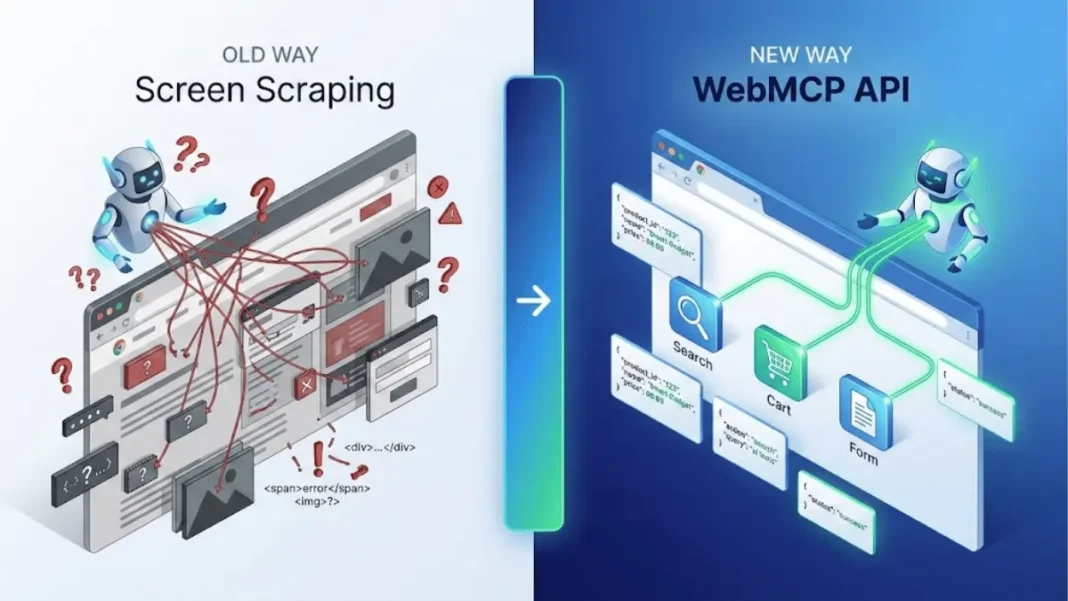
- Eliminates DOM manipulation agents call functions with schemas instead of screen scraping
- Available through Chrome early preview program with chrome://flags activation
Google Chrome introduced WebMCP (Web Model Context Protocol) on February 10, 2026, fundamentally changing how AI agents interact with websites. Instead of agents guessing button functions through screen scraping, websites now expose structured tools with explicit schemas eliminating ambiguity and accelerating agent workflows. This marks Chrome’s commitment to the “agentic web,” where machines consume web content alongside humans.
Understanding the Agentic Web Shift
The web was built for human eyes and hands. AI agents attempting to navigate traditional websites face the same challenge automated systems encounter with visual-only interfaces they must interpret pixels, guess element purposes, and hope DOM structures remain consistent. WebMCP addresses this by letting websites publish contracts that define exactly what actions agents can perform and how.
The agentic web concept recognizes two parallel internet experiences emerging: one optimized for human browsing, another designed for machine consumption. WebMCP positions Chrome as the bridge between these worlds, allowing a single website to serve both audiences without maintaining separate interfaces.

WebMCP’s Two-API Architecture
What is the Declarative API in WebMCP?
The Declarative API transforms standard HTML forms into agent-executable tools by adding attributes: toolname, tooldescription, and optionally toolautosubmit. No JavaScript required. When an agent encounters a form marked with these attributes, it understands the tool’s purpose, required inputs, and expected outputs through JSON schema inference from form fields.
When an agent invokes a form tool without auto-submit enabled, the browser brings the form into focus and populates fields visually giving users visibility into agent actions before submission. This approach works for straightforward interactions like search filters, checkout flows, and support ticket submissions.
How does the Imperative API differ?
Complex, stateful interactions demand more control than HTML forms provide. The Imperative API uses navigator.modelContext to register and manage JavaScript functions as callable tools. Developers access four key methods:
registerTool(): Defines new tool with function signature and input schemaunregisterTool(): Removes tool from agent accessprovideContext(): Adds contextual information for agent decision-makingclearContext(): Removes previously provided context
You define the function signature, input schema, and return type then agents invoke these functions directly without touching your UI. This proves essential for multi-step workflows like dynamic pricing calculators, real-time inventory checks, or configuration builders where intermediate states matter.
Agent Awareness and Visual Feedback
WebMCP introduces SubmitEvent.agentInvoked to HTML forms, creating agent-aware submission handling. When agentInvoked returns true, your form handler knows an AI agent triggered submission not a human. You can then differentiate responses: display human-friendly error pages for browsers while sending machine-readable JSON to agents.
Chrome also provides CSS pseudo-classes :tool-form-active and :tool-submit-active for styling forms during agent interactions. Websites can visually indicate when agents are actively using tools, improving transparency for users monitoring agent behavior.
The API dispatches two events: toolactivated fires when an agent begins interacting with a tool, and toolcancel triggers when the agent abandons the operation. These events enable analytics tracking and user notification systems.
Testing WebMCP Tools
Chrome released the Model Context Tool Inspector extension for developers testing WebMCP implementations. This debugging tool displays registered tools, shows agent invocations in real-time, and validates schema definitions.
Google also published a live travel booking demo at https://travel-demo.bandarra.me/ showcasing declarative and imperative API usage. The demo illustrates flight search, hotel filtering, and itinerary building through agent-executable tools providing reference implementations for developers.
Practical Use Cases Across Industries
E-commerce Product Configuration
An agent helping users find “waterproof hiking boots under $150 in size 10” can invoke your filter tool with exact parameters. It receives structured product data IDs, prices, availability instead of parsing HTML tables. When the user wants green instead of brown, the agent modifies one parameter and recalls the tool instantly.
Travel Booking Precision
Flight search becomes deterministic. Agents call your search tool with departure city, destination, dates, and preferences encoded in JSON. Results return as structured data with booking IDs. The agent handles date flexibility, layover preferences, and price tracking through repeated tool calls no visual page rendering required.
Customer Support Automation
Technical support tickets demand detailed system information. An agent can auto-populate browser version, OS details, error logs, and reproduction steps by calling your ticket creation tool. The imperative API handles dynamic field visibility like showing database selection only for enterprise customers through conditional schema responses.
WebMCP vs Model Context Protocol
WebMCP draws inspiration from Anthropic’s Model Context Protocol (MCP) but targets different deployment models. MCP runs server-side, you host tools on your infrastructure and agents connect remotely. WebMCP operates client-side within the browser tab, executing tools using JavaScript in the page context or HTML form submissions.
This architectural difference matters for latency-sensitive interactions. WebMCP tools execute immediately without network round trips to your servers. However, MCP offers better security for sensitive operations since tool logic never reaches the client. Many websites will deploy both: MCP for backend operations, WebMCP for browser-based interactions.
Implementation Requirements
Chrome 146 Canary includes WebMCP behind a flag. Navigate to chrome://flags, search “WebMCP for testing,” enable it, and relaunch. Websites can then register tools through either API without external dependencies.
For declarative implementation, add toolname="product_search", tooldescription="Find products matching criteria", and optionally toolautosubmit="true" to your existing forms. The browser automatically generates tool schemas from input field names, types, and validation rules.
Imperative tools require calling navigator.modelContext.registerTool() with your function, input schema, and description. The API mirrors MCP’s tool definition format developers familiar with MCP can adapt implementations quickly.
Open Standards Development
WebMCP is being developed as an open web standard through the W3C Web Machine Learning Working Group, not as a Chrome-exclusive feature. The specification remains in early preview, with active community feedback shaping the final design. This collaborative approach ensures cross-browser compatibility once the standard matures.
Developers can contribute to the specification through the GitHub repository at github.com/webmachinelearning/webmcp. The working group welcomes proposals for additional capabilities, security enhancements, and use case documentation.
Security and Privacy Considerations
WebMCP tools execute with the page’s existing permissions if JavaScript can’t access a resource, neither can WebMCP tools. Tools inherit the same origin policy, content security policy, and permission model as regular page scripts.
Rate limiting becomes critical. A misbehaving agent could invoke tools rapidly. Implement throttling at the tool level, returning structured error responses when limits exceed. Monitor invocation patterns to detect anomalous behavior.
User consent remains essential. Websites should inform users when agents are invoking tools on their behalf, especially for actions with financial or privacy implications. The visual feedback mechanisms focused forms and CSS pseudo-classes help maintain transparency.
Adoption Challenges and Limitations
WebMCP requires conscious website implementation and passive sites gain no benefit. This creates a “cold start” problem where agents lack tools on most sites initially. Chrome may address this through automatic form detection, but custom business logic demands manual tool creation.
Tool quality determines agent reliability. Poorly documented tools, incomplete schemas, or inconsistent responses cause agent failures just like bad APIs break applications. Websites must maintain tool contracts as carefully as REST APIs breaking changes strand deployed agents.
Not every interaction suits structured tools. Content discovery, visual design review, and qualitative assessment still require traditional browsing. WebMCP optimizes transactional flows, not exploratory experiences.
The Business Case for Early Adoption
Why prioritize WebMCP implementation in 2026?
Websites embracing WebMCP gain first-mover advantages as agents become primary user interfaces. When an AI assistant decides where to book flights, tool-equipped sites appear more capable than competitors requiring screen scraping. The agent chooses the path of least resistance, reliable tools over unreliable DOM manipulation.
Conversion rates improve when agents execute flawlessly. A user delegating “book the cheapest direct flight to Chicago next Tuesday” expects instant results. Tools deliver that experience by providing deterministic interfaces agents can trust.
Analytics opportunities emerge from tool invocation data. Understanding which agents use your tools, success rates, and common workflows reveals optimization opportunities invisible in traditional web analytics.
Joining the Early Preview Program
Chrome restricts WebMCP access to early preview program participants. Enrollment provides documentation, demo implementations, API update notifications, and developer support channels. Sign up through Chrome’s early preview program portal to begin prototyping.
The preview phase allows Google to refine the API based on real-world implementation feedback before broader release. Early adopters influence specification design and establish expertise before mainstream competition arrives.
WebMCP Implementation Roadmap
Start with high-value, low-complexity tools. Product search, store locators, and contact forms offer immediate wins with minimal implementation effort. Deploy declarative tools first they require only HTML attribute additions.
Test implementations using the Model Context Tool Inspector extension and reference demo at travel-demo.bandarra.me. These resources accelerate debugging and validate schema correctness.
Monitor tool invocation analytics. Track which agents call tools, success rates, common error patterns, and execution times. This data reveals optimization opportunities and validates implementation quality.
Expand to imperative tools for differentiated workflows. Multi-step configurators, dynamic pricing engines, and real-time inventory checks showcase your site’s unique capabilities to agents.
Document tools thoroughly. Clear descriptions, example inputs, and expected outputs help agents understand tool purposes and appropriate usage contexts. Poor documentation leads to misuse and support burden.
Limitations and Considerations
WebMCP doesn’t eliminate traditional UIs. Human users still need visual interfaces, accessibility features, and exploratory browsing capabilities. Tools augment experiences rather than replacing them.
Agent behavior remains unpredictable during the early adoption phase. Expect unusual input combinations, rapid-fire invocations, and edge cases human testing never uncovered. Robust error handling and validation become mandatory.
Tool maintenance creates ongoing obligations. Schema changes require version management, deprecation notices, and backward compatibility strategies similar to public API governance.

Frequently Asked Questions (FAQs)
What browsers currently support WebMCP?
Chrome 146 Canary supports WebMCP through the “WebMCP for testing” flag in chrome://flags starting February 2026. The feature is being developed as an open web standard, though other browsers have not announced implementation timelines.
Does WebMCP work with existing websites without modifications?
No. Websites must explicitly implement WebMCP tools using HTML attributes for declarative forms or navigator.modelContext for imperative JavaScript tools. Passive sites without tool definitions provide no agent interfaces.
How does WebMCP differ from traditional web scraping?
Web scraping interprets HTML structure and guesses element purposes through DOM manipulation. WebMCP provides explicit schemas defining tool inputs, outputs, and behaviors eliminating ambiguity and improving reliability for agent interactions.
What are the four main navigator.modelContext methods?
The four methods are registerTool() for defining new tools, unregisterTool() for removing tools, provideContext() for adding contextual information, and clearContext() for removing context. These enable full tool lifecycle management.
How can I test my WebMCP implementation?
Use the Model Context Tool Inspector Chrome extension to debug tool registration and invocations. Google also provides a live demo at travel-demo.bandarra.me showcasing reference implementations.
What happens visually when an agent invokes a form tool?
Unless toolautosubmit is enabled, the browser brings the form into focus and populates fields visually allowing users to see agent actions before submission. CSS pseudo-classes :tool-form-active and :tool-submit-active enable custom styling.
How do I detect if an agent submitted a form?
Check SubmitEvent.agentInvoked property in your form submission handler. When true, the submission came from an agent rather than a human user.
Is WebMCP a Chrome-only feature?
No. WebMCP is being developed as an open web standard through the W3C Web Machine Learning Working Group. The specification is available on GitHub for community contribution.

