

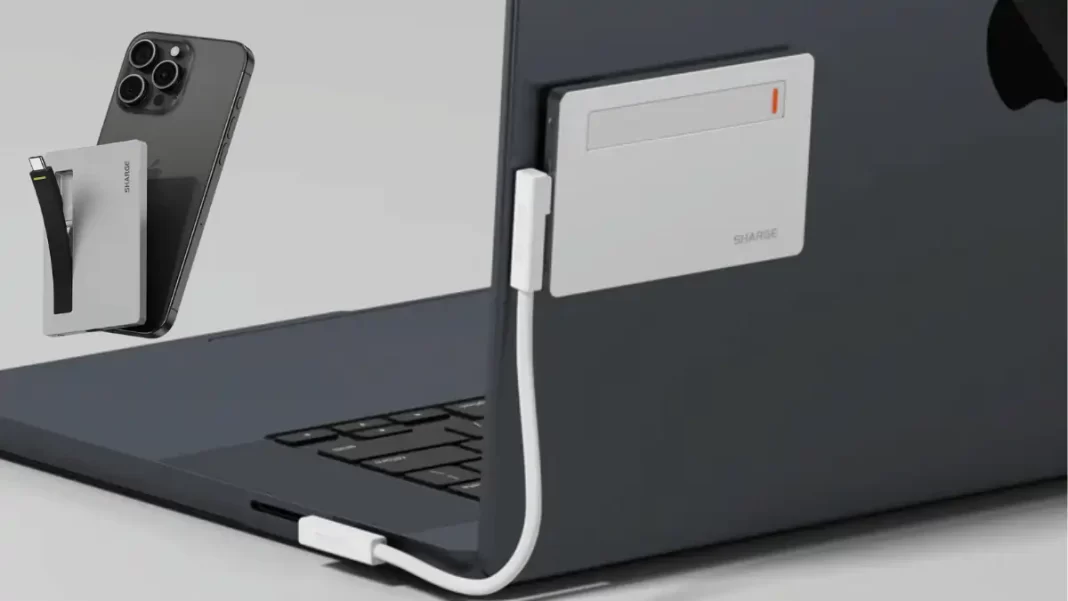
If you want pocketable NVMe storage that also keeps your laptop or handheld topped up, Sharge Disk Plus is worth a look. It is a 6 mm thin aluminum NVMe enclosure with USB 3.2 Gen 2 speeds and a built-in cable. It also adds pass-through power up to 100 W to cut desk clutter.
What is Sharge Disk Plus and who is it for
Disk Plus is a thin USB 3.2 Gen 2 NVMe enclosure that supports up to 4 TB single-sided M.2 drives and can charge a host device while transferring data, thanks to dual USB-C ports rated up to 100 W.
Key specs at a glance
- Thickness: 0.24 in (6 mm), size: 93 × 60 × 6 mm
- Interface: USB 3.2 Gen 2, up to 10 Gbps
- SSD support: M-key NVMe 2230/2242/2280, single-sided only
- Capacity: up to 4 TB
- Ports: 2 × USB-C, built-in cable
- PD pass-through: up to 100 W
- OS: Windows, macOS, Android, Linux, iOS
These are pulled from Sharge’s product pages.
Where it fits
- Creators backing up shoots to a thin drive while charging a MacBook.
- Handheld gamers using a 2230/2280 NVMe with Steam Deck or ROG Ally while keeping power flowing.
- Students and office users carrying one slab instead of an enclosure plus cable. (PD and built-in cable cited above.)
Design and build: why 6 mm matters
The 6 mm chassis slides into any sleeve and feels denser than plastic shells. The aluminum body helps spread heat during long copies. The integrated USB-C cable tucks into the frame, so you don’t hunt for a lead every time.
Single-sided SSD caveat
Disk Plus supports single-sided M.2 NVMe drives only. Many 2280 sticks are single-sided, but performance 2-sided models exist. Some listings also note height under roughly 2.6 mm for compatibility. If your SSD has chips on both sides, pick a different enclosure.
Ports and power: data plus charging on one desk
There are two USB-C ports. One is focused on data, the other on power delivery. Sharge lists up to 100 W PD and labels per-port power as 85 W and 100 W in the India spec block. In practice, that’s enough to keep most laptops and all handhelds charged while transferring files.
When pass-through shines
- Office or café use with a single wall charger powering the laptop while the enclosure handles storage.
- Handhelds like Steam Deck or ROG Ally that draw under 65 W. (PD headroom from the spec above.)
Caveat we noticed
Buyer reviews show mixed PD results. At least one India buyer reports USB-PD passthrough “never works” with their chargers, while others are satisfied. Differences in chargers, cables, and device power draw can affect outcomes. Use a quality PD brick with overhead.
Performance: what 10 Gbps really delivers
Disk Plus is a USB 3.2 Gen 2 enclosure, so the theoretical ceiling is 10 Gbps. In the real world, plan for up to ~1050 MB/s sequential transfers with a fast NVMe and the right host port. Listings and retail pages mention a Realtek RTL9210 bridge, a common, stable USB-to-NVMe controller.
What that means for you
- Copy a 60 GB camera card in about a minute on a good day.
- Edit 1080p and many 4K Long-GOP projects from the drive.
- Heavy multicam ProRes or Blackmagic RAW will do better on USB4 or Thunderbolt enclosures.
Compatibility and setup
Supported SSD sizes: 2230, 2242, 2280. Capacity: up to 4 TB. OS: Windows, macOS, Android, Linux, iOS. Many users will need to format the new SSD before first use.
Quick install
- Open the shell per the included guide.
- Insert a single-sided M.2 NVMe (M-key) and secure it.
- Apply the thermal pad if included.
- Connect using the integrated cable.
- Initialize and format in Disk Utility or Disk Management.
Pros and Cons
Pros
- 6 mm thin aluminum body that actually pockets well.
- Built-in USB-C cable, less to carry.
- Dual USB-C with up to 100 W pass-through to the host.
- Supports 2230 to 2280, up to 4 TB.
Cons
- Single-sided SSD only, height matters.
- 10 Gbps ceiling, not USB4 or Thunderbolt speeds.
- PD pass-through results vary with chargers and handhelds.
Alternatives you should compare
Sabrent EC-SNVE (10 Gbps, tool-free)
Great value, takes NVMe and SATA, toolless install, but no pass-through PD and no built-in cable.
Ugreen 10 Gbps enclosures
Affordable, support NVMe (and some models both NVMe and SATA) and larger capacities. Again, no PD passthrough.
When to step up
If you need to edit high-bitrate 4K or 6K straight off the drive, consider USB4 or Thunderbolt enclosures for 20–40 Gbps or more. Recent USB4 options from Satechi show the jump.
Should you buy Sharge Disk Plus
If you want a thin enclosure that simplifies your bag with a built-in cable and can charge your device while moving files, Disk Plus is a smart pick. If your SSD is double-sided, or your workflow needs faster than 10 Gbps, pick a different class.
India price note: the India store lists a sale price of ₹6,599.
Frequently Asked Questions (FAQs)
How do I format the SSD the first time
Most drives arrive unformatted. Use Disk Utility on macOS or Disk Management on Windows to create an exFAT or APFS/NTFS volume. Sharge’s FAQ confirms a first-use format may be needed.
Will PD passthrough power my ROG Ally or Steam Deck
It can, within PD limits. Some users report mixed results depending on the charger and firmware. Use a quality PD brick with overhead.
Is 10 Gbps enough for 4K video
For Long-GOP 4K and many ProRes proxy workflows, yes. For heavy ProRes HQ or BRAW, pick USB4 or Thunderbolt.
Does it support SATA drives
No. Disk Plus is for NVMe (M-key) drives only.
What’s in the box
The enclosure with an integrated cable plus the usual paperwork. SSD is not included.
India price and availability
The India page showed ₹6,599 on sale and “Sold out” during our check. Stock varies.
Comparison table
| Model | Interface | Max speed class | PD pass-through | SSD support | Notable |
|---|---|---|---|---|---|
| Sharge Disk Plus | USB 3.2 Gen 2 | 10 Gbps | Yes, up to 100 W | NVMe M-key 2230/2242/2280, single-sided | 6 mm thin, built-in cable |
| Sabrent EC-SNVE | USB 3.2 Gen 2 | 10 Gbps | No | NVMe and SATA, tool-free | Value pick, broad SSD support |
| Ugreen NVMe/SATA (10 Gbps) | USB 3.2 Gen 2 | 10 Gbps | No | NVMe + SATA up to 8 TB | Good budget choice |
| USB4/Thunderbolt options | USB4/TB | 20–40 Gbps | Varies | NVMe | For heavy editing, higher cost |
Featured Snippet Boxes
Does Sharge Disk Plus support double-sided SSDs
No. Disk Plus supports single-sided M.2 NVMe drives only. Many 2230, 2242, and 2280 sticks are single-sided, but check your model’s height before buying.
How fast is Disk Plus
It’s a USB 3.2 Gen 2 enclosure rated up to 10 Gbps. In practice, expect up to ~1050 MB/s sequential transfers with a fast NVMe and a proper Gen 2 USB-C port.
Can it charge while transferring data
Yes. Disk Plus has dual USB-C ports and supports PD up to 100 W, so you can power a laptop or handheld while moving files. Results depend on your charger and cables.
Which SSD sizes fit
2230, 2242, and 2280 single-sided NVMe drives up to 4 TB capacity.
What controller does it use
Retail listings cite the Realtek RTL9210 USB-to-NVMe bridge, a common 10 Gbps controller in many enclosures.
Source: SHARGE

