

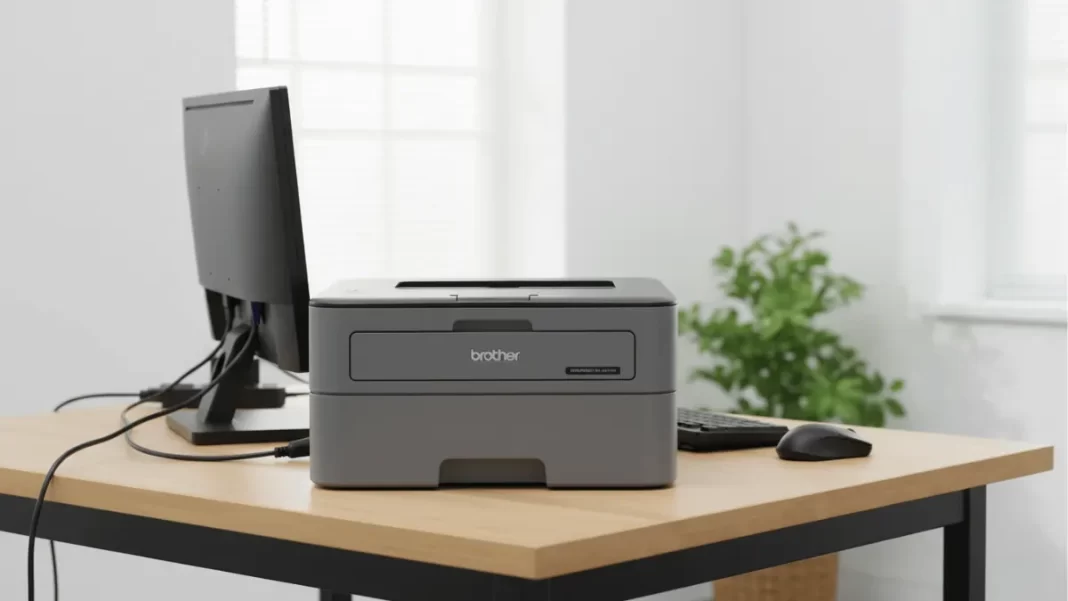
Brother HL-L2321D is a no-nonsense mono laser for text-heavy printing. It does 30 ppm, prints on both sides, and uses the TN-2365 high-yield toner rated for 2,600 pages. It is USB-only, so no Wi-Fi. If you want fast, cheap black-and-white pages at home or in a small office, it fits.
Is the HL-L2321D worth it?
If you need reliable black-and-white prints with automatic duplex and low running costs, yes. It is fast at up to 30 ppm, uses a 2,600-page TN-2365 toner, and keeps paper costs down with duplex. Skip it if you require Wi-Fi, mobile printing, or scanning.
Table of Contents
Key specs at a glance
- Type: Mono laser, single-function, A4
- Speed: Up to 30 ppm A4, 7.5 sheets per minute duplex
- Paper: 250-sheet tray, 100-sheet output
- Duplex: Automatic
- Memory: 8 MB
- Ports: USB 2.0 only
- Size/Weight: 356 × 360 × 183 mm, 6.8 kg
- Warranty: 1-year on-site in India
- Inbox toner: Full-capacity up to 2,600 pages (TN-2365)
Pros and Cons
Pros
- Fast 30 ppm A4 with auto duplex
- Low running costs with TN-2365
- Sturdy tray and simple controls
Cons
- No Wi-Fi or Ethernet
- Mono only
- Drum is a separate consumable
Who should buy Brother HL-L2321D
- Students printing 50–150 pages a month.
- Home offices sending invoices and statements.
- SMBs that need cheap text printing with duplex.
Skip if you need colour or built-in Wi-Fi. Consider HL-L2361DN for Ethernet or HL-L2366DW for Wi-Fi.
Cost per page of Brother HL-L2321D
Why it matters: cost per page (CPP) = consumable price ÷ ISO yield. Brother quotes yields using ISO/IEC 19752, which standardizes the test page and coverage for mono lasers.
Toner math
- Toner model: TN-2365 high yield, ~2,600 pages (ISO/IEC 19752).
- Typical street prices seen online: roughly ₹1,550 to ₹3,499 for original units, with MRP listings up to ₹4,190. That gives a toner CPP of ~₹0.60 to ₹1.61 per page.
Drum amortization
- Drum model: DR-2365, ~12,000 pages. Market prices vary widely; many Indian listings cluster around ₹2,000 to ₹3,500. That adds ~₹0.21 to ₹0.29 per page if you amortize the drum.
What is the real cost per page?
Using OEM-priced TN-2365 toner, expect roughly ₹0.60 to ₹1.61 per page for toner alone, depending on where you buy. Adding the DR-2365 drum amortization brings it to ~₹0.81 to ₹1.90 per page. Actual costs vary with page coverage and paper.
Monthly examples
- Student, 100 pages/month: ~₹81 to ₹190 in consumables.
- SMB, 1,000 pages/month: ~₹810 to ₹1,900.
Assumes ISO page coverage and OEM supplies.
Setup and duplex tips
- Install the latest driver from the Brother India support page.
- Connect via USB, set default duplex in the driver, and select “Text” or “General” mode for crisp documents.
- Load 75–80 gsm paper for best duplex reliability.
- Keep a spare TN-2365 on hand once the “toner low” warning appears.
Does it print on both sides?
Yes. HL-L2321D supports automatic two-sided printing. Enable duplex in the print dialog or set it as default in the driver. Duplex cuts paper use and total cost for multi-page documents like reports and invoices.
Print quality and speed
Text is this printer’s strong suit. At up to 30 ppm on A4, it handles long study notes and invoice batches quickly. For sharp text, stick to good 75–80 gsm paper and use the default HQ1200 mode when needed.
Connectivity and OS support
This is a USB-only model. No Wi-Fi, no Ethernet, and no native AirPrint or Mopria. You can still share it over a PC on your network. Brother lists Windows and macOS support via drivers and the iPrint&Scan desktop app.
Is HL-L2321D wireless?
No. It connects over USB only. If you need network printing, consider HL-L2361DN for Ethernet or HL-L2366DW for Wi-Fi.
Brother HL-L2321D vs HL-L2361DN vs HL-L2366DW
- HL-L2321D: USB only, cheapest.
- HL-L2361DN: Adds Ethernet for wired networking.
- HL-L2366DW: Adds Wi-Fi and Wi-Fi Direct for phones and laptops.
All use similar 2,600-page toner and do auto duplex. Pick based on connectivity needs.
Cost-per-page table (ISO/IEC 19752)
| Consumable | Yield | Typical price (INR) | CPP (INR) |
|---|---|---|---|
| TN-2365 toner | 2,600 pages | 1,550 | 0.60 |
| TN-2365 toner | 2,600 pages | 3,499 | 1.35 |
| TN-2365 toner | 2,600 pages | 4,190 (MRP example) | 1.61 |
| DR-2365 drum | 12,000 pages | 2,189 | 0.18 |
| DR-2365 drum | 12,000 pages | 3,099 | 0.26 |
Frequently Asked Questions (FAQs)
Which toner does it use?
TN-2365 high-yield, ~2,600 pages.
Is there a drum, and when to replace?
Yes, DR-2365. Replace around 12,000 pages or when print quality drops.
What is the duty cycle?
Retailer specs often quote up to 10,000 pages monthly. Treat it as a maximum, not a target.
Does it support duplex by default?
Yes, automatic two-sided printing. Enable in driver.
Can I print from a phone?
Not directly. It lacks Wi-Fi. Use a networked PC share or choose HL-L2366DW.
Final Verdict
If you want a dependable text printer with duplex and low running costs, HL-L2321D is easy to recommend. Confirm you are fine with USB-only. Budget for TN-2365 toner and the DR-2365 drum over time.

