

Best 3D Printers for Beginners in 2025
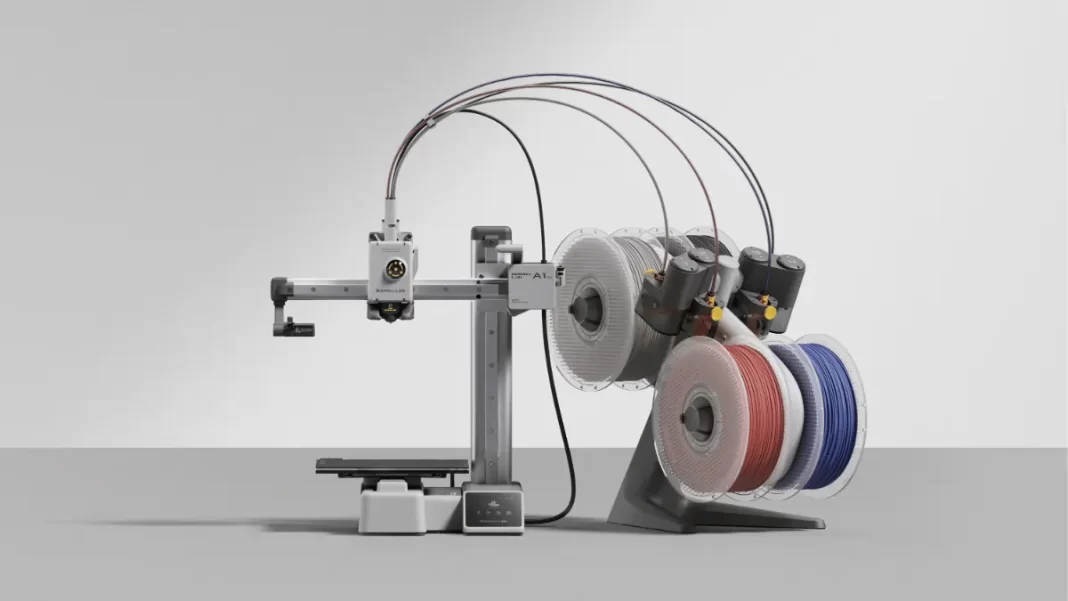
If you want the easiest start, get the Bambu Lab A1 Mini. It’s fast for its size, has auto-calibration, and optional multi-color. On a tight budget, the Creality Ender-3 V3 SE is the best under ~$250 with auto leveling. Prefer a tidy, semi-enclosed setup? FlashForge Adventurer 5M is beginner-friendly. Painting tabletop minis? Start with an entry-level resin like Elegoo Saturn 4 Ultra, but read the safety notes first.
Why these picks are best 3d printer:- A1 Mini is widely named “best for beginners” thanks to speed, simple setup, and AMS Lite compatibility.
- Ender-3 V3 SE brings auto bed leveling and easy setup at a low price.
- Adventurer 5M is a polished “open-frame but tidy” pick with straightforward UX.
- Saturn 4 Ultra is an approachable resin option with smart features, but resin needs ventilation and PPE.
Table of Contents
Beginner Buyer’s Guide: How to Pick Your First 3D Printer
FDM vs Resin: which should you start with?
For most beginners, FDM (filament) is the calmer start. Filament printers handle functional parts, organizers, brackets, toys, and cosplay. Resin shines for tiny, detailed models like miniatures, but cleanup uses chemicals and needs ventilation. Start FDM unless your main goal is miniatures.
Must-have features for first-timers
- Auto bed leveling and Z-offset assist. These reduce the “why won’t it stick?” spiral.
- PEI spring-steel plate. Flexible and grippy for PLA.
- Good slicer profiles out of the box (Bambu Studio, PrusaSlicer or OrcaSlicer).
- Active support and parts availability. Avoid brands with uncertain support paths.
Nice-to-haves you’ll appreciate
- Enclosure if you plan ABS/ASA later, or want to control drafts and dust.
- Multi-color with an AMS-style unit for playful projects.
- Built-in camera for timelapses and remote checks.
Budget and the real cost of starting
A realistic beginner setup looks like this:
- Printer: $199–$499 for an entry FDM or $299–$399 for basic resin.
- Filament: Start with PLA. One or two spools are enough to learn.
- Tools: Flush cutters, scraper, calipers, IPA wipes.
- Upgrades later: Better nozzles, PEI plates, or a simple enclosure bin if needed.

Safety First: Ventilation, Materials, and Common Myths
3D printers release ultrafine particles (UFPs) and VOCs. Exposure levels depend on material, temperature, and room airflow. ABS and resin generally emit more than PLA. Good ventilation plus sensible handling makes a meaningful difference at home.
What research says:
- Studies have documented VOCs and UFP emissions from consumer printers; ABS is often higher-emitting than PLA.
- Agencies and labs (EPA, Chemical Insights/UL) recommend better ventilation and exposure awareness.
Practical steps for hobbyists:
- Place the printer in a well-ventilated area. Crack a window or use a vent hose with a fan if resin or ABS is involved.
- Prefer PLA to start. Add PETG later.
- For resin, use gloves, eye protection, and dedicated containers for washing/curing.
Setup to First 3d Print: A 20-Minute Path
Unbox, assemble any major parts, run the printer’s auto-level routine, load PLA, open a known-good profile in your slicer, and slice 3DBenchy at default speed and 0.2 mm layer height. Watch the first layer. If edges lift, clean the plate with IPA, re-run Z-offset, and try again.
Steps:
- Unbox and place the printer on a steady surface.
- Run auto-leveling and set Z-offset per on-screen guide.
- Load PLA and preheat.
- In Bambu Studio/OrcaSlicer/PrusaSlicer, pick the matching profile, import 3DBenchy, slice at 0.2 mm.
- Start the print and watch the first 5–10 minutes.
- Inspect: clean bottom, no strings, smooth arches. Keep your first success as a baseline.
Common Beginner Mistakes and Easy Fixes
- Poor first layer: Clean plate with IPA, raise bed temp a bit, tweak Z-offset in tiny steps.
- Stringing: Dry filament, enable retraction, reduce nozzle temp slightly.
- Warping: Add brim, increase bed temp, shield from drafts; consider enclosure if moving to ABS.
- Too fast too soon: Use default speed first. The “500 mm/s” marketing can wait until you have a clean baseline.
Best Beginner 3d Printer Models Compared
| Model | Why it’s beginner-friendly | Key specs | Pros | Cons | Best for |
|---|---|---|---|---|---|
| Bambu Lab A1 Mini | Easiest start; auto calibration; AMS Lite option | 180×180×180 mm; up to 500 mm/s | Simple setup, great profiles, fast for size | Small build volume; AMS sits beside unit | First-timers who want “it just works” |
| Creality Ender-3 V3 SE | Best budget with auto-level | 220×220×250 mm; ~200+ mm/s | Cheap, auto bed level, big community | Basic plate; learn a bit of tinkering | Budget buyers who want to learn basics |
| FlashForge Adventurer 5M | Polished UX; quick start | 220×220×220 mm; fast modes | Easy assembly, friendly UI | Fewer community mods than Ender | Apartment users who value neat setup |
| Elegoo Neptune 4/4 Pro | Speedy budget option | 225×225×265 mm; high speed | Good value, strong community | Leveling approach is more manual | Tinker-curious beginners on a budget |
| Elegoo Saturn 4 Ultra (resin) | Easy resin start features | 150 mm/h; smart monitor | Great detail for minis | Resin workflow + PPE required | Miniature painters willing to handle resin |
Note on AnkerMake M5/M5C: support and parts availability appear uncertain after Anker paused sales. Beginners should consider support ecosystems before buying used or legacy units.
The Bottom Line
- Buy A1 Mini for easiest start; Ender-3 V3 SE if you’re on a tight budget; Adventurer 5M for tidy setup; Saturn 4 Ultra for minis (with safety).
- Start with PLA, learn first layers, then experiment.
- Use ventilation if printing ABS or resin.
Beginner Checklist
- Pick printer + 2 spools PLA
- Auto-level + Z-offset
- Slice 3DBenchy at 0.2 mm
- Clean plate with IPA, watch first layer
- Log your first successful settings
Frequently Asked Questions (FAQs)
What’s the best 3D printer for beginners right now?
Bambu Lab A1 Mini is the easiest overall start for most people. If you need the lowest price, Creality Ender-3 V3 SE is a solid budget pick.
Should I start with filament or resin?
Start with filament (FDM) unless you only care about tiny, highly detailed miniatures. It’s cleaner and simpler for home use.
Do I need an enclosure?
Not for PLA. It helps stabilize temperatures and reduce drafts, useful for ABS/ASA or dust control.
Is ventilation actually necessary?
It’s wise, especially for ABS and resin. Use a well-ventilated room, vent hose, or print enclosure with filtration.
How much should I budget?
$199–$499 for a starter FDM printer, plus a few tools and filament. Resin adds wash/curing gear and consumables.
What should I print first?
Try 3DBenchy, a phone stand, or small organizers. Great confidence builders and quick to print.
What is the best 3D printer for beginners?
The Bambu Lab A1 Mini is the easiest start for most people. It sets up quickly, auto-calibrates, and can add multi-color later with AMS Lite. Budget pick: Creality Ender-3 V3 SE.
FDM or resin for beginners?
Start with FDM unless you’re focused on tiny, detailed minis. FDM is cleaner, simpler, and safer to learn at home.
Do I need ventilation at home?
It’s recommended, especially for ABS or resin. Print in a ventilated space and consider a vent hose or enclosure with filtration.
How much does a first setup cost?
Roughly $199–$499 for an FDM printer plus a couple of PLA spools and basic tools.
What is auto bed leveling and why care?
It measures the bed and adjusts the nozzle height so your first layer sticks. It saves beginners from the most common failure.

