

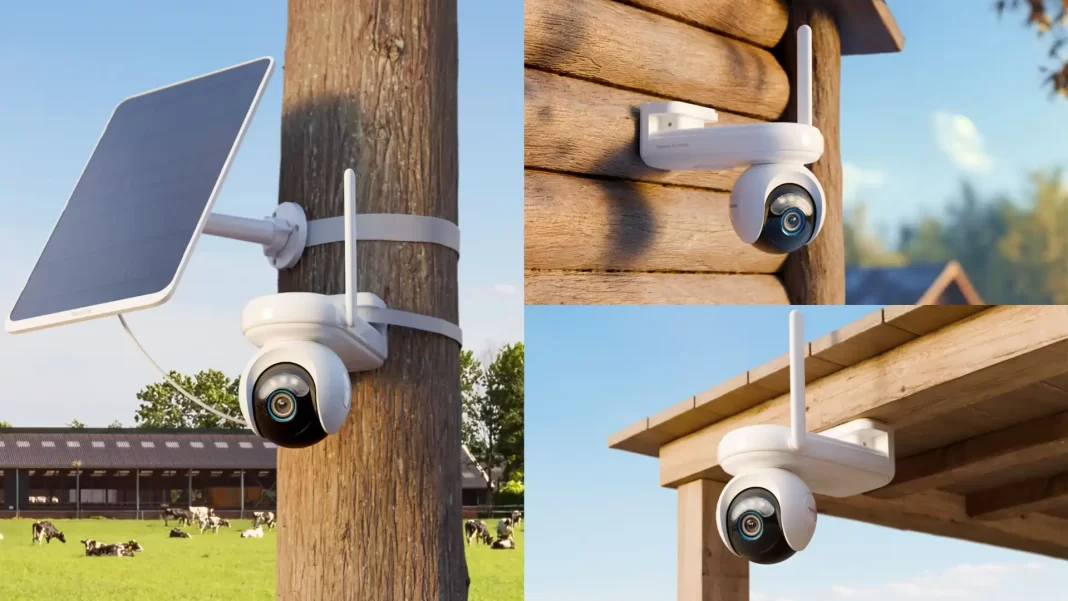
Is the Reolink Altas Go PT worth it?
If you need a wire-free, off-grid security camera with proper pan-tilt, the Reolink Altas Go PT nails the basics: 2K video, 4G LTE, 10s pre-record, ColorX night vision, and a big 20,000mAh battery with solar support. It shines for farms, cabins, and construction sites; less ideal if you demand constant 4K detail.
Table of Contents

What is the Altas Go PT? Specs at a glance
Reolink’s Altas Go PT is a 2K (4MP), battery/solar-powered 4G LTE camera that pans 355° and tilts 90°. It records to microSD (up to 512GB), supports Reolink Cloud in select regions, and adds 10-second pre-recording so you see what happened before motion was triggered rare on battery cams.
Key specs
- Sensor: 1/1.8″ CMOS, F1.0 lens; ColorX true color night vision
- Resolution: 2560×1440 @15fps
- Power: 20,000mAh internal; optional 6W/12W Reolink solar panels
- Storage: microSD up to 512GB; Cloud (region-dependent)
- Connectivity: 4G LTE (regional bands), app control, Google Assistant view
- Recording modes: motion, schedule, continuous; pre-record 2–10s (10s default)
About ColorX: Reolink’s ColorX pairs a fast F1.0 aperture with a sensitive 1/1.8″ sensor to keep color in very low light often without blasting a spotlight. That means fewer blown highlights and less wildlife disturbance at night.
Real-world performance
Day & night quality: In daylight, its 2K picture is clean with good detail for plates and signage at reasonable distances. At night, ColorX keeps footage colorful in street- or yard-lit scenes. In true darkness, you can switch to infrared (940nm) or add a small utility light to help ColorX along.
Motion + pre-record: The camera buffers video, so when its PIR + AI detection triggers, you get up to 10 seconds from before the event. That’s great for catching a plate or a face entering the frame rather than after the fact. Auto-tracking follows people, vehicles, and animals as they move across the scene.
Continuous vs motion recording: Technically, continuous recording is available, but understand the trade-off: battery drain rises sharply, especially if you live-view often. For most off-grid setups, motion recording (with pre-record on) is the sweet spot. Reolink’s own guidance on battery cams stresses they’re not meant for 24/7 live streaming; continuous is best paired with solar and modest live-view habits.
Battery life reality: Reolink quotes “months” on a charge in PIR-triggered mode. With the 12W Solar Panel 3, Reolink says ~10 minutes of sun per day can offset motion recording. Battery life will vary by temperature, motion frequency, and whether pre-record/auto-tracking are enabled.
Setup guide (5-minute overview)
1) Insert SIM & activate in the app
Use the included Reolink SIM (or your carrier’s) and activate in the app. Confirm LTE bands for your region:
- Americas: B2/B4/B5/B12/B13/B14/B66/B71
- Europe: B1/B3/B7/B8/B20/B28A
- Australia: B1/B3/B5/B7/B8/B28
3G is technically supported but not recommended; 5G SIMs aren’t supported.
2) Mount for coverage, not just height
For wide yards, aim at 20–30° down-tilt and use presets to sweep key zones (driveway → gate → barn). Keep the antenna clear of metal siding.
3) Power tips
Charge fully first, then connect Solar Panel 2 (6W) or Solar Panel 3 (12W) if motion is frequent. If you enable continuous, consider Solar Panel 3 and lower your live-view habit.
4) Smart detection
Start with medium PIR sensitivity, set exclusion zones for swaying trees, and leave pre-record at 10s for a week before fine-tuning.
Reolink Altas Go PT vs rivals
Go PT vs Go PT Ultra (4K LTE)
- Resolution: 2K vs 4K (Ultra)
- Use case: 2K is efficient for battery; 4K provides plate-level detail if you have the solar headroom. Third-party Ultra tests note excellent footage but stricter power demands in heavy-motion scenes.
- Verdict: If you need high detail for IDs and can power it (solar), Ultra; otherwise Go PT is the safer battery choice. Reolink’s own comparison also positions non-Ultra as the affordable, lighter option.
Go PT vs Eufy 4G LTE Cam S330
- Eufy S330 offers 4K and PT + AI tracking, with 4G/Wi-Fi dual-mode; strong if you want 4K and Eufy’s local-first approach.
- Reolink Go PT wins on pre-record and a mature LTE camera lineup; app feels simpler for multi-site installs. (Spec basis as cited; UX is subjective.)
Go PT vs Arlo Go 2
- Arlo Go 2 mixes Wi-Fi + LTE and has polished apps, but no pan-tilt and recurring cloud costs if you want full features. Reviews flag price/complexity vs competition.
- Verdict: If you specifically need pan-tilt and local storage without subscriptions, Reolink is easier to recommend.
Who should buy this? Who should skip it?
Buy if: you secure remote properties (farms, cabins, marinas), need pan-tilt for distributed areas, want local storage and no mandatory subscription, and plan to add a solar panel.
Skip if: you need Wi-Fi smart-home automations (this is LTE-first), true 4K ID detail, or 24/7 constant live viewing on battery.
Pricing, availability, and accessories
Pricing varies by region and bundles (solar/microSD). Reolink sells Solar Panel 2 (6W) and Solar Panel 3 (12W); a pole mount is handy for job sites. Check regional bands and Cloud availability on the product page.
Comparison Table
| Model | Resolution | Network | PT Range | Night vision | Battery | Storage | Notes |
|---|---|---|---|---|---|---|---|
| Reolink Altas Go PT | 2K (4MP) | 4G LTE | 355°/90° | ColorX + 940nm IR | 20,000mAh + solar | microSD 512GB, Cloud | 10s pre-record; motion/schedule/continuous. |
| Reolink Go PT Ultra | 4K (8MP) | 4G LTE | 355°/140° | ColorX | 20,000mAh + solar | microSD 512GB | Higher detail, stricter power needs. |
| Eufy 4G LTE Cam S330 | 4K | 4G + Wi-Fi | Pan-tilt | Color night + AI | Solar/battery | Local + cloud options | Strong 4K rival with dual-mode. |
| Arlo Go 2 | 1080p | Wi-Fi + LTE | Fixed (no PT) | Color + IR | Battery | microSD + cloud | Polished app; extra costs for features. |
Frequently Asked Question
Do I need a subscription?
No. Local microSD (up to 512GB) works out of the box; Cloud is optional and region-dependent.
How much storage for 24/7?
At 2K/15fps H.265, a 512GB card can cover days of continuous video; exact duration varies with scene complexity. Reolink supports 512GB max on Go PT.
Will ColorX work in total darkness?
It needs some ambient light. In pitch dark, switch to IR (940nm) or keep a small dusk-to-dawn light on.
Can I use it for wildlife?
Yes, but auto-tracking + continuous can tax the battery. If you want 4K detail, consider Go PT Ultra with solar and conservative tracking.
Does it support Google Assistant or Alexa?
Google Assistant view is supported; check Reolink’s app for current integrations.
What carriers are supported?
It depends on bands above; verify with your local carrier before buying.
Is 24/7 live view recommended?
No. Battery cams aren’t designed for constant live streaming; use motion + pre-record and add solar for best results.
What’s in the box?
Camera, bracket, USB-C cable, strap, SIM card, quick start guide.

Featured Answer Boxes
Does the Reolink Altas Go PT work without Wi-Fi?
Yes. It uses 4G LTE (SIM included; use a compatible plan) and records to microSD or Reolink Cloud (where available). No Wi-Fi is required.
How long does the battery last?
In PIR/motion mode, Reolink cites months per charge; with Solar Panel 3 (12W), brief daily sun can keep it topped up. Continuous recording drains faster.
Can it record continuously?
Yes continuous, scheduled, and motion modes exist. Expect faster battery drain; pair with solar and minimize live-view sessions.
What is ColorX night vision?
Reolink’s ColorX uses an F1.0 lens and 1/1.8″ sensor to keep color in low light, often without a spotlight.
Which LTE bands are supported?
Americas: B2/B4/B5/B12/B13/B14/B66/B71; Europe: B1/B3/B7/B8/B20/B28A; Australia: B1/B3/B5/B7/B8/B28.
Source: Reolink

