

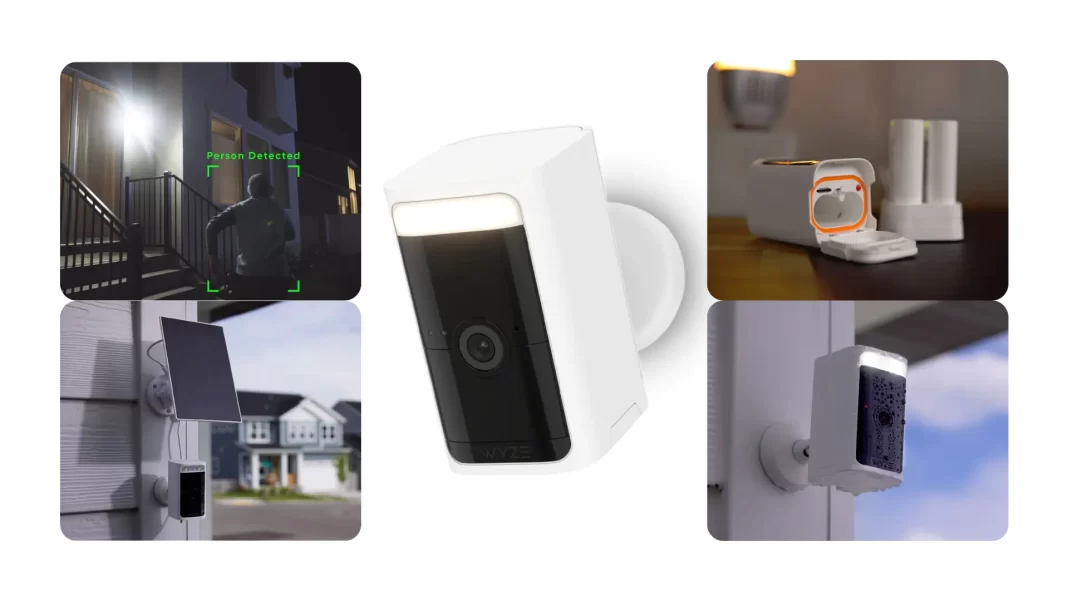
Wyze Battery Cam Pro is a low-cost, wire-free 2.5K camera with radar-aided motion alerts, color night vision, a 100 dB siren, and local microSD support. It’s great for doorways and driveways on a budget. Continuous 24/7 recording is possible but drains the battery fast, so treat it as an event-based camera.
Who should buy it
Pick it if you want an affordable, no-hub battery cam with dual-band Wi-Fi, decent 2.5K detail, and flexible storage. Skip it if you need long continuous recording without wiring or if you want premium 4K optics.
Table of Contents
What is the Wyze Battery Cam Pro?
Wyze’s Battery Cam Pro is a wire-free outdoor cam that records at 2.5K HDR, adds a built-in spotlight and siren, and uses both radar and PIR to reduce false alerts. It works on 2.4 and 5 GHz Wi-Fi and is IP65 weather-resistant.
Key specs at a glance
- Resolution: 2560×1440 at 15 fps day and night
- Lens: f/1.6, 134° DFOV (108° HFOV)
- Night: 2 IR LEDs + 2 white LEDs, ~187 lumens
- Audio: 2-way talk, 100 dB siren
- Storage: microSD up to 256 GB, motion or continuous
- Power: swappable rechargeable pack; optional solar
- Size/weight: 3.5 × 1.8 × 2.5 in, ~0.94 lb
- Smart: Alexa, Google Assistant, IFTTT
Sources: Wyze product and support pages.
What’s new vs older Wyze cams
It’s Wyze’s first mainstream cam that’s truly wire-free with dual-band Wi-Fi and microSD continuous recording support. It drops the base-station requirement from the original Wyze Cam Outdoor.

Setup and installation
Pairing and mount
Setup uses Bluetooth to speed up onboarding in the Wyze app. The box includes a 1/4-20 wall mount; you can mount ceiling-style with Wyze’s universal mount.
Solar and charging time
Wyze’s panel connects via USB-C. Fully charging a pack on the dock takes roughly 9 hours. Solar can offset daily drain but won’t sustain 24/7 continuous recording in most locations.
Battery-saving starter profile
- Motion-only local recording
- Set detection distance with radar to reduce empty clips
- Use spotlight on motion only
- Keep clip length modest if you’re on cloud storage
These tweaks come from Wyze docs and long-term user testing patterns.
Video quality and night vision
Daytime video is sharp enough to read plates at close range and identify faces across a small yard. Quality tops out at 2.5K/15 fps, which is fine for events but not silky. At night, you can use IR for stealth or switch on the two white LEDs for color night vision.
Reviewers note that while the image is solid for the price, it isn’t class-leading and the field of view is narrower than some rivals.
Motion detection and alerts
Wyze combines radar with PIR to better confirm a real object is moving, which helps cut false alerts from branches or headlights. With a subscription, you also get person, vehicle, package, pet, and even bird detection.
In 2025, Wyze added Descriptive Alerts in its Cam Unlimited Pro plan that can describe details like colors or actions. It’s more context than a basic push alert, though it sits behind the highest-tier plan.
Clip length and cooldown
Cloud clip length and cooldown depend on plan. Continuous recording to microSD is supported, but it hits the battery hard, which is why most people should run motion-based recording.
Storage and subscriptions
Local storage
The cam supports microSD cards up to 256 GB and can record motion events or continuously. If Wi-Fi drops after startup, it typically keeps recording to the card.
Cloud plans
- Cam Plus: 14-day cloud event storage and smart detections for about $2.99 per camera per month.
- Cam Unlimited: covers all your cameras for about $9.99 per month.
- Cam Unlimited Pro: adds Descriptive Alerts, facial recognition, search, and 60-day storage.
Prices and features per Wyze’s plan pages and reporting.
Battery life in the real world
Wyze doesn’t promise a fixed number because usage varies. Independent testing and user reports suggest months of life with light-to-moderate motion when recording events, but continuous 24/7 local recording can drain a pack in roughly a day. Solar helps but usually can’t keep up overnight.
Expect shorter life in winter and with lots of live-viewing. Some owners report needing wired power if they insist on continuous mode.
Smart home integration
The camera works with Alexa and Google Assistant for live view on smart displays, notifications, and routines. IFTTT is supported for simple automations.
Privacy and reliability notes
Wyze has had public security lapses in prior years. In 2025 it launched VerifiedView, a system that adds identity checks to access footage and claims stronger internal security practices. It isn’t end-to-end encryption, but it’s a step up. If privacy is your top priority, factor this in.
Comparisons and alternatives at a glance
| Camera | Resolution | Local recording | Smart detections | Typical use case |
|---|---|---|---|---|
| Wyze Battery Cam Pro | 2.5K/15 fps | microSD up to 256 GB; motion or continuous | With Cam Plus/Unlimited | Best value for doorways, driveways |
| Nest Cam (battery) | 1080p HDR | Local backup via hub; rich Google features | Strong on-device + cloud AI | Reliable alerts, simple app |
| Blink Outdoor 4 | 1080p | Local via Sync Module hub | Basic person detection | Long battery life, low cost |
| Arlo Pro 5S 2K | 2K/30 fps | Local via hub; richer optics | Advanced with paid plan | Higher-end video, pricier |
| EufyCam 3 | 4K | Local to HomeBase; no monthly fee | On-device AI | Subscription-free 4K with solar |
Pros and cons
Pros
- Wire-free, no hub needed
- 2.5K HDR with color night vision and spotlight
- Radar + PIR helps reduce false alerts
- microSD local recording, plus affordable cloud tier
- Works with Alexa and Google
Cons
- 15 fps cap limits motion smoothness
- Battery drains fast in continuous mode
- Video isn’t the sharpest in class
- Some users report reliability quirks and quick drain with microSD continuous
Pricing and availability
The Battery Cam Pro has commonly been priced under 100 dollars for the single-cam kit, with bundles that add spare batteries or a solar panel. Check Wyze’s store or major retailers for current promos.
How to install Wyze Battery Cam Pro
How to: Charge the battery, insert it, and open the Wyze app. Add Device → Cameras → Battery Camera → Battery Cam Pro. Press the setup button until you hear “ready to connect”, join Wi-Fi, then mount using the included 1/4-20 bracket. Test motion and adjust radar distance to cut false alerts.
Steps
- Charge or swap in a battery.
- Add the camera in the app and pair via Bluetooth.
- Update firmware.
- Mount 7-9 feet high, angle 15-30 degrees to your zone.
- Insert microSD if you want local clips or continuous recording.
Troubleshooting quick wins
- Can’t view SD events: power cycle, reseat card, test another card, and check “Jump to SD” in app.
- Water resistance: it’s IP65 weather-resistant, not waterproof. Don’t submerge.
Checklist: dial in your settings
- Turn on motion-only local recording first
- Set radar distance to match your yard
- Enable person/vehicle detection if you subscribe
- Keep clip length reasonable to save battery
- Use spotlight on motion for color night clips
- Consider a solar panel if events are frequent
Comparison Table
| Feature | Wyze Battery Cam Pro | Nest Cam (battery) | Blink Outdoor 4 | Arlo Pro 5S 2K | EufyCam 3 |
|---|---|---|---|---|---|
| Resolution | 2.5K | 1080p HDR | 1080p | 2K up to 30 fps | 4K |
| Local storage | microSD in-cam | Backup via hub | Via Sync Module | Via hub | HomeBase storage |
| Smart alerts | With plan | Strong Google AI | Basic | Advanced with plan | On-device AI |
| Strength | Value + microSD | Reliability + Google | Battery life + price | Video + features | 4K, solar, no fees |
| Watchout | 15 fps, battery drain in 24/7 | Price | Limited features | Cost, subscriptions | Higher upfront cost |
Frequently Asked Question
Does Wyze Battery Cam Pro support continuous 24/7 recording?
Yes, to microSD. Expect heavy battery drain; plan for wired power or solar if you try it.
How weatherproof is it?
It’s IP65 and rated for roughly -4°F to 122°F, suitable for rain and dust.
Which assistants work?
Alexa, Google Assistant, and IFTTT.
How long does a charge take?
About 9 hours on Wyze’s charging dock.
Do I need a hub?
No. It connects directly to Wi-Fi.
What cloud plan should I get?
Cam Plus is the cheapest way to unlock smart detections and 14-day cloud events. Cam Unlimited covers all cams; Pro adds Descriptive Alerts.
Glossary
PIR: Passive infrared sensor that detects heat signatures.
Radar: Low-power radio sensing to confirm motion and distance.
IP65: Dust-tight and protected from water jets.
microSD: Local storage card for motion or continuous video.

Featured Answer Boxes
Is Wyze Battery Cam Pro worth it?
Yes if you want a budget, wire-free 2.5K cam with radar motion and microSD. It’s reliable for alerts, but continuous 24/7 local recording drains the battery fast, so treat it as an event-based camera.
Does Wyze Battery Cam Pro record without a subscription?
Yes. Insert a microSD card for local motion or continuous recording. Cloud AI and 14-day storage require a plan.
How waterproof is it?
It’s IP65 weather-resistant for rain and dust, not waterproof for submersion.
Can it describe what it sees?
With Cam Unlimited Pro, Wyze adds Descriptive Alerts that summarize events with rich detail like colors and actions.
Source:

