

Quick Brief
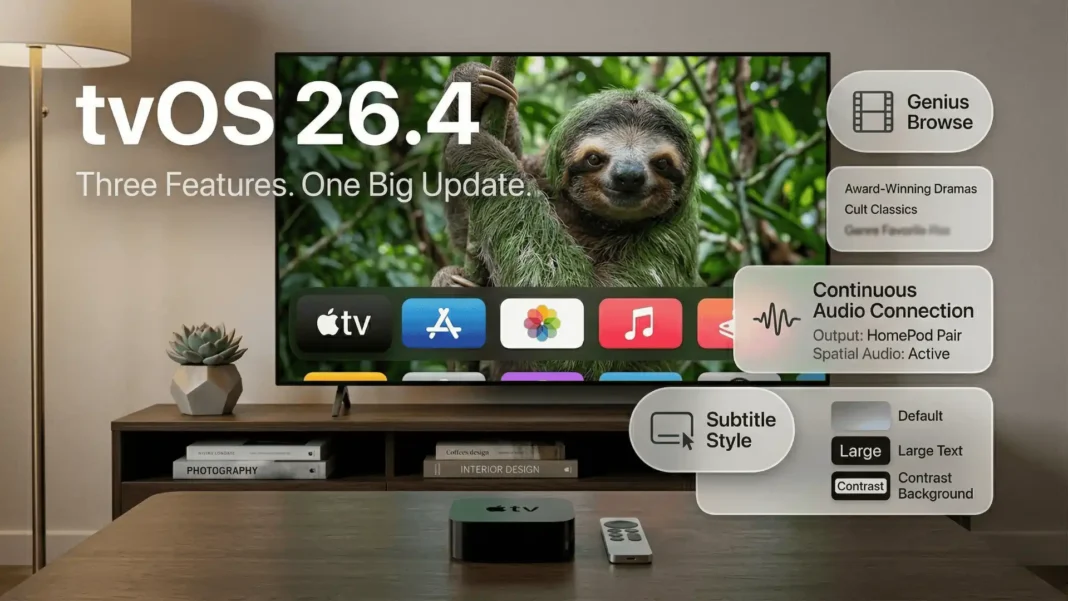
- Genius Browse lands inside the TV app’s Home tab, surfacing curated picks from Apple TV+, Prime Video, HBO Max, and other supported services
- Continuous Audio Connection resolves Dolby MAT handshake issues, specifically noted by Sonos users during the beta period
- Subtitle Style menu moves from Accessibility settings into the live video player, with four design presets
- iTunes Movies and iTunes TV Shows standalone apps are removed; all store functions now sit inside the TV app
Apple released tvOS 26.4 (build 23L243) on March 24, 2026, delivering three user-facing changes for Apple TV 4K users. The update targets content discovery, audio reliability, and subtitle accessibility, areas where Apple TV users have reported friction for multiple software generations. No new hardware accompanies this release; the improvements are purely software-side.
Genius Browse: Curated Picks Across All Your Streaming Apps
Content discovery on Apple TV has historically relied on individual app algorithms, each surfacing titles only from within its own catalog. Genius Browse introduces a unified recommendation layer inside the TV app’s Home tab.
Scrolling down in the Home tab reveals Genius Browse, which presents curated categories that refresh regularly so the same titles do not repeat week after week. Selecting any title within a category surfaces additional related picks, creating a second layer of discovery. The feature pulls content from Apple TV+, Prime Video, HBO Max, and other supported streaming services connected to the TV app.
Users can filter Genius Browse results by genre and by user profile. The feature is exclusive to Apple’s TV app and does not appear across third-party streaming platforms.
What Genius Browse Actually Addresses
The feature directly responds to a long-standing criticism of Apple TV: unlike smart TVs from Samsung or LG, the platform had no cross-service “what to watch” layer built into the home screen. Genius Browse does not replace individual app recommendations but sits above them. Its practical value scales with the number of supported streaming subscriptions connected to the TV app.
Continuous Audio Connection Targets Dolby MAT Dropouts
tvOS 26.4 adds a new toggle called Continuous Audio Connection, found under Settings > Video and Audio > Audio Format > HDMI Output.
Apple’s official description of the feature states: “Apple TV uses a Dolby MAT connection for seamless transitions across formats. Older receivers might indicate Atmos, but the original audio will play as intended”. The feature was identified during the beta as likely added to improve compatibility with Sonos speakers, though 9to5Mac notes its impact should extend beyond Sonos to other affected setups.
Users who experienced audio format switching issues or brief silences at the start of spatial audio tracks should enable this toggle. If your current audio setup has no dropouts or handshake errors, leaving the toggle off is safe.
Which Setups Benefit Most
Reddit discussions from the Sonos community during the tvOS 26.4 beta period pointed to this feature as a fix for quiet LPCM behavior on Sonos devices. Apple has not published a specific list of compatible or affected hardware, so the only way to confirm benefit is to enable the toggle and test your own setup.
Subtitle Customization Moves Into the Video Player
Before tvOS 26.4, subtitle styling options existed inside Accessibility settings, several taps away from the content playback experience. Apple now surfaces these controls directly inside the native video player’s subtitle menu.
When subtitles are active in apps that use Apple’s default tvOS video player, a new “Style” option appears alongside the on/off toggle. Four presets are available: Classic, Large Text, Outline Text, and Transparent Background. A “Manage Styles” button opens the full Accessibility customization screen for users who want granular control over font, size, and color.
The change reduces the number of steps required to adjust subtitle appearance from several Settings screens to a single in-player tap.
One Hard Limitation
Many major streaming apps, including Netflix, Disney+, and YouTube, use their own custom video players on tvOS and do not use Apple’s default player. As 9to5Mac notes, “the Apple TV app might be the main place you see this change”. The feature works fully for the Apple TV app and any other app built on Apple’s native tvOS video player framework.
iTunes Movies and TV Shows Apps Are Removed
The standalone iTunes Movies and iTunes TV Shows apps are gone in tvOS 26.4. Apple’s migration of legacy iTunes functionality into the TV app is now complete.
All purchasing, browsing, and renting of movies and TV shows continues inside the Store tab of the TV app, which has housed this functionality for several years. One item worth noting: Apple separately announced the discontinuation of the iTunes Wish List feature and has recommended users migrate saved Wish List items to the TV app’s Watchlist before the removal takes effect. The Watchlist and Wish List are not identical features, so users with saved Wish List items should review and transfer them manually.
Developer Changes in tvOS 26.4 (Build 23L243)
The tvOS 26.4 SDK bundled with Xcode 26.4 resolves several issues and adds new API capabilities:
- Background Assets framework now supports offline asset pack status checks via localStatus(ofAssetPackWithID:) and assetPackIsAvailableLocally(withID:)
- A crash that occurred when downloading asset packs in the Background Assets framework is fixed
- A networking bug where multiple processes leaked CFRunLoopSource objects under Automatic Proxy Configuration is resolved
- StoreKit Transaction gains revocationType and revocationPercentage fields for granular purchase revocation data
- SwiftUI no longer fails to surface the latest .userActivity as the current user activity
Developers should be aware of one known issue: apps built and run with Xcode 26.3 or earlier may hang when Address Sanitizer or Thread Sanitizer runs against a tvOS 26.4 device. Updating to Xcode 26.4 resolves this.
Liquid Glass on tvOS 26: Compatibility Note
Liquid Glass, introduced in tvOS 26.0, is supported only on Apple TV 4K (2nd generation) and newer. Apple TV HD and the original Apple TV 4K both receive tvOS 26.4 but the Liquid Glass visual redesign does not apply to those devices. The update installs normally on all compatible devices regardless of Liquid Glass eligibility.
Considerations
The three user-facing features in tvOS 26.4 are practical and address real friction points, but scope is limited. Subtitle customization applies primarily to the Apple TV app given that major streamers use their own players. Continuous Audio Connection is conditional on having an affected audio setup. Apple Intelligence remains absent from Apple TV in this release.
How to Install tvOS 26.4
- Open Settings on your Apple TV
- Select System
- Select Software Updates
- Select Update Software and confirm installation
The update is free and available now for Apple TV 4K and Apple TV HD.
Frequently Asked Questions (FAQs)
What is the tvOS 26.4 build number?
tvOS 26.4 carries build number 23L243. Apple released it on March 24, 2026, as a free update for Apple TV 4K and Apple TV HD. Install it from Settings > System > Software Updates on your device.
What is Genius Browse in tvOS 26.4?
Genius Browse is a content recommendation feature in the TV app’s Home tab that surfaces curated categories pulling from Apple TV+, Prime Video, HBO Max, and other supported services. Categories refresh regularly. You can filter by genre and by user profile. The feature is exclusive to the TV app.
What does Continuous Audio Connection do in tvOS 26.4?
Continuous Audio Connection maintains a Dolby MAT audio link over HDMI to prevent format-switching dropouts. Apple describes it as ensuring that older receivers indicating Atmos play the original audio as intended. Enable it under Settings > Video and Audio > Audio Format > HDMI Output if you experience audio issues.
Does the subtitle style feature work in Netflix or YouTube on Apple TV?
No. The new Subtitle Style menu only works in apps that use Apple’s native tvOS video player. Netflix, YouTube, Disney+, and other major streamers use custom video players that bypass this system-level control. The Apple TV app is the primary app where the feature functions.
Why were the iTunes Movies and TV Shows apps removed in tvOS 26.4?
Apple removed these apps because their core functionality had already been integrated into the TV app for years. The standalone apps had become redundant. One feature affected is the iTunes Wish List, which Apple is also discontinuing. Users are advised to migrate Wish List items to the TV app’s Watchlist before the removal finalizes.
Which Apple TV devices support tvOS 26.4?
tvOS 26.4 is compatible with Apple TV 4K (all generations) and Apple TV HD. Liquid Glass visual elements introduced in tvOS 26 are only available on Apple TV 4K 2nd generation and newer. Apple TV HD and the original Apple TV 4K receive tvOS 26.4 without the Liquid Glass redesign.
Does tvOS 26.4 include Apple Intelligence features?
No. Apple Intelligence is not part of tvOS 26.4. As of March 2026, Apple Intelligence has not been extended to Apple TV. AppleInsider noted in its tvOS 26 review that this remains “the most glaring omission” for the platform.

