

Quick Brief
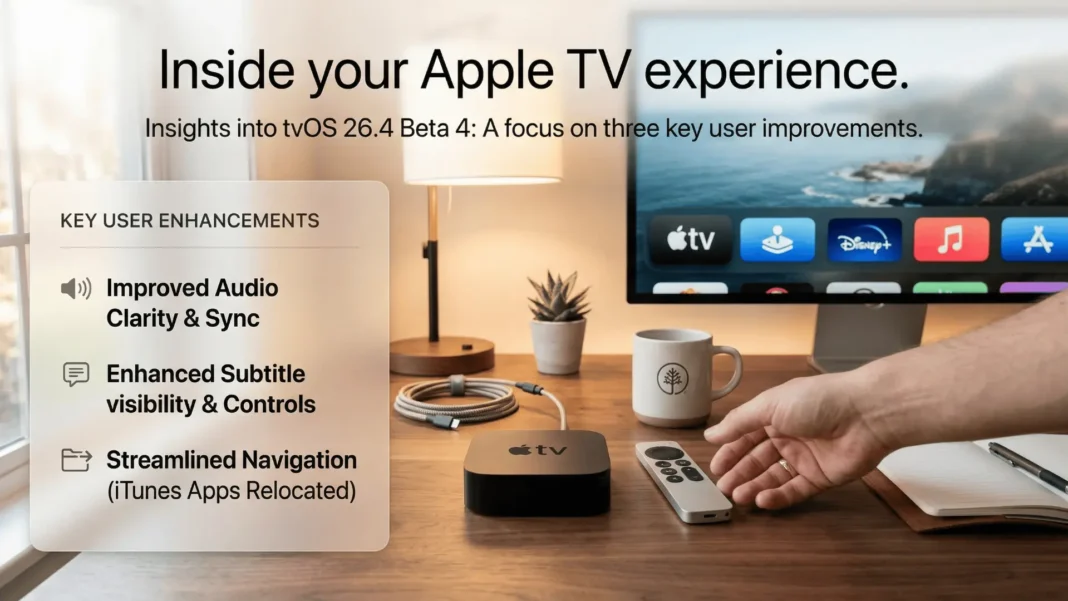
- Apple seeded tvOS 26.4 Beta 4 (build 23L5234a) to developers on March 9, 2026
- iTunes Movies and TV Shows apps removed permanently from Apple TV Home Screen
- New Continuous Audio Connection toggle uses Dolby MAT for seamless audio format transitions via HDMI
- Subtitle style controls now accessible directly inside the native video player during playback
Apple has seeded its fourth developer beta of tvOS 26.4, and the three changes inside it have been building since Beta 1. This release finalizes the removal of legacy iTunes apps, introduces a dedicated HDMI audio continuity setting, and puts subtitle customization where it always should have been: inside the video player itself. Here is what each change does, how it works, and who benefits.
tvOS 26.4 Beta 4: Build Number and Release Date
Apple released tvOS 26.4 Beta 4 with build number 23L5234a on Monday, March 9, 2026. The update is available through the Settings app on any Apple TV enrolled with a developer account, or via the Apple Developer portal at developer.apple.com. Beta 3 arrived one week earlier, on March 2, 2026. A public launch for tvOS 26.4 is expected next month, based on the current beta pace.
iTunes Movies and TV Shows Apps Removed From Apple TV
tvOS 26.4 completes Apple’s long-running migration away from standalone iTunes apps by removing the iTunes Movies and iTunes TV Shows apps from the Apple TV Home Screen. These apps stopped functioning as actual storefronts years ago. Since then, they have only redirected users to the TV app for purchases and rentals, making their continued presence redundant.
All previously purchased content remains fully accessible through the TV app’s Library tab. No purchases are affected.
iTunes Wish List: Act Before tvOS 26.4 Ships
One feature does disappear with no direct equivalent. Apple has already begun notifying iTunes users that the Wish List feature will be discontinued. Apple’s recommended path is to save any remaining Wish List items to the TV app’s Watchlist before tvOS 26.4 launches publicly. The Watchlist is not identical to the Wish List in function, but it is the closest available alternative.
Continuous Audio Connection: How It Fixes HDMI Audio
tvOS 26.4 adds a new toggle called Continuous Audio Connection, found in Settings, then Video and Audio, then Audio Format, under the HDMI Output heading. This is Apple’s official description of what the setting does:
“Apple TV uses a Dolby MAT connection for seamless transitions across formats. Older receivers might indicate Atmos, but the original audio will play as intended.“
The feature was likely added to improve compatibility with Sonos speakers specifically, though its impact extends to any HDMI-connected audio setup. Users who have experienced audio interruptions or unexpected format switching on external receivers and soundbars should test this toggle after updating.
Subtitle Customization Moves Into the Video Player
tvOS 26.4 relocates subtitle style controls from the buried Accessibility settings menu into the native video player itself. When toggling subtitles on or off during playback in the Apple TV app, users now see a new Style option alongside the standard on/off control.
The four available preset styles are:
- Classic
- Large Text
- Outline Text
- Transparent Background
A “Manage Styles” button within the player opens the full Accessibility settings screen for building a custom subtitle style.
One Important Limitation
This change only applies to apps that use the default tvOS video player. Many major streaming services, including Netflix and YouTube, build their own custom video players and will not show these new in-player subtitle controls. The Apple TV app is the primary place this improvement is visible.
tvOS 26.4 Beta Changes at a Glance
| Change | What It Does | Where to Find It |
|---|---|---|
| iTunes Apps Removed | Standalone Movies and TV Shows apps gone; content still in TV app Library | Home Screen (apps no longer present after update) |
| Continuous Audio Connection | Maintains Dolby MAT connection for seamless HDMI audio format transitions | Settings > Video and Audio > Audio Format > HDMI Output |
| In-Player Subtitle Styles | Choose Classic, Large Text, Outline Text, or Transparent Background during playback | Subtitle toggle in native tvOS video player |
Considerations
tvOS 26.4 Beta 4 is a developer-only build and should not replace stable software on a primary Apple TV. The subtitle style feature does not reach most major streaming apps due to custom video players. Users with iTunes Wish List items need to act before the public release, as the feature will not transfer automatically.
Frequently Asked Questions (FAQs)
What is the build number for tvOS 26.4 Beta 4?
tvOS 26.4 Beta 4 carries build number 23L5234a. Apple released it on March 9, 2026, to registered developers. The update is available through the Settings app on enrolled Apple TV devices or via the Apple Developer portal directly.
Will removing iTunes apps delete my purchased movies and TV shows?
No purchases are affected. All previously bought movies and TV shows remain fully accessible through the Library tab in the Apple TV app. Only the standalone iTunes Movies and iTunes TV Shows Home Screen shortcuts are removed with tvOS 26.4.
What is the iTunes Wish List and why is it disappearing?
The iTunes Wish List let users save content to purchase later. Apple has notified users it will discontinue this feature with tvOS 26.4. Apple recommends migrating saved Wish List items to the TV app’s Watchlist before the public release ships.
What does the Continuous Audio Connection toggle do exactly?
According to Apple’s own description, the toggle keeps Apple TV on a Dolby MAT connection to ensure seamless transitions across audio formats via HDMI. On older receivers that may incorrectly indicate Atmos, the original intended audio format still plays as expected.
Does the new subtitle style picker work in Netflix or YouTube on Apple TV?
No. The in-player subtitle style picker only works in apps that use the default tvOS video player. Netflix, YouTube, and most major streaming services build their own custom video players, so they will not display the new Style option during playback.
When will tvOS 26.4 release publicly?
Apple has not confirmed an exact date. Based on the Beta 3 to Beta 4 weekly cadence and 9to5Mac’s reporting that a launch is expected next month, a public release in late March or April 2026 is the most likely window.
How do I install tvOS 26.4 Beta 4?
Go to Settings, then System, then Software Updates on your Apple TV. A free Apple Developer account registration is required to access developer betas. Alternatively, download directly from developer.apple.com on a Mac and install via Apple Configurator.

