

Essential Points
- Supabase Log Drains, previously restricted to Team and Enterprise tiers, are now available as a Pro plan add-on
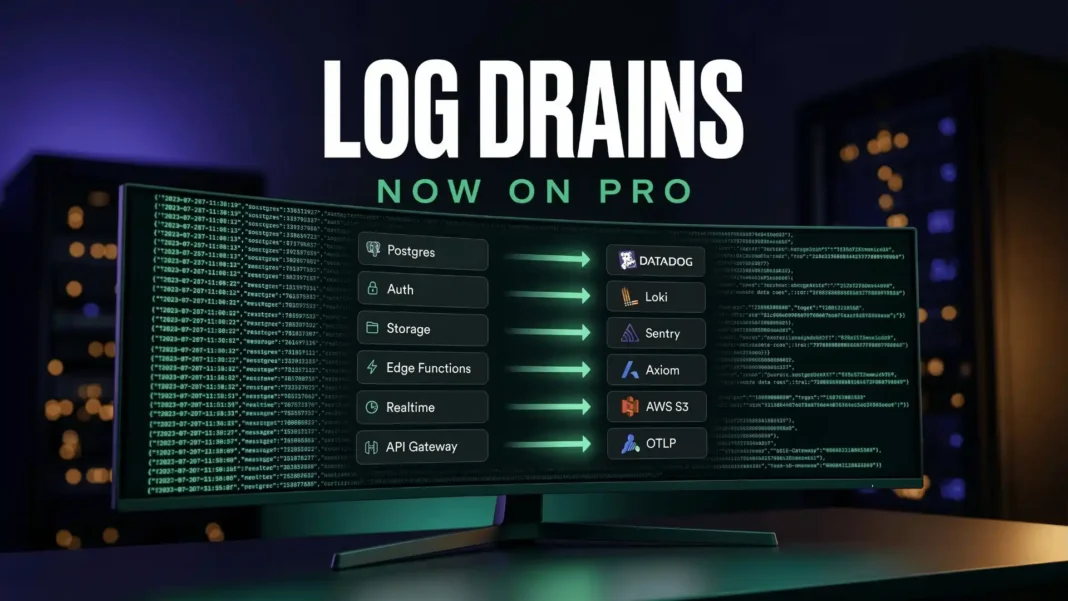
- Supported destinations include Datadog, Loki, Sentry, Axiom, AWS S3, OTLP, and any generic HTTP endpoint
- Logs from Postgres, Auth, Storage, Edge Functions, Realtime, and the API Gateway are all supported
- Each drain costs $60 per month, plus $0.20 per million log events and $0.09 per GB egress
Supabase just removed one of the biggest reasons developers outgrow the Pro plan before they outgrow the product. Log Drains, a feature that continuously pushes your entire infrastructure log stack into the observability tool your team already uses, moved from Team and Enterprise to Pro on March 4, 2026. This guide breaks down exactly what changed, what it costs, how to configure each destination, and what the pricing means in practice.
What Supabase Log Drains Actually Do
A Log Drain is a continuous export pipeline. Instead of manually querying Supabase’s built-in Logs Explorer, you configure a drain to push logs automatically to an external destination the moment they are generated. Logs are batched in groups of up to 250 events or flushed every second, whichever comes first, and compressed with gzip when the destination supports it.
This matters because production debugging rarely lives in a single tool. Your application errors are in Sentry, your infrastructure metrics are in Datadog, and your database queries were previously isolated inside Supabase Studio. Log Drains consolidate all of that into one place.
Which Services Send Logs Through a Drain
Every major Supabase service participates in the drain pipeline:
- Postgres: Query logs, connection events, database-level activity
- Auth: Login attempts, token events, failure reasons
- Storage: File operation logs and access patterns
- Edge Functions: Invocation traces and execution errors
- Realtime: Connection and subscription activity
- API Gateway: Request paths, status codes, and latency data
Previously, correlating a 500 error from your API Gateway with a Postgres event required switching between separate log tabs in Supabase Studio and matching timestamps manually. With a drain configured, both events land in the same dashboard your team already monitors.
All 7 Supported Destinations
Supabase currently supports six named destinations plus a universal generic HTTP endpoint:
| Destination | Transport | Best Use Case |
|---|---|---|
| Datadog | HTTP | APM correlation, alerting, gzip-compressed ingestion |
| Loki | HTTP | Self-hosted or Grafana Cloud log aggregation |
| Sentry | HTTP | Error tracking with full log context via DSN |
| Axiom | HTTP | Cost-efficient log storage and streaming |
| Amazon S3 | AWS SDK | Long-term archival and compliance retention |
| OTLP | HTTP (Protobuf) | Any OpenTelemetry-compatible backend |
| Generic HTTP Endpoint | HTTP | Custom routing via POST to any tool |
The OTLP destination is compatible with OpenTelemetry Collector, Grafana Cloud, New Relic, Honeycomb, Datadog OTLP ingestion, Elastic, and more. The generic HTTP endpoint option allows teams to route logs through an Edge Function, filter or restructure them, and forward to any tool not natively listed.
How to Set Up Each Drain
All drain configuration happens inside the Supabase dashboard under Project Settings > Log Drains No CLI commands or external scripts are required.
Datadog: Generate a Datadog API key and select your Datadog site region. Logs are gzip-compressed before sending and tagged with the service name on the service field .
Loki: Provide your Loki HTTP API URL and any required headers. Loki must be configured to accept structured metadata. Supabase recommends increasing the default maximum structured metadata fields to at least 500 to accommodate large log payloads.
Sentry: Grab your DSN from Sentry project settings (format: {PROTOCOL}://{PUBLIC_KEY}:{SECRET_KEY}@{HOST}{PATH}/{PROJECT_ID}). Logs are ingested as Sentry Logs, not as errors. Self-hosted Sentry requires version 25.9.0 or later.
Axiom setup steps:
- Create a dataset in Axiom Console under Datasets
- Generate an Axiom API token with ingest permission for that dataset
- Enter the dataset name and API token in the Supabase dashboard
- Verify events appear in the Axiom Console Stream panel
Amazon S3 required fields:
- S3 Bucket name (must already exist)
- AWS Region where the bucket is located
- Access Key ID and Secret Access Key with write permissions
- Batch Timeout in milliseconds (recommended: 2000 to 5000ms)
OTLP required fields:
- Endpoint URL ending in
/v1/logs - Protocol: currently
http/protobufonly - Gzip: recommended enabled to reduce bandwidth
- Optional authentication headers such as
AuthorizationorX-API-Key
Pricing Breakdown: What $60/Month Gets You
The cost structure is additive:
- Base cost: $60 per drain per month
- Event volume: $0.20 per million log events processed
- Egress: $0.09 per GB of log data transferred
This is the same pricing structure that launched with the feature for Team and Enterprise in August 2024. The Pro plan base cost is $25 per month. A team running two drains (for example, Datadog for alerting and S3 for archival) starts at $120/month in drain fees before factoring in event volume. For reference, the Pro plan includes 7-day log retention by default. Routing to S3 gives teams unlimited archival at S3 storage rates, which is relevant for audit trail and compliance needs.
How Log Drains Are Built: The Logflare Architecture
Log Drains are built into Logflare, the analytics and observability server underlying the Supabase platform. Supabase rewrote Logflare’s architecture using a multi-backend V2 pipeline to enable efficient, scalable log dispatching to multiple simultaneous destinations. The BEAM runtime powering Logflare enables soft-realtime dispatching, meaning any configured drain receives log events as fast as, or faster than, they appear in the Supabase Logs UI.
When Log Drains Were First Available
Supabase first launched Log Drains in August 2024, exclusively for Team and Enterprise customers. The initial release supported only two destinations: Datadog and a generic HTTP endpoint. Since that launch, Supabase expanded the destination list to seven options, and as of March 4, 2026, opened access to Pro plan customers as an add-on.
Limitations Worth Knowing
Log Drains are priced as add-ons, not included in the Pro plan base cost. Teams running multiple drains on high-event-volume projects will see costs scale accordingly. The Free plan has no access to Log Drains. Generic HTTP endpoint requests are currently sent unsigned, though Supabase has noted that signed requests are planned for a future update.

Frequently Asked Questions (FAQs)
What is Supabase Log Drains?
Supabase Log Drains automatically export logs from Postgres, Auth, Storage, Edge Functions, Realtime, and the API Gateway to external tools. Logs are batched up to 250 events or flushed every second and compressed with gzip when the destination supports it.
How much do Supabase Log Drains cost on the Pro plan?
Each drain costs $60 per month as a base fee. Additional charges apply at $0.20 per million log events processed and $0.09 per GB of egress. This pricing applies identically to Pro, Team, and Enterprise plans.
Which logging tools does Supabase support as drain destinations?
Supabase natively supports Datadog, Loki, Sentry, Axiom, Amazon S3, and OTLP. A generic HTTP endpoint option routes logs to any tool that accepts POST ingestion, including custom Edge Function pipelines.
Were Log Drains always available on the Pro plan?
No. Supabase launched Log Drains in August 2024 exclusively for Team and Enterprise customers with support for only Datadog and HTTP endpoints. The feature became available to Pro plan customers as an add-on in March 2026.
How do Log Drains help with compliance requirements?
Routing logs to Amazon S3 allows teams to retain logs beyond the default 7-day retention on the Pro plan, supporting audit trail and compliance needs. This was previously only accessible on Team and Enterprise tiers.
How quickly do logs appear in the destination tool?
Supabase batches logs in groups of up to 250 events or flushes every second, delivering near-real-time log data. The BEAM runtime powering Logflare enables dispatching as fast as or faster than logs appear in the Supabase Logs UI.
What is OTLP and why does it matter for log drains?
OTLP is the OpenTelemetry Protocol, an open standard for telemetry data. Supabase’s OTLP drain destination is compatible with Grafana Cloud, New Relic, Honeycomb, Elastic, Datadog OTLP ingestion, and any other OpenTelemetry-compatible backend.
Are HTTP endpoint requests signed for security?
Currently, HTTP endpoint requests sent by Supabase Log Drains are unsigned. Supabase has stated that signed requests are a planned future update. Teams requiring authenticated ingestion should use a native destination like Datadog or Sentry in the interim.

