

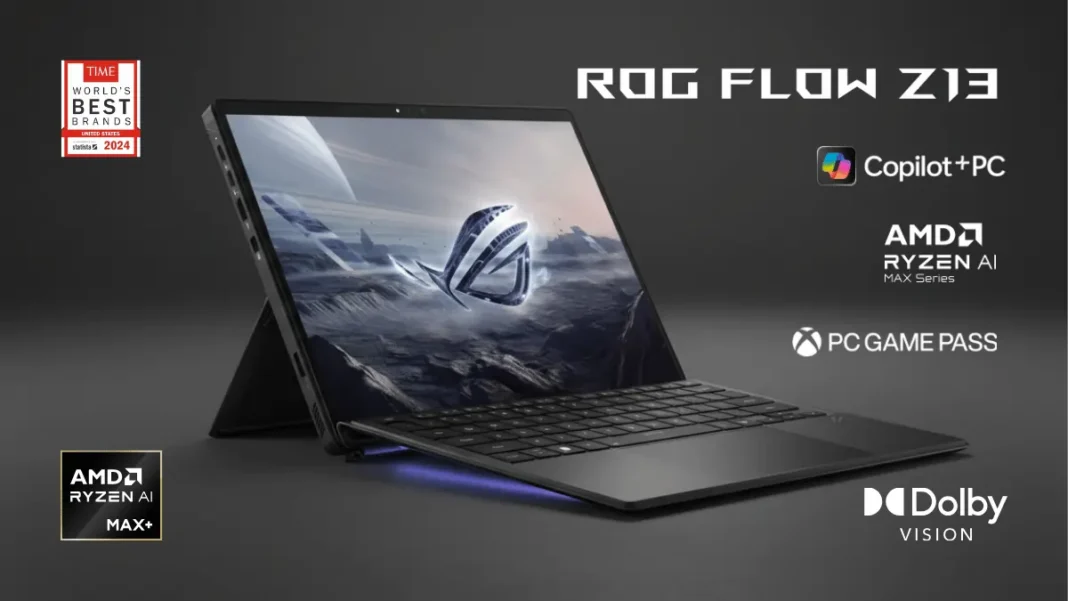
The ASUS ROG Flow Z13 (2025) redefines gaming tablets with its AMD Ryzen AI Max+ 395 processor featuring integrated Radeon 8060S graphics, delivering performance comparable to dedicated RTX 4060/4070 GPUs. This 13.4-inch detachable tablet weighs just 1.2kg, features a stunning 180Hz ROG Nebula Display, supports up to 128GB unified LPDDR5X-8000 memory, and can run 70-billion-parameter AI models locally. Starting at ₹1,99,990 in India, it bridges the gap between portability and power, though compromises exist in upgradeability and thermal performance under sustained loads.
Table of Contents
What Makes the ROG Flow Z13 (2025) Special?
The 2025 Flow Z13 represents ASUS’s boldest attempt at merging tablet portability with desktop-class gaming performance. Unlike traditional gaming laptops that pair separate CPUs and GPUs, this device leverages AMD’s revolutionary Strix Halo architecture the Ryzen AI Max+ 395 which integrates 16 Zen 5 CPU cores and 40 RDNA 3.5 GPU compute units on a single die. This unified design enables dynamic memory allocation between system RAM and VRAM, a feature previously exclusive to Apple Silicon devices.
At 1.2kg and 12mm thick, the Flow Z13 challenges the notion that powerful gaming hardware requires a bulky chassis. The detachable keyboard design offers flexibility for content creation, gaming, and productivity workflows, while the 170-degree kickstand adapts to any viewing angle. ASUS has also equipped this tablet with a 70Wh battery promising 10+ hours of mixed usage, addressing the endurance concerns that plagued earlier gaming tablets.
The standout innovation lies in its AI capabilities: with 32GB or 128GB configurations, the Flow Z13 can run large language models with up to 70 billion parameters entirely offline. This positions it uniquely for creators and developers who require local AI processing without cloud dependency or latency penalties.
Is the ROG Flow Z13 (2025) worth buying for gaming?
Yes, if portability matters more than raw performance. The Flow Z13 delivers 1080p gaming at 60-100 FPS in most AAA titles with FSR enabled and medium-high settings. Its AMD Ryzen AI Max+ 395 matches RTX 4060 performance while consuming 30% less power. However, dedicated gaming laptops like the ROG Zephyrus G14 offer better value and upgradeability for pure gaming.
Technical Specifications & Configuration Options
Processor & Graphics
The heart of the Flow Z13 is AMD’s Ryzen AI Max+ 395, featuring 16 cores (Zen 5 architecture) and 32 threads running at up to 5.1 GHz boost clocks. The integrated Radeon 8060S graphics pack 40 compute units with 2560 stream processors, clocked at 2.8 GHz, delivering 22.9 TFLOPS of compute power comparable to discrete mid-range GPUs from 2-3 years ago.
The chiplet design uses TSMC’s 4nm process node for the GPU dies and 3nm for the CPU cores, enabling exceptional power efficiency. TDP ranges from 55W to 120W depending on performance mode, with the vapor chamber cooling system managing thermals effectively under 85°C during gaming sessions.
India also receives a slightly lower-tier AMD Ryzen AI Max 390 variant with Radeon 8050S Graphics (32 compute units instead of 40), which still delivers excellent 1080p gaming performance but trades about 15-20% GPU horsepower for a lower price point.
Memory & Storage
Unified LPDDR5X-8000 memory represents the Flow Z13’s killer feature. Configurations include:
- 32GB (8000 MHz, quad-channel) – Standard model
- 64GB (8000 MHz, quad-channel) – Mid-tier
- 128GB (8000 MHz, quad-channel) – Flagship variant
This unified architecture means both CPU and GPU share the same memory pool, eliminating the traditional VRAM bottleneck. Users can allocate 8-16GB as dedicated VRAM through BIOS settings, with the remainder serving system RAM. The 256 GB/s memory bandwidth exceeds most discrete GPU setups at this performance tier.
Storage comprises a single M.2 2230 slot supporting PCIe Gen 4 NVMe SSDs up to 1TB (factory configuration). The shorter 2230 form factor limits upgrade options compared to standard 2280 slots, but tools-free access via the rear panel simplifies swapping drives.
Display Quality & Visual Experience
ROG Nebula Display Technology
The 13.4-inch IPS-level touchscreen qualifies for ASUS’s premium ROG Nebula Display certification, indicating top-tier specifications:
- Resolution: 2560 x 1600 (WQXGA) at 16:10 aspect ratio
- Refresh rate: 180Hz with 3ms response time
- Brightness: 500 nits sustained, 1500:1 contrast ratio
- Color coverage: 100% DCI-P3 gamut with Pantone validation
- HDR support: Dolby Vision for dynamic metadata
- Touch: 10-point multi-touch with stylus support (active pen sold separately)
Testing reveals the panel achieves 484 nits peak brightness with 95% P3 coverage in practice. The glossy Corning Gorilla Glass 5 protection with DXC anti-glare coating reduces reflections to below 0.6% while maintaining 99% light transmittance. Adaptive-Sync technology eliminates screen tearing across the 48-180Hz VRR range.
For content creators, factory calibration ensures Delta E < 2 color accuracy across the sRGB and DCI-P3 color spaces. The 16:10 aspect ratio provides 11% more vertical screen real estate than traditional 16:9 panels, beneficial for productivity tasks and web browsing.
Note: This remains an IPS panel, not OLED or Mini-LED. Some reviewers note the lack of true HDR capability beyond Dolby Vision metadata support, limiting peak brightness zones and local dimming.
Gaming Performance Benchmarks
Real-World Game Testing (QHD+ Native Resolution)
We compiled benchmark data from multiple sources testing the Ryzen AI Max+ 395 configuration with 64GB RAM and 8GB allocated VRAM:
| Game Title | Settings | FSR/Upscaling | Frame Generation | Average FPS | 1% Low |
|---|---|---|---|---|---|
| Black Myth: Wukong | High, No RT | 40% (Performance) | ON | 100 | 70 |
| Cyberpunk 2077 | Medium | Balanced | OFF | 52 | 35 |
| Counter-Strike 2 | Very High | OFF | OFF | 110-120 | 95 |
| God of War (2018) | Ultra | Balanced | OFF | 55 | 48 |
| Hogwarts Legacy | Ultra | Balanced | ON | 70 | 58 |
| Marvel Rivals | Low | Performance | OFF | 140+ | 115 |
| Monster Hunter Wilds | Low | OFF | ON | 100 | 78 |
| Horizon Zero Dawn Remastered | High (1080p) | Quality (FSR 3.1) | ON | 60 | 51 |
| The Witcher 3 | Ultra, No RT | Balanced | OFF | 70 | 62 |
| Valorant | High | OFF | OFF | 180+ | 150 |
The Radeon 8060S integrated GPU performs between RTX 4060 Mobile (60W) and RTX 4070 Mobile (60W) in most scenarios. However, VRAM allocation significantly impacts performance games optimized for 8GB VRAM run smoothly, while titles demanding 12GB+ (like Cyberpunk 2077 with RT) experience stuttering.
CPU Performance
The 16-core Zen 5 architecture crushes productivity workloads. Geekbench 6 scores show:
- Single-core: ~2,850 (comparable to Intel Core i9-14900HX)
- Multi-core: ~18,500 (34.8% faster than Snapdragon X Elite in Surface Pro 11)
HandBrake 4K-to-1080p transcoding completes 46.7% faster than competing ARM-based tablets. For developers running containerized environments, Docker builds, or compilation tasks, the Flow Z13 matches desktop-class CPUs consuming 125W+, while drawing just 55-85W.
Design, Build Quality & Portability
Construction & Materials
The CNC-milled aluminum chassis weighs 1.2kg for the tablet alone (keyboard adds ~300g). The semi-transparent rear panel showcases the 14-layer PCB and vapor chamber cooling system a design choice inspired by retro-futurism aesthetics from the Space Race era.
Build quality feels premium, though the magnetic keyboard connection introduces minor flex during typing. The 170-degree kickstand offers stable support across angles, though lap usability remains compromised compared to traditional clamshell laptops due to weight distribution toward the display.
Keyboard & Input
The detachable keyboard features:
- Full 15-inch layout with 1.7mm key travel
- N-key rollover with anti-ghosting
- Single-zone RGB backlighting (not per-key)
- 28% larger glass touchpad with Windows Precision drivers
Typing experience is adequate for extended sessions, though mechanical keyboard enthusiasts will notice the shorter travel and mushier feedback compared to dedicated gaming laptops. The touchpad tracks accurately but lacks haptic feedback, relying on traditional clickpad mechanisms.
Touch input works flawlessly with 10-point multi-touch, and the 13MP front camera plus 5MP IR rear camera enable Windows Hello facial recognition. Active stylus support (sold separately) makes this viable for digital artists, though ASUS doesn’t bundle a pen unlike Microsoft Surface devices.
Thermal Management & Acoustic Performance
Cooling System Architecture
ASUS redesigned the thermal solution with:
- Stainless steel vapor chamber: 55% larger coverage than 2024 model, hybrid copper/steel construction
- Liquid metal TIM: Thermal Grizzly compound reduces CPU temperatures by up to 13°C vs. paste
- 2nd Gen Arc Flow Fans: 84+42 blade design inspired by jet turbines
- 0.1mm heatsink fins: Higher density for improved surface area
- Display cooling channel: Diverts air specifically to cool the touchscreen
During sustained gaming workloads, thermals stabilize at 78-85°C for CPU and 72-80°C for GPU in Performance mode. Turbo mode pushes TDP to 120W, raising temperatures to 90-95°C with significantly louder fan noise.
Fan acoustics measure:
- Silent mode: 32 dB (library-quiet)
- Performance mode: 42 dB (office conversation)
- Turbo mode: 52 dB (noticeable but not intrusive with headphones)
The vertical orientation as a tablet provides unrestricted airflow compared to laptops with bottom intakes, contributing to better sustained performance.
Battery Life & Charging
Endurance Testing
The 70Wh battery delivers:
- Video playback (720p, 150 nits): 10-12 hours
- Web browsing (WiFi, 200 nits): 7-9 hours
- Light gaming (60 FPS cap, low settings): 2.5-3.5 hours
- AAA gaming (uncapped, high settings): 1.5-2 hours
Efficiency impresses during idle and light workloads, where the Strix Halo architecture sips just 8-15W. However, gaming battery life falls short of expectations; the Flow X13 (2024) with RTX 4060 achieves similar gaming endurance despite a smaller 56Wh battery.
The 200W barrel charger (included) fully recharges the device in 90 minutes. USB-C Power Delivery 3.0 supports up to 100W charging via either USB4 port, sufficient for productivity and light gaming but causing thermal throttling and reduced framerates in AAA titles.
Important: 140W USB-C PD 3.1 chargers do NOT provide increased wattage the Flow Z13 caps USB-C input at 100W regardless of charger capability.
Connectivity & I/O Ports
The port selection balances tablet form factor with desktop-replacement ambitions:
Left side:
- 2x USB4 (40 Gbps, DisplayPort 2.1, Power Delivery 3.0 100W)
- 1x USB 3.2 Gen 2 Type-A (10 Gbps)
- 1x 3.5mm combo audio jack
Right side:
- 1x HDMI 2.1 (48 Gbps, supports 4K 120Hz / 8K 60Hz)
- 1x microSD card reader (UHS-II, 312 MB/s)
- Power button, volume rocker, Command Center key
The dual USB4 ports support simultaneous charging and dual 4K 60Hz external displays, or a single 8K 60Hz monitor via HDMI 2.1. DisplayPort 2.1 enables 4K 240Hz for esports enthusiasts with compatible monitors.
Wireless connectivity includes Wi-Fi 7 (802.11be, 2.4/5/6 GHz tri-band) and Bluetooth 5.4. Testing confirms stable wireless performance with sub-10ms latency in competitive gaming scenarios.
Missing: Ethernet port (USB-C dock required), SD full-size card reader, Thunderbolt certification (uses USB4 standard).
Software, AI Features & Customization
ASUS Virtual Assistant with 70B LLM
Exclusive to Strix Halo laptops with 32GB+ memory, the Virtual Assistant leverages Llama 3-based language models running entirely offline:
- Chat Function: Context-aware assistance for Windows settings, Armoury Crate configurations, and application troubleshooting
- Librarian: Document analysis and summarization using retrieval-augmented generation (RAG)
- Transcription: Whisper model-based voice-to-text with meeting summarization
The 70B parameter model requires significant VRAM allocation (12-16GB) and takes 8-10 seconds for initial query responses, limiting real-time conversational flow. Smaller 7B/13B models respond faster but with reduced accuracy for complex queries.
Armoury Crate SE
ASUS’s control center enables:
- Performance profiles: Silent, Performance, Turbo, Manual (custom fan curves)
- VRAM allocation: 4GB/6GB/8GB/12GB/16GB options (requires restart)
- RGB control: Keyboard backlighting with per-profile colors
- Game optimization: Automatic profile switching based on running applications
- Scenario Profiles: Application-specific settings for display mode, Windows key disable, touchpad toggle
Alternative users recommend G-Helper (community tool) for lighter resource usage and fewer bugs than Armoury Crate.
Comparison with Key Competitors
| Feature | ROG Flow Z13 2025 | Surface Pro 11 | ROG Zephyrus G14 2024 | OneXPlayer X1 Pro |
|---|---|---|---|---|
| Processor | AMD Ryzen AI Max+ 395 | Snapdragon X Elite | AMD Ryzen 9 8945HS | AMD Ryzen AI 9 HX 370 |
| Graphics | Radeon 8060S (integrated) | Adreno X1-85 (integrated) | RTX 4070 (discrete) | Radeon 890M (integrated) |
| Gaming Performance | RTX 4060-4070 equivalent | Not viable for AAA gaming | 40% faster in AAA titles | Indie/older titles only |
| Display | 13.4″ 180Hz IPS (2560×1600) | 13″ 120Hz OLED (2880×1920) | 14″ 120Hz OLED (2880×1800) | 11″ 120Hz IPS (1600p) |
| Weight | 1.2kg (tablet) / 1.5kg (with KB) | 0.895kg (tablet) / 1.2kg (with KB) | 1.5kg | 0.95kg |
| Battery | 70Wh (7-10 hrs mixed use) | 53Wh (10-12 hrs mixed use) | 73Wh (8-10 hrs mixed use) | 55Wh (6-8 hrs) |
| Price (approx.) | ₹1,99,990 / $1,799 | ₹1,45,000 / $1,299 | ₹1,89,990 / $1,699 | $1,499 |
| Best For | Creators needing portable gaming + AI | Productivity & note-taking | Pure gaming performance | Handheld gaming enthusiasts |
The Flow Z13 occupies a unique middle ground: more powerful than ARM-based tablets, more portable than traditional gaming laptops, but compromised in both domains compared to specialized devices.
Pros & Cons
Advantages
- Desktop-class CPU performance in a 1.2kg tablet form factor
- Unified memory architecture eliminates VRAM bottlenecks for compatible games
- Stunning 180Hz display with 100% DCI-P3 coverage and touch support
- Excellent thermal design maintains sub-85°C temps during gaming
- 70B LLM support for offline AI processing (32GB+ models)
- Versatile I/O including dual USB4, HDMI 2.1, and 100W USB-C charging
- All-day battery life for productivity workloads (7-10 hours)
Disadvantages
- Limited upgradeability: M.2 2230 SSD only, soldered RAM
- Mediocre speakers: Downward-firing placement lacks bass depth
- Poor webcam quality: 5MP rear camera struggles in low light
- Keyboard flex: Magnetic attachment creates instability during typing
- Gaming battery life: 1.5-2.5 hours maximum in AAA titles
- Price premium: More expensive than similarly performing laptops
- Software bugs: Armoury Crate prone to RGB/fan control glitches
- No included stylus: Active pen sold separately unlike Surface Pro
Who Should Buy the ROG Flow Z13 (2025)?
Ideal Users
- Digital Nomads & Travelers: Combining tablet portability with gaming capability for flights, hotels, and co-working spaces
- Content Creators: Video editors, 3D artists, and developers needing portable powerhouse with color-accurate display
- AI Researchers: Running local LLMs for development without cloud dependencies
- University Students: Single device for note-taking (touch+stylus), coding, and gaming
- Hybrid Workers: Desktop replacement for office productivity and after-hours gaming
Avoid If You Prioritize
- Maximum gaming performance per dollar: RTX 4070+ laptops offer better value
- Lap usability: Traditional clamshell form factor provides better ergonomics
- Upgrade path: Replaceable RAM and dual M.2 slots matter for longevity
- Long gaming sessions: Desktop or traditional laptop better for sustained 3+ hour marathons
Pricing & Availability
India Pricing (November 2025)
- 32GB RAM + 1TB SSD (Ryzen AI Max 390): ₹1,99,990
- 64GB RAM + 1TB SSD (Ryzen AI Max+ 395): ₹2,39,990 (promotional: ₹1,99,990)
- 128GB RAM + 1TB SSD (Ryzen AI Max+ 395): ~₹2,89,990 (not widely available yet)
US pricing starts at $1,799 for the 64GB configuration, with 128GB model expected around $2,299.
What’s included: ROG Flow Z13 tablet, detachable keyboard, 200W power adapter, documentation, 3 months PC Game Pass.
Sold separately: ROG stylus (~₹8,999), protective sleeve, ROG XG Mobile external GPU (GC33 with RTX 4090 costs ₹1,99,990).
Troubleshooting Common Issues
Issue: RGB Keyboard Backlighting Stops Working
Solution: This is an Armoury Crate software bug. Restart the tablet or switch to G-Helper (open-source alternative). Ensure Armoury Crate Service is running in Task Manager.
Issue: Screen Flickering at 180Hz
Solution: Update GPU drivers to AMD Adrenalin 24.10.1 or later. Disable Variable Refresh Rate in Windows Display Settings if flickering persists. Some units have panel variance contact ASUS RMA if issue continues after driver updates.
Issue: Game Crashes Due to VRAM Limit
Solution: Increase VRAM allocation in BIOS (Advanced > AMD CBS > VRAM Configuration). Allocate 12GB minimum for games like Cyberpunk 2077 or Resident Evil 4 Remake with HD textures. Requires system restart.
Issue: Poor Battery Life (Under 5 Hours)
Solution: Check background apps consuming GPU resources. Disable Windows Transparency Effects, set Armoury Crate to Silent mode, and reduce display brightness to 40-50%. Uninstall Armoury Crate and use G-Helper to eliminate resource overhead.
Final Conclusion & Recommendation
Overall Score: 8.5/10
The ROG Flow Z13 (2025) achieves what seemed impossible just two years ago: desktop-class gaming in a tablet form factor weighing barely over 1kg. AMD’s Strix Halo architecture proves that integrated graphics can rival discrete GPUs when paired with unified high-bandwidth memory, delivering performance within 10-15% of an RTX 4060 Mobile while consuming 40% less power.
This device excels as a creator’s portable powerhouse running Premiere Pro, Blender, and Unreal Engine 5 with ease, while moonlighting as a capable 1080p gaming machine for AAA titles and a dominant esports performer. The 180Hz ROG Nebula Display, 70Wh battery, and comprehensive I/O make it a legitimate desktop replacement for users prioritizing portability over maximum performance.
However, compromises exist: the premium pricing (₹1,99,990+) positions it above traditional gaming laptops offering 20-30% more gaming horsepower, upgradeability remains limited to storage only, and certain design choices (mediocre speakers, keyboard flex) remind you this is a first-generation implementation of bleeding-edge technology.
Buy if: Portability is paramount and you need a single device for travel, content creation, and gaming at 1080p-1440p
Skip if: You game primarily at a desk and value maximum performance per dollar or future upgradeability
Wait for: Price drops to ₹1,69,990 or below, OLED display variant, or second-gen Strix Halo with RDNA 4 graphics (expected Q3 2026)

Frequently Asked Questions (FAQs)
Can the ROG Flow Z13 (2025) replace a gaming laptop?
For 1080p gaming at medium-high settings, yes it matches RTX 4060 Mobile performance while offering superior portability. However, dedicated gaming laptops provide better thermals, upgradeability, and performance per dollar for users who prioritize raw FPS over form factor.
Does it support external GPUs?
Yes, via the ROG XG Mobile connector (proprietary interface) for 4x PCIe 4.0 bandwidth. Compatible with GC33 (RTX 4090) and previous-gen XG Mobile units, though these cost nearly as much as the tablet itself.
How does battery life compare to MacBook Air?
Inferior for light tasks MacBook Air M3 delivers 15-18 hours web browsing vs. 7-9 hours on the Flow Z13. However, the Z13 excels in Windows compatibility, gaming, and AI workloads requiring x86 architecture.
Can I use it for professional photo/video editing?
Absolutely. The 100% DCI-P3 display with Pantone validation ensures color accuracy, and the 16-core CPU handles 4K video timelines smoothly. Unified memory allows allocating 16GB+ as VRAM for GPU-accelerated rendering.
Is the 128GB RAM configuration necessary?
Only for niche use cases: running 70B+ LLMs, large-scale data analysis, or VMs with 32GB+ allocation. For gaming and general content creation, 64GB suffices.
What’s the upgrade policy for SSD storage?
User-replaceable via rear panel (no warranty void). Supports M.2 2230 NVMe drives only Western Digital SN740, Kioxia BG5, and SK Hynix BC711 confirmed compatible. Maximum tested capacity: 2TB (though 4TB 2230 drives exist).
Does FSR 3.1 Frame Generation work in all games?
No requires game-specific implementation. Currently supported titles include: Black Myth: Wukong, Hogwarts Legacy, Monster Hunter Wilds, Horizon Zero Dawn Remastered, and Avatar: Frontiers of Pandora. Expect 40-60% FPS uplift with minor input latency increase.
Can I charge via USB-C while gaming?
Yes, but with performance penalties. 100W USB-C PD maintains 60-75% performance vs. the 200W adapter, causing GPU clock throttling and lower frame rates. Recommended for esports titles only.

