

Quick Brief
- my.WordPress.net runs a complete WordPress environment entirely inside your browser with zero signup
- Built on WordPress Playground, data stays in your browser and is never uploaded to any server
- Includes three one-click apps: Personal CRM, Personal RSS Reader, and an AI Workspace and Knowledge Base
- Storage starts at roughly 100 MB per device; each device maintains its own separate installation
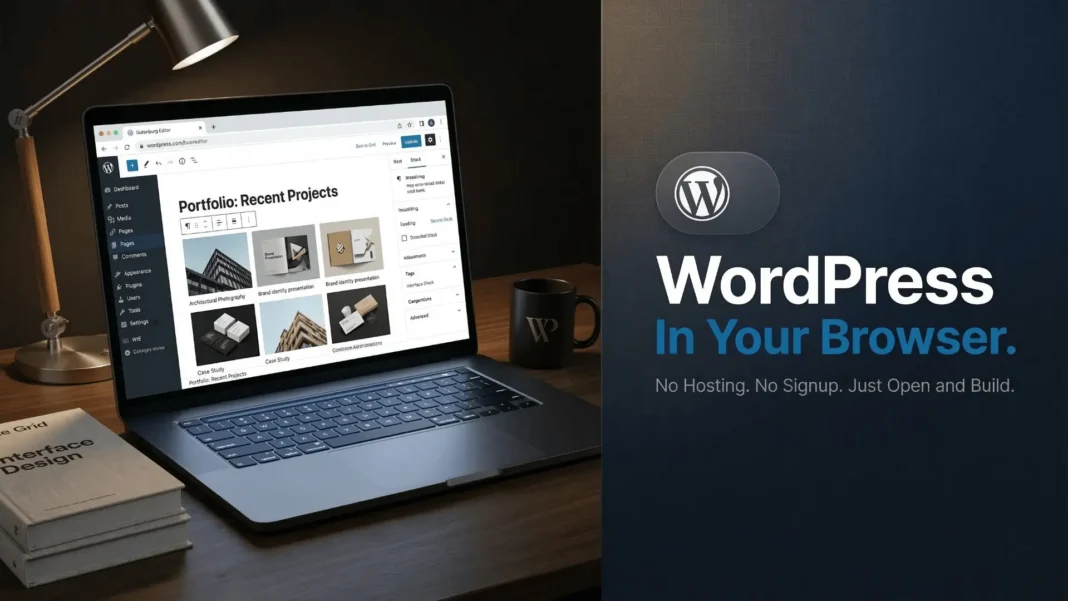
WordPress just eliminated the single biggest reason people avoid it. my.WordPress.net launches a full WordPress environment directly in your browser, with no hosting plan, no domain purchase, and no account creation standing between you and your first post. This is not a temporary demo. It is a persistent, private workspace built on WordPress Playground that stays with you across sessions.
What my.WordPress.net Actually Does
my.WordPress.net is powered by WordPress Playground, the technology that runs a complete WordPress environment inside your browser. When you open the URL, WordPress initializes locally on your device. Nothing is transmitted to an external server. Your content, drafts, contacts, and configurations stay on your machine.
The official announcement, published March 11, 2026 by Brandon Payton on WordPress.org, frames this as an update to the spirit of WordPress’s famous five-minute install, redesigned for a browser-first web. my.WordPress.net takes the same technology that powers instant WordPress demos and turns it into something permanent and personal.

No Signup. No Hosting. No Friction.
The traditional WordPress setup requires choosing a host, registering a domain, and configuring an install before writing a single word. my.WordPress.net replaces all of that with a single browser visit.
The first launch takes a little longer while WordPress downloads and initializes. After that, the environment persists on the same device across sessions. Because there is no hosting provider in the picture, your WordPress belongs entirely to you.
Three Built-In Apps That Show What This Platform Can Do
my.WordPress.net ships with an App Catalog featuring three pre-configured experiences designed specifically for personal use, built with WordPress plugins. Each app installs with a single click and configures itself automatically.
- Personal CRM: A private relationship manager that helps you stay in touch with people who matter to you. Contacts can be grouped, enriched with personal details, and paired with reminders to reconnect. The demo extends to analyzing communication patterns using imported chat data, stored locally inside WordPress.
- Personal RSS Reader: Uses the Friends plugin to turn WordPress into a quiet, personal feed reader. You follow sites and creators inside your own WordPress and read at your own pace, free from algorithms or engagement pressure.
- AI Workspace and Knowledge Base: Because my.WordPress.net is powered by WordPress Playground, an AI assistant can safely modify it. You can ask it to modify a plugin, create an entirely new one, or ask it about data stored in your WordPress. The assistant remembers what it touches and makes it easy to share changes with others. Over time, WordPress itself can become a personal knowledge base the AI understands and works with.
How It Compares to Traditional WordPress Setup
| Feature | my.WordPress.net | Standard WordPress Hosting |
|---|---|---|
| Setup time | Under 60 seconds | 30 minutes to several hours |
| Cost | Free | Paid hosting plan required |
| Hosting required | No | Yes |
| Public by default | No (private only) | Yes |
| Data location | Your browser/device | Remote server |
| Storage | Roughly 100 MB to start | Varies by plan |
| Backups | Manual download required | Often automated |
| Plugin installation | Supported | Supported |
Permanently and Privately Yours
Sites on my.WordPress.net are private by default and not accessible from the public internet. This separates it fundamentally from any hosted WordPress solution where your data lives on a third-party server.
The official announcement quotes contributor Alex Kirk: “This takes WordPress from being framed as something that is democratizing publishing to democratizing digital sovereignty.” That distinction matters. In a publishing environment, you briefly interact with WordPress as you prepare a post. In a personal setting, my.WordPress.net becomes a space you shape and return to, where ideas can exist before they are ready to be shared, or where they may never be shared at all.
What my.WordPress.net Means for Learners and Creators
my.WordPress.net lowers the barrier to getting started with WordPress to almost nothing. It offers a fast, commitment-free way to explore, learn, and build, whether the result is a long-term personal project or something that eventually moves to a hosted environment.
People can explore plugins, themes, and features inside a real WordPress environment where mistakes are expected and recoverable. For writers, researchers, and learners, this creates a low-stakes environment for drafting ideas, organizing notes, or testing plugins without the pressure of a live site.
What Developers Should Know in 2026
WordPress 7.0, currently in Beta and with RC1 scheduled for March 19, 2026, is introducing a Connector feature built around the php-ai-client package, a shared PHP library for standard AI service communication. Three provider packages are now available in the Plugin Directory, one each for OpenAI, Google, and Anthropic. This structure allows developers to write features once against the shared interface, making provider switching a simple configuration change.
WordPress 7.0 is also bringing Real-Time Collaboration to the block editor, using an HTTP polling sync provider and CRDT data stored via post meta. The decision to enable it by default will be finalized around RC2. For developers building on or alongside my.WordPress.net’s AI Workspace, the php-ai-client Connector architecture is the platform-level infrastructure that connects AI features to the broader WordPress ecosystem.
Limitations Worth Knowing
Storage begins at roughly 100 MB, which limits media-heavy projects. Because each device maintains its own separate installation, work does not sync automatically between your phone and laptop. Users must download backups regularly to avoid data loss. The platform is also private only, so anyone expecting to publish a live website to the public internet will still need traditional hosting.
Frequently Asked Questions (FAQs)
What is my.WordPress.net?
my.WordPress.net is a browser-based WordPress environment that runs entirely on your device using WordPress Playground technology. It requires no signup, no hosting, and no domain. All data stays local and private. It launched on March 11, 2026, announced by Brandon Payton on WordPress.org.
Is my.WordPress.net free to use?
Yes. my.WordPress.net is completely free. There is no subscription, no hosting plan, and no account requirement. You open the URL, WordPress loads in your browser, and you start immediately. Storage begins at roughly 100 MB per device.
Does my.WordPress.net replace WordPress.com or a hosting plan?
No. my.WordPress.net is a private, local environment not accessible from the public internet. It is designed for personal use, learning, drafting, and experimenting. If you want a live public website, you still need a hosting provider or a WordPress.com plan.
Can I install plugins on my.WordPress.net?
Yes. The environment supports plugin installation. The App Catalog provides three pre-configured plugin experiences that install with a single click. The AI Workspace can also modify and create plugins through the assistant interface.
Will my data be saved between sessions?
Yes. Unlike older WordPress Playground demos that reset on refresh, my.WordPress.net is persistent. Your content remains on your device across sessions. However, each device has its own separate installation with no automatic cross-device sync, so regular manual backups are recommended.
Is my.WordPress.net safe for private notes and drafts?
Yes. All data remains in your browser and is never uploaded anywhere. Sites are private by default and cannot be accessed from the public internet. The official announcement confirms this explicitly, making it suitable for personal journaling, research, and private drafts.
What is the App Catalog in my.WordPress.net?
The App Catalog is a collection of pre-configured WordPress experiences built with plugins and designed for personal use. At launch it includes three apps: a Personal CRM, a Personal RSS Reader using the Friends plugin, and an AI Workspace and Knowledge Base. Each installs with one click.
How does the AI Workspace work in my.WordPress.net?
Because my.WordPress.net runs on WordPress Playground, an AI assistant can safely modify your environment. You can ask it to modify or create plugins, build new blocks, or query data stored in your WordPress. The assistant retains memory of its changes and can share those changes with others.

