

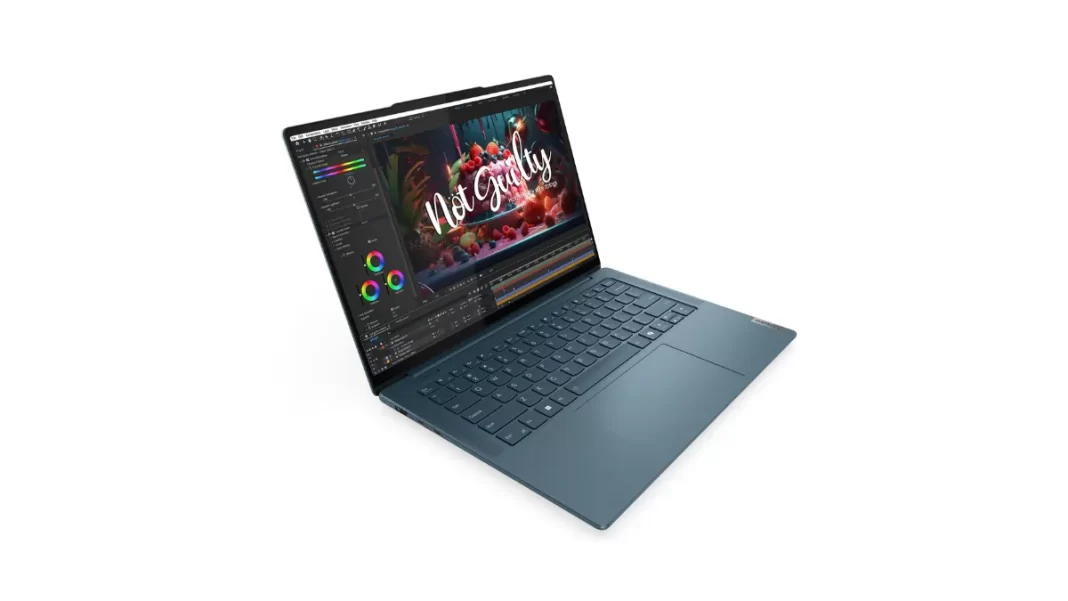
Short Answer: If you need a compact 14.5″ Windows laptop that edits 4K video, handles Lightroom with heavy RAWs, and still travels well, the Yoga Pro 7 14IMH9 with RTX 4050 is a strong all-rounder. You get a sharp 3K 120 Hz panel, a 60W RTX 4050 for GPU-accelerated apps, and a 73Wh battery that can stretch a workday with the right settings. It’s not silent under load and gaming is mid-range, but the balance is excellent.
At a glance
- Pros: Premium 14.5″ chassis, 3K 120 Hz display options, RTX 4050 at 60W for creator apps, modern CPUs, solid IO (TB4 on Intel), 100W USB-C charging.
- Watch-outs: Fans get loud during sustained GPU loads; battery life dips at 120 Hz and with heavier work; OLED configs cost more and require basic burn-in hygiene.
Key specs that matter (and why)
CPU (Intel IMH9): Most IMH9 units ship with Core Ultra 7 155H. It offers plenty of multi-core headroom for encode/compile tasks and a competent integrated GPU for light work when the RTX is asleep.
GPU: The star is the GeForce RTX 4050 (Laptop) at up to 60W TGP on this chassis. That TGP number is important: it tells you sustained graphics power, which maps closely to export times in Premiere/Resolve and viewport smoothness in Blender. 60W is the upper half of 4050 implementations in thin-and-lights, and testing shows it sustains well here.
Display: 14.5″ 3K (3072×1920) 120 Hz panels are common; some regions list OLED, others IPS. Creators benefit from the higher pixel density and refresh for smooth timelines and pen scrolls. If you color-grade, aim for the wide-gamut options.
Memory & storage: LPDDR5x (soldered) up to 32GB pick your capacity at purchase. Most configs include a 1TB SSD; some regions mention a second M.2 slot, but verify your SKU.
Battery & charger: 73Wh battery with a 100W USB-C slim adapter. That’s enough to power the CPU+GPU without throttling on wall power while staying travel-friendly.
Real-world performance
Video & photo: With the RTX 4050, you’ll see meaningful gains in Premiere Pro, DaVinci Resolve, and Photoshop/Lightroom thanks to CUDA/OptiX acceleration. A 60W 4050 won’t match a 4070 studio machine, but it’s fast enough to cut 4K H.264/H.265 timelines with moderate effects and punch out exports at reasonable speeds. Expect smooth scrubbing with optimized proxies and smart caching.
3D and AI tools: Blender viewport work is comfortable on mid-complexity scenes. Cycles renders are several times faster than iGPU. Generative image tools that use CUDA benefit too. If you rely on Stable Diffusion locally, you’ll get decent single-image throughput, though VRAM (6GB) limits ultra-large models.
Gaming (casual): 1080p high on most modern titles is realistic; 3K native is too ambitious without DLSS and lowered settings. Remember, this is a creator-leaning laptop, not a gaming brick.
Thermals & noise: Reviews show the 4050 holds 60W, which is great for performance, but fans spin up under sustained load. On battery, power limits pull back, which is normal. If you edit on the go, set the panel to 60 Hz and use a balanced/quiet profile to keep noise in check.
Battery life: realistic expectations
Numbers vary with panel type and refresh. In standardized tests, ~7–10 hours of light to mixed use is typical; heavy creator work can cut that to 3–5 hours. Running at 120 Hz trims runtime compared with 60 Hz. Use the Windows “Best Power Efficiency” preset and Lenovo Vantage’s adaptive modes for longer stretches.
Display choice guide: OLED vs IPS on Yoga Pro 7
OLED: Deep blacks, vibrant color, and instant pixel response fantastic for grading and content. Two small caveats: peak SDR brightness and potential image retention over many years if you leave static UI elements at max brightness all day. Keep auto-hide taskbars, vary content, and avoid 100% brightness for best panel health.
IPS: A touch brighter in some regions, no burn-in anxiety, often cheaper. Motion isn’t as crisp as OLED, but 120 Hz helps.
If you’re a video or photo creator who works in dim to moderate light, OLED 3K/120 is the sweet spot. If you’re a student or office user prioritizing price and bright classrooms, a quality IPS 3K/120 is perfectly fine.
Ports and connectivity
On the Intel IMH9, you get Thunderbolt 4, USB-C with Power Delivery/DisplayPort, HDMI 2.1, plus the usual USB-A and audio combo. That covers a 4K/120 external monitor or a color-accurate 27″ 4K panel at 60 Hz with no drama. AMD Yogas swap TB4 for USB4, which for most creators feels the same in daily use.
Intel IMH9 vs AMD (Gen 9) Yoga Pro 7: which to buy?
- Performance/watt & battery: AMD variants often post longer runtimes at similar performance, especially on light tasks. If battery life is top priority, AMD tends to edge it.
- IO: Intel gives you Thunderbolt 4 handy for certain docks and pro capture devices. AMD’s USB4 is broadly compatible with the same gear, but check your peripherals.
- AI features: Both run AI workloads; AMD’s newer NPUs can help in supported apps. For creator tools today, GPU acceleration (i.e., RTX) still does most of the heavy lifting.
If you want the 14IMH9 Intel + RTX 4050 specifically, choose it for Thunderbolt-centric setups and the widespread availability of configs. If you’re optimizing for battery, consider the AMD Yoga Pro 7 alternative.
Config recommendations
Students & office: Core Ultra 7 155H, 16GB RAM, 512GB–1TB SSD, IPS 3K/120, 60 Hz most of the day. Great balance of speed and battery.
Photo/video creators: Core Ultra 7 155H, 32GB RAM, 1TB SSD, OLED 3K/120, carry a fast USB-C SSD for footage.
Engineers/designers (light 3D): Same as creators; if you push CAD/Blender often, consider an RTX 4060 SKU if available in your region.
Travelers: Prioritize lighter panel/IPS and keep refresh at 60 Hz on battery; pack the 100W USB-C brick.
Alternatives worth a look
- Asus ROG Zephyrus G14: more GPU headroom (up to 4070) in a similar footprint; a bit more gamer-leaning.
- Razer Blade 14: premium build, stronger GPU options, higher price.
- MacBook Pro 14 (M4 Pro): best battery and thermals for macOS workflows; different app ecosystem.
Known limitations & workarounds
- Fan noise under load: use a cooling pad or “Balanced” mode unless you’re exporting.
- Battery at 120 Hz: toggle to 60 Hz when unplugged.
- VRAM (6GB) on 4050: use proxies/tuned textures for large projects.

Comparison Table
| Laptop | GPU/TGP (approx) | Display | Weight class | Why pick it |
|---|---|---|---|---|
| Yoga Pro 7 14IMH9 | RTX 4050 @ up to 60W | 14.5″ 3K 120 Hz (OLED/IPS) | 14-inch creator | Balanced power, TB4, travel-friendly. |
| Zephyrus G14 | RTX 4060/4070 higher TGP | 14″ high-refresh | 14-inch gaming/creator | More GPU grunt if you game often. |
| Razer Blade 14 | RTX 4070 options | 14″ QHD+ | Premium 14″ | Luxury build, stronger GPU, higher price. |
| MacBook Pro 14 | M4 Pro | Liquid Retina XDR | Light 14″ | Best battery/noise; macOS workflows. |
Frequently Asked Questions (FAQs)
- Does the IMH9 model support Thunderbolt docks? Yes Intel IMH9 units have TB4; AMD uses USB4.
- What’s the RTX 4050 TGP here? Up to 60W sustained in reviews/specs.
- Can I upgrade RAM later? No LPDDR5x is soldered. Pick 32GB if you do heavy creative work.
- Is there HDMI 2.1? Yes on many SKUs; check your region’s listing.
- How heavy is it? Around the typical 14-inch creator weight class; verify your SKU’s exact figure on PSREF before buying.
- Does 120 Hz drain battery faster? Usually yes. Switch to 60 Hz on battery for longer runtimes.
- Any second SSD slot? Varies by SKU/region some user reports mention a second slot; confirm with PSREF for your exact model number.
Featured Snippet Boxes
Q: Is the Yoga Pro 7 14IMH9’s RTX 4050 good for video editing?
A: Yes. The 60W RTX 4050 speeds up timelines and exports in Premiere and Resolve, making 4K projects workable in a thin 14.5″ chassis. It won’t match a 4070, but the balance of power, thermals, and weight is excellent for travel-friendly editing.
Q: How long does the battery last?
A: Expect around 7–10 hours of light to mixed work at 60 Hz and several hours less with 120 Hz or creator workloads. Review testing shows ~8 hours web at 60 Hz and longer in video playback. Settings and panel type matter.
Q: OLED or IPS on the Yoga Pro 7?
A: OLED brings better contrast and motion; IPS is cheaper and worry-free for static UI. If you grade video or edit photos, OLED 3K/120 is lovely. For classrooms/bright offices, IPS 3K/120 is still excellent and more battery-friendly in some cases.

