

Essential Points
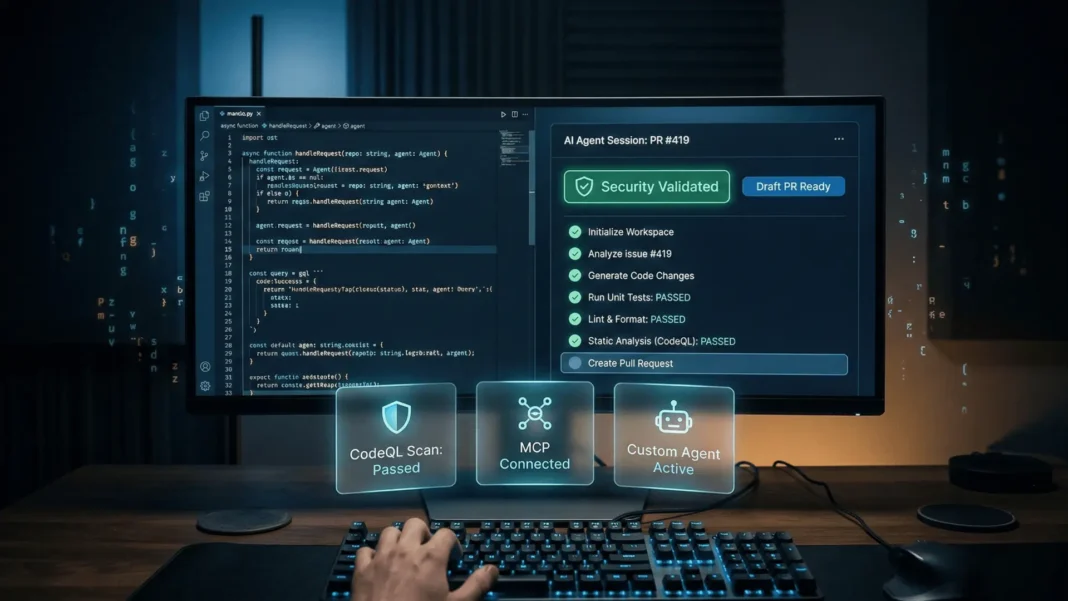
- GitHub Copilot coding agent works asynchronously in a GitHub Actions-powered sandbox, pushing commits to a draft pull request while you stay focused elsewhere
- Built-in security validation uses CodeQL, the GitHub Advisory Database, and secret scanning to catch vulnerabilities before the PR completes
- MCP server support lets teams connect the coding agent to external data sources and tools directly from repository settings
- Available on Copilot Pro, Pro+, Business, and Enterprise plans; Business and Enterprise require an administrator to enable the policy first
GitHub just shifted its coding agent from a capable assistant into something closer to an asynchronous team member. The coding agent does not just write code inside your editor. It takes a GitHub issue, works independently in a secured cloud environment, and delivers a pull request ready for your review. Every step is logged, auditable, and subject to your existing branch protections.
What the GitHub Copilot Coding Agent Actually Does in 2026
The coding agent operates entirely on GitHub, inside an ephemeral development environment powered by GitHub Actions. You assign a task by selecting Copilot as the issue assignee, by asking from Copilot Chat in VS Code, or by mentioning @copilot in an existing pull request comment. The agent then explores your codebase, makes changes, runs automated tests and linters, and opens a draft pull request with its results.
This is distinct from agent mode in your IDE. Agent mode makes autonomous edits directly in your local environment during an active session. The coding agent works in the background on GitHub, with no active session required on your end.
The agent handles bug fixes, incremental feature implementation, test coverage improvements, documentation updates, and technical debt reduction. Pull requests proposed by the coding agent are treated as draft PRs and require approval from a user with write permissions before any Actions workflows run.
6 Capabilities That Define the GitHub Copilot Coding Agent
Model Selection: Match the AI to the Task
Depending on how you start a coding agent task, you can select the AI model the agent uses. Different models perform better on different task types, and GitHub surfaces this choice at task initiation. The CLI also introduced GPT-5 mini and GPT-4.1 as subscription-included models in January 2026.
This matters practically. A broad refactoring task across dozens of files has different requirements than a targeted bug fix in a single function. Letting developers route tasks to the most suitable model eliminates the single-model compromise that constrained earlier agentic workflows.
Built-In Security Validation
Before completing any pull request, the coding agent runs security validation automatically. This is not an optional step or a separate tool. It runs as part of every agent session.
Three mechanisms power this validation:
- CodeQL identifies code security issues introduced by the agent’s changes
- GitHub Advisory Database checks new dependencies for malware advisories and any CVSS-rated High or Critical vulnerabilities
- Secret scanning detects sensitive information such as API keys, tokens, and other secrets that may have been inadvertently included
This validation does not require a GitHub Secret Protection, GitHub Code Security, or GitHub Advanced Security license. Findings and actions taken appear in the session log, giving you a complete audit trail.
Custom Agents: Specialize Copilot for Your Team
Custom agents let teams create different specialized versions of the coding agent for different workflows. A frontend agent can focus on React components and styling. A documentation agent can handle technical writing standards. A testing agent can specialize in generating comprehensive unit tests.
Each custom agent carries specific prompts, tools, and instructions tailored to its task. The GitHub Copilot CLI, updated in January 2026, introduced four built-in reference agents: Explore for fast codebase analysis, Task for running commands like tests and builds, Plan for implementation planning, and Code-review for high signal-to-noise pull request reviews.
MCP Support: Extend Agent Context Beyond the Repository
Model Context Protocol (MCP) servers let teams give the coding agent access to data sources and tools outside of GitHub. MCP servers are configured directly in the repository’s settings, keeping the setup within the existing governance layer.
With MCP support, the agent can interact with external systems, proprietary databases, or third-party APIs during its task execution. GitHub also includes the GitHub MCP server by default in Copilot CLI, and additional MCP servers can be layered on top. This transforms the coding agent from a repository-scoped tool into one that can incorporate external context without custom integration work.
Hooks and Skills: Extend the Agent Execution Loop
Hooks allow teams to execute custom shell commands at key points during agent execution. Use cases include adding validation steps, logging specific decisions, triggering custom security scanning, or automating workflow steps that fall outside the agent’s default behavior.
Skills extend what the agent can do by adding instructions, scripts, and resources that enhance its ability to perform specialized tasks. Together, hooks and skills give enterprise teams fine-grained control over agent behavior without forking or rebuilding the agent from scratch.
Copilot Memory: Let the Agent Learn Your Repository
Copilot Memory, currently in public preview, is available on Copilot Pro and Copilot Pro+ plans. When enabled, Copilot stores useful details it has worked out about a repository. The coding agent draws on this stored context when working in that repository on future tasks.
This is distinct from custom instructions, which are static files you write and maintain. Memory is dynamic. The agent updates it based on what it learns through task execution. Over time, this reduces the amount of context you need to provide explicitly in issue descriptions.
How the Coding Agent Fits Into Your Existing Workflow
The agent integrates at three entry points. You can assign a GitHub issue to Copilot from the issues interface, delegate a task from Copilot Chat in VS Code, or mention @copilot directly in a pull request comment. Context from VS Code chat passes automatically to the GitHub coding agent, so it starts with the same picture you have.
Every step the agent takes is visible. Commits appear on the draft PR, session logs record every decision, and security validation results are included in the log before you ever open the PR. The developer who originally assigned the task cannot approve the resulting pull request, preserving your existing code review controls.
Agent mode in JetBrains, Eclipse, and Xcode became available in public preview at Microsoft Build 2025, extending the broader Copilot agent ecosystem beyond VS Code.
GitHub Copilot Coding Agent vs. Standard Agent Mode
| Dimension | Standard Agent Mode (IDE) | Coding Agent (GitHub) |
|---|---|---|
| Execution environment | Local, inside your editor | Remote, GitHub Actions-powered sandbox |
| Task assignment | Chat prompt in VS Code | GitHub issue, VS Code chat, or @copilot in PR comment |
| Output format | Inline edits in open files | Draft pull request with commits |
| Session type | Synchronous, developer stays active | Asynchronous, works in background |
| Security validation | Not included natively | Built-in: CodeQL, Advisory DB, secret scanning |
| MCP support | Full support | Full support via repository settings |
| PR approval required | Not applicable | Yes, human approval required before CI/CD runs |
| Best for | Active editing sessions | Background task delegation on scoped issues |
Plan Availability and Usage Costs
The coding agent is available on Copilot Pro, Copilot Pro+, Copilot Business, and Copilot Enterprise plans. Business and Enterprise subscribers require an administrator to enable the relevant policy before users can access the agent.
Usage consumes two resources: GitHub Actions minutes and Copilot premium requests. Both have included monthly allowances depending on your plan, and tasks completed within those allowances do not incur additional charges. Repository owners can also opt specific repositories out of coding agent access entirely.
Limitations Worth Knowing Before You Delegate
The coding agent can only make changes in the single repository specified when you start a task. It cannot work across multiple repositories in one run. It can only open one pull request per task, and it cannot mark its own PRs as “Ready for review” or approve and merge them.
Certain repository rules block agent access entirely. If you have “Require signed commits” configured as a ruleset, the agent cannot operate unless Copilot is added as a bypass actor. Content exclusions set by administrators do not apply to the coding agent: it will see and potentially update files that are excluded from standard Copilot responses. Tasks that are vague or overly broad produce inconsistent results. Clear acceptance criteria in the issue description consistently improve agent output.

Frequently Asked Questions (FAQs)
What is the GitHub Copilot coding agent?
The GitHub Copilot coding agent is an asynchronous AI that works on development tasks independently. You assign it a GitHub issue or delegate from VS Code chat. It pushes commits to a draft pull request in a GitHub Actions-powered environment, then requests your review before anything merges.
What security protections does the coding agent have?
The coding agent runs built-in security validation before completing any pull request. It uses CodeQL for code security issues, the GitHub Advisory Database for dependency vulnerabilities rated High or Critical, and secret scanning to detect API keys and tokens. This runs automatically and does not require Advanced Security licenses.
What is the difference between Copilot agent mode and the coding agent?
Agent mode in your IDE runs synchronously in your local environment, making edits while you stay active in the session. The coding agent runs asynchronously on GitHub, taking an issue and working until it produces a pull request, with no active session required from you during that time.
Which Copilot plans include the coding agent?
The coding agent is available on Copilot Pro, Copilot Pro+, Copilot Business, and Copilot Enterprise plans. Business and Enterprise users require an administrator to enable the policy first. Usage draws on GitHub Actions minutes and Copilot premium requests, both of which have included monthly allowances.
What is MCP and why does it matter for the coding agent?
Model Context Protocol (MCP) is an open standard that lets the coding agent connect to external data sources and tools beyond your GitHub repository. You configure MCP servers in your repository settings, allowing the agent to access internal APIs, documentation systems, or third-party services during task execution.
Can teams create specialized versions of the coding agent?
Yes. Custom agents let teams build specialized versions tailored to specific workflows, such as a frontend agent focused on React components, a documentation agent, or a testing agent. Each carries specific prompts, tools, and instructions. The Copilot CLI also provides four reference agents: Explore, Task, Plan, and Code-review.
What are hooks and skills in the coding agent?
Hooks let teams execute custom shell commands at defined points during agent execution, enabling custom validation, logging, or security scanning. Skills add instructions, scripts, and resources that extend the agent’s ability to perform specialized tasks. Both are configurable per repository.
Can the coding agent work across multiple repositories at once?
No. The coding agent can only make changes in the single repository specified when you start a task. It cannot open multiple pull requests for one task, and it cannot push changes to your main or master branch directly. All pushes go to branches beginning with copilot/.

