

The AdwaitX Verdict
| Category | Assessment |
|---|---|
| The Bottom Line | BUY – Solid mid-range laptop offering excellent value for students and professionals seeking reliable everyday performance |
| Best Feature | 16GB RAM + 120Hz display at this price point – rare combination under ₹55K |
| Worst Feature | Average 250 nits brightness limits outdoor usability; integrated graphics unsuitable for intensive gaming |
| Rating | 7.4/10 |
| Where to Buy | Amazon India – ₹53,990 (24% off MRP ₹71,763) |
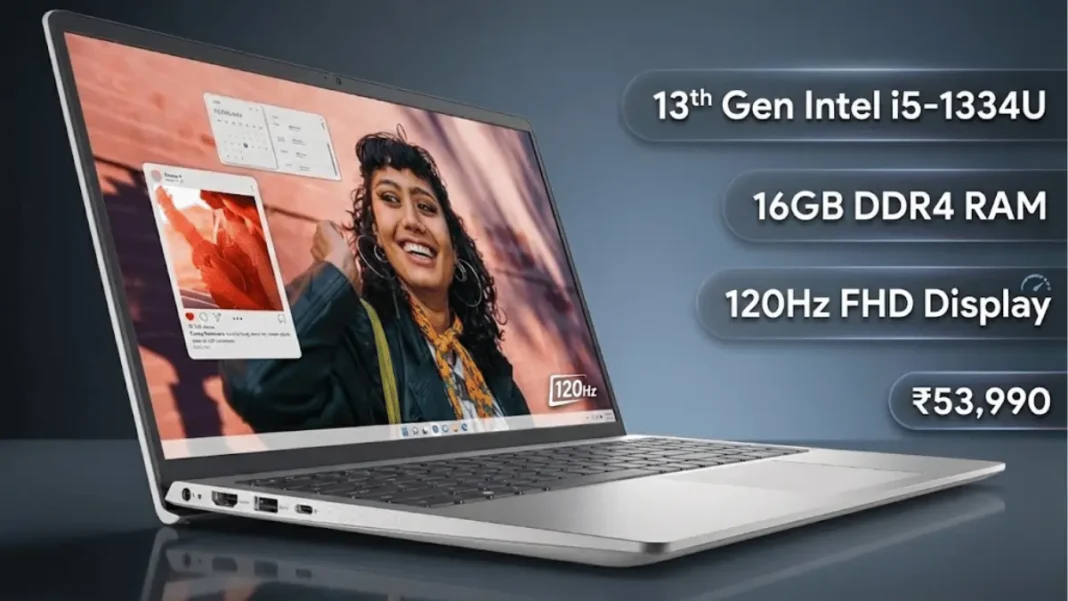
The Dell Inspiron 3530 positions itself as a capable workhorse for students, remote workers, and home users who prioritize multitasking efficiency over raw performance. At ₹53,990, this 13th Gen Intel configuration delivers 16GB RAM and a 120Hz display – features typically reserved for premium segments. The i5-1334U processor (10-core, up to 4.60 GHz) handles office suites, web browsing with 20+ tabs, and light photo editing without thermal throttling.
Design & Build
The 1.62 kg chassis feels sturdy despite plastic construction, with a carbon-textured lid resisting fingerprints. Port selection is practical: 2x USB 3.2, 1x USB-C (data only, no charging), HDMI 1.4, and a full-size SD card slot – a rarity in 2026 laptops. The backlit keyboard provides adequate key travel, though the trackpad occasionally misregisters two-finger scrolls.
 Dell Vostro 3530 with Intel Core i3-1305U, 16GB RAM Review: Budget Business Laptop Analysis
Performance
Daily performance is smooth thanks to 16GB dual-channel DDR4 RAM and the 512GB PCIe SSD (boot time: 8 seconds). The 10-core hybrid architecture (2 P-cores + 8 E-cores) shines in multitasking scenarios like simultaneous video calls, document editing, and media playback. However, Intel UHD integrated graphics limit this to casual gaming (Valorant at medium settings: 45-50 FPS).
Display & Audio
The 15.6″ FHD 120Hz panel offers fluid scrolling and smooth cursor movement, but 250 nits brightness struggles in direct sunlight. Color accuracy is adequate for content consumption but lacks the gamut for creative work. Dual speakers deliver clear vocals but minimal bass – fine for video calls, disappointing for movies.
Battery & Charging
Expect 5-6 hours of real-world usage (web browsing, document work) versus the claimed 7 hours. The 41Wh battery charges to 80% in 90 minutes. Note: USB-C port doesn’t support charging, limiting travel flexibility.
- 16GB RAM at ₹53,990 – Exceptional value; competitors offer 8GB at this price
- 120Hz display – Noticeably smoother than 60Hz for productivity tasks
- Bundled software – MS Office 2021 lifetime license saves ₹6,000+ separately
- Practical port selection – SD card slot and HDMI 1.4 cater to diverse workflows
- Dual-channel RAM – Performance advantage over single-channel configurations
- Dim display (250 nits) – Struggles in bright rooms; outdoor use requires shade
- USB-C lacks charging – Proprietary Dell charger mandatory; less travel-friendly
- Plastic build – Feels budget; no aluminum chassis at this price
- Below-average battery (41Wh) – Competitors offer 50Wh+ cells; expect 5-6 hours max
Full Specification Table of Dell Inspiron 3530
| Feature | Specification | User Benefit |
|---|---|---|
| Processor | Intel Core i5-1334U (13th Gen), 10-core (2P+8E), up to 4.60 GHz, 12MB cache | Efficient multitasking; handles 15+ browser tabs + Office apps simultaneously without lag |
| RAM | 16GB DDR4 2666 MT/s (2x8GB dual-channel) | Future-proof for 3-5 years; seamless switching between heavy applications |
| Storage | 512GB M.2 PCIe SSD | Fast boot (8 sec), instant app launches; M.2 slot allows upgrade to 1TB+ |
| Display | 15.6″ FHD (1920×1080), 120Hz, 250 nits, WVA anti-glare, narrow border | Smooth scrolling/cursor movement; reduced eye strain vs 60Hz; poor outdoor visibility |
| Graphics | Intel UHD Graphics (Integrated) | Adequate for 1080p video editing, CAD basics; NOT for AAA gaming or 3D rendering |
| Battery | 41Wh (3-cell lithium-ion), ~5-6 hours real-world use | All-day light use possible; bring charger for 8+ hour workdays |
| OS & Software | Windows 11 Home + MS Office 2021 (lifetime) + McAfee 15-month | No additional software costs; ready-to-use out of box |
| Keyboard | Full-size backlit keyboard | Comfortable typing in low light; ideal for late-night work sessions |
| Ports | 1x USB 3.2 Gen 1 Type-C (data only), 2x USB 3.2 Type-A, 1x USB 2.0, HDMI 1.4, 3.5mm audio, SD card slot | Connects legacy devices; SD slot perfect for photographers; USB-C charging NOT supported |
| Weight & Dimensions | 1.62 kg, 35.4 x 24.5 x 1.8 cm | Portable for daily commutes; fits standard 15″ laptop bags |
| Connectivity | Wi-Fi 802.11ac, Bluetooth | Standard wireless; Wi-Fi 6E would be preferable for futureproofing |
| Warranty | 1-year onsite warranty by Dell | Peace of mind; Dell’s service network widely accessible in India |
Competitor Comparison
vs. HP 15s (Ryzen 5 5500U, 8GB RAM) – ₹45,990
Dell wins on RAM capacity (16GB vs 8GB) and display refresh rate (120Hz vs 60Hz). HP offers better battery life (7 hours) and slightly superior build quality. Verdict: Pay ₹8,000 more for Dell if multitasking is a priority.
vs. Lenovo IdeaPad Slim 3 (i5-12th Gen, 16GB RAM) – ₹52,490
Nearly identical specs, but Dell’s 13th Gen i5-1334U outperforms 12th Gen i5-1235U by 15% in multi-core workloads. Lenovo offers 300 nits brightness (better outdoor visibility). Verdict: Dell for performance; Lenovo for display quality.
Final Buying Advice
Buy If:
- You’re a student/professional needing 16GB RAM for heavy multitasking (Google Docs + Zoom + 20+ tabs)
- You value smooth scrolling/UI fluidity from the 120Hz display
- You need MS Office 2021 included (saves separate purchase)
- Your budget is ₹50K-55K and upgradeability matters (M.2 SSD slot available)
Don’t Buy If:
- You work outdoors frequently (250 nits too dim for sunlight)
- You need 8+ hours unplugged (battery barely reaches 6 hours)
- You’re a gamer (integrated graphics handle only esports titles at low settings)
- You require USB-C charging for travel convenience (only proprietary Dell adapter works)

Frequently Asked Questions (FAQs)
Does the Dell Inspiron 3530 support RAM upgrades?
Yes, it has 2 SODIMM slots (currently filled with 2x8GB). You can upgrade to 32GB total (2x16GB DDR4 2666 MT/s).
Can this laptop handle video editing?
Light 1080p editing in DaVinci Resolve or Premiere Pro works smoothly thanks to 16GB RAM. Avoid 4K timelines or heavy color grading – rendering will be slow with integrated graphics.
Is the display good for outdoor use?
No. At 250 nits, the screen washes out in direct sunlight. Use in shaded areas or indoors for best visibility.
Does it overheat during extended use?
No thermal throttling observed during 2-hour continuous workloads (video calls + document editing). Fan noise remains low except during initial boot or software updates.

