

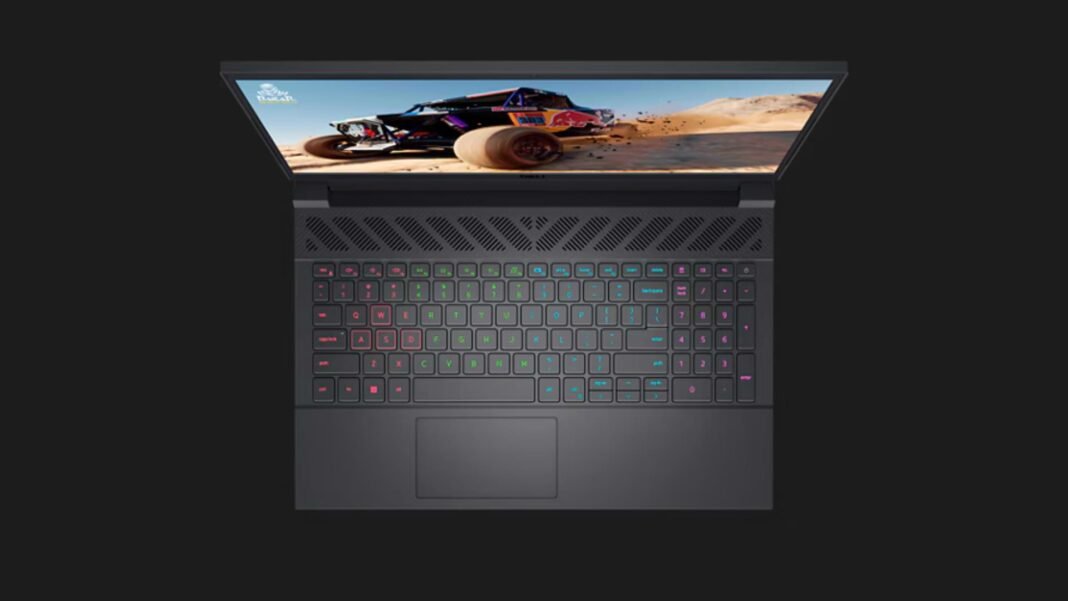
If you want a budget friendly gaming laptop that can push popular titles at 1080p high settings, Dell G15 5530 with RTX 4050 is a sensible pick. The challenge is choosing the right panel, battery, and CPU without overpaying. This guide explains the best configs, what kind of performance to expect, and when a rival makes more sense.
Dell G15 5530 RTX 4050: Key Specs at a Glance
- CPUs, Core i5 13450HX through Core i9 13900HX. The sweet spot for price and thermals is Core i7 13650HX.
- GPU, RTX 4050 6 GB is common on this model and handles 1080p high in most games.
- Displays, FHD 120 Hz 250 nits 45 percent NTSC, FHD 165 Hz 300 nits 100 percent sRGB with Advanced Optimus, and a QHD 240 Hz 400 nits option on some regions. Pick the 165 Hz FHD for color and comfort if QHD is not in budget.
- Battery, 56 Wh base or 86 Wh large pack. Battery life varies a lot by panel and CPU.
- Dimensions, about 21 to 26 mm thick, 357 by 275 mm footprint. Weight varies by config.
- Ports and omissions, you get the usual USB and HDMI, but no Thunderbolt and no SD reader on typical configs. Plan your dock and card workflow accordingly.
Does Dell G15 5530 have Thunderbolt
No. Typical G15 5530 configs do not include Thunderbolt and there is no SD card slot, so external capture and fast storage may need a USB dock.
Performance and thermals
What to expect
With Core i5 13450HX and RTX 4050, you are in the 80 to 150 fps range at 1080p in well optimized games on high settings. Notebookcheck measured around mid 80s fps in Final Fantasy XV at 1080p high and over 140 fps in Strange Brigade. That gives a good baseline for esports and many AAA titles with some settings tweaks.
Thermals and noise
This chassis prioritizes value over ultra quiet cooling. Expect noticeable fan ramp in performance mode during long sessions. Sustained CPU performance tracks average for HX class parts in this price tier per synthetic loops. If you edit video or render often, plan for a stand and a well ventilated desk.
Battery and charging results
You can find two batteries, 56 Wh and 86 Wh. For mixed browsing and document work at 200 nits on the 165 Hz FHD panel, expect roughly a school day with the 86 Wh pack and closer to half that with the 56 Wh in heavier use. If battery is a priority, factor the larger pack into your SKU hunt.
Display quality and color accuracy
The panel matrix matters. The 120 Hz FHD option is dimmer at about 250 nits and covers 45 percent NTSC, fine for gaming, not ideal for color work. The 165 Hz FHD option goes to 300 nits and 100 percent sRGB with Advanced Optimus, a much better everyday screen. Tom’s testing shows over 320 nits and wide color on a similar configuration, which aligns with the better FHD panel.
Keyboard, trackpad, build, ports
Key travel is comfortable and the deck is sturdy enough for long sessions. The port mix covers daily needs, but creators will miss SD and Thunderbolt. Add a USB card reader and a 2.5 G capable dock if you move footage often.
Serviceability and upgrades
Good news, you have two M.2 slots for storage and user serviceable RAM depending on region. The owner’s manual lists battery and module procedures. Keep a plastic spudger and track the screws to avoid clip damage.
Best configuration to buy
- Students and general use, Core i7 13650HX, RTX 4050, 16 GB DDR5, 512 GB SSD, FHD 165 Hz panel, 86 Wh battery. Balanced, quiet enough on balanced mode, and better screen.
- Competitive esports, same as above but favor the 165 Hz panel, and plan to plug in. Cap frames per title to reduce heat and noise.
- Budget creator work, if QHD 240 Hz with higher color coverage is available in your region and budget, take it. Otherwise pick FHD 165 Hz for 100 percent sRGB and attach a calibrated external monitor for grading.
Rivals and quick comparisons
- Lenovo LOQ 15 RTX 4050 performs in the same range and often bundles a larger battery at similar prices.
- Asus TUF A15 RTX 4050 brings strong sustained performance in many tests and a sturdy chassis.
- Acer Nitro 16 RTX 4050 is a frequent alternative with bright panels in some markets. Use your panel and battery priorities to decide.
Software, noise, and after sales
Use performance profiles to keep noise under control for lectures and meetings. Dell’s support pages include clear service steps and parts references, handy if you plan upgrades later.
Pick the RTX 4050 model with FHD 165 Hz 100 percent sRGB and the 86 Wh battery. Expect smooth 1080p gaming and a comfortable everyday screen. Accept the lack of Thunderbolt and SD, or add a dock and reader.
Comparison Table
| Model | CPU Class | GPU | Panel Pick | Battery | Why Pick It |
|---|---|---|---|---|---|
| Dell G15 5530 | HX class Intel 13th gen | RTX 4050 | FHD 165 Hz 100% sRGB | 86 Wh | Value gaming, easy storage upgrades |
| Lenovo LOQ 15 | Intel 13th or Ryzen 7000 | RTX 4050 | FHD 144–165 Hz | Large options | Often sharp prices, similar frames |
| Asus TUF A15 | Ryzen 7000 | RTX 4050 | FHD 144–165 Hz | Decent | Strong sustained loads, sturdy build |
Featured Snippet Boxes
Which panel is best on Dell G15 5530
Get the FHD 165 Hz panel with 300 nits and 100 percent sRGB. It adds Advanced Optimus for smoother switching and is the best all round choice for gaming and everyday work.
Does Dell G15 5530 have upgradeable storage
Yes. It supports two M.2 slots for SSDs, so you can add or replace storage later.
What battery options exist for Dell G15 5530
Two options, 56 Wh and 86 Wh. Choose the 86 Wh if you care about unplugged time.
Is 16 GB RAM enough for Dell G15 5530
For gaming and study yes, 16 GB is fine. For heavy video edits or large codebases, consider 32 GB to reduce swaps.

Frequently Asked Questions (FAQs)
Does Dell G15 5530 support Thunderbolt
No. Typical configs lack Thunderbolt and there is no SD card slot.
Which CPU should I pick
Core i7 13650HX balances cost and performance. The i5 works, but i7 keeps frame times steadier in CPU heavy games.
How bright is the screen
The 165 Hz FHD panel is rated 300 nits and 100 percent sRGB, with lab tests around 320 nits on review units.
What is the weight and thickness
Expect roughly 21 to 26 mm thickness and a 357 by 275 mm footprint, with weight depending on battery and panel.
Which wireless does it support
Wi-Fi 6 and Bluetooth 5.2 on common modules.
Can I use Ubuntu
Yes, Dell lists Ubuntu LTS as an option on select configs.

