

At a Glance
- AMD Ryzen AI 5 430 and Ryzen AI 7 445 processors both deliver 50 TOPS NPU performance; the AI ceiling stays constant across both processor tiers
- 27-inch and 24-inch-class FHD panels ship with 99% sRGB accuracy, 178° viewing angles, and TÜV Rheinland low-blue-light certification
- DDR5 5600MHz memory scales to 64GB across two SO-DIMM slots; dual M.2 slots support up to 2TB PCIe 4.0 SSD
- WiFi 7 and touchscreen are optional upgrades, not standard features on all configurations
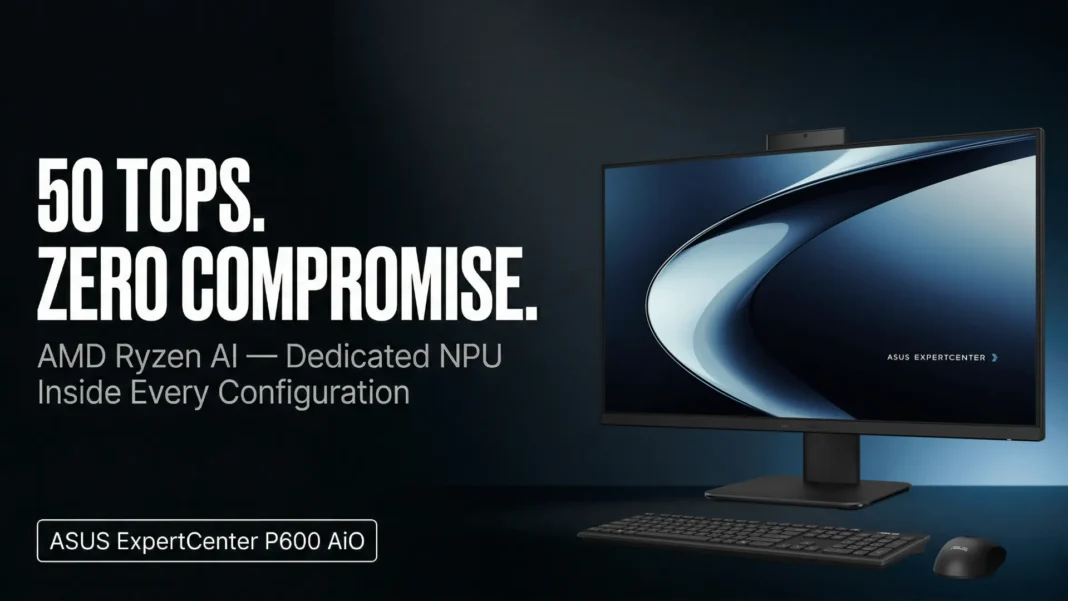
ASUS announced the ExpertCenter P600 AiO on March 27, 2026, in Taipei two models, the 27-inch PM670GA and the 24-inch-class PM640GA, both built around AMD’s Ryzen AI processor platform and qualifying as Copilot+ PCs. The defining specification is a dedicated NPU rated at 50 TOPS, present in both processor options, which routes AI workloads off the main CPU. For businesses evaluating AI-ready hardware, the consistency of that NPU rating across SKUs is the first thing worth understanding before comparing tiers.
Two Models, One NPU Ceiling
Both the Ryzen AI 5 430 and the Ryzen AI 7 445 share an identical 50 TOPS NPU rating. The Ryzen AI 5 430 runs 4 cores and 8 threads with a boost clock up to 4.5GHz and 8MB cache. The Ryzen AI 7 445 adds 6 cores, 12 threads, a 4.6GHz boost, and 16MB cache. The difference between tiers is CPU headroom for multitasking, not AI processing capacity.
Both chips base at 2.0GHz. For workflows that involve running AI noise cancellation, background blur, or on-device language tools alongside standard productivity applications, the NPU handles the AI layer without drawing from the CPU. That separation is what ASUS is positioning as the primary performance advantage over non-Copilot+ AIOs.

Display Specs Across Both Sizes
The PM640GA uses a 23.8-inch FHD (1920×1080) IPS panel at 250 nits, 72% NTSC, and 60Hz. The PM670GA steps up to 27 inches at 300 nits, same resolution, color gamut, and refresh rate. Both panels carry 99% sRGB color accuracy, 178° wide viewing angles, and anti-glare coating with TÜV Rheinland certification for low blue-light emissions.
And both support an optional touchscreen variant. The non-touch configuration ships as the base option; multitouch requires a factory-configured upgrade. Buyers should specify at time of order since panel replacement post-purchase is not a standard service.
5 Features the Spec Sheet Buries
- HDMI-in mode a side-mounted button switches the display to monitor mode for an external device; the port sits alongside a Kensington lock slot and a USB 2.0 Type-A on the side panel
- Retractable camera fully concealable via push-and-pull; no shutter switch, no software toggle required for privacy
- Adaptive Lock the IR camera detects user presence, logs in automatically when you sit down, and locks the system the moment you step away
- NIST SP 800-155-compliant BIOS with 5-year update support a defined firmware maintenance window that directly affects IT procurement and long-term security planning
- ASUS Carbon Partner Services + Digital Product Passport verified carbon offset credits and traceable lifecycle data for organizations with ESG procurement requirements
Connectivity and Audio
The rear panel carries HDMI-out 2.1 TMDS, HDMI-in 1.4, three USB 3.2 Type-A Gen1 ports, one USB 3.2 Type-C Gen 1, an RJ45 LAN port, and power input. The side panel adds one USB 2.0 Type-A, a headphone/microphone combo jack, the Kensington lock slot, and the HDMI-in mode button. Audio runs through 5W × 2 internal 6015 stereo speakers.
WiFi ships in two configurations: WiFi 6 (802.11ax, 2×2) with Bluetooth 5.2, or the optional WiFi 7 (802.11be, 2×2) with Bluetooth 5.4. WiFi 7 availability varies by country and local regulatory approval ASUS recommends confirming with local retailers before ordering.
Security Architecture
ASUS ExpertGuardian covers the full hardware-to-software stack. Biometric login with FIDO authentication ships standard; TPM 2.0 is an optional add-on. A one-year McAfee+ Premium membership is included. The retractable camera and Kensington lock slot address physical access risks in shared office environments.
MIL-STD 810H testing covers shock, vibration, humidity, and temperature stress. ASUS positions this primarily for environments like retail counters, industrial workstations, and educational institutions rather than field mobility, which is the intended deployment context for an office AIO form factor.
Where It Falls Short
The 60Hz FHD resolution across both panel sizes is a real ceiling for 2026. High-resolution content review, video production, or any workflow that benefits from sharpness beyond 1080p will run into that limit. ASUS has not announced a higher-resolution panel option for this model.
Height-adjustable stand, touchscreen, VESA compatibility, TPM 2.0, WiFi 7, and the keyboard-and-mouse set are all optional rather than included. The base configuration may arrive at retail missing features that buyers assume are standard. Verify the full option list against the specific SKU before purchasing.
ASUS ExpertCenter P600 AiO Full Specifications
| Specification | PM640GA (24-inch class) | PM670GA (27-inch) |
|---|---|---|
| Processor | Ryzen AI 5 430 or AI 7 445 | Ryzen AI 5 430 or AI 7 445 |
| NPU | 50 TOPS | 50 TOPS |
| Display | 23.8″ FHD, 250 nits, 60Hz | 27″ FHD, 300 nits, 60Hz |
| Color Accuracy | 99% sRGB, 72% NTSC | 99% sRGB, 72% NTSC |
| Memory | Up to 64GB DDR5 5600MHz | Up to 64GB DDR5 5600MHz |
| Storage | Up to 2TB PCIe 4.0 M.2 | Up to 2TB PCIe 4.0 M.2 |
| WiFi | WiFi 6 std / WiFi 7 optional | WiFi 6 std / WiFi 7 optional |
| Audio | 5W × 2 stereo | 5W × 2 stereo |
| Weight | 6.9kg | 9kg |
| OS | Windows 11 Home / Pro | Windows 11 Home / Pro |
| Certifications | ENERGY STAR 9.0, EPEAT Gold, MIL-STD 810H | Same |

