

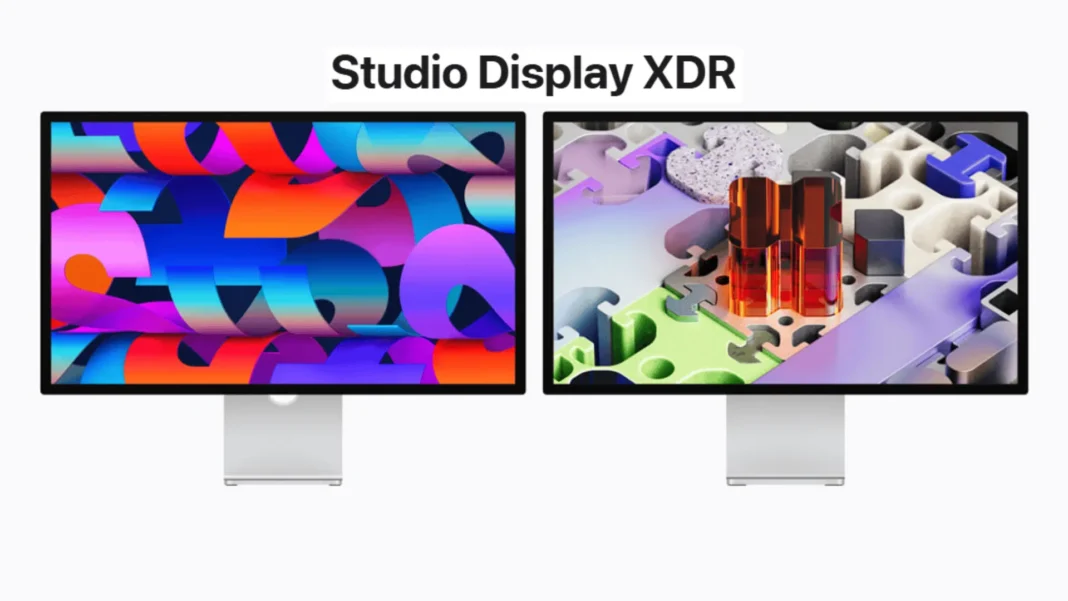
Quick Brief
- Studio Display XDR delivers 2000 nits peak HDR brightness with 2,304 mini-LED dimming zones and a 1,000,000:1 contrast ratio
- 120Hz Adaptive Sync supports variable refresh between 47Hz and 120Hz for video editing and gaming workflows
- New DICOM medical imaging presets target diagnostic radiology; Medical Imaging Calibrator on macOS is pending FDA clearance
- Pre-orders open March 4, 2026; units ship March 11 across 35 countries; Studio Display XDR starts at $3,299 in the US
Apple has made its most significant display move in years: the Studio Display XDR directly replaces the Pro Display XDR, bringing a 27-inch 5K mini-LED panel with 2000 nits of peak HDR brightness and a 120Hz refresh rate at a $1,700 lower starting price than its predecessor. The updated base Studio Display also arrives with Thunderbolt 5 and a 12MP Center Stage camera with Desk View, raising the floor for everyday Mac setups. Both displays ship March 11 and represent Apple’s most complete monitor lineup in years.
What the Studio Display XDR Changes for Pros
The Studio Display XDR targets workflows where accuracy and speed are non-negotiable. Its mini-LED backlight uses 2,304 local dimming zones to produce a 1,000,000:1 contrast ratio, eliminating the bloom and halo artifacts common on standard IPS panels. The result is HDR video that holds up in color-critical production environments.
Color professionals gain P3 and Adobe RGB support from the same default preset, streamlining workflows that frequently switch between color spaces. That coverage exceeds 80 percent of Rec. 2020 for HDR video editing and color grading, making the display a viable reference monitor for film and print production.
120Hz and Adaptive Sync: The Overlooked Upgrade
The shift from 60Hz to 120Hz on a pro Mac display extends well beyond gaming. Motion clarity in timeline scrubbing, animation previews, and UI interactions all improve with the doubled refresh rate. Adaptive Sync adjusts dynamically between 47Hz and 120Hz, keeping frame delivery smooth without screen tearing.
Editors working in DaVinci Resolve or Final Cut Pro will notice smoother real-time playback without the need for proxy workflows at full resolution. It is worth noting that Mac models with M1, M1 Pro, M1 Max, M1 Ultra, M2, and M3 chips support Studio Display XDR only at up to 60Hz; full 120Hz requires M4 or later.
DICOM Medical Imaging: A First for Apple Displays
Apple has built DICOM preset support directly into Studio Display XDR, paired with a Medical Imaging Calibrator on macOS. This positions the display as a dual-purpose monitor for radiologists who already use Mac for general workflows, reducing reliance on dedicated single-purpose clinical displays. The display supports seamless mode switching between standard and medical imaging presets.
The Medical Imaging Calibrator is pending FDA clearance and is not yet available in the US. The presets should not be used for diagnostic purposes unless the display has been calibrated using the Medical Imaging Calibrator on macOS and paired with a compatible DICOM viewer. The display is not intended for use in mammography.
Studio Display vs Studio Display XDR: Which One Fits Your Work
| Spec | Studio Display | Studio Display XDR |
|---|---|---|
| Panel Type | IPS LCD | Mini-LED LCD |
| Resolution | 5K 27-inch | 5K 27-inch |
| Peak Brightness | 600 nits SDR | 1000 nits SDR / 2000 nits HDR |
| Refresh Rate | 60Hz | 120Hz Adaptive Sync |
| Contrast Ratio | Standard | 1,000,000:1 |
| Color Gamuts | P3 wide color | P3 + Adobe RGB |
| Rec. 2020 Coverage | Not specified | Over 80% |
| DICOM Presets | No | Yes (FDA pending) |
| Thunderbolt 5 Ports | Two | Two |
| Host Charging Power | Up to 96W | Up to 140W |
| Stand (included) | Tilt-adjustable | Tilt- and height-adjustable |
| Starting Price (US) | $1,599 | $3,299 |
| Education Price (US) | $1,499 | $3,199 |
The base Studio Display serves video editors, coders, and creators who do not work with HDR deliverables daily. The XDR model justifies its price for film colorists, print and design professionals needing Adobe RGB accuracy, 3D animators, and medical professionals requiring DICOM support.
Thunderbolt 5 and the Workspace Hub Advantage
Both displays now ship with Thunderbolt 5 connectivity. The Studio Display XDR includes one upstream Thunderbolt 5 port for the host Mac and one downstream Thunderbolt 5 port for daisy-chaining displays or connecting high-speed accessories, plus two USB-C ports running at up to 10Gb/s for peripherals.
Studio Display XDR delivers up to 140W of charging through its included Thunderbolt 5 Pro cable, enough to fast-charge a 16-inch MacBook Pro. The base Studio Display provides up to 96W via the same cable, covering fast charging for a 14-inch MacBook Pro. Users can daisy-chain up to four Studio Display models from a MacBook Pro with M5 Max, combining nearly 60 million pixels across the chain.
Camera and Audio: Built-In Studio Quality
Both displays carry a 12MP Center Stage camera with Desk View. Desk View simultaneously shows the user and a top-down view of their workspace during video calls, useful for design presentations and creative reviews. The three-microphone array uses directional beamforming to isolate voice from ambient noise.
The six-speaker system on both models includes four force-cancelling woofers that deliver 30 percent deeper bass than the previous Studio Display generation, plus two high-performance tweeters. Spatial Audio support with Dolby Atmos makes both displays a practical audio reference for content creators and music producers who do not need separate external monitors.
Pricing, Availability, and Compatible Macs
Studio Display starts at $1,599 in the US and $1,499 for education. Studio Display XDR starts at $3,299, with a $3,199 education price. Both are available in standard glass or optional nano-texture glass configurations. Pre-orders opened March 4 at apple.com and in the Apple Store app across 35 countries and regions, with availability beginning March 11, 2026.
Studio Display XDR requires macOS Tahoe 26.3.1 or later and is compatible with Mac models using Apple silicon from 2020 onward, including MacBook Pro (2021 and later), MacBook Air (M1 and later), Mac Studio (2022 and later), Mac mini (2020 and later), Mac Pro (2023 and later), and iMac (2021 and later). It also supports iPad Pro (M4 and M5) and select iPad Air models with iPadOS 26.3.1.
Considerations Before Buying
Studio Display XDR carries a $3,299 entry price without any compute hardware, as it requires a Mac or compatible iPad to function. Mac models with M1 through M3 chips are limited to 60Hz on the XDR, not the full 120Hz. The DICOM medical imaging presets require FDA-cleared calibration software before they can be used for diagnostic purposes, and that clearance is still pending in the US. Neither display supports nano-texture glass as a default; it is a paid configuration option.
Frequently Asked Questions (FAQs)
What is the difference between Apple Studio Display and Studio Display XDR?
Studio Display XDR adds a mini-LED backlight with 2,304 dimming zones, 2000 nits peak HDR brightness, a 120Hz Adaptive Sync refresh rate, Adobe RGB color gamut covering over 80 percent of Rec. 2020, and DICOM medical imaging presets. Studio Display tops out at 600 nits and 60Hz. The XDR starts at $3,299 versus $1,599 for the base model.
Does Apple Studio Display XDR replace the Pro Display XDR?
Yes. Apple’s official press release confirms Studio Display XDR replaces the Pro Display XDR. The new model starts at $3,299 compared to the Pro Display XDR’s $4,999 starting price, adds a built-in 12MP camera, six-speaker audio, and Thunderbolt 5 connectivity not present on the outgoing model.
What is the Apple Studio Display XDR price in 2026?
Studio Display XDR starts at $3,299 in the US for standard glass. The education price is $3,199. Nano-texture glass is available as a configuration option, though Apple has not listed a specific price difference on the spec page. Pre-orders opened March 4, 2026.
Does Apple Studio Display XDR run at 120Hz on all Mac chips?
No. Mac models with M1, M1 Pro, M1 Max, M1 Ultra, M2, and M3 support Studio Display XDR at up to 60Hz only. Full 120Hz operation requires an M4-series chip or newer. All other features of the display remain supported on older chips.
What Mac is needed to run Apple Studio Display XDR?
Studio Display XDR requires macOS Tahoe 26.3.1 or later. Compatible models include MacBook Pro (2021 and later), MacBook Air (M1 and later), Mac Studio (2022 and later), Mac mini (2020 and later), Mac Pro (2023 and later), and 24-inch iMac (2021 and later). Daisy-chaining up to four units requires a MacBook Pro with M5 Max.
Can Apple Studio Display XDR be used for medical imaging?
Apple built DICOM medical imaging presets into Studio Display XDR. However, the Medical Imaging Calibrator on macOS is pending FDA clearance and is not yet available in the US. The presets must not be used for diagnostic radiology until the display has been calibrated using the cleared software and paired with a compatible DICOM viewer. Not suitable for mammography.
Is Apple Studio Display XDR worth it over the base Studio Display?
For HDR video colorists, 3D artists, print and design professionals requiring Adobe RGB accuracy, and medical professionals needing DICOM support, the XDR is the appropriate tool. For photo editing, coding, music production, and everyday creative work, the base Studio Display at $1,599 provides strong value. The 120Hz advantage also requires an M4 Mac or newer to activate fully.

