


If you use an iPhone, iPad, or Mac, there’s one simple Apple Intelligence move that will save time every day: use Apple Intelligence’s quick “Rewrite & Summarize” tool to turn long messages, emails, or web pages into a short, action-ready note. Apple built these writing and summary tools directly into iOS, iPadOS, and macOS so you can compress text, rewrite for tone, or produce bullet points without leaving the app.
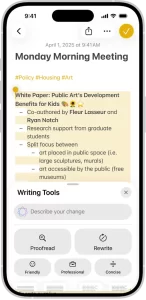
Because most people waste minutes rewording texts, extracting next steps from long emails, or hunting for the point in a long article. With Apple Intelligence you can select a chunk of text, tap the “Rewrite” or “Summarize” option, and get a clean, usable snippet often in one tap. For example: copy a long email, ask for “3 action items,” paste the result into Reminders or Messages, and you’ve effectively delegated the first draft.
How to use it (quick steps)
- On iPhone/iPad: Select text → Share → Apple Intelligence (Compose/Summarize/Rewrite) → choose tone/length → paste or send.
- On Mac: Select text in Mail or Safari → right-click → Apple Intelligence → pick “Summarize” or “Rewrite” → save or share.
Practical examples that stick
- Convert a meeting transcript into 3 bullets and owner assignments.
- Turn product feedback into a concise bug report.
- Shrink a news article into a 2-line briefing for a teammate. These examples cut the typical processing time from 5–10 minutes to under a minute.
What to watch out for
Apple mixes on-device and server processing; some heavier tasks use cloud models and may vary by region or language. Also, don’t rely on it for legal or medical precision use it to prepare drafts, not final decisions. Apple’s privacy approach is stricter than many rivals, but functionality and region availability can change.
One-minute setup checklist
- Update to the latest iOS/iPadOS/macOS with Apple Intelligence enabled.
- Turn on Writing Tools in Settings.
- Try summarizing a recent long email. If output is off, adjust length/tone prompts.
If you try one Apple Intelligence habit, make it this: before you reply to long content, ask Apple Intelligence to reduce it to the three next steps. It trains you to act, not read.
Featured Answer Boxes
What is the best Apple Intelligence trick?
Use the Rewrite/Summarize tool to convert long text into short action items. Select text, choose “Summarize” or “Rewrite,” and copy the result into your reply or task manager. Saves minutes on emails and meetings.
Where is Apple Intelligence available?
Built into iPhone, iPad, and Mac with supported OS versions; features vary by language and country. Check Apple’s Apple Intelligence page and Support for availability.
Is Apple Intelligence private?
Apple emphasizes on-device processing and privacy-first design; some heavy model tasks may use server processing but Apple documents its privacy approach.
Source: Apple

